


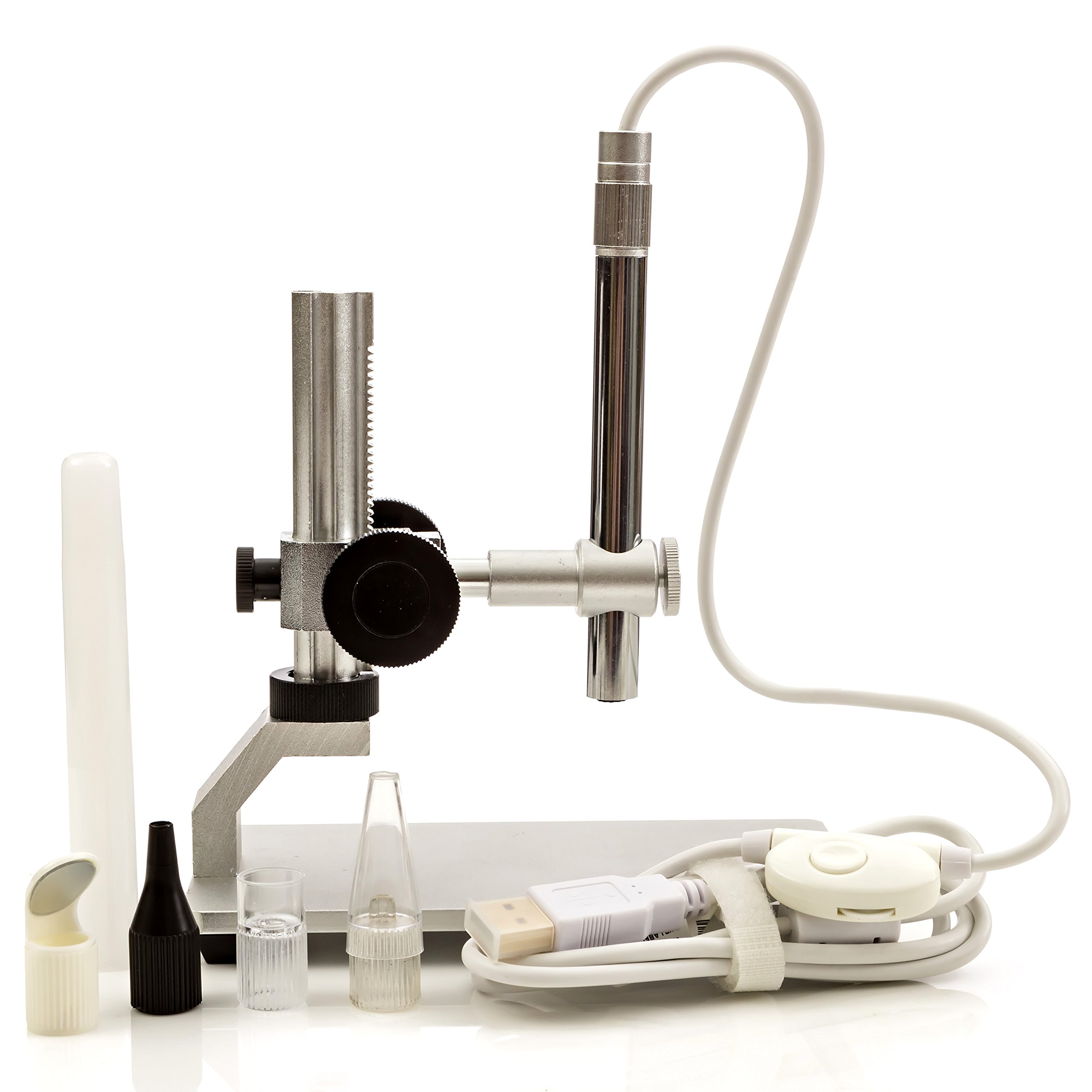


🔍 See the unseen, own the detail.
The Opti-TekScope Digital USB Microscope Camera combines a powerful 200x zoom with a 1600x1200 HD CMOS sensor and an industrial-grade aluminum stand. Equipped with 8 LED lights and broad OS compatibility, it offers professionals and enthusiasts a plug-and-play solution for precision imaging, live video capture, and detailed macro analysis across diverse applications.


| ASIN | B0184CCOY0 |
| Best Sellers Rank | #1,685 in Camera & Photo Products ( See Top 100 in Camera & Photo Products ) #256 in Lab Handheld Digital Microscopes |
| Brand | Opti-Tekscope |
| Built-In Media | Microscope/Camera, USB Power Cord |
| Color | Silver |
| Compatible Devices | Laptop, Personal Computer |
| Customer Reviews | 4.4 out of 5 stars 441 Reviews |
| Enclosure Material | Aluminum |
| Item Dimensions L x W x H | 5"H |
| Item Height | 15.24 centimeters |
| Item Weight | 91 Grams |
| Light Source Type | LED |
| Magnification Maximum | 200 x |
| Manufacturer | Opti-Tekscope |
| Model Name | OT-HD |
| Objective Lens Description | Achromatic |
| Power Source | USB |
| Real Angle Of View | 30 Degrees |
| UPC | 706752100080 |
| Voltage | 5 Volts |
| Warranty Description | Warranty: This product includes a one-year limited warranty. We will replace or exchange the product if the issue is related to manufacturing defects or product malfunction under normal use. This warranty does not cover damage caused by misuse, accidents, or unauthorized modifications. |
F**E
The unit is of high quality with respect to materials, workmanship, and performance.
The product arrived on the second day as promised, is exactly as described and of very high quality with respect to materials, workmanship, and performance. The stand is particularly impressive as compared with others furnished with microscopes in the price range of this instrument, of which I have tried several, and in fact is more usable than some stands sold separately costing more, alone, than the Opti-Telescope microscope/stand combination. The Opti stand is made entirely of aluminum and is quite rigid for its size, has a wide range of adjustment, and fine focusing is a pleasure with the smoothly functioning rack an pinion mechanism incorporated in the unit.The optics seem to be very good for a less-than-$100 microscope, and the software furnished is entirely adequate for everyday observations. Tasks such as counting; length, area, and angle measurements; and indeed, sophisticated image-analysis procedures, may be accomplished by pairing this unit with ImageJ, a free, open source image processing program produced and maintained with the sponsorship of the National Institutes of Health, and with which, happily, the Opti unit is compatible. ImageJ is readily available for download online.
S**S
This is a GREAT microscope!
I got this microscope so that I could search for Micro-Meteorites. These are very small (almost dust-sized) meteorites. Millions of them fall to the earth every single day - but no one knows about them because they are so small - a millimeter in size or less. With my old microscope, I could see only one or two specks at a time. With this Opti-TekScope I can see hundreds at a time. It's really good! Searching for Micro-Meteorites is not that hard - but the better microscope you have, the faster you will find them. Google the subject if you are interested. You can find meteorites yourself in your own back yard, and start a collection of outer-space meteors. This is the microscope you want if you are going to try that, because you can see hundreds of possible meteor specks at a time, instead of just one or two or three. The first day I got this, the frame rate was slow - but I found the menu choice to increase the frame rate, and that made it really fun and useable - it was just like the guy demonstrating it on you-tube - but even better. Also, on the first day I had it, (before I started my Micro-Meteorite search) I thought I would look for cells - I remembered from high-school biology class you could pull a bit of "skin" off of an onion slice if you broke the onion slice and pulled the very thin layer off - that is a single-cell-layer. Then, I put it on a pieces of clear plastic (glass is better) and put a drop of iodine on it (get iodine from the drug store - CVS, etc.) and that stains it so you can see the cells and nucleus better. I attached the picture to this review - it's really cool! And, I did this my very first day with the Opti-TekScope! It was easy, it was fun. I also attached a photo of magnetic "dust" that I gathered while searching for the Micro-Meteorites. Great Microscope! Love it!!! Steve Capps Tennessee
R**X
Great Device For The Price + How to run on any OS With FREE, OPEN SOURCE Software
When you get this wonderful lil Scope Camera it will come with a driver CD and some software. I wasn't able to use any of it (Default Windows 10 Drivers work just fine for the camera); and the AMCap that comes with it will not run on Windows 10, and the new version is paid for. So to run this great lil cam on any OS you just need FFMPEG its FREE and Open Source To use FFMpeg to run your new camera you can do the following. Run in a command line. ffmpeg -list_devices true -f dshow -i dummy This will list the hardware devices that your computer has found. On Windows 10 mine reads as "USB camera" To always use the proper camera though grab its other hardware name below, it will look something like this "device_pnp_\\?\usb#vid_0...... Once you have your device name you can view any of its available formats with FFPlay (comes with ffmpeg) by using or Editing one of the two example commands. For MJpeg formats you can use a line like like the following to play your camera: ffplay -f dshow -i video="USB camera" -vcodec mjpeg -video_size 1600x1200 -framerate 30 Options Available: 320x240 FPS=30 640x480 FPS=30 800x600 FPS=30 1280x960 FPS=30 1600x1200 FPS=30 For yuyv422 formats you can use a line like the following to play your camera: ffplay -f dshow -i video="USB camera" -pix_fmt yuyv422 -video_size 1600x1200 -framerate 5 320x240 FPS=30 640x480 FPS=30 800x600 FPS=20 1280x960 FPS=9 1600x1200 FPS=5 The Frame Rate (-framerate x Value) can be anything up to and including the FPS XX number but not above. (If you replace "USB camera" with your camera's hardware id you can save it to a .bat on Windows or a file on nix based with chmod +755; this will allow you to launch your camera with a simple double click or cmdline to call the script))
D**K
Opti-tekscope Digital USB Microscope Camera
This Microscope magnifies well but it is not high enough in power to view microorganisms in pond water. You can view the small print on a dollar bill or look close at an object, beyond what you can normally see. There are two good words to describe a microscope/magnifier. The magnification and the resolution. High magnification is useless if there is not enough resolution. Think of what you see if you zoom into a picture you took on your cell phone. As you zoom in you see more detail but at some point the detail stops and continuing to zoom provides nothing of value. How much resolution you need depends on what you are looking at. You could zoom into text letters with lower resolution and still be ok because you can make out the letters. I was able to confirm the 200x magnification on a 23” monitor. But as stated above, magnification is not the only thing that matters. You could project the same image on a 52” TV and get further magnification but that does not mean you will see anything further or see any value in the image. I think 200x is about the limit of what is useful. The best way to describe the magnification is with something we can all look at and understand. For that I used the US dollar bill. This camera will magnify George Washington’s eye in a one dollar bill to fill the entire viewer. Picture included to see the maximum magnification using George Washington’s eye from the dollar bill. It doesn’t matter how big your monitor is, you still get the same image in the frame of the viewer. A larger screen just has a larger eye in a larger frame but that does not mean it shows more detail. This web camera can run on any device that supports web cameras. You can use any software you can get that works with web cameras. So yes, this works on Linux and it works on cell phones and tablets that support USB cameras. Not all phones or tablets will support USB cameras. I have tried the Linux Camarama Webcam Viewer software from the Ubuntu software library. It works as well as the Cheese application. It will likely work on any web camera software because this is just a web camera. This camera works on my Android Pixel XL phone as well using a OTG cable. The OTG cable is a cheap cost connector that lets you convert the micro USB to a standard USB connector. This allows you to use a USB drive to back up software or pictures from your phone. You do need the OTG labeled connector, it is not just a simple USB micro to USB connector. And of course you phone needs to support OTG. Many newer phones support it. The Google pixel phones and the Samsung Note5 support OTG as well as many others. There are a couple steps to turn OTG on these phones. Research phone OTG and turning it on prior to attempting to using the camera to save some frustration. For the android phone, there are may webcam apps, I tried a few and liked the Endoscope app but it has low resolution images, like 640 x 480. But this is enough for many things. There are others, try them all if you want. Some will store much larger images. Resolution: The camera description states the camera sensor provides 1600 x 1200 image resolution size. However not all software supports that. Using the android Endoscope app, the images are saved as 640 x 480 (0.3 MP) size. The Linux Camarama Webcam Viewer software will display the image in 3 different views, Small, Medium, and Large. The Small image was saved as 160x120. The Medium image was saved as 800 x 600. The Large image was saved as 1600 x 1200. CameraFi Android application Can select different video sizes from 640 x 480 to 2048 x 1536, 2592 x 1944 at1 0fps, 1600 x 1200 at 30 fps So the choice of software/application can change the resolution of the image saved. The Linux Camerama app saves the files to png type. The android app stored the file as a jpg. The type of file is determined by the webcam software not the camera. So if you want jpg files, find an app that saves as jpg. Png file format probably makes the most sense for storing the detail of a magnified image. jpg files have too much compression which does not work when trying to capture details of a magnified image. The light is adjustable but can be too much for looking up close at shiny objects. It is very hard to look at a diamond because of all the glare. Can turn off the light and use an external light which is better in some cases. It is helpful to use reflected light or light diffusers, on some objects. The stand is stable enough. It has enough weight to it to hold the apparatus stable while turning the focus knob. With all the knobs on the stand locked, the camera is stable. It does not move in any direction due to vibration or tilting of the stand. There is a radial pivot on the camera holder. It can move radially and does not have a lock but it is does hold in place well. It will not move due to any small movements, you have to put some pressure on it to move it. Appears to be a rubber on metal grip. A quick pull on the camera wire could cause the camera to move radially but this is not something that would easily happen if you are careful. There are two black turn knobs on the standup post, the one with the gear notches. These two knobs are locked together, turning one turns the other. This set of knobs will raise and lower the camera on the stand. At first I was loosening the lock nut then using the larger knobs to move it up and down. This works but you have to lock the position before removing your grip from the larger black knob. Otherwise the weight of the arm will cause the arm to drop all the way down. Then I found if you tighten the lock nut snug but not any tighter, you can move the larger knobs and the arm will not fall when you remove your hand. This is the way to use the device, it works really well. The camera comes with several attachments. At first I didn’t think much about the attachments. Then I decided to look more closely at them. They are helpful for viewing some things. For instance, one attachment is a plastic piece that fits over the camera tip. Does not look like it would do much good but it does help look at objects up close when hand holding the camera. Given the magnification, it is hard to hold the camera still enough to view something clearly when using the higher magnification. Using the plastic tip, put the tip on the camera then place the end of the tip up against a table and focus the image. Then you can just put the tip up against anything else to see that object in focus without using the focus knob and not dealing with your hand moving the camera around. This works really well to view up and down the edge of a knife to see the edge in detail, see attached pictures. It also helps to look at your skin, you can just move it around on your skin and see it in focus. This is not easily done without the attachment. There is another attachment that looks like the end piece used on that instrument your doctor uses to look into your ear. With that piece you can do the same thing, focus it first then put up into your ear and likely need to fine tune the focus to see. You can see inside your ear well with this piece. Without the piece it is hard to focus on anything. The other attachment is a long tube, I think to look inside something, like your mouth. These attachments make it much easier to focus on certain types of things. The last attachment is the 90 degree mirror. It works for looking around a corner, like into a wall or something like that. The camera will focus up close, around 5mm from an object. This is not an exact measurement, I just held up a ruler at what I found to be the closest I can get from a penny. On the other end, the camera can focus to infinity, meaning you can see around a room like a traditional webcam. Nothing special there, don’t really see much use for that given the stand. Summary: The camera works well for looking at images magnified up to 200x. The camera is compatible with a lot of third party software. I have confirmed it works on Linux, Android, and Windows 10. Took two pictures of the same dime, one at 800x600 and the other at 1600x1200. Other pictures included too.
J**.
Excellent small boroscope / microscope
I found this to be an excellent pen microscope / boroscope. For the money it is an deal. The stand is made of anodized aluminum. The finish and machining is crude but works. For the price, the quality of the stand is excellent. The knobs are of ABS plastic, The cord is a Mac-style white USB cord with a dimmer. The dimmer has a still capture button. The focus ring is on the pen at its base and works reasonable well. The base is 5-3/4" x 3" and is large enough to accommodate the largest object that is viewable by the scope (about 1.5" x 2"). The device comes with 5 accessory attachments in high quality medical-style ziploc pouches, and a CD. The accessories are: (1) a protective sleeve for the pen, (2) a clear plastic offset attachment that allows the pen to be held against a flat object, (3) a clear plastic cone attachment that would be appropriate for using in a nostril, (4) a black plastic narrow neck attachment that would be appropriate for using in an ear canal, and (5) a right-angle mirror attachment. The CD has several instruction documents, including a well-written troubleshooting document, and two viewing programs, AMCAP.exe and ehe.exe for Windows. There is also a Mac folder with "WebCam Monitor v2" software. The camera functions like a web cam and will focus at infinity all the way down to about a millimeter which for my computer monitor was a 200-to-1 magnification. Since the image is 1900 x 1200, the smallest resolvable object would be about 0.001 mm in diameter, or 0.00004". I was able to photograph a human hair 0.001" or so in diameter (see photo below). The photographs also show typical views of a coin and a detail on the same coin. The ability to adjust lighting with the dimmer was crucial to getting good results. I was also able to use it like a medical boroscope, examining my own mouth. This device could be used for a variety of purposes, such as biology/naturescope, simple medical boroscope, metallurgy, numismatics, taking pictures of small objects like insects, electronics, viewing hard to reach areas, etc. The AMCAP software included is a free web cam viewing package which works reasonably well and operates fine on Windows XP, my platform. If you are doing serious work, you may want to get a more professional web cam viewing software package.
K**.
additional info
I did a review on this scope/camera about a week ago and have since learned a lot more about its adjustability. This scope is highly adjustable by acc essing the video capture menu ( once AMcap software has been installed ) in itsb default mode all I changed was the flicker rate from 50 to60 hz. but everything you could possably want to adjust is there. And there are quite a few adjustments to the image to lighting is there,, so I have to give this scope/camera a 5 star rating. Very easy to use fantastic image quality and a great price. when purchasing this scope/camera I bought the one with the better stand. So holding the image in the exact spot every time is great after you have the scope/camera adjusted to your liking just put your item to be vuwed under the scope and your ready to go image quality is fantastic. You will not be disappointed . this is a great buy and all the attachments are usefull I recomened this to anyone looking at a scope for coins or anything really. 5 star item a great price you will not be disappointed. kevin n.
M**F
Update - Very difficult to focus due to image time lag.
While the microscope has a good image when focused, it is very difficult to get the image focused since there is such a time lag between changing the height or focus control and seeing the result. It is about 10 seconds or more to get a screen update. This means that you cannot see the results of your focusing for a long time and will result in going back and forth to get a good image. If you move the object, you have to go through the whole process again. In addition, the whole microscope holder rotates with respect to the base plate since there is no way to keep it in place when touching the device to focus. I guess that it might work OK if you are looking at perfectly flat objects like stamps but it is almost useless to look at PC boards, which are not flat. I will be returning the unit as it is impossible to use due to the above shortcomings. Update - The long time lag was due to the software that I was using. Operating it with their software greatly reduced the lag time and so made it much easier to see changes in focus, movement, etc. While its construction and stability could be improved, it is good enough now that I will keep it.
P**L
Great Microscope that works very well once you find the right software.for your computer.
The Opti-Tekscope Digital microscope hardware is well made, getting it to work with my laptop along the best software was my problem. Even though I got the error message that I was "trying to install a USB 2.0 device on a USB 3.0 port the device manager showed that the driver for the microscope was installed and working properly. Only by disabling the driver for the laptops webcam was I able to then use the microscope and capture an image using screen print. The supplied programs along with various windows apps did not work well or at all with my computer; but I was able to do more by using VLC and a screen capture program called Ice Cream. But by far the easiest program to use is called Bandicam, this program can do all of what the above programs do, but even better it can directly access the USB camera of the microscope and to capture both video and still images to file. Bandicam has both a free and paid version, the free has unobtrusive water marks and a 10 minute video recording limit, the paid has neither. limitation. Matt at Opti-TekScope was very helpful and responsive in trying to help me get my microscope working. The 4 star rating only because I had to find software suitable to my computers configuration, really more my equipments issue than Opti-Tek's. A good product that works very well now
Trustpilot
1 week ago
2 days ago



