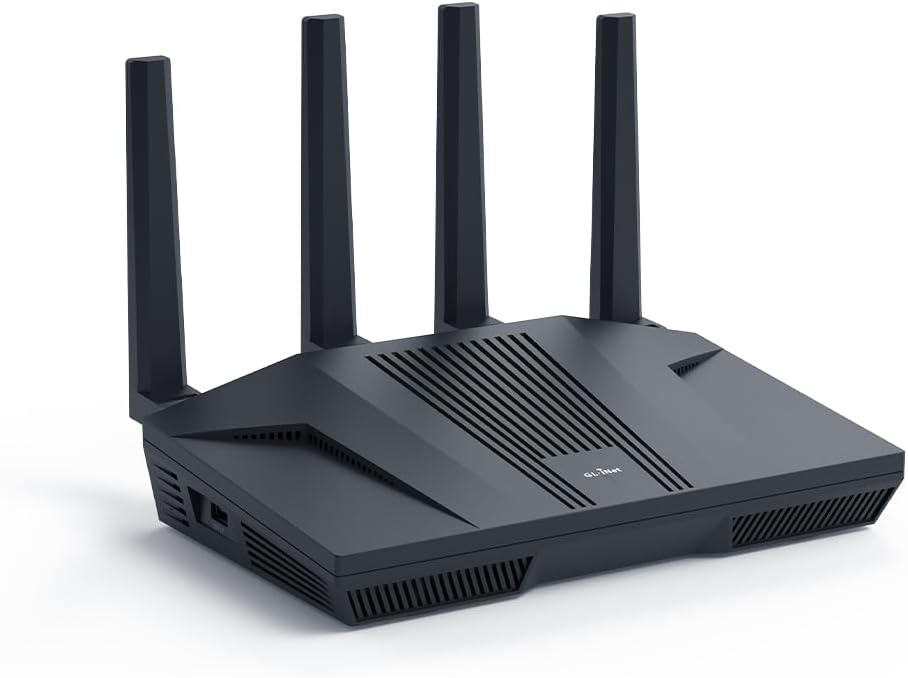
🚀 Level up your network game with Flint 2 — where speed meets security!
The GL.iNet GL-MT6000 (Flint 2) is a cutting-edge WiFi 6 router designed for gamers and professionals demanding ultra-fast, low-latency wireless and wired connections. Featuring dual 2.5G Ethernet ports, 8-stream WiFi 6 technology, and robust VPN support with Wireguard and OpenVPN, it delivers blazing speeds up to 6 Gbps and secure, reliable connectivity for over 100 devices. With built-in AdGuard Home for ad-blocking and a user-friendly OpenWRT-based interface, Flint 2 is the ultimate router for home and business environments seeking next-level performance and control.


| ASIN | B0CP7S3117 |
| Antenna Location | Business, Gaming, Home |
| Antenna Type | Retractable |
| Best Sellers Rank | #1,310 in Electronics ( See Top 100 in Electronics ) #15 in Computer Routers |
| Brand | GL.iNet |
| Built-In Media | Ethernet Cable, GL-MT6000 router with 2-year warranty, Power Adapter (US Plug), User Manual |
| Color | Black |
| Compatible Devices | Gaming Console, Personal Computer |
| Connectivity Technology | Wi-Fi |
| Control Method | Touch |
| Coverage | Wide Coverage |
| Customer Reviews | 4.6 out of 5 stars 2,282 Reviews |
| Data Transfer Rate | 6000 Megabits Per Second |
| Frequency | 5 GHz |
| Frequency Band Class | Dual-Band |
| Is Electric | Yes |
| Is Modem Compatible | Yes |
| Item Weight | 761 Grams |
| LAN Port Bandwidth | 2 x 2.5G Ports, 4 x 1G Ports |
| Manufacturer | GL.iNet |
| Maximum Upstream Data Transfer Rate | 2500 Megabits Per Second |
| Model Name | Flint 2 |
| Model Number | GL-MT6000 |
| Number of Ports | 6 |
| Operating System | Linux |
| Other Special Features of the Product | Access Point Mode, Guest Mode, Internet Security, QoS |
| RAM Memory Installed | 1 GB |
| Security Protocol | WPA3 |
| Special Feature | Access Point Mode, Guest Mode , Internet Security, QoS |
| Voltage | 5 Volts |
| Warranty Description | 2 Years |
| Wireless Communication Standard | 802.11ac, 802.11ax, 802.11b, 802.11g, 802.11n |
| Wireless Compability | 802.11ac, 802.11ax, 802.11b, 802.11g, 802.11n |
A**S
Outstanding quality and performance
I've owned a lot of routers in my time, and this one is the best by far. It's at an extremely affordable price, and offers basically every feature you can want. The hardware is more than enough to keep up with gigabit speeds, and the wifi speed and reliability is exceptional. The software is very nice and easy to use, and is based on OpenWRT which makes it easy to flash actual OpenWRT if needed. The only feature it doesn't have that I wish it did is PoE, but it's understandable that a home networking router wouldn't have that. This router (or one of GL.iNets other similar routers such as the GL-BE6500) is what I will be recommending to everyone I know, especially for those who need it for gaming.
O**R
Wow! Just wow!
I had a Synology RT6600ax that I bought just under a year ago. I really like that router, but I didn't like the fact it only has one 2.5Gb LAN port and the WAN port is only 1Gb. I upgraded my internet plan to 2.5Gb, so that router would no longer work for me. I could have connected the single LAN port to my 2.5Gb switch, but the internet would be limited to 1Gb. I tried various workarounds, but decided it needed to be replaced. I did some research and people were raving about the GL.iNet GL-MT6000 (Flint 2) router. I was a bit unsure, but the price was so good I decided it wouldn't be too big of a risk. The risk has so far paid off and this is an exceptional router. It runs on OpenWRT, but configuring it wasn't too difficult because GL.iNet has a custom GUI which simplifies things. I like the custom GUI, but I also like that the OpenWRT GUI is still accessible for more advanced settings. Once I got the router up and running, I was shocked at the WiFi performance. In addition to the Synology router, I had three Synology MR2200ac access points. Even with the GL-MT6000 (Flint 2) router in the basement, it still had a much faster speeds than the Synology access points. I almost didn't connect my Synology access points, but I thought it would be best to do so since I have IoT devices outside the house and the signal might not go that far (especially seeing as how the router was in the basement equipment room). Configuring the Synology MR2200ac access points without the Synology router was still possible. I was able to have the wireless devices that connect to the main network via the Synology APs appear on my GL-MT6000 (Flint 2) router and be handled via DHCP. I still need to figure out VLAN on OpenWRT to have my IoT devices be handles by the GL-MT6000 (Flint 2) router DHCP. These devices are currently being handled by the Synology APs, and it they are working fine. I originally bought this router expecting to use it until I found something better. I don't know if I will be replacing it anytime soon. Though not as simple to configure as a Synology router, it outperforms my Synology RT6600ax router in many other ways.
N**Y
Great High Speed Router!
I had issues with the first router, and turned to customer support. They helped troubleshoot it for awhile until deciding replacement was best. They helped me replace it and it works so great! Great customer service, great router. It connects across the house unlike our previous router. Both 2.4GHz and 5GHz bands work great, as well as wired ethernet. (For reference we get 400mbps down and 200mbps up and have many devices in the house, like 20.) Really easy to setup, though there are advanced features easily available as well.
J**S
Powerful OpenWRT IQRouter Replacement for Low Latency No Bufferbloat Cake SQM Performance and More
Regarding the Flint 2 GL-MT6000 router by GL.iNet received May 1, 2025 I have a Netgear CM600 cable modem (also purchased on Amazon IIRC) and 300/10 Mbit cable service feeding the Flint 2. After the very sad demise of the IQRouter company, I knew I couldn't be without a full featured OpenWRT based router that could handle SQM and Cake without choking and that would give me access to all those settings I was reading about on the internet. I wanted those A+ bufferbloat scores that the IQRouter gave me even if I had to wade through millions of misleading and obsolete configuration posts. The training wheels have come off and the Flint 2 has delivered. On the hardware side: The hefty passive heatsink inspires confidence because routers heat up under heavy load which can cause intermittent performance issues. The antennas can't swivel to the side unlike my stone age routers that you could rotate into a rabbit ears position. It appears this generation they are meant to stay parallel, likely for beamforming purposes. On the operating system and software side: If you're confronting the full fat OpenWRT for the first time like me then the slick Netdata monitor console which you can install, plus the preinstalled systemwide AdGuard ad blocking and VPN that can be turned on or off by clicking a button will make you feel satisfied. You can run a multimedia server, Tailscale for remote access and other stuff I didn't know I needed is built in and made easy. I can finally get a decent port forward for QBittorrent. WiFi coverage is as good or better than my last router although I don't have any WiFi 6 devices to test that band. The Flint 2 does have DFS bands on 5G WiFi that I didn't know existed. My cell phone sees those bands but my 4K Firestick doesn't. If you live in an apartment building then you will appreciate those DFS bands because not as many of your neighbors will have access to them, so less interference. There is a new GL.iNet firmware version in the works which is great to know, and anyway you can put vanilla OpenWRT on the device so obsolescence is not an issue. Their product release schedule is impressive too which gives me confidence in this company. Customer support was excellent. I contacted them about a mistake I had made which was not their responsibility and that was entirely their prerogative to dismiss yet they handled it with aplomb. Research indicates this is a good value router too, but don't buy on impulse if you know what I mean. In summary, if you've done your research, and this router is on your list of candidates, then I can recommend it. This review was written without the assistance of any AI, and ignoring all my browser's grammar autosuggestions to add more commas. I left out some hyphens too that the browser missed. Stupid browser.
Z**O
Excellent router, very fast, AdGuard Home integrated, OpenWRT support.
This is easily the best router I've ever owned, very easy to set up, good coverage, fast and with a huge number of features. I'm running the stock firmware which has an easy to use interface but it can also run newer versions of OpenWRT. I really like how easy it is to set up AdGuard Home and it makes a noticeable difference in browsing speed and even blocks annoying ads on my game consoles. This is a stark improvement over my last router which was a few years old. My only complaint is that there is a maddening bug with the Network Acceleration feature that makes loading some things on WiFi extremely unstable with hanging sites that load extremely slowly or not at all. After disabling this feature performance is excellent. I haven't checked the latest firmware to see if this is resolved but it's something to note.
P**R
Great hardware but no VLAN or firewall rules functionality
The gl.inet firmware that comes with their routers (such as flint 2) does not allow setting up VLANs. Customer support confirmed it to me with this email: “We apologize, but GL does not currently support VLAN functionality. Users who require VLANs must configure them using custom methods.” Their firmware is based on a fork of OpenWrt, but apparently there is a bug in the fork and advanced settings (luci) aren’t really configurable. If you try to set up a vlan it will lose connectivity and either reset without applying the settings, or locks you out requiring a factory reset. Ask me how I know. A related issue is that custom firewall rules are also impossible to configure. This is because on openwrt (including gl.inet’s fork) you can only set firewall rules between different subnets. They don’t work between wired devices within the same ip subnet. So a firewall rule won’t work as a substitute for a vlan, because firewall rules on openwrt/luci gui require vlans in order to work. This bug in the firmware effects the current, dsa version of openwrt that was forked. It appears from forum posts that in the past vlans were possible, so maybe it is something gl.inet will fix in a future release. Which would be awesome because their firmware is otherwise very functional and user friendly imo. I just wish I knew about the lack or vlan and firewall rules support before spending so much time trying to make it work. For what it’s worth, i flashed pure openwrt onto the same router and had vlans and firewall rules up and working in short order. The issue is only with gl.inet’s fork/stock firmware, not with openwrt itself. So if you need a vlan or firewall rules on a current gl.inet router that’s your only option at this time. If not for this pretty important missing security feature it would be 5 stars. The guest wifi network does work, so it does have that basic requirement at least, and it is a physically very well built and reliable unit (I have several).
O**H
A great solid 75+ connections Open-WRT unit that can be configured as JUST an Access Point
This unit works well and with the Open-WRT web config UI .. no more locked into a vendor's limited config abilities. This GL-MT6000 unit can be configured to be only an AP with no issue. It fixed connection issues that were frustrating and thought to be the DEVICE connecting in to Wifi. TV's work!. Has a good strong Wifi 6 signal on 2.4/5.0 Ghz and reliably handles all traffic not just streaming devices. Bought (3) now for others I indireclty support, and have not looked back! As people upgrade their protection to dedicated Firewall appliances (as one device is over taxed to handle all of that work) properly. Needed JUST an Access Point (AP) for WIfi access to the secure networks. I have bought and trashed many versions of TP-LINK, NetGear, Asus, Mikrotik, et al, and all have low connection counts (~25) device connections max "reliably" and little security capabilities. Outside of personal devices, streaming and IOT (50)+ items on Wifi happens quickly everywhere. This unit handles it all and supports VLAN's. You'll know to get off those other units when Streaming devices connect solidly but laptops and tablets and phones cannot. Its the router prioritizing and dropping connections :(
M**S
Best Home Router I've Ever Owned
It runs OpenWRT (open source) and has both a user friendly interface developed by GL-iNet, and the regular LUCI interface for more advanced users who want to do things like set up custom firewall rules. The GL-iNet interface though has 99% of the options you would ever need including settings to make the router up to act as a VPN server or client, setting up guest networks, etc. It also comes with a built in dynamic DNS service so if you're new to self-hosting and don't yet have your own proper domain name, you can use one generated by GL-iNet to connect to your network from elsewhere in the world. There's also an optional mobile app that can be paired with it to make quick adjustments to a lot of settings, such as turning your guest WiFi on or off, showing the QR code for a network to help a visitor connect, blocking devices, reserving IP addresses and more. The range on it is outstanding. Even my 5 GHz network reaches over 300 feet down my driveway "after" going thru two walls of my house to get outside. This is easily the best home router I've ever owned. I've already recommended it to my brother who also ordered one and loves his as well. When/if it it dies or I need to upgrade, I'll definitely be buying from this company again.
Trustpilot
3 days ago
5 days ago