
DOWNLOAD THE APP


Customer Services
Copyright © 2025 Desertcart Holdings Limited
DOWNLOAD THE APP
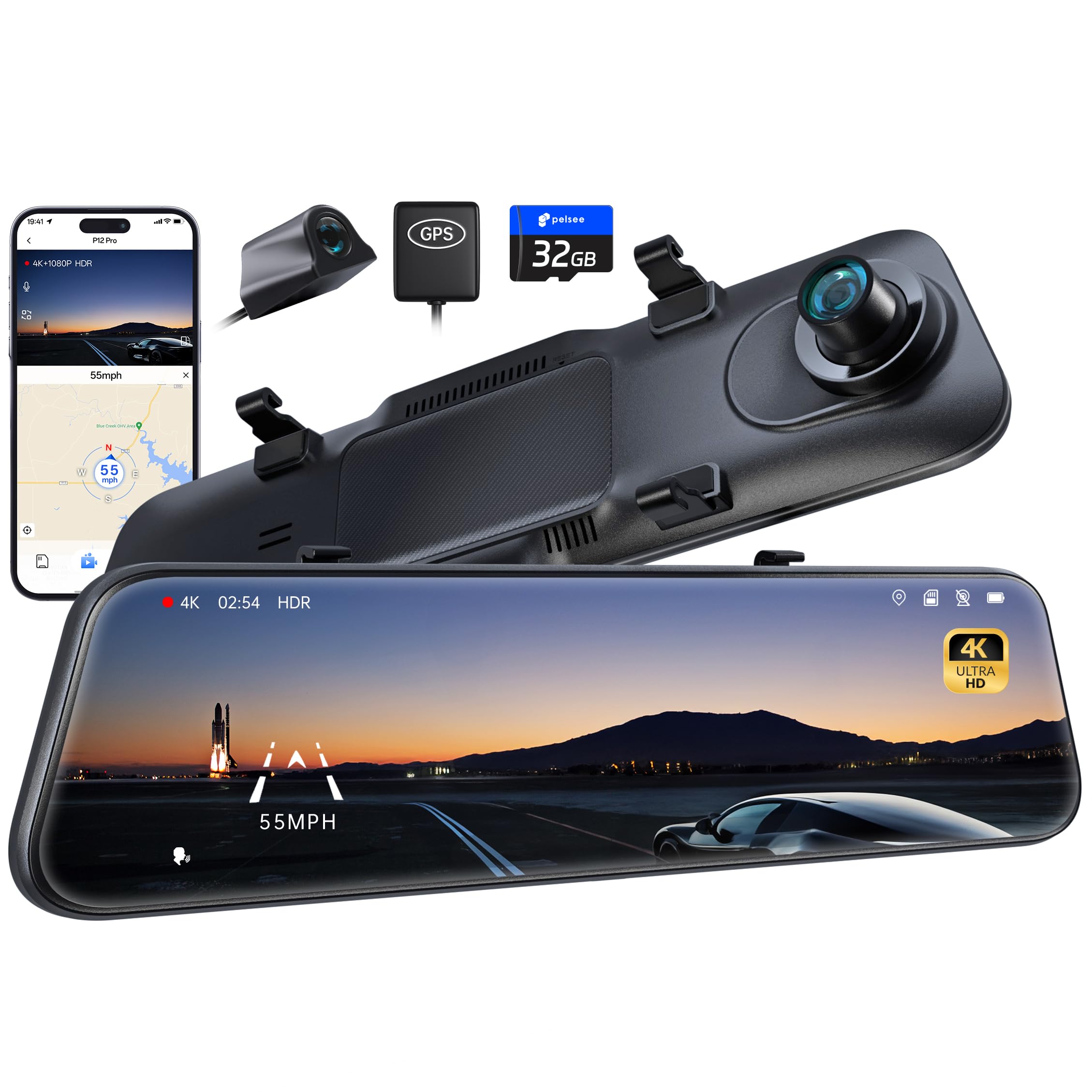
🚗 Elevate your drive with the Pelsee P12 Pro — where safety meets crystal-clear vision!
The Pelsee P12 Pro is a premium 12-inch mirror dash cam featuring 4K UHD front and 1080P rear cameras, advanced driver-assistance systems (ADAS) including blind spot detection, and ultra-fast 5.8GHz WiFi for quick video transfer. It offers voice control, GPS tracking, color night vision, and a 32GB memory card, designed to enhance driving safety and convenience with continuous loop recording and parking monitoring capabilities.


| ASIN | B0BF4WCZ8Q |
| Are Batteries Included | Yes |
| Auto Part Orientation | Front & Rear |
| Auto Part Position | Front, Rear |
| Battery Cell Type | Lithium |
| Best Sellers Rank | #3,520 in Electronics ( See Top 100 in Electronics ) #5 in Car In-Mirror Mounted Video Players |
| Brand | pelsee |
| Built-In Media | 4K Mirror Dash Cam |
| Color | Black |
| Compatible Devices | Minivan, Truck, Car |
| Compatible with Vehicle Type | Car, Minivan, Truck |
| Connectivity Technology | USB |
| Control Method | App, Touch, Voice |
| Customer Reviews | 4.3 out of 5 stars 3,156 Reviews |
| Display Type | LCD |
| Field Of View | 150 |
| Flash Memory Supported Size Maximum | 32 GB |
| Flash Memory Type | TF |
| Frame Rate | Either 24 FPS, 25 FPS or 30 FPS |
| Included Memory Card Size | 32 GB |
| Item Dimensions D x W x H | 0.7"D x 12"W x 3"H |
| Item Type Name | Mirror Dash Cam |
| Item Weight | 2.38 Pounds |
| Manufacturer | pelsee |
| Memory Slots Available | 1 |
| Model Name | Mirror Dash Cam |
| Mounting Type | Rearview Mirror Mount |
| Other Special Features of the Product | 5.8GHz WiFi/App Control, Advanced Driver Assistant System, Built-In GPS, Loop Recording, G-Sensor, Reverse Assist, Voice Control |
| Real Angle of View | 170 Degrees |
| Screen Size | 12 |
| UPC | 860008302878 |
| Vehicle Service Type | Car, Minivan, Truck |
| Video Capture Resolution | 4K |
| Warranty Description | Pelsee commits to provide 30-day refund and 12 month manufacturer defect warranty! Feel free to contact us with any questions or concerns. |
J**A
Update to: Love it, but has a few issues...
===== Update 1/9/2024 ===== Ok, so after emailing with support, they asked me if I bought the correct hard wire kit, which I hadn't. I had bought the one that Amazon was recommending. I had actually avoided buying the Pelsee brand one because it had low reviews because as some users reported, it would drain their car battery because it didn't have the Volt Protection Technology which turns off the dashcam if the car's battery voltage goes below something like 12.5 volts or something like that. The new one that Pelsee was now recommending to use had very high reviews and it specified that it has Low Voltage Protection built in. So I bought and installed the correct Hard Wire kit, which is this one: https://a.co/d/96tzm2u The major difference with the two different hard wife kits is that the original one that I bought only had one wire which connected to a fuse that had power all the time, so it was telling the dash cam to never turn off. The new Pelsee brand kit comes with two wires, one that connects to a fuse that is always on and one wire that connects to a fuse that has power only when the car is on and cuts off the power when the car goes off. After changing kits, I'm very happy to announce that the dashcam works perfectly as I would expect it to. It turns on when I turn the car on and it turns off only when I turn off the car. But not only that, but if you bump the car or mess with it in any way, the cash cam immediately records for the next 2 minutes, but the screen doesn't go on. It records covertly, which is simply awesome! I love it now and I just updated my rating from 2 stars to 5 stars. Way to go Pelsee!!! ====== Original Review Below ========= First of all, gotta say that I'm impressed with the quality of this mirror dash cam. It looks amazing. The night vision is insane! That said, there's a few issues that I hope they'll be able to fix. I installed it with a hard wire kit so that it can monitor the car 24/7. The kit only comes with 1 red wire and the instructions clearly state that if camera comes with parking mode, to connect that red wire to a fuse that has power even when car is off. So that's what I did. The problem is that the camera is always on, even when the car gets turned off, the display remains on all the time. Now, the mirrorcam comes with an auto shutoff feature as well as an auto screen-off feature. These features would be ideal, but there's another problem with them. I set the auto screen-off feature to turn off the display after 3 minutes of inactivity. And as I'm driving, it turns off every 3 minutes! I have to keep tapping the screen to keep turning it on! Pelsee... please update your software so that if the car is in motion, it detects that motion as "activity" and keeps the screen on. If it's detecting any speed or movement, it should not be considered "inactivity". Make sense? So that could be a simple fix. The other issue I found on my unit is that the auto shut off doesn't work at all. I set it for 1 minute, nothing. Then I set it for 3 minutes and nothing. It just never shut down at all. So that might need to get looked at. Another issue that popped up yesterday, we noticed that it tends to get pretty hot and when it does, it kinda shuts down and restarts on you. As we were driving, when we'd swipe the screen so it can show us the front camera, it would suddenly shut down and restart again. Then we'd swipe again so it could show us the rear camera and it would do a whole restart cycle again. But when the cam is cool, that doesn't happen. So that kinda worries me because we live in Yuma, AZ. Right now, the temperatures are still cool, but what will happen when the summer hits and the car's internal temps reach 200 degrees? I don't think it's going to survive one Yuma summer. So as I was saying... I'm so happy I finally have a dash cam. It's beautiful and I love that as it records full HD video, it's showing the direction I'm traveling as well as the speed, so that's cool. But I can only give it 2 stars until the issue of it always staying on gets fixed. That is really a big issue that I feel needs attention. And again, don't get me wrong. I DO want the camera on and monitoring the car 24/7, but it should be smart enough to detect when there's true inactivity, you know, the car off and no motion for 3 minutes and only then the display should turn off. Makes sense? Oh, and the hardwire kit I installed it with was the one Amazon recommended, which is this one: https://a.co/d/ceQLgKD
J**A
Great device. Best support from Pelsee
I bought the Pelsee P12 Pro to use on an RV. The installation process was easy and without any issues. On the first major trip across the country, it was not comfortable at all. The device powered off (or entered into standby mode) ever few minutes. I had to keep it awake by touching the screen constantly, it was driving me nuts. I even thought it was the SD card getting full, because it was constantly recording, and caused the system to power off. When the device was ON, the image was crisp and without any lag. The brightness is good, and the ADAS was working great. So, on the first evening i emailed Pelsee asking for help on the power off issue and the always recording function. In the morning i already had a reply from support apologising for the inconvenience and offering help in a clear instruction and also a screenshot on how to deactivate the "auto power off", and explaining the always-recording function is like this by design, but asking me if i preferred it to be set out differently, as they could manage it somehow. In a matter of seconds i found the setting they suggested - for which i searched on the day before, without success, that's on me - and tested it. The P12 Pro worked without depowering for an hour until i switched it off! And now that i know that the always recording function was not the issue, getting the SD card full, I'm OK with the device always recording. This is not my first mirror, but it is by far, the best i had. The previous ones were from the other side of the world, with sketchy firmwares, even some translation errors, as we all know. The support given to this issue was quite a surprise for me, as it was fast and effective. I ordered this from the US Amazon all the way to Portugal, because of the many reviews i saw online and i don't regret it. As I said to Pelsee support, in my opinion, the auto power off should be preset to OFF instead of 5 min, as this is a rearview mirror, and should be ON as long as the vehicle is ON, but other people may think differently. TL;DR: Great device with excellent image and even better support. The problem I had was that I hadn't read the manual.
J**N
A must have for your younger/new drivers
I bought this for one of my kids to avoid being in a "he-said she-said" situation in case of an accident. I have had window mounted dash cams in the past and never liked them. I've also had front view only dash cams. I chose this because it attaches over the rearview mirror and also has a rear camera. I am very happy with the purchase however there are some things I do not like. First, the good points. Picture quality is excellent. The front camera has plenty of adjustability. The fact the power plug that goes into a cigarette lighter has a pass-thru USB is well thought out. Night vision is excellent and the blind spot, collision warning, and overall crash avoidance features are amazing. As for negatives, I should have done more research and bought the next level up (the P12 Plus) which has Wi-Fi. Not a deal breaker, but that would be worth the extra $$. The other negative is probably related to legality. I do not like the mirror finish as it takes away from the display. I am guessing there's some legal requirement for a rearview replacement to have a mirror quality to it, so I don't think it is a knock against the product, but it is very annoying to have the reflection so pronounced on the screen. Overall, a very good product with some minor drawbacks.
E**E
Quality Camera, Highly Recommend
*This is review is by Niall* After having a frustrating time with my last dash cam due to phone connectivity issues, I was looking for something easier, a plug in and record device as opposed to trying to connect it to a phone first. Searching, browsing and even more browsing and with so many other dash cams on the market, we're certainly spoiled for choice. Until I saw the Pelsee P10 Pro 10" 4K Mirror Dash Cam. A simple plug in and play set up. Exactly what I wanted. But not only that, they have safety systems built in, which I was impressed with and hadn't seen it on any others..at this Pelsee price too that is. Affordable but not breaking the bank. These safety systems were for Advanced Driver Assistance System and Blind Spot Detection. After installing it over the rear view mirror, the rear dash cam is certainly sturdy and not going anywhere. The straight forward setup up of settings, correcting the time, turning the safety systems on or off and calibrating the sensitivity of it. A breeze to do. Having now used it for a solid month I certainly do feel so much safer behind the wheel knowing if ever I'm in an accident, the Pelsee rear view dash cam has me covered at the front and the rear. It detects people and other cars swiftly, with beeps letting me know if there's a car coming up behind me left or right. With brilliant 4k resolution on both cameras BUT drops slightly to 2.5K at the rear cam if the safety features are on. Don't worry, that's still fantastic clarity to view the footage in. I did have queries though, I didn't like the fact that it automatically started recording as soon as the dash cam turned on, I felt it was wasting footage before I even set off driving so I asked if there would be an update in the future for disabling that or have a setting where it would start recording when the car is then in motion. Query 2 was that on the split screen for front and rear, would it be possible to switch the rear view to the left and the front on the right, I felt it'd be easier for my eyes to quickly see behind if it was closer to me. That may have been a more personal note I had but I was assured by Helen in support that it'd be something they'd look into. So yes, they are taking notes of any issues we have to then maybe update them in the future. I did however run into an issue viewing the files on a desktop. The third party app for viewing it wasn't wholly compatible. An email to the ever helpful support of Helen guided me in the right direction. Apparently I had to slightly change each file name on the front and rear video files then I was able to view both video displays simultaneously. Happy days. Another hiccup I discovered was that when it's raining, the rear lens gets quite fogged up and misty making it a little difficult to see behind. It's just a big blur of lights behind you with no outline of cars. I'd suggest to maybe invest in a lens protector for that rear camera..or a camera shield. Maybe something Pelsee could include in future packages? With this unknown to me brand, originally, I wasn't sure about buying but after other stellar reviews, now knowing it's a quality product and well designed and researched, easy to set up and absolute reassurance that Pelsee has me covered when out driving, I'm delighted I purchased this rear view dash cam.
J**S
High quality mirror finish dash camera!
Best rear view camera / dashcam with mirror finish, I paired with the Pelsee base to replace my OEM mirror. Very satisfied withe video quality and functionality not only in normal use but also the motion detection feature that saves parking activities around. Can’t speak for durability yet but seems of very high quality. The cable length was enough to route rear camera and the vision during night driving is more than adequate.
U**Z
Great mirror dash cam
This is my second pelsee dash cam, so far is working great, I love the fact that automatically save videos if collision is detected, prevented them from been deleted. the video quality is good. The only issue is that at night the cars lights will put too much glare on the rearview mirror cam. During the day works better y much clear.
F**N
Undecided
I was so excited to have this item for my older Toyota. It was exactly what I needed & wanted. Installation was quick and easy, although I had help from a mechanic who is very familiar with fuses and wiring in cars. It looks beautiful, I was immediately impressed by the picture/video, I love the GPS feature It’s pretty easy to use interface as well. If you want to use the safe driving features, you have tweak the settings, but it’s pretty self-explanatory. They just aren’t entirely accurate so definitely don’t rely on them 100% It just takes a little bit of time and patience, I think going into an empty parking lot or near empty parking lot might make it a lot easier when tweaking some of the settings. My biggest complaint? almost immediately the machine does not understand what I’m saying. You cannot say “back camera“ you have to say “show back screen “and when I say this No matter how clearly I annunciate my words, it just shows me a completely black screen, the same thing for when I ask “show split screen“ all I get is the disembodied voice saying “OK” then the machine shows nothing. A black screen. Sometimes it will show me something, but it’s usually the complete opposite of what I asked for. Biggest issue? Unfortunately, now that I’m out and about during the day, around 4 PM EST time, the glare is quite confusing. I feel like I’m trying to play with a tablet in the sunshine. So I am looking into some type of “anti-glare” sticker, which will (hopefully) take away the glare BUT it will take away my back mirror when the camera is off. I need to decide if I am willing to go without back mirror 100% in order to use the Glare Reducing screen sticker. As I was driving recently , I couldn’t fuss with the screen, since it was not following my voice requests I was left without any type of proper mirror at a time when it was not safe to take my hands off of the wheel and fuss with my rearview mirror Which left me driving kind of blindly until it was safe to pull over and put everything Back to normal. In the end because of the horrible glare I ended up turning off the camera completely. I wanted a camera I can use consistently without glare stickers & constant fussing & worries when I’m driving blind after a technology glitch. I’d rate the system roughly 60% positive & 40% negative In my experience so far anyways.
A**L
Camera works good but don't like the rear
The product itself was great and easy to set up the dashcam. Using the Wifi app was annoying cause it connected once thn didn't seem to want to connect. Main thing I didn't like was the rear camera. It is more "advanced" so when it gets dark out, it goes black and white and although that helps you see better, moving objects, such as cars, look like ghosts moving in slow motion and that's annoying
Trustpilot
1 month ago
3 weeks ago