
DOWNLOAD THE APP


Customer Services
Copyright © 2025 Desertcart Holdings Limited
DOWNLOAD THE APP

💡 Light up your Pi projects with clarity and control!
The HCDC RPi GPIO Status LED & Terminal Block Breakout Board HAT is a precision-engineered add-on for Raspberry Pi models A+ through 4B, featuring dedicated LEDs for 5V, 3.3V, and GPIO pin status. Its one-to-one LED-to-pin layout offers instant visual feedback on GPIO logic levels, while the screw terminal blocks provide secure, clean wiring for 16-26 AWG cables. Designed for low power consumption and easy installation, this breakout board is a must-have for professionals and makers seeking efficient debugging and reliable GPIO management.


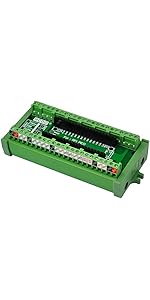


| ASIN | B08RDYDG6X |
| Best Sellers Rank | #612 in Single Board Computers (Computers & Accessories) |
| Brand | HCDC |
| Color | blue, red |
| Connector Type | Screw |
| Current Rating | 3 Amps |
| Date First Available | September 17, 2018 |
| Gauge | 26.0 |
| Item Pitch | 0.14 Inches |
| Item Weight | 2.08 ounces |
| Item model number | HD040 |
| Manufacturer | Xiken Electronic Technology Co., Ltd. |
| Material | Copper |
| Mounting Type | Panel Mount |
| Number Of Contacts | 40 |
| Number Of Poles | 40 |
| Product Dimensions | 2.56"W x 1.09"H |
| Voltage | 3.3 Volts |
E**N
Excellent for Debugging and Clean Wiring – A Must-Have for Pi GPIO Projects
I used this breakout board in my Raspberry Pi–based oven controller, and it made wiring and debugging way easier. The screw terminals keep connections secure and clean, and the LED indicators on each GPIO pin are incredibly helpful for monitoring pin state at a glance—no more guessing if your code or wiring is working. It plugs directly onto the Pi's GPIO header and includes clear pin labels, so setup was fast and error-free. Perfect for permanent installs or prototyping where reliability and visibility matter. Highly recommend for any Raspberry Pi GPIO project—especially if you’re driving relays, sensors, or building something like a custom control panel. This board makes it way easier to troubleshoot and maintain.
E**K
Well built non-intrusive connections and monitoring for your GPIO pins
Since Amazon likes to combine reviews for totally different products, this review is for the HCDC RPi GPIO Status LED & Terminal Block Breakout Board HAT. I'm not sure why people complained about putting this board in a case. It is pretty obvious that many HATs will not fit inside a closed case. This board will work with a male to female 40-pin flat extender cable if you remove the two plastic posts on either side of the connector. You really don't need those posts except to permanently attach it to the base board or another HAT. The connector works pretty well as a "foot" and you can leave the other posts for feet on the other side. I am using a Compute Module 4 with a WaveShare IO baseboard. This has plenty of clearance above the Waveshare heat sink and Compute Module 4. Although I can't close the case, I could file a slot in the cover and use a ribbon cable. My only minor complaint is that the signal designations on the terminal blocks are ordered differently than for the connector pins. I haven't figured out if there is a system to it, but they seem quite random. In some cases the label is the GPIO pin and in some cases it is the usual function, like "TX' or "RX". Probably it wasn't possible (or easy) to make a layout on the terminal blocks to match the connector pin ordering. With a little bit of care in finding the right connection, this provides all the signals. What impressed me was the construction. If this is built by hand, it was done very well. There were no cold solder joints, splashes or burnt lands from using too much heat. It actually looks like it was put through a wave soldering or surface mount soldering machine. The plastic posts could have been metal, but they're good enough being plastic. For the price, this board is a good value. I'm porting an OS to the Compute Module 4, and this board has saved me from hanging LEDs off of my board. It is also nice to see the serial port TX and RX data to at least know of the signals are reversed (one LED on instead of 2).
A**R
Breakout for raspberry pi with led status indicators
Bought for building Raspberry Pi projects for the led indicator to check coding.
E**D
It works really well but has a couple of confusing eleiments to it
It functions fine and does exactly what it suppose to do which earns it 5-stars. BUT, I found two aspects to it to be confusing: 1) The terminal connections don't have any correlation to the 40-pin connector & LED layout on the right side. You can have pin 1 located on the 3rd row of terminal connections and pin two can be on the 1st row, pin 3 next to it and pin 4 on the 4th row. Very confusing. 2) The led indicator lights for the GPIO connections turn on when the circuit is Open and turn off when the circuit is Closed. Like turning a switch off to make the like turn on and vice versa. Otherwise, it works fine once you understand its quirks.
D**G
Easy way to test code.
This provides a light for every output, plus access to the output with a screw terminal rather than having to make a header for connection. It is a step closer to installation in the final product without the need for weaker connection means, plug in socket with a wire is not a reliable way to implement a project. With this, you can test outputs by sight, and simulate inputs with simple means. Well worth the money. After the first arrived, I ordered three more.
R**.
Great for development.
Very useful during the development cycle of a project using the Raspberry Pi 4 Model B.
M**M
Nice for quick prototyping and testing
I recommend this breakout board for the following reasons: * Sturdy construction * Much easier than accessing the GPIO pins directly * It is very informative (and cool) to see activity with the LEDs * Still leaves the GPIO Pins accessible via a pass through * Seems inexpensive for the value
I**N
A lovely little piece of tech
I used the board in this case to make accessible the GPIO ports of the Raspberry PI 4B-8. This board interfaces perfectly in any situation where the GPIO pins array is accessible. This little board is a no-brainer. Don't think, just buy it. :-)
R**G
Way better than using the pins
Trustpilot
2 weeks ago
1 month ago