We remain fully operational. Our teams are working around the clock to ensure your deliveries continue safely.

DOWNLOAD THE APP


Customer Services
Copyright © 2025 Desertcart Holdings Limited
DOWNLOAD THE APP

🚀 Never Buffer Again: WiFi That Follows You Everywhere
The NETGEAR EX6120 AC1200 WiFi Range Extender dramatically expands your wireless coverage by up to 1,500 sq. ft., supporting over 25 devices simultaneously. Featuring dual-band technology with patented FastLane™ for speeds up to 1.2 Gbps, it ensures smooth video streaming and casual gaming. Its compact wall-plug design includes an Ethernet port for wired connections and offers a quick, one-button setup compatible with any router or ISP. Ideal for eliminating dead zones and buffering, this extender keeps your entire home connected effortlessly.


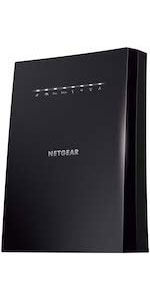


| ASIN | B014YN7LVE |
| Best Sellers Rank | #15 in Repeaters |
| Brand | NETGEAR |
| Color | White |
| Customer Reviews | 3.7 3.7 out of 5 stars (43,401) |
| Date First Available | September 14, 2015 |
| Is Discontinued By Manufacturer | No |
| Item Dimensions LxWxH | 2.64 x 1.54 x 2.17 inches |
| Item Weight | 4.6 ounces |
| Item model number | EX6120-100NAS |
| Manufacturer | Netgear |
| Product Dimensions | 2.64 x 1.54 x 2.17 inches |
| Series | EX6120-100NAS |
| Voltage | 120240 Volts |
| Wireless Type | 802.11ac |
R**H
Easy to Set-up & Connect
After logging into NetGears Setup Page and making a password and 2 security questions I found it fairly simple and quick to get the AC1200 WiFi Range Extender to lock into my router. I live in a mobile home and the WiFi connection in the living room where the router is located is fine but when you take your laptop or Ipad down to the other end of the trailer, in the bedrooms you lose quite a bit. On a lot of sites you would get a lot of buffering. Once I put AC1200 in the back bedroom it was like having the router in the room. Plus there are no cord connections, just plug it in the wall socket. If I want to use an Ethernet Cable with my laptop in the bedroom there is an Ethernet Port on the side of the AC1200 Extender to plug into. Some Extenders I reviewed before buying this one don't have that feature. You can't go wrong with this model. Works great. And if your a member of Amazon Prime you'll get it in 2 days. I did.After logging into NetGears Setup Page and making a password and 2 security questions I found it fairly simple and quick to get the AC1200 WiFi Range Extender to lock into my router. I live in a mobile home and the WiFi connection in the living room where the router is located is fine but when you take your laptop or Ipad down to the other end of the trailer, in the bedrooms you lose quite a bit. On a lot of sites you would get a lot of buffering. Once I put AC1200 in the back bedroom it was like having the router in the room. Plus there are no cord connections, just plug it in the wall socket. If I want to use an Ethernet Cable with my laptop in the bedroom there is an Ethernet Port on the side of the AC1200 Extender to plug into. Some Extenders I reviewed before buying this one don't have that feature. You can't go wrong with this model. Works great. And if your a member of Amazon Prime you'll get it in 2 days. I did.After logging into NetGears Setup Page and making a password and 2 security questions I found it fairly simple and quick to get the AC1200 WiFi Range Extender to lock into my router. I live in a mobile home and the WiFi connection in the living room where the router is located is fine but when you take your laptop or Ipad down to the other end of the trailer, in the bedrooms you lose quite a bit. On a lot of sites you would get a lot of buffering. Once I put AC1200 in the back bedroom it was like having the router in the room. Plus there are no cord connections, just plug it in the wall socket. If I want to use an Ethernet Cable with my laptop in the bedroom there is an Ethernet Port on the side of the AC1200 Extender to plug into. Some Extenders I reviewed before buying this one don't have that feature. You can't go wrong with this model. Works great. And if your a member of Amazon Prime you'll get it in 2 days. I did.After logging into NetGears Setup Page and making a password and 2 security questions I found it fairly simple and quick to get the AC1200 WiFi Range Extender to lock into my router. I live in a mobile home and the WiFi connection in the living room where the router is located is fine but when you take your laptop or Ipad down to the other end of the trailer, in the bedrooms you lose quite a bit. On a lot of sites you would get a lot of buffering. Once I put AC1200 in the back bedroom it was like having the router in the room. Plus there are no cord connections, just plug it in the wall socket. If I want to use an Ethernet Cable with my laptop in the bedroom there is an Ethernet Port on the side of the AC1200 Extender to plug into. Some Extenders I reviewed before buying this one don't have that feature. You can't go wrong with this model. Works great. And if your a member of Amazon Prime you'll get it in 2 days. I did.After logging into NetGears Setup Page and making a password and 2 security questions I found it fairly simple and quick to get the AC1200 WiFi Range Extender to lock into my router. I live in a mobile home and the WiFi connection in the living room where the router is located is fine but when you take your laptop or Ipad down to the other end of the trailer, in the bedrooms you lose quite a bit. On a lot of sites you would get a lot of buffering. Once I put AC1200 in the back bedroom it was like having the router in the room. Plus there are no cord connections, just plug it in the wall socket. If I want to use an Ethernet Cable with my laptop in the bedroom there is an Ethernet Port on the side of the AC1200 Extender to plug into. Some Extenders I reviewed before buying this one don't have that feature. You can't go wrong with this model. Works great. And if your a member of Amazon Prime you'll get it in 2 days. I did.After logging into NetGears Setup Page and making a password and 2 security questions I found it fairly simple and quick to get the AC1200 WiFi Range Extender to lock into my router. I live in a mobile home and the WiFi connection in the living room where the router is located is fine but when you take your laptop or Ipad down to the other end of the trailer, in the bedrooms you lose quite a bit. On a lot of sites you would get a lot of buffering. Once I put AC1200 in the back bedroom it was like having the router in the room. Plus there are no cord connections, just plug it in the wall socket. If I want to use an Ethernet Cable with my laptop in the bedroom there is an Ethernet Port on the side of the AC1200 Extender to plug into. Some Extenders I reviewed before buying this one don't have that feature. You can't go wrong with this model. Works great. And if your a member of Amazon Prime you'll get it in 2 days. I did.After logging into NetGears Setup Page and making a password and 2 security questions I found it fairly simple and quick to get the AC1200 WiFi Range Extender to lock into my router. I live in a mobile home and the WiFi connection in the living room where the router is located is fine but when you take your laptop or Ipad down to the other end of the trailer, in the bedrooms you lose quite a bit. On a lot of sites you would get a lot of buffering. Once I put AC1200 in the back bedroom it was like having the router in the room. Plus there are no cord connections, just plug it in the wall socket. If I want to use an Ethernet Cable with my laptop in the bedroom there is an Ethernet Port on the side of the AC1200 Extender to plug into. Some Extenders I reviewed before buying this one don't have that feature. You can't go wrong with this model. Works great. And if your a member of Amazon Prime you'll get it in 2 days. I did.After logging into NetGears Setup Page and making a password and 2 security questions I found it fairly simple and quick to get the AC1200 WiFi Range Extender to lock into my router. I live in a mobile home and the WiFi connection in the living room where the router is located is fine but when you take your laptop or Ipad down to the other end of the trailer, in the bedrooms you lose quite a bit. On a lot of sites you would get a lot of buffering. Once I put AC1200 in the back bedroom it was like having the router in the room. Plus there are no cord connections, just plug it in the wall socket. If I want to use an Ethernet Cable with my laptop in the bedroom there is an Ethernet Port on the side of the AC1200 Extender to plug into. Some Extenders I reviewed before buying this one don't have that feature. You can't go wrong with this model. Works great. And if your a member of Amazon Prime you'll get it in 2 days. I did.After logging into NetGears Setup Page and making a password and 2 security questions I found it fairly simple and quick to get the AC1200 WiFi Range Extender to lock into my router. I live in a mobile home and the WiFi connection in the living room where the router is located is fine but when you take your laptop or Ipad down to the other end of the trailer, in the bedrooms you lose quite a bit. On a lot of sites you would get a lot of buffering. Once I put AC1200 in the back bedroom it was like having the router in the room. Plus there are no cord connections, just plug it in the wall socket. If I want to use an Ethernet Cable with my laptop in the bedroom there is an Ethernet Port on the side of the AC1200 Extender to plug into. Some Extenders I reviewed before buying this one don't have that feature. You can't go wrong with this model. Works great. And if your a member of Amazon Prime you'll get it in 2 days. I did.After logging into NetGears Setup Page and making a password and 2 security questions I found it fairly simple and quick to get the AC1200 WiFi Range Extender to lock into my router. I live in a mobile home and the WiFi connection in the living room where the router is located is fine but when you take your laptop or Ipad down to the other end of the trailer, in the bedrooms you lose quite a bit. On a lot of sites you would get a lot of buffering. Once I put AC1200 in the back bedroom it was like having the router in the room. Plus there are no cord connections, just plug it in the wall socket. If I want to use an Ethernet Cable with my laptop in the bedroom there is an Ethernet Port on the side of the AC1200 Extender to plug into. Some Extenders I reviewed before buying this one don't have that feature. You can't go wrong with this model. Works great. And if your a member of Amazon Prime you'll get it in 2 days. I did.After logging into NetGears Setup Page and making a password and 2 security questions I found it fairly simple and quick to get the AC1200 WiFi Range Extender to lock into my router. I live in a mobile home and the WiFi connection in the living room where the router is located is fine but when you take your laptop or Ipad down to the other end of the trailer, in the bedrooms you lose quite a bit. On a lot of sites you would get a lot of buffering. Once I put AC1200 in the back bedroom it was like having the router in the room. Plus there are no cord connections, just plug it in the wall socket. If I want to use an Ethernet Cable with my laptop in the bedroom there is an Ethernet Port on the side of the AC1200 Extender to plug into. Some Extenders I reviewed before buying this one don't have that feature. You can't go wrong with this model. Works great. And if your a member of Amazon Prime you'll get it in 2 days. I did.After logging into NetGears Setup Page and making a password and 2 security questions I found it fairly simple and quick to get the AC1200 WiFi Range Extender to lock into my router. I live in a mobile home and the WiFi connection in the living room where the router is located is fine but when you take your laptop or Ipad down to the other end of the trailer, in the bedrooms you lose quite a bit. On a lot of sites you would get a lot of buffering. Once I put AC1200 in the back bedroom it was like having the router in the room. Plus there are no cord connections, just plug it in the wall socket. If I want to use an Ethernet Cable with my laptop in the bedroom there is an Ethernet Port on the side of the AC1200 Extender to plug into. Some Extenders I reviewed before buying this one don't have that feature. You can't go wrong with this model. Works great. And if your a member of Amazon Prime you'll get it in 2 days. I did.After logging into NetGears Setup Page and making a password and 2 security questions I found it fairly simple and quick to get the AC1200 WiFi Range Extender to lock into my router. I live in a mobile home and the WiFi connection in the living room where the router is located is fine but when you take your laptop or Ipad down to the other end of the trailer, in the bedrooms you lose quite a bit. On a lot of sites you would get a lot of buffering. Once I put AC1200 in the back bedroom it was like having the router in the room. Plus there are no cord connections, just plug it in the wall socket. If I want to use an Ethernet Cable with my laptop in the bedroom there is an Ethernet Port on the side of the AC1200 Extender to plug into. Some Extenders I reviewed before buying this one don't have that feature. You can't go wrong with this model. Works great. And if your a member of Amazon Prime you'll get it in 2 days. I did.
K**N
The only "extender" worth having really.
Most "extenders" or "repeaters" work in a single band (e.g. 2.4GHz or 5GHz) and have a single radio front end that means they "extend" or "repeat" on the very same RF channel as your primary router. The end result is that you cripple the original router as the repeater interferes on the very same frequency. In theory an extender could have two radio front ends say on the 2.4 GHz band and thus chose a different 2.4 GHz channel to setup its extended network and avoid interference, but as far as I'm aware few if any do that. This extender is dual band, operating on both 2.4GHz and 5GHz and by default will extend both bands. Trouble is that results in the same interference problem as described above - it will setup its two networks on the very same channels as the primary router and thus interfere on both bands! The secret sauce here is that the EX6120 has a unique mode in which it can connect to your main router in one band (e.g. 5 GHz) and then extend that on the other band (e.g. 2.4 GHz). Since these are separate RF front ends the extended network can choose any channel it wants on the extended band. The downside of course is that you only get the bandwidth of the lowest band, but you should never being using an extender for high bandwidth connections in the first place. The benefit is that without the interference you can get the full bandwidth of the channel, unlike typical same-channel extenders that at the very maximum might get half the channel bandwidth. Other benefits of this extender, not necessarily unique to it, are that it uses the upstream main router DHCP for all connected devices and thus your extended network lives on the same subnet as the main router and can communicate with all devices on the main router as well. This is accomplished by creating a virtual MAC address on the main network for each client on the extended network and these virtual address are assigned in a deterministic way (the upper bytes of the MAC are replaced with a fixed prefix) and so you can even properly assign static DHCP addresses for devices on the extended network. This is in contrast to some extenders which instead setup an entirely separate subnet with their own DHCP server which complicates communication between the main and extended networks. Like all of these devices the web administration page could be a bit better and it often tries to "help" you with ham-fisted "wizards" for setup that hide a bunch of useful features. But that's par for the course and it is no worse than most and far better than many.
M**A
It's very convenient to install It's very useful for those apartments where bedroom has low signal strength. It strengthens the signal strength.
L**R
Facil de instalar, muy buena cobertura, la señal se extiende entre 30 y 40 metros fuera de la casa. Recfomendable
P**O
Lo uso en una casa de dos pisos de concreto donde la señal del router principal no llega a la planta baja con suficiente intensidad, con este repetidor se crean 2 redes nuevas (para 2.4Ghz y 5Ghz) con suficiente intensidad y muy buen desempeño. Muy fácil de instalar.
J**L
VERY VERY VERY VERY VERY BAD PRODUCT DONT BUY
M**J
Seems it needs to be close to the wifi source for relay , the signal strength seems better than the routers itself.
Trustpilot
3 weeks ago
2 weeks ago