
DOWNLOAD THE APP


Customer Services
Copyright © 2025 Desertcart Holdings Limited
DOWNLOAD THE APP


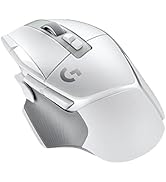
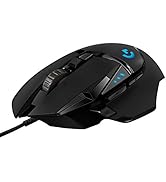
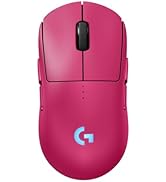
🎮 Elevate your game with precision, power, and style — the G502 SE Hero is your ultimate weapon.
The Logitech G502 SE Hero is a high-performance gaming mouse featuring the advanced HERO 25,600 DPI sensor for unparalleled precision, 11 programmable buttons for customizable control, and a tunable weight system for personalized balance. Enhanced with Logitech G LIGHTSYNC RGB lighting and durable metal button mechanisms, it offers both style and longevity for serious gamers and professionals alike.





| ASIN | B07PHLBBQR |
| Batteries | 1 AAA batteries required. |
| Best Sellers Rank | #31,804 in Video Games ( See Top 100 in Video Games ) #1,052 in PC Gaming Mice |
| Brand | Logitech G |
| Color | Special Edition |
| Customer Reviews | 4.6 4.6 out of 5 stars (9,322) |
| Date First Available | October 18, 2019 |
| Hardware Platform | PC |
| Item Dimensions LxWxH | 5.2 x 2.95 x 1.57 inches |
| Item Weight | 4.3 ounces |
| Item model number | 910-005728 |
| Manufacturer | Logitech |
| Operating System | Microsoft Windows |
| Product Dimensions | 5.2 x 2.95 x 1.57 inches |
| Series | G502 HERO SE |
S**R
3 years and still going!
I have absolutely loved this mouse. Im 3 years almost to the date I believe of having this particular mouse. I had never had a weighted mouse before but I cant imagine not having weights in mice after working with this one so long. Mine came with weights to allow for the perfect wight for your preference. The button amount is perfect for my gaming and general web surfing needs. Perfect size for my hand. Build quality has been amazing, and long lasting. I dont imagine it will break anytime soon unless its a software/hardware issue. Would for sure buy again.
J**B
Solid Mouse
UPDATE 2024/03/26: For maybe the past few months I've been experiencing degraded performance of the left-click button. Specifically, when I try to highlight text (click and drag) the selection often changes like I quickly released and re-clicked even though I have the button depressed the whole time. I am a pretty casual mouse user, I don't do left-click-intensive activities at all, so this is kind of disappointing. Maybe I can open it up and clean it to fix the problem myself. I really like the mouse, so I'd be disappointed if it became usable for this reason. UPDATE 2021/03/18: I actually downloaded the G hub software and did a bit of customization. I disabled the left scroll wheel button, since I accidentally hit it so often when trying to middle click. I also increased DPI a bit (max is >25000 now?!) and set the DPI shift button so I can easily switch to a less sensitive DPI for accurately drawing pixel art or adjusting volume. Very nice features. This mouse hasn't had any paint wear/peeling issues like my last (cheap) one. Despite the scroll wheel not being rubber, I think it feels just fine. I haven't used any weights, and I don't really know why I would. I use a palm-ish grip, and I have a medium size hand. Since getting this mouse, I've switched from a "normal" DPI to max, and it is so nice being able to navigate my computer with fine movements. I can move my cursor across all three of my monitors by rotating my hand ~1.5 inches. My only complaint is that the left button seems to be a bit sensitive. Maybe it's the way I hold the mouse, but in a 2D scrolling environment, it's easy to accidentally hit the left scroll button when holding down the wheel. I have to make a concerted effort to ensure that I am pressing the wheel straight down. It would also be nice if the DPI button was harder to press just so I don't hit it by accident, but that is very rare anyways. When I bought this, it was on sale for $37. For that value, this mouse is 5 stars (so far). If I had spent ~$55 or more, this would be 4 stars. Overall a great mouse.
█**█
Good Mouse Overall
Currently cheaper than the other models of G502 that I was waiting for a discount on. Two different software to customize the mouse how you like. Personally, I just go with the legacy software, LCore. You can change a lot of settings with this mouse including the buttons, dpi, color of lighting or just turn off the light like I do. This has multiple buttons and layouts you can set which is great for that certain game or program. I have settings that allow me to quickly switch to the browser tab on the left and right and refresh the page which is extremely helpful and one of the top reasons I bought this. The scroll wheel is kind of hit or miss. I don't like it when I depend on an accurate scroll in a game or on a website but when I get the right place it sometimes goes back up a notch and I miss. Seems to happen pretty frequently too. You get used to it eventually. Free-scrolling is fun to use on long webpages. I don't really feel a difference with the weights in my opinion, but I just put it all on to keep it heavy. A good mouse for the price. If you need a new mouse maybe choose this one. Pros Pretty cheap price Good Quality and feel Customizable buttons that can be saved on hardware so you don't need to open up their software for a different layout Lighting Free-scroll is fast and fun strong cable SE is arguably cooler than the regular version and cheaper Cons Scroll wheel might not be accurate
K**I
Not bad, especially for the price
This review is for the Logitech G502 Hero. Back in 2010 I had purchased the Logitech G500 and LOVED it! Very comfortable, solid build, lots of customization options, and worked forever. After 10 years my cat chewed through the cord and so I had to get a new mouse. It was an easy choice to try the Logitech G502 since I thought it was the next iteration of the mouse I loved so much. HOWEVER, after opening it I could see the there was a downgrade in build quality. The mouse felt harder yet more fragile than my previous one. Still, for the price it didn't seem too bad. However, after about a year and a half of medium duty use, the primary left click button began to stop working, requiring either a lot of pressure or hard tapping to get it to work. Very frustrating since I've bought Logitech products for over twenty years and been very happy with them previously. I will say that perhaps my mouse is the exception. The price of the mouse was pretty reasonable, and if I hadn't had such a great experience with the G500 I probably would not have been as disappointed. I really like the being able to switch between a smooth and clicky scroll wheel, a must for gaming. Would easily be a five star mouse if not for the intermittent left click button.
K**D
o kadar güzel bi mause ki anlatamam 5 yıldız
F**A
Muito bom
Y**N
قد جربت العب بي مواس قيمق رخيص على السوني 4 وكنت بوت ويوم جربت الماوس هذا صارت ايمي اسطوري صدق المستشعر الدقيق افضل الف مره من ماوس عادي اذ جديد في الماوس جربه وتكون ممتاز وراح تحب تلعب فيها وفي 11 زر تقدر تخصصه
D**I
This mouse is so good, I got a spare one after a couple of years, just so I have it for the future. I don't really care about 'up to 16k dpi' settings or a million led colours available, the main point is that this mouse is so comfortable. It has a great design, 3 customizable side buttons for extra functionality (the extra 2 next to LMB aren't really usable unless you have a ridiculously long index finger), and a set of weights that can be inserted on the bottom. The scroll wheel moves left and right for back and forward actions that work on web pages and some apps that support such navigation. On-board memory allows you to to map buttons once and use it on multiple computers with the same functionality.
J**.
Just so put this out there now, I'm not a gamer and I don't use this mouse for gaming, I'm a CAD engineer. This thing has some weight to it, you're either going to like that or you're not. I like it. It glides quietly across the desk (I don't use a mat) and the clicks are rather quiet. Somethin I really like. Only gripe I have is that the scroll wheel is really loud (like "ker-chunk, ker-chunk, ker-chunk") when the slow scroll is locked in. Really though, the fast scroll wheel is basically what sold this mouse to me, it just keeps on spinning, makes for very fast workflow. All my buttons are customized of course but the software wants to keep going back to default button assignments, I have to keep openng the software and reloading my prefered button profile. A bit annoying, not sure if there's something I'mm missing. All-round great mouse, I'm sure you don't need me to say so. Also, 16,000 DPI?? Really? Who's ever going to use that? 0.001mm of movement across the desk equates to the mouse pointer telleporting across all 3 monitors =/
Trustpilot
5 days ago
2 weeks ago