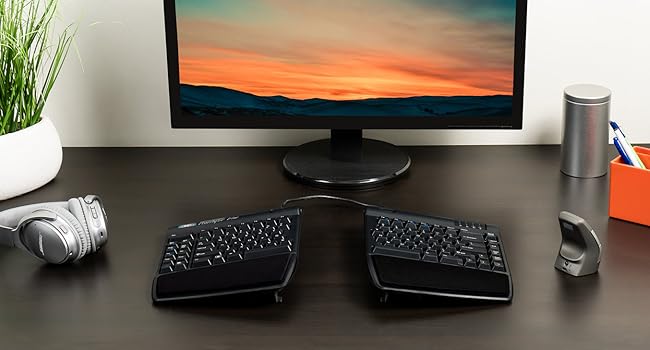
↔️ Elevate your workspace, split the strain, and type like a pro!
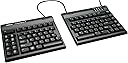
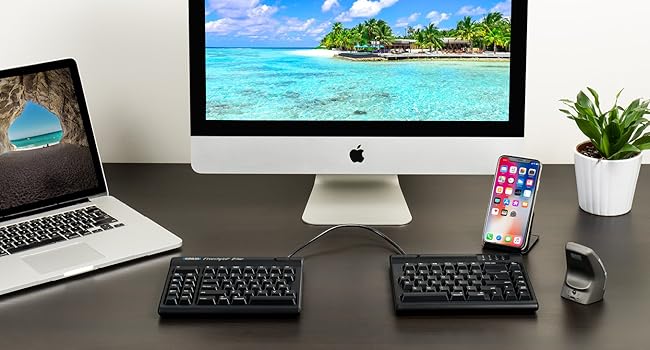
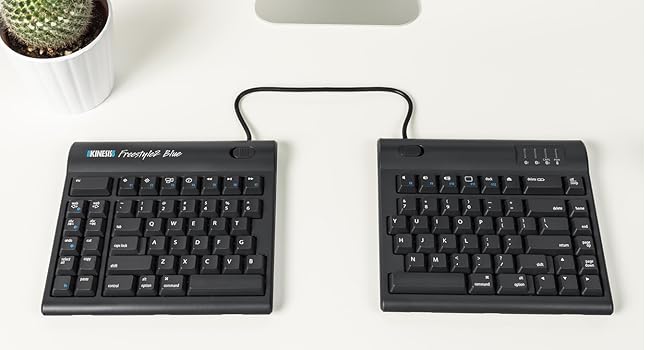
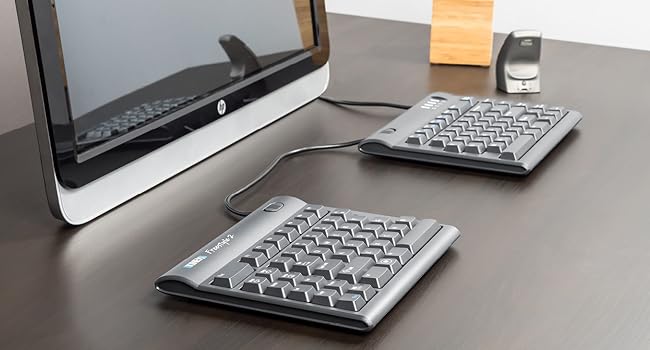
The KINESIS Freestyle2 Ergonomic Keyboard features an award-winning split design with up to 9" adjustable separation, low-force tactile membrane keys, and plug-and-play compatibility across major OS platforms. Designed to reduce repetitive strain injuries and improve posture, it includes productivity hotkeys and a standard Windows layout, making it the ideal choice for professionals seeking comfort and efficiency in their daily typing.


| ASIN | B00CMALD3E |
| Best Sellers Rank | #329 in Computer Keyboards |
| Customer Reviews | 4.1 4.1 out of 5 stars (1,414) |
| Date First Available | October 3, 2010 |
| Is Discontinued By Manufacturer | No |
| Item Weight | 2 pounds |
| Item model number | KIN-FS2-01US |
| Manufacturer | Kinesis Corporation |
| Product Dimensions | 15.94 x 9.25 x 1.26 inches |
M**N
Awesome with one small exception.
UPDATE: I think the one real issue I have with this keyboard is the inability to map the three web-dedicated buttons on the left to something else. I'd LOVE an Enter key on that side. If that's not a dealbreaker for you, read on, because 99% of this keyboard is amazing. ORIGINAL: I've been dithering over getting this keyboard for a long time. I have RSI in both hands and have tried almost every other keyboard out there. I even looked at the Kinesis $300 one with the 'hand wells' but decided against it because people described the keys as needing force and there was no good option for 10-key number pad entry (Accounting major so std 10-key is a must). My RSI requires that I not need a lot of force to press the keys. Pros: The 20" cord between the keypads fits perfectly on my VariDesk 36" giving me plenty of room in the middle for my mouse (any of the 4 I switch around to keep those tendons from complaining at me!) and/or my drawing tablet. That 20" gap also allows me to sit in a relaxed, shoulders-back position to type which is worlds better than the hunch or crouch that happens when concentrating intently on what I'm typing on a regular, even ergonomic, keyboard. There is a group of buttons on the left-hand side that are Copy, Paste, Cut, Del, Undo, Web, and Forward/Back web buttons. These are SO USEFUL when using the mouse in the right hand. If you buy this with the tilt/wristpad accessory that Amazon 'recommends' with it it gets even better, with several good tilt angles for each side independently. The wrist pads are soft and comfy. You don't have to have it 20" apart, there's a way to link the two halves together and just tilt them out from each other if you're short on space. The keys are easy to press but still make a good clicky sound. I'm a gamer and I haven't had any issue with them. Cons: There's a little bit of a learning curve but if you're a touch-typist like me it's quite quick to get over. The accessory kit mentioned above does not have positive or negative tilt front/back, only left-right. I'd like to be able to tilt the top of the keyboard down and the back up, as well as the sides. The accessory kit tilt feet are kind of loose so it's easy to change the tilt when you move the keyboard, that's kind of a pro/con. The little rubber feet are pretty good at keeping the keyboard still under normal usage. Set it and forget it is the best way to work with this, I think. With the 20" cord in between, if you're not using the whole thing, it's in the way. I tucked mine under the VariDesk middle bit (see pic) and it fit perfectly. But not everyone has that option, so just be aware that the cord might be annoying unless you can tuck it under something else. The 10-key keypad is an extra buy. That's kind of annoying but I get that not everyone wants/needs it. Also with the main keyboards so far apart, putting the keypad on the far right like I'm used to was not an option. I put in the middle because while I do use it, I don't use it often enough to make a special place for it in my setup. I move it aside when I pull out my drawing tablet. Overall I highly recommend this keyboard to touch typists with RSI, or who want to avoid it, those with w/ back issues, shoulders, neck, etc. It really opens up your posture if you use it at the 20" and lets your whole body be in a more neutral position than a centralized keyboard setup. It actually makes me feel more relaxed overall with my posture more relaxed.
C**K
Awesome ergonomic keyboard with a few quirks
tl;dr: Amazingly adjustable ergonomic keyboard with fantastic key feel that has a few slight quirks. I love this keyboard and would not knock off a star for a those minor quirks that I will likely adjust to over time. I have been in the software development industry for 15 years. Over the past year or so, I have noticed signs of it catching up to me and have started experiencing aches and pain in my wrists and forearms. I have used the Microsoft natural keyboard for the last 5 years in an effort to avoid those issues but apparently it only delayed it at best. When I actually looked at how I used the MS keyboard, I realized that it straightened my arms and wrists out a bit when compared to a traditional flat keyboard, but a combination of my desk layout and having wide shoulders resulted in my wrists needing to splay outward somewhat. In short, the angle provided by that keyboard was insufficient for my desk and body. When I saw the Kinesis, it was obvious that the independent halves would be completely adjustable in angle and separation to fit my needs at my current desk or future setups, so despite the much higher price tag than the MS keyboard I purchased it as well as the VIP3 accessory that adds wrist rests and angled adjustments. I've used it now for several weeks and am happy to report that pain from lots of daily typing has drastically reduced, almost to the point of elimination. I feel with continued use that problems will cease. Lots of people talk about the somewhat strange keyboard layout. While I agree that some of the keys are laid out in a way I am not yet used to, 95% of the keys that I use primarily are right where I expect them to be, and there was very little adjustment period. There are only two keys that have given me persistent problems over the two weeks I've been using it: the Delete key atop the Backspace and the toggle function of the Fn key. The Delete key I tend to hit when I'm trying to hit Backspace, and for a second I'm confused as to why the wrong characters are getting deleted. Not a huge deal. The Fn key I occasionally hit when going for the left Ctrl key, and the toggle nature of it then causes me to start typing numbers or alternate characters that I am not expecting. No big deal on either account and I'm sure that I will adapt over time just like I have when switching between Windows and Mac, or when I first started using the MS keyboard. Another minor gripe is it seems that the VIP3 accessory should just be included as standard on what is a premium ergonomic keyboard. However I don't feel the cost of the whole package is overpriced so it's probably nice for those that don't want angled adjustment to have it sold separately. There's a lot of things to praise about this keyboard. While I don't want to drag on and on, I would be remiss to a least mention the key feel. These keys are awesome. They require a light touch but retain a satisfying clicking mechanical sound and feedback. Typing on this thing is a pleasure. Secondly, I was concerned when I opened the box and attached the VIP3 attachment that it would not be stable and that the two halves would push apart from each other with use, but that has thus far proven to be an unnecessary concern. The little feet grip incredibly firmly and have not budged since I set it up. Other reviews have complained that the pads have fallen off...I will monitor mine as it ages and see if I have similar problems.
A**ー
重いので、持ち運びには向いていませんが、家で仕事をするには良いと思います。仕事で肘と腕を傷めてしまい、以前から気になっていた分割キーボードを購入しました。 US配列しか無いので、慣れるまで少し不便ですが、ブラインドタッチが出来るのであればすぐに慣れると思います。 指や腕を傷めている場合は極力キーを押す力が軽めの方が負担が無いのですが、少しキーの厚みがあるように感じるので、もう少し薄めの方が良いのですが、押し心地は軽いと思います。 軽度の肩こりとかであればこの商品があれば大分軽減されるのではないかと思います。普通のキーボードのように真ん中にぎゅっと両手を寄せて巻き肩にならなくても作業ができるので、肩と手首は大分楽です。 別売りの附属品も購入しましたが、リストレストは確かにあった方が良い気がしますが、傾斜を付ける部品は人によっては不要かも知れません。傾斜をつけると手首の自然な角度が保たれるので楽な気がしますが、劇的なメリットはそれほど感じられないかも知れません。
A**R
This was my first split-design keyboard so it took some time to get used to it. I decided to get this one in an attempt to provide some relief to my upper back stiffness and pain. I am a software engineer that works from home, so my keyboards are heavily used. Even though, my keyboards last for years and usually I get new ones just because I get tired of them and want a new look. Not the case with this keyboard. As reported by other users, with a little bit over an year of use, the keyboard started to present some issues like keys not responding or keys typing multiple times in a single press. It is one of the most expensive keyboards I had and definitely the one that lasted the least. I give it 2 starts because it helped me easy upper back pain tension but in my opinion, this product is not worth the price.
C**A
The option to keep the keyboard together is good to get used to the layout. I increased the distance gradually and in a week I am typing with very few errors, looking at the keyboard. My shoulder is much better - very happy with it. Really love the copy & paste & undo button. I even dowloaded a software and reassigned one key to have ENTER on the left hand. Brilliant. The only thing is that the keyboard is flat, without the option to raise it (as expected in all keyboards). I use two post it to do it, but it is annoying
B**S
While doing a complete overhaul of my home office recently, one of my top priorities was getting a truly split keyboard. Very specifically, I needed a keyboard I could set very widely apart, as I have broad shoulders, and putting my hands together in front of my stomach to type was absolutely killing my wrists. I always had so much tension in my shoulders and back. But you'll find from a quick Google search, there aren't many obvious options for such a keyboard. The Kinesis Freestyle 2 with the 20" cable was one of the first and only options to come right up. I was pretty skeptical about the Kinesis keyboard series in general, if I'm honest. I just found the cost to be outragious for a membrane keyboard. Particularly, I scoffed at the cost of some of the accessories, like the num pad. But, compared to every other truly split keyboard on the market (the few there are), it was the most affordable choice by far. And after a couple weeks, I have to admit that I was really wrong: this keyboard has been fabulous. I highly recommend getting the keyboard AND the VIP3 accessory with the adjustable risers and wrist rests. To be honest, the VIP3 is not great as a standalone purchase. Only two of the three height options are very stable, and none of the materials seem very premium at first. But it really does complete the keyboard setup for me. The rests and the adjusted angle really make the keyboard very, very comfortable to use. And as I spend most of each day working at my computer, I am repeatedly surprised by how relaxed my upper body feels typing with my arms spread out. It's exactly what I had hoped for. I am actually typing this on a regualr Lenovo keyboard at my work office (as opposed to my home office - we have a hybrid schedule) and the differene is so pronounced. My wrists are really missing the Freestyle 2. I've been typing for less than an hour and my wrist already hurts. I encounter no such pain on the Freestyle 2 at home. A few extra notes: - The features are great. The additional keys for copy/cut/paste and more on the left side are really handy. And the numerous alternate functions (labeled in blue and toggled with a single key on the left side) are really helpful. In fact, I was planning on getting an additional num pad, but using the alternate function, there is a really serviceable num pad built into the Freestyle 2. I find it more than sufficient for my needs. - I find myself really grateful for the open space directly in front of me, between the two halves of the keyboard. I am using it all the time, for my notebook, for a drink (caution advised), for a project I'm tinkering with. It adds a whole degree of convenient usability to my desk. - The keyboard actually has some heft to it. It's not incredibly premium or anything, but it's definitely got a sturdy quality that instills confidence in its lifespan. - I really wish the connector cable wasn't built-in. It would be really nice if I could replace that cable myself. For one, it would be much more customizable, in terms of length and looks. But I have a feeling that cable is one of the most vulnerable parts on the keyboard to failure. I could prolong the lifetime of the device if I could change out the cable. But, at least the included built-in cable seems pretty robust. It's a chonker for sure. In conclusion, if you have broad shoulders/chest and are frequently uncomfortable typing at normal keyboards, and if you are able to afford it, the Kinesis Freestyle 2 is a really good purchase. It has really improved my desk experience. Your wrists and back will thank you.
P**E
it was easy to start on it and so far i'm already very happy with how ergonomic it is. i'm still getting used to layout of the right hand buttons but i really like the left hand shortcut buttons - very useful for someone who works with large chunks of text and has tendonitis! have recommended to several friends already
Trustpilot
2 months ago
1 month ago