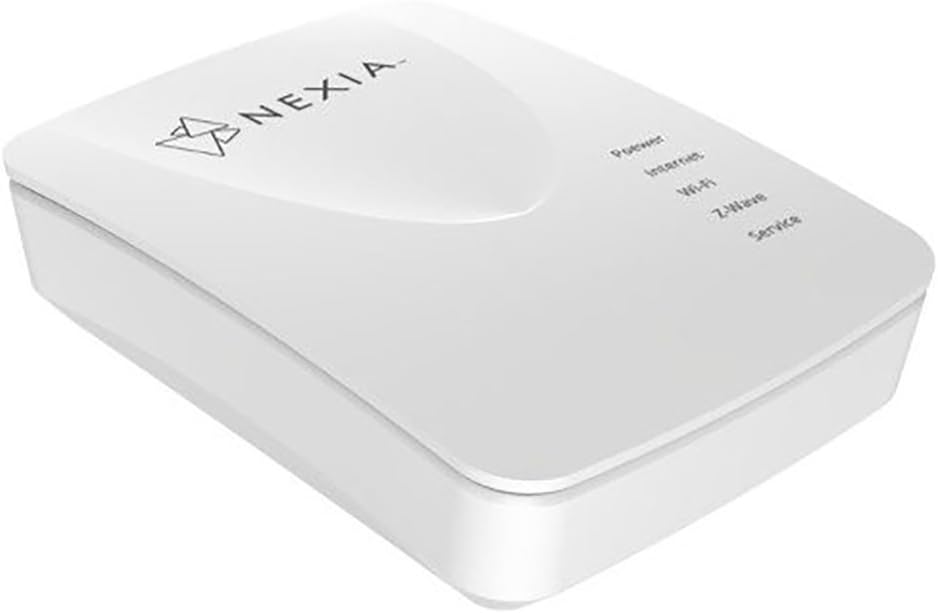


Nexia BR200 Z-Wave Bridge, Smart Home Hub, Compatible with Alexa and Google Home
Product ID: 86075582
🌐Wi-Fi Enabled
📱Mobile Management
🔒Secure Connection
🏡 Elevate Your Home Experience with Nexia!
The Nexia BR200 Home Bridge is a cutting-edge device that allows you to manage your home environment seamlessly through a secure online account and mobile app. With robust security features, flexible Wi-Fi connectivity, and compatibility with major HVAC brands, it ensures a modern, efficient, and worry-free home automation experience.
| ASIN | B07D9VDH57 |
| Antenna Location | Home |
| Best Sellers Rank | #97,548 in Computers & Accessories ( See Top 100 in Computers & Accessories ) #2,153 in Computer Routers |
| Brand | Nexia |
| Built-In Media | Ethernet Cable, Power Supply |
| Color | White |
| Compatible Devices | Laptop, Personal Computer, Smartphone, Tablet |
| Connectivity Protocol | ethernet, wi-fi |
| Connectivity Technology | Wi-Fi |
| Control Method | App |
| Controller Type | nexia, vera |
| Customer Reviews | 3.8 out of 5 stars 117 Reviews |
| Frequency | 5 GHz |
| Frequency Band Class | Dual-Band |
| Is Electric | Yes |
| Is Modem Compatible | Yes |
| Item Type Name | Nexia Home Bridge |
| Manufacturer | Nexia |
| Mfr Part Number | 811097020433 |
| Model Name | BR200 |
| Model Number | BR200 |
| Number of Ports | 1 |
| Operating System | Proprietary operating system |
| Other Special Features of the Product | WPS |
| Security Protocol | WPS |
| Smart Home Compatibility | Smart Home Compatible |
| Special Feature | WPS |
| UPC | 811097020433 |
| Warranty Description | 1 year |
| Wireless Communication Standard | 802.11ac |
| Wireless Compability | 802.11ac |
E**S
Great product from Nexia.
I had a old Nexia bridge that was turning off and on. Had it for over 7 years so I got my money’s worth. Decided to buy the new one and it didn’t disappoint. Just make sure you back up your old bridge and then remove it from the Nexia app. Then reinstalled the new one and it’s a breeze. Everything transfer over. It work with my front entry door and 3 spare bedrooms locks for my Airbnb. It also controls two dimmers.
A**S
Unreliable. Poor support. Subscription requires and doesn’t work.
This Nexia bridge is quite frustrating. Conceptually, if the system worked reliably, it would be great technology. I use it to control a lock on a beach condo vacation rental property we have. Over the course of a season, I have 20-25 guests that will rent my beach front condo for 3-7 days. I issue a four-digit access code to each guest. This is great because each guest as a unique code and I can monitor who enters and if they are doing so during their reservation. It is a great security feature for my guests. BUT THE BRIDGE IS NOT RELIABLE!!! I cannot add/delete codes reliably. The app keeps saying “Failed to save code to Front door”. I am a four-hour drive away and cannot easily check cables, reboot, etc. It essentially may or may not work remotely. I am down to entering all of the codes when I am there in person. Then I can make sure each one works by physically entering. I think I am limited to Nexia because I have a Schlage lock. BUYER BEWARE. THE BRIDGE IS SIMPLY UNRELIABLE. This Nexia bridge is quite frustrating. Conceptually, if the system worked reliably, it would be great technology. I use it to control a lock on a beach condo vacation rental property we have. Over the course of a season, I have 20-25 guests that will rent my beach front condo for 3-7 days. I issue a four-digit access code to each guest. This is great because each guest as a unique code and I can monitor who enters and if they are doing so during their reservation. It is a great security feature for my guests. BUT THE BRIDGE IS NOT RELIABLE!!! I cannot add/delete codes reliably. The app keeps saying “Failed to save code to Front door”. I am a four-hour drive away and cannot easily check cables, reboot, etc. It essentially may or may not work remotely. I am down to entering all of the codes when I am there in person. Then I can make sure each one works by physically entering. I think I am limited to Nexia because I have a Schlage lock. BUYER BEWARE. THE BRIDGE IS SIMPLY UNRELIABLE.
S**N
Better experience than other users
I was reluctant to buy this product based on the bad review of other users, but I needed the extended range and wifi capability of this version of the Nexia Bridge. My experience was considerably better than those posting here and the bridge is working satisfactorily. I did have an initial issue getting the bridge to see my home wifi network and tech support was of little help, only suggesting that I reboot my router which I knew was not the issue. A word about tech support at Nexia--there is a wide disparity between the individuals and if you are unlucky you may get someone who doesn't really understand the nuances of a ZWAVE mesh network, or the Nexia system as a whole. I finally succeeded in getting my wifi network recognized by entering the ID in manually and Presto--my network and others within close range suddenly appeared. If you need the wifi and extended range this Nexia Bridge offers, then I think you can go ahead and buy with confidence, despite the poor experiences of others posting reviews.
S**T
The upgrade instructions on the Nexia website are the best I have ever seen
I upgraded from a BR1000 to the newer BR2000 when I was going through a migration from all my X10 devices to ZWave. The BR1000 is no longer supported. It did a software upgrade as part of the migration from the BR1000 to the BR2000. I have really had no issues with the newer product. What Nexia does it, it does well. Just wish it supported more devices.
J**L
Works great
Our old one died after about 10 years, got this new one a few months ago. It been working great. Tech support walked me through setup and it was easy. All is good now that we r back online!
M**P
it works - but is not 100% reliable
This bridge disconnects from the internet and does not reconnect to the internet on its own. I had the BR100 and it disconnected from time to time, but it WOULD re-connect on its own. I've called customer service several times and they have not really had a solution. I had to be home and with them on the phone. They needed to know how the 'lights' were blinking, etc. I've asked for a replacement and they have not come through, so much for honoring a warranty. To reconnect involves unplugging it and re-plugging it back in. Then we are in business until the next time, I'm at work and trying to set up a code for a renter coming to my house and it tells me the 'bridge is disconnected'. This really SUCKS! So far, I've been able to get home to reconnect it and not have my renters unable to open the door. I use an Apple air extreme router and comcast. this set up has been in place since 2014... the BR100 would reconnect on its own... the BR200 does not do this. The disconnection happens because of the ebbs and flows of the internet signals thank you Comcast... (this is my guess) I would say - stick with the BR100 - they have not got the programming right on this one.
P**W
Nexia Bridge BR200 works great
My original BR100 was failing. I bought this new version and no longer have to reset the bridge. Nexia customer service helped me set the bridge. They are the best.
L**S
GARBAGE
I switched from VeraPlus because I installed Trane thermostats and wanted better integrated functionality than I had with the VeraPlus bridge. Well that was a mistake. This unit loses connectivity and it does not come back automatically all the time. Before I continue let me provide some background. I am an IT professional. I have an APC1500 UPS that this, my router and my cable modem are all connected to. I may lose power at times but that does not mean you lose internet. Too many times I have lost connectivity to this bridge and it just hangs until I get up to my place and unplug it and plug it back in - TO THE UPS! All of my other devices (Nest, Internet, etc.) are up and accessible but not this piece of garbage. Plus Nexia makes me pay $9.99 a month to use their cloud service to control my bridge! Talk about a rip off business model with subpar products. Automations at first seem to have a lot of configurable options but once you get into it they really don't. Going to you place? Want the heat up when you get there? Set it to Home right? Sure. Then wait hours for the program you have set on the thermostat to change and THEN it will change the temp to that at the next time setting. Really? When I set it to home it should see the schedule and heat to that set point immediately - like my VeraPlus did. Nope. Only have heat on your thermostat? Your log will show continual cool set point errors. You can't set a program without setting a cooling point either - which has to be X degrees apart from your heat or else it won't take the schedule. Ridiculous especially when the thermostat does not have cooling functions available because it knows there is no AC connected to it! Want it to go to a set point when you set the home to Away? Can't do it. You have to manually do that as the automations won't let you implement a set point hold. You can't just make a set point schedule. This is the worst product and does not even meet the most basic of automations or functionality. Add to that they make you pay $9.99 for literally doing their work for them and this is one product you want to stay FAR away from!
J**O
Funciona bien, pero limitado.
El puente funciona bien, puedes controlar focos, termostatos e interruptores sin problema. Pero esta limitado, para poder usar toda la capacidad es necesario pagar una mensualidad, a diferencia de otras marcas que tienen todo su potencial para uso libre, sin pagos mensuales.
Trustpilot
3 days ago
4 days ago