Buy anything from 5,000+ international stores. One checkout price. No surprise fees. Join 2M+ shoppers on Desertcart.
Desertcart purchases this item on your behalf and handles shipping, customs, and support to GERMANY.
🚀 Transform your PC into a speed machine with Samsung 850 EVO!
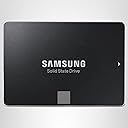
The Samsung 850 EVO 1TB SATA III SSD delivers up to 540MB/s sequential read and 520MB/s write speeds powered by advanced 3D V-NAND technology. With up to 98K IOPS for random read/write, it dramatically accelerates boot times, app launches, and multitasking. Backed by a 5-year warranty and broad OS compatibility, it’s the ultimate upgrade for professionals seeking reliable, high-performance storage that future-proofs their workflow.

| ASIN | B00OBRFFAS |
| Additional Features | Portable |
| Best Sellers Rank | #771 in Internal Solid State Drives |
| Brand | Samsung |
| Built-In Media | 2.5” (7mm) SATA III (6GB/s) SSD & User Manual |
| Cache Memory Installed Size | 1 |
| Color | Titanic |
| Compatible Devices | Windows 10/8/7/Vista SP1 and above (32/64 bit), Widows Server 2008 (32/64 bit), Linux Compatible |
| Connectivity Technology | SATA |
| Customer Package Type | Standard Packaging |
| Customer Reviews | 4.7 4.7 out of 5 stars (2,543) |
| Digital Storage Capacity | 1 TB |
| Enclosure Material | 3D Nand Flash Memory |
| Form Factor | 2.5-inch |
| Global Trade Identification Number | 00887276086156 |
| Hard Disk Description | Solid State Drive |
| Hard Disk Form Factor | 2.5 Inches |
| Hard Disk Interface | Serial ATA |
| Hard-Drive Size | 1 TB |
| Hardware Connectivity | SATA 6.0 Gb/s |
| Installation Type | Internal Hard Drive |
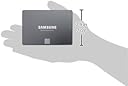
| Item Dimensions L x W x Thickness | 3.94"L x 2.75"W x 0.28"Th |
| Item Weight | 0.12 Pounds |
| Manufacturer | Samsung Electronics |
| Media Speed | 520 Megabytes Per Second |
| Model Name | 850 EVO |
| Model Number | MZ-75E1T0B/AM |
| Number of Items | 1 |
| Read Speed | 540 Megabytes Per Second |
| Specific Uses For Product | Personal |
| UPC | 801947295876 779184011149 782941461408 809394598120 714547219961 012305136056 887276086156 804067313840 808112997863 782386508775 771591292647 780411939686 771591311355 804904117211 |
| Unit Count | 1.0 Count |
| Warranty Description | 5 Years/150TBW |
J**N
Much faster than any SSHD Hybrid Drive
I bought the 1TB version, as I didn't like the idea of keeping a small SSD drive and a big HDD for my setup as many other people have been doing. Because of this, I delayed my purchase of a primary SSD drive on my system until prices came down a lot, especially for the 1TB version. System Specs: I5 2500K Gigabyte GA-Z68P-DS3 (BIOS F9) Corsair 16GB Ram EVGA GTX 970 I downloaded Samsung's Data Migration Software and easily cloned my Seagate 2TB SSHD Hybrid Drive; I had about 190GBs of data to clone. I switched the SATA cables around and the system booted up with no problems. The first boot up was fast, but not as fast as I was expecting. I installed Samsung SSD Magician and found my system was set to IDE mode. Went into my BIOS and indeed found it set to IDE. Just to give you a little backstory, I had just done a complete reinstall of Windows 10 about 2-3 weeks prior to this install due to issues with overclocking I had done which corrupted the Windows System files. Having set everything to default for the Windows 10 install, it apparently defaulted the system to IDE mode, and I hadn't noticed it at the time. I've read online that to get the best performance from this SSD, it's best to use AHCI mode. I went ahead and installed a fresh copy of Windows 10 again, since Microsoft makes it so easy to do so now, in regards to activation. After making the necessary changes in my BIOS, the Windows 10 install was quick and easy. I'd say it took half the time, if not less, when compared to the Seagate SSHD just 2-3 weeks ago. Now with the fresh install of Windows 10, everything just feels snappier and Windows 10 boots in about 4 seconds starting from the Windows logo. I've set the OS optimization to Maximum Performance via Samsung SSD Magician, Rapid Mode disabled. Samsung SSD Magician reported 546MB/s and 509MB/s, read and write. Also, random read IOPS at 94.2k and random write IOPS at 71.7k. It's not the fastest I've seen when compared to other people's stats, but it is still blazing fast from my experience. HWMonitor reports between 28-33 degrees Celsius. With my system being six years old now, I once had Intel Smart Response SSD caching setup for the first few years of its life. I used a 30GB SSD which I still have and it still works flawlessly. Due to unforeseen issues, I stopped using Intel's SSD caching. I did notice a slight increase on load times when I stopped using the SSD caching, but I don't ever remember the SSD caching being as responsive and as quick to load applications when compared to using this SSD as my primary drive. It's really a world of difference. When comparing SSD and SSHD speeds, there is no comparison. Don't let all that marketing mumbo jumbo from Seagate's SSHD advertisements fool you, the SSHD just can't keep up, speed wise. Those SSHD drives though, in my experience, are rock solid reliable. I have three Seagate SSHD drives right now and they all work perfectly fine. I tested Skyrim Special Edition and found load times short, to where I spend less time looking at those 3D model load screens and just playing the game. Next, I loaded up Endless Legend, which is notorious for long load times, but didn't find much of a big difference of load times between the SSD and SSHD drives. Any difference would be about 10 seconds in length when loading a new game. I guess I can't expect everything to load in under 10 seconds or less. Currently, I'm playing Starcraft 2's campaign from the beginning since I just bought Legacy of the Void for cheap, and found the load times for this game very quick, about 5 seconds to load a campaign map (though I don't remember what it was like before, it's been years since I played these games). Didn't notice any increase in FPS on any of the games I tested and I wasn't expecting there to be. After over a week of use, it's just made using the computer so much better, not having to wait around for things to load or install. I'm so impressed with the speed of SSD that I want to update the rest of my computers in the house with SSDs, only for the lack of money I haven't done so already. For the past several years, I have preferred to use my iPad for daily stuff like browsing the web, paying bills, etc., partly because apps just loaded so much faster on the iPad, than having to load anything on my computer. Especially since I don't keep my computer on 24/7, I turn it off when it's not in use. Now, I can boot the computer in a fraction of the time it used to take; I think I may begin using my computer just a little bit more than usual. For an almost seven year old computer, that's not bad at all.
R**C
Super fast SSD for an old iMac 2007
I chose Samsung 850 EVO 2.5inch 1TB drive for my upgrade for better warranty and read/write speeds. I spent 3-5 days skimming through forums catching up on others that have my same iMac 7,1 (mid 2007) 20inch, but I couldn't find anyone specifically saying this SSD would work. Huzzah, it did! For anyone else out there that want to stretch some more years out of their old iMac, I did start with this reputable manufacturer's website wizard to check on what works for my Mac. [...] I already got my system upgraded to 4GB RAM, but why did I decide to upgrade my 320GB HDD this late in the game?? Well, funny thing. I thought I had a bunch of malware on my old HDD, as it was booting up, shutting down, running apps super SLOW. Usually, slowness is a good indication. Now, my OCD really wanted to nuke those malware bytes in memory, so I elected to run a 35 pass drive wipe. This probably pushed a near 10 year old drive over the edge with it's worn out moving parts. Firing up the old Mac OS X Lion installation CD, then eventually getting all the way to downloading El Capitan after the usual updates, the installation wizard detected S.M.A.R.T errors and stopped the installation. When I upgraded the RAM, the system did seem like it got a boost, and well, this system overall is still working very well for web surfing, so I checked out what other people had to say about their old iMacs. Looking at the Mac's System Profile and Apple.com tech specs, it was very hard to find specifics to what level SATA the mobo is running. It appeared to be SATA i. In the Crucial wizard, you will find the suggestion is for a SATA iii drive (SATA 6.0Gb/s). I found on some forums where people were saying the Mac's old HDD is actually connected to SATA ii. After my installation, I can confirm, YES, the Mac is on SATA ii (3.0 Gb/s). For novices like me in this realm, each level SATA is apparently backwards compatible. I found this following article, [...] Ok, I'm sure some of you are still asking, why go with a SATA iii 1TB SSD Drive? For me, I'm thinking ahead. When this iMac is completely done and useless even with web surfing, then I can still repurpose this SSD on a new system. Samsung 850 EVO - 1TB - 2.5-Inch SATA III Internal SSD (MZ-75E1T0B/AM) I followed the build steps exactly and worked out perfectly. Even though, this video is for HDD to HDD upgrade, it will work with the Samsung SSD. [...] when you use this or a similar adapter. NewerTech AdaptaDrive 2.5" to 3.5" SATA Drive Converter Bracket The adapter frame appears to be aluminum and very sturdy, but very light. I know some people mentioned they had a DOA or soldering was bad and had a short, and someone mentioned the included screws did not fit. However, I was lucky and did not encounter any issues. For anyone that wants to just start fresh with a new OS install without cloning your old drive, when you go through the Mac OS X installation CD, and your drive is not listed, it is because you need to go up to the Utilities menu and format the drive with Mac OS X Extended (journaled) with GUID. I hard restarted the system 3 times before I realized that I needed to format the new drive, so the installation wizard can read the drive. In the end, my iMac got a rebirth with the new and much faster drive. It is booting up, shutting down, and launching apps way faster. Keep in mind, when the SSD is backwards compatible, it will not reach it's full drive potential. Check out the details that I posted above from SanDisk.
F**I
Perfeito !!!
M**I
Very satisfied.. i thought that my laptop is having an outdated GPU bt then i got to know abt this ssd. I ordered and installed it. I was surprised to see that everything is running so fast. Windows 10 boots in 7 secs. And GTA 5 runs at High settings on geforce 740M. This ssd saved lots of money.
S**N
I got this to replace my HDD in my Laptop HP Envy. The CD that came along with it has software to clone the OS. It was a simple process. Works fine. Boots time of laptop reduced drastically. Works as expected.
R**N
Tenho um Notebook com boas configurações, mas a lentidão me deixava muito irritado. Trocar pelo SSD foi a melhor coisa que poderia ter feito. Fácil de instalar, comprei junto o cabo para fazer a clonagem do HD, usando o APP da Samsung foi muito fácil. A entrega foi muito rápida, chegou em 4 dias quando a previsão era de 15 dias.
A**O
Pode comprar de olho fechado. Um ótimo SSD. Vai deixar seu PC/Note/Mac voando!
Trustpilot
1 week ago
3 weeks ago