![(SBG10) - Cable Modem Router Combo - DOCSIS 3.0 16 x 4 Gigabit & AC1600 WiFi, [Check with your provider for compatibility]400 Mbps Max Internet Speeds](https://m.media-amazon.com/images/I/51cZX1MBpSL.jpg)

🚀 Own your speed, own your space — surf smarter with SURFboard SBG10!
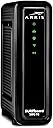
The ARRIS SURFboard SBG10 is a high-performance DOCSIS 3.0 cable modem and dual-band Wi-Fi router combo delivering up to 1600 Mbps speeds and coverage up to 1,400 sq ft. Certified for most U.S. cable providers, it offers easy app-based setup, parental controls, and two Ethernet ports. Backed by ARRIS’s 70 years of innovation and over 260 million modems sold, it’s a cost-effective solution to eliminate rental fees and upgrade home connectivity.


| ASIN | B07H42QXF1 |
| Antenna Location | Gaming, Home |
| Antenna Type | Internal |
| Best Sellers Rank | #3,813 in Computers & Accessories ( See Top 100 in Computers & Accessories ) #14 in Modem Router Combos |
| Brand | ARRIS |
| Built-In Media | And 2-Year Warranty Card, Arris Surfboard Sbg10 Cable Modem, Power Supply, Quick-Start Guide |
| Color | Black |
| Compatible Devices | Personal Computer, Smart Television, Smartphone |
| Connectivity Technology | Ethernet |
| Control Method | App |
| Controller Type | App Control |
| Coverage | Up to 1,400 sq ft |
| Customer Reviews | 4.2 out of 5 stars 15,594 Reviews |
| Data Transfer Rate | 1600 Megabits Per Second |
| Frequency | 5 GHz |
| Frequency Band Class | Dual-Band |
| Global Trade Identification Number | 00612572215388 |
| Has Internet Connectivity | Yes |
| Has Security Updates | No |
| Is Modem Compatible | Yes |
| Item Dimensions L x W x H | 6.77"L x 1.97"W x 6.58"H |
| Item Type Name | Cable Modem & Wi-Fi Router |
| Item Weight | 1.96 Pounds |
| LAN Port Bandwidth | 1000 Mbps |
| Manufacturer | CommScope |
| Maximum Upstream Data Transfer Rate | 131 Megabits Per Second |
| Model Name | Surfboard |
| Model Number | SBG10 |
| Number of Antennas | 1 |
| Number of Ports | 2 |
| Operating System | Arris |
| Other Special Features of the Product | Access Point Mode, Parental Control |
| Router Network Type | Cable |
| Security Protocol | WPA2-PSK |
| Special Feature | Access Point Mode, Parental Control |
| UPC | 612572215388 |
| Unit Count | 1.0 Count |
| Voltage | 120 Volts (AC) |
| Warranty Description | 2 years |
| Wireless Communication Standard | 802.11ac |
| Wireless Compability | 802.11ac |
J**D
Fast, Easy Set-Up, Works Like a Dream with Cox
After struggling for 5 hours trying to get two different Netgear routers to work only to find out that Netgear was blocking my devices until I paid them big bucks for some bogus security service subscription, and realizing, because of that, the new stand alone modem I got was now useless too...I decided to just go "all in one." I studied Cox' list of accepted devices and this little beauty by Arris seemed to check all the boxes. I've always had great luck with Arris Surfboard products, and this combo router/modem is no exception. Super simple to set up with the quick start and QR codes. They even include ALL of the numbers/passwords/codes you might ever need to make things work right inside your little quick start booklet! So when I got Cox on a chat, I just told them all the numbers, they swapped out my new combo device for my old modem, bingo bango, I'm back in business! No glitches, no issues, no useless subscriptions, just powerful speeds and super fast connectivity. Little bonus? The lights are a soft green and very easy on the eyes, even at night. As to cost, the two-device method would have been $150, versus this one and done unit at $80. Your mileage may vary, but I'm very pleased with my decision and purchase. Happy shopping, all!
K**N
Stable Internet, Small Footprint, Works Flawlessly
After struggling with spotty internet for several weeks, being told from Comcast that our service lines were not being worked on or suffering outages, and having our cables checked, I realized that the $200 modem/router combo we bought last year was the culprit of our internet woes. Why I didn’t suspect our router first...it’s a $200 router for cryin’ out loud! Sadly, that stupid router was the problem and was long out of return period, just out of warranty period, and I really couldn’t be bothered with repairing it. The Arris Surfboard was half the cost, but worked great - if not better - than our old router/modem. Setup was straightforward and easy - I was able to setup my new router without having to call Comcast even (you can active a new router by plugging in a computer via Ethernet cable and going directly to Comcast’s site - it will load). The internet has been flawless and the unit has two channels (2.5 ghz & 5.0 ghz) so I am able to split up devices in the house depending on location and speed requirements. We have at least 17 devices on the WiFi, and they all run flawlessly. There are two slots to have Ethernet wired items, if you so choose, as well. You can keep track of the devices on your WiFi via app, locate suspicious devices getting on your WiFi, and even run speed tests from various rooms in your home. The unit has a small footprint, operates silently, and keeps our internet running. Overall, if you don’t want to pay for modem/router rental fees, or need a small reliable modem/router combo, this is a good one to consider.
R**Y
Should be Easy to set up. Careful with the Sec Key
Bought this to replace a separate modem router with Comcast ISP. My old stuff was slow. The Comcast people checked and told me the old equipment was slower than the slow speed I selected. Anyway, plugged everything in as as many have noted you have to contact Comcast to get the modem recognized. If you are like me and do this sort of thing every 4 or 5 years, this is referred to as the Gateway (I guess the modem part of the set up). Aside from 20 minutes on hold to talk to a person, this went smoothly. Then to set up the router part. The info sheet says to download the app. Guess what, If you have already disconnected your internet and router, that is not going to happen unless you have a smart phone or some other way to access the internet using WiFi. They really want you to use a laptop with an internet cable to the modem. I would say DO NOT attempt to set this stuff up without a device you can plug into the modem. It has 2 internet-ethernet ports and NO USB. I think the higher priced models do have a USB. So after a fashion and much frustration, I called the help number which gets you s rep with pretty good, not great English. I assume, from her 'help', she had a list of things to do, to try. Turn the power off then on. Try this try that. Turn the power off for 30 sec, try this, try that. Push in the reset and hold for 30 sec. Try this try that. Hold in the reset for 120 sec, try this try that. Use a laptop.....I don't have one handy. Oh, it would be easier with a laptop. I don't have one here. Oh, I see, Try this try that. After 30 minutes of that nonsense, we finally got to where I could put in a password for the router. Still did not work. then I was told I should use a laptop. Rep told me the Sec Key was the password, but hard already told me the password was password. She said when you put in the Sec Key, it had to be exactly as presented, spaces, case sensitive etc. Guess what? About that time we got cut off. Out of frustration, I deleted the app and reloaded it on my IPad. That was the answer. Who knows why it did not work before, but then I found the Sec Key would not work. Then I tried it without the spaces and BINGO. The key is letter case sensitive but no spaces. I was then able to get my FireStick working as well as Alexa, all with the SEc Key using no spaces. I checked the internet speed and it improved 50%, to what Comcast told me I had signed up for. So I assume the modem router is working as it is supposed to. Be leary of customer support and if I ever did this again, I would not attempt it without having a hardwired device to connect to the modem.
T**O
Worth Buying
Solid product and great price. Work like a gem before XFinity kill it. Never use with XFinity
M**A
Not worth the struggle
I bought the ARRIS SBG10 hoping it would be a solid modem/router combo, but unfortunately, it just didn’t work for me. Pros: The all-in-one design is convenient if you’re looking to reduce clutter. Cons: Unreliable Connection: The main issue was the connection. The Wi-Fi kept dropping and lagging, especially when multiple devices were connected. It made streaming or gaming frustrating, as the internet would randomly disconnect. Setup Struggles: The setup process was confusing. The instructions weren’t clear, and it took much longer than expected to get everything working properly. Weak Wi-Fi Range: The coverage was really poor. Even in rooms near the modem, the signal was weak, and I couldn’t get reliable internet in larger areas of my house. No Gigabit Ports: For the price, I was expecting at least one gigabit Ethernet port, but it only has standard fast Ethernet, which made wired connections slower than I’d like. Bottom Line: I can’t recommend the ARRIS SBG10. Its performance was far from what I expected, with frequent connection issues, weak Wi-Fi, and a frustrating setup. There are definitely better options out there
E**N
Easy installation
Great product, easy to install
K**M
Excellent Replacement for Comcast Modem/Wi-Fi Router & Cheapest
This is an excellent replacement for the Comcast Modem/Wi-Fi Router. It is also probably one of, if not the cheapest replacement ones available at 115 bucks. It will save the 13 bucks I was paying to Comcast every month and therefore will pay for itself in 8 months. We have noticed no reduction in performance from what we had with the Comcast unit and we have 4 smart phones, 2 streaming big screen TVs, 3 laptops and a desktop computer in a 2 story, 2500 square foot colonial house with many of those devices operating simultaneously at times. Also, despite what some have wrongly stated, it also has 2 ethernet ports where you can connect a desktop computer directly to it as I am doing. After 30 years with Comcast, I finally dropped cable TV and a landline (which had degenerated into just telemarketer calls all day). The landline was replaced by 4 cell free Samsung smart cell phones with unlimited data for 100 bucks a month including all fees from T-Mobile via Metro PCS. I have what I consider the ultimate package to replace cable. I got YouTube TV for 49.95 per month including all fees and the perfect channel line-up, incredible sport package, 6 different accounts, and unlimited cloud storage for recording. I combined it with Amazon Prime where for 115 per year (only 9 bucks a month) I get free shipping, free music on all my devices and Amazon Prime Video with as many movies as Netflix, but obviously a way better deal getting all 3 things and for less money. I also took a chance and reduced the internet speed from Comcast from 400 mbps to only 60 to save even more money. Guess what? I noticed zero difference in performance and we got those 4 phones on wifi, 2 TVs streaming, 3 laptops going plus the desktop. Next I bought this router to replace the Comcast router and got the same performance. I reduced my Comcast bill from 230 per month to 75 with all these changes. When you include the cost of YouTube TV, the total bill was reduced from 230 to 125. I also researched the 3 WiFi adapters - Roku, Amazon Firestick and Google's chromecast. I found Firestick to be the best but then found out Google's chromecast blocks Amazon's Prime video and Amazon's Firestick blocks YouTube TV. Therefore in the end, I had to go with Roku. Bottom line: Dump landline and go with T-mobile via Metro PCS 4 phone deal. Dump cable and go with the combo of YouTube TV and Amazon Prime which essentially gives you movies for free from Amazon Prime Video. Buy a Roku for your TVs to pick up the WiFi signal. Dump Comcast's modem/wifi router and buy this Arris Surfboard. Reduce your internet speed from Comcast down to 60. If that happens to not work for you, simply go back up to Comcast's next speed up which I think is 150, but of course costs more.
K**K
Bad signal
It will do in a pinch but the signal is spotty and it has trouble going through walls in a tiny space
Trustpilot
2 months ago
2 days ago