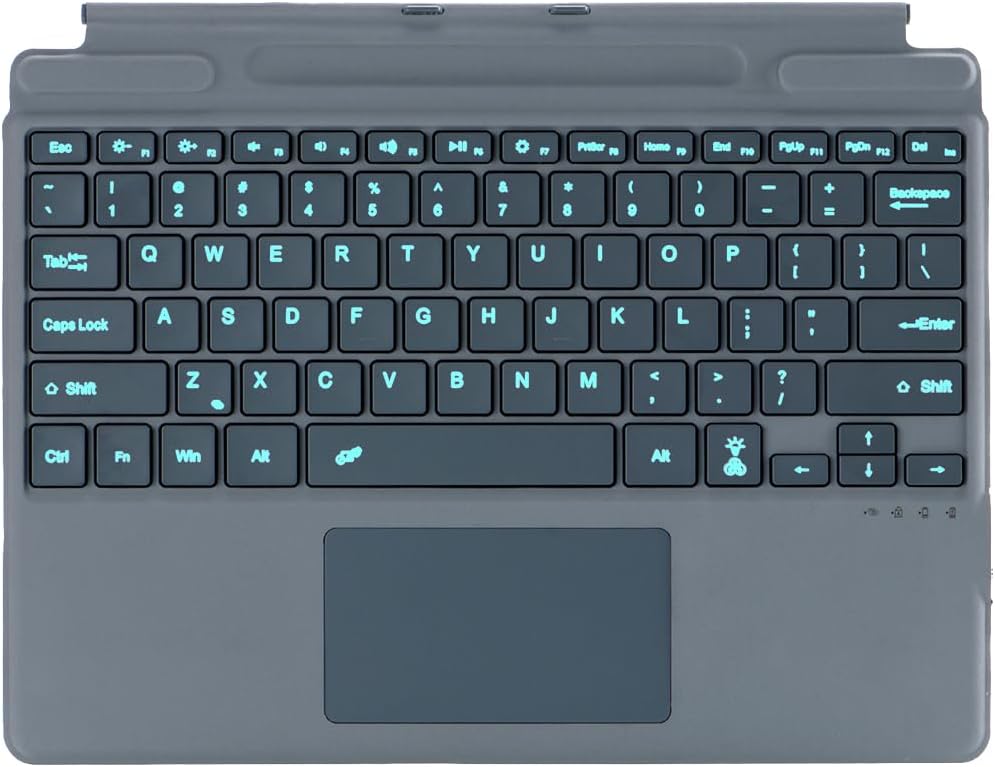
For Transparency, I don't own the Microsoft tablet, and am testing the device on a Moto Stylus 2024 Android phone, and am typing up this review using the keyboard. Functionality wise, this keyboard has some of the flaws common with ALL of these kinds of portable keyboards. ALL of these kinds of keyboards have a little bit of flex to them, since they are made to be light, and small. This one has significantly small bounce when typing on it, and doesn't flex very much, if I try to manhandle it and bend or twist it. The other limitation of these boards is some of the keys. Especially the backspace key. This one is no exception, and it's incredibly easy to hit the == key instead of the backspace key. The keys. The keys are pretty much the same size as that of a sub 14 inch laptop. With the same kind of flat keys that you find on most laptops. Almost. While they look flat, they have an ever so slight concave center in the keys. Which is nice, as my comparison keyboard has some rather deep centers. Which is also nice. Typing on them is quite comfortable. They are deep press, which is very nice. They don't do the clackity clack when typing , but it's audible. Has the pretty standard limitation of where the lights are that show your caps lock on, which is hidden under your right hand, when you're typing, and therefore worthless. Same limitation also of a large mouse pad on a small keyboard, of your thumbs brushing against it while typing in some positions. It then moves your cursor around on the screen and you end up with a big typo. The mouse works just fine with Android devices, and moves about speedily, and accurately. It also supports hard click and soft tap click. Backlight. This is where I'm not happy with this keyboard. The light is... Subdued. Under normal room light, I can barely see it at all. Really only under the corners of the keys, and as a slight coloration to the letters. I tried to capture this contrast in the pictures, but my camera enhances the lights from both boards, and makes both appear more drastic than what your eyes see. I'm making a lot of typos while writing this review. Fortunately, unlike some keyboards, this one still uses a (mouse just redirected my typing there) spell correct that you can engage, using the space bar and has helped fix my typos. Setting something under the back of the keyboard to tilt it diagonally towards me, like with a desktop keyboard helps to cure the problem of the typos, and pick my typing speed back up. When I first tested the lighting, it was pretty dim. I thought maybe the battery was almost dead. So I stuck it on the charger. This board doesn't report to Android what the battery is at. It took about 2 hours to go from red light to blue light. I don't like that it doesn;t report what the battery level is at. Maybe it would, on a Microsoft device. The pen holder slot is magnetic. With any magnetic capable pen or stylus, it holds it there just fine. Overall- It's capable. It's functional. It's visually appealing. But. In this price range, I think there are better boards out there. Particularly the backlighting.