Desertcart purchases this item on your behalf and handles shipping, customs, and support to GERMANY.
🏠 Transform your home into a smart haven with a tap!
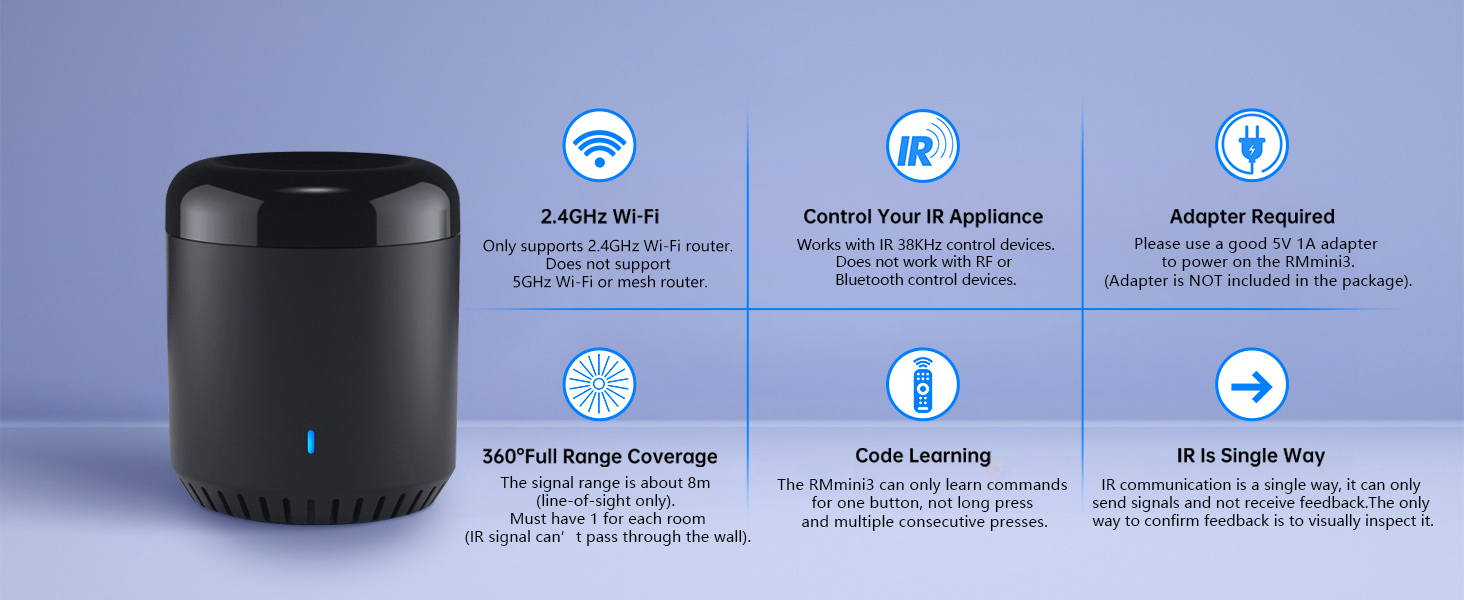
The Broadlink RM Mini 3 is a compact Wi-Fi smart home hub that supports over 50,000 IR-controlled devices via 2.4 GHz Wi-Fi. It enables universal remote control for TVs, air conditioners, set-top boxes, and more, with cloud-updated IR codes and customizable automation scenes. Compatible with Alexa, Google Home, and IFTTT, it offers voice control and remote access through the BroadLink app, making everyday devices smarter and your home more connected.


| ASIN | B07K2DHXB6 |
| Additional Features | Support 2.4G Wi-Fi, Universal |
| Battery Type | No battery |
| Best Sellers Rank | #92,551 in Tools & Home Improvement ( See Top 100 in Tools & Home Improvement ) #126 in Home Automation Hubs & Controllers |
| Brand | Broadlink |
| Button Quantity | 3 |
| Color | Black |
| Compatible Devices | IR 38K Devices |
| Connectivity Technology | Infrared , Wi-Fi |
| Controller Type | APP Control |
| Customer Reviews | 4.0 out of 5 stars 1,497 Reviews |
| Item Dimensions L x W x H | 2.17"L x 2.17"W x 2.56"H |
| Item Weight | 0.14 kg |
| Manufacturer | Hangzhou Gubei Electronics Technology Co.,Ltd. |
| Max Number of Supported Devices | 50000 |
| Maximum Number of Supported Devices | 50000 |
| Maximum Range | 26.2 feet |
| Mfr Part Number | 8541545902 |
| Model Name | 8541545902 |
| Model Number | 8541545902 |
| Special Feature | Support 2.4G Wi-Fi, Universal |
| UPC | 602168425093 |
| Unit Count | 1 Count |
M**A
Works wonderfully
Setting up device in the app wasn't super smooth, but that is expected with these sort of devices (also, required me to reset the device to connect to my wifi), but besides that, works exactly as you would like it to! This allows me to make my heater "smart", so I can turn it off/on and increase/decrease temperature without having to be at home (i.e., save on my electricity bill)! And you can use this device to remote control multiple things at once, so if you have lots of remote controlled devices, it's super worth it to make devices smart! Alexa integration is ok, can power off/on easily but the temp up/down is a bit quirky... though I won't be using it via alexa, so I don't care. Also, it has a micro-usb port; not sure why in this day and age micro-usb are used, rather than usb-c... it comes with a cord though, but usb-c would be much better.
L**Y
Device works wonderfully, I hope this helps
I have the RM Mini 3 and it works great for my Projector, Soundbar, & Fireplace. I didnt have any trouble until I added it to Alexa which was very frustrating at first but [FOR ME] it was fixed by using Routines in the Alexa App. 1.) Download the IHC app (colorful star with dots logo) then register your account using an email or your phone number (DO NOT USE FACEBOOK) 2.) Setup all of your intended devices within the IHC app. 3.) **FOR EACH ACTION** you want executed by Alexa, first create a scene in the IHC app. Alexa will only discover the SCENES you create in IHC. Example: Because I wanted Alexa to turn my Soundbar up by increments of 10 I created a Scene called "Vol Up 10" 4.) Add the IHC Skill through the Alexa App & let it discover new devices. (The skill logo should be the same colorful logo as the IHC app you downloaded) 5.) Alexa will now recognize your Scenes HOWEVER she will ONLY allow you to turn them ON. If you try telling her anything else she will respond that the "Device is not responding" I assume this is an Alexa issue not the device or RM Mini 3. To remedy this just go to ROUTINES in your Alexa app & create a new one. 6.) - "ENTER ROUTINE NAME" [My Example: Vol Up 10] - Choose a "WHEN THIS HAPPENS" phrase [My Example: Alexa, Turn Volume Up 10] - Under 'ADD ACTION' scroll down to pick 'SMART HOME' & choose the skill you want activated. [I chose my "Vol Up 10" Scene] Now it should work how you need it to & just follow the same process for each action you need. I know its long but I hope this helps!
B**N
Great app, but hardware requires reset for wifi connection
I bought two hubs and neither one would broadcast or connect Wi-Fi. I almost returned them but happened to reset one while it was plugged in and boom, that's all it needs. Unbelievable that this isn't mentioned anywhere in the setup. The app is quite amazing with Google Home. I have the broadlink hub set up to control an LED strip and I can tell Google to change the color, turn up the brightness, turn on/off. They also have predefined IR buttons that other users have set up so you don't need to set up 20 different buttons. I also have a routine set to turn on my bedroom TV before I go to bed and then shut it off 1 hour after that automatically within Google home.
G**S
Very frustrating
If you like things that just work out of the box, this is not for you. I spent longer than I would have liked trying to get this set up through their app using both "Smart" setup mode, "AP" mode connecting directly to the device wifi, as well as using their 2 phone with a hotspot workaround and everything I found online including using Python scripts, all to no avail. I ended up getting the RF capable model up (RM4Pro) and had similar issues with the app setup. If you do a search for "broadlink setup" or "broadlink wont connect" you'll find a lot of people having issues. I think there's something wrong that I was 0/2 with getting their app to recognize their devices. The instructions are pretty bare in the box, you need to look at the guide in the app. I was about to give up on the RM4Pro setup when I decided to check my network to see if the device had connected and it did, just not in their App. So it was not my network settings or something like that. I see a lot of people saying it was really easy to set up, or the first try didn't work and so they changed one thing or restarted their router and it worked, but that was not my experience. Maybe you need to buy several and return the bad ones that don't work. In any case this is not a product for someone who just wants to control their stuff within 5 minutes of opening the box.
G**B
Automation to start/stop Holiday Projector
I bought the Broadlink Mini 3 to automatically start and stop my rear screen video projector for Halloween and Christmas projection show in my front window. I bought this device not really knowing if it would actually do the desired job. I was happy to learn that this IR blaster allowed me to connect a non-listed video projector and map all the IR remote control buttons to the Mini 3. From there, I was able to define 2 "scenes"; one to turn on the projector, wait 10 seconds for it to boot up, then define the button sequence to start the desired video from a USB thumbdrive. The other scene turns off the video projector with transmission of 2 button presses of the power button. Each of these "scenes" are started independently at a specific time every day. Once setup, the Broadlink iPhone app is pretty intuitive. Also, the "scenes" are saved to the cloud thus you do not have to have your phone or app running for the automation to work. However, the only setup "hiccup" I ran into was not knowing what "type of device" is the Mini 3 considered in the app. In the Broadlink app, the mini3 is considered a "remote control". From there you can scroll down and find the Mini 3 and complete the setup configuration. I did not need to configure this to Alexa or Google so no feedback on that. Also note there is a power cable provided but there is NOT a power block to plug in the wall.
M**T
Wifi connection problems can be worked around
As others have mentioned, it's pain to configure these devices to connect to your wifi. The configuration app won't allow you to add the device if your phone is on a 5Ghz network. It stops with a warning with no way to bypass it. Many modern wifi systems combine the SSID for 2.4GHz and 5GHz networks and don't allow you to separate them as the app suggests. This is how I worked around that problem. I installed the Broadlink app on my phone, configured an account and tried to install the app. It failed as described above. Smartphone Wifi hotspots use 2.4GHz. I configured a wifi hotspot on my phone using a different SSID (wifi network name). Some recommend using the same SSID as your home network, but that didn't work for me. I installed the Broadlink app on a second phone that's already configured for my home Wifi network and logged in using the same Broadlink account I created from the other phone. I connected the second phone to the 2.4GHz hotspot on my first phone. I ran through the setup to add the RM mini 3. When it got to the step where it displayed the name of the Wifi network, just past where the 5GHz warning is displayed, I turned off the hotspot on my first phone and waited a few seconds. The SSID in the app changed to my regular home Wifi network name and I was able to complete the install. This was a pain, but I was able to complete the setup for 2 other devices without major issues. Once the devices are setup, they'll show up in the app on your first phone too. The same is true for any "appliances" and routines you setup. I'm using these devices to control cheap projectors for Halloween displays. I set schedules to power up, start the videos, and power off later in the evening. There are no options to add pauses between the steps in the routines. This is a problem because it takes a few seconds for the projectors to boot. I created separate routines for power on and play with different start times to work around that problem. These devices are an inexpensive solution for what I needed to do. They're not perfect, but if you can get past the frustrating wifi issues, they may work for you as well. I don't want to give this less than 3 stars because it might put people off, but if you don't consider yourself a techie, this probably isn't the product for you. It's not uncommon for cheap smart home devices to use 2.4GHz because of its longer range. It is uncommon for it to be this much of a headache. Once they're setup, the RM mini 3s work as expected.
S**L
Great little device
I’m a fan of broadLink devices, I have various remote controls and buttons throughout my house. I opted to go with this particular device because of its size and price point, I simply needed a way to control a tv with Alexa and BroadLink buttons. I had to go this route since no matter how I named the firesticks in the house, Alexa always turned the living room tv off which is connected to our harmony hub. For $20, it’s well worth its weight in gold. Set up was a breeze and the remote easily found my tv. Alexa integration was also a breeze since I already had BroadLink enabled. I created a routine to where we can either control our tv with the app, Alexa or the BroadLink button. I’m a huge fan of the buttons, we have four sets already and I plan on buying more. I’m a button pusher so being able to control multiple things with a push of a button is amazing!
J**E
Broadlink IR Remote Review
This is a fantastic device for consolidating control over multiple appliances. It worked seamlessly to manage my TV, AC, and other IR-based devices. The remote itself is reliable and versatile, but the biggest downside is the app. While it was once intuitive and efficient, it no longer works well, leaving the device underutilized. If the app were updated, this would easily be a 5-star product.
P**N
Fonctionne super bien
Enfin un petit gadget qui fonctionne à merveille, l'infrarouge est très puissant, de plus l'on peut programmer les télécommandes qui ne sont pas dans la liste, vraiment un plus, j'adore la possibilité d'activer mon climatiseur, dans mon cas, à distance et même de n'importe où même à l'extérieur de la maison. J'adore et je recommande.
E**O
Buen producto.
Era la primera vez que compraba un control IR, la verdad es bastante práctico para deshacerse de los controles o para ya no gastar dinero en baterías. Al principio me costó algo de trabajo vincularlo a la red, pero es cuestión de tener paciencia. Se integra bien con Alexa y puedes programar horarios por ejemplo para el aire acondicionado. Estoy satisfecha.
A**R
Works with Hornbill Smartlock
I bought a Hornbill smart lock on sale in October. Unfortunately I didn't notice when I purchased it that you need a gateway for voice control. The Hornbill documents do not recommend a specific gateway so I chose this one. It works great! Connected to my wifi quickly, synced up with the smartlife app and Alexa and now I can voice control my lock.
S**A
Tremendo
Aun lo sigo configurando para poder integrarlo con Alexa pero al menos ya controla todos mis aparatos, eso es genial un solo control remoto para todo
L**O
No reconoce bien el clima Meade
Difícil de programar. No reconoce bien el clima Meade. El alcance del IR es limitado a 3 metros.
Trustpilot
2 weeks ago
2 weeks ago