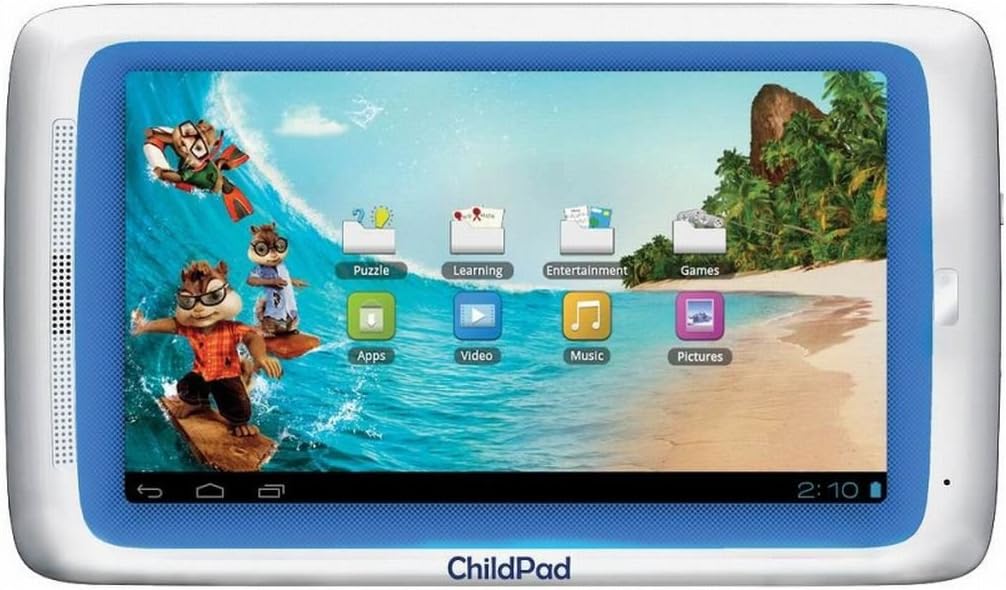
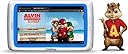


This easy to use tablet provides hassle-free Internet navigation with a 7-inch Resistance Touch Screen display. The ARCHOS 501943 Child Pad Internet Tablet harnesses the combined forces of a 1.2GHz Processor and a 1GB RAM memory to deliver outstanding performance with its pre-loaded Kids apps. All your multimedia files can be kept by the tablet's 4GB Flash Memory for quick retrieval. Connecting to networks is easy thanks to the ARCHOS 501943 Child Pad Internet Tablet Wi-Fi capabilities. Review: Nice Tablet For The Little Ones...With Room To Grow - I bought this Child Pad for a special little guy in my life who is almost 6 years old. It comes with nearly 30 child specific apps, and has some Alvin & the Chipmunks content on it, but other than that, it's a real grownup Android tablet! This means that while he will mostly be using it for games and educational apps at the moment, as he starts learning how to use the internet and do more complex things, he won't outgrow this tablet like he would some of the other child-specific devices. The tablet has a resistive touch screen, rather that a capacitive touch screen, but I was actually surprised at just how responsive the screen was to moderate finger pressure...much better than older resistive screen devices of the past. A firm rubber tipped stylus also worked great... and even better with the plastic styli with rounded hard plastic tip. He has game systems with this type of screen, so it won't be any problem for him. There is supposed to be a Child Pad coming out with a capacitive screen soon, if it isn't out already. The Child Pad runs Android 4.0, called IceCream Sandwich, and is fast and smooth in operation. I put it through it's paces for 3 days and nights straight, watching videos, reading books, playing games and surfing the internet, to make sure the Child Pad would work as expected with no problems. I was very happy with it's performance. The Child Pad comes with a 6 month trial of a parental filter app from Profil Technology. It gives you some peace of mind if your child is old enough to begin venturing onto the internet, allowing you to block a long list of content types. There are the usual blocks for sexual and violent content, et cetera, and additional choices to block search engines, email, video sites, merchant sites, social sites and much more, so you can make your little one's online experience much safer. If the child clicks on or tries to surf to content or sites that are blocked, they are redirected to the Wikipedia website. The parental filter app will show an on-screen message that gives the child the option to request you to unblock that site. You can then either go through the app, or on the Profil website and review the list of unblock requests your child has made, and choose to allow those sites if you want. It will also show you a list of every site that the child was blocked from viewing, whether an unblock request was made or not. There were a few glitches in the parental filter app. Occasionally, when I would click on an option, either in the app, or on the website, I would get a navigation error. I found that if I clicked more slowly it would go through. Also, I had all languages blocked except for English, but one time when I went to the Profil site, it had changed to all languages blocked except French. I changed it back, and never had the problem again. I tested the app extensively by attempting to view blocked content, and the filter worked every time. One thing I found lacking was a way to keep a young child from getting into the settings and system file areas of the tablet. So I went in search of an app-locking app. I tried a few, but for some reason they would not work on the Child Pad. Then I found an app called "Android4Kidz" on desertcart. This is an amazing app that has really really good child safe content like games, educational apps, videos and websites. You can additionally choose which apps on the tablet that you want your child to have access to, and put those into the "app library." At that point, the child would not be able to get into any other areas of the tablet, so settings and system files would be safe. You can set it up so that the child stays within the "walled garden" of the Android4Kidz app, or you can set it to allow free access into and out of it as the child chooses. The only thing is, all the amazing content of the Android4Kidz app is only available when the tablet is connected to the internet. So I set it up so that he could go into and out of the Android4Kidz app whenever he wanted, and enjoy the content there whenever he has an internet connection, and went in search of another app lock to secure the settings and system files. I found Smart AppLock by ThinkYeah Studios in the desertcart Appstore. It works perfectly on the ChildPad. I was able to password protect the tablet's Settings and File Manager, as well as block the installing or uninstalling of apps,access to the app stores,and so on. I thoroughly tested, and it works great! Next I installed Dr. Web free mobile antivirus app for protection from malware. I have used Dr. Web on my own tablet, because it scans the entire system, and anything you download and install, and protects the system in real time without hogging up tablet resources. At this point, with the Child Pad set up for child safe surfing, access to critical system resources password protected, and an antivirus app installed and on the job, I turned my attention to reviewing the nearly 30 preinstalled children's apps that come with the Child Pad. The educational apps were actually pretty good, and I left them. I ended up uninstalling almost all of the others. They were either just so-so, or had obtrusive ads (one had a large ad for a "dating" site, which I thought was inappropriate for a children's app) and others were just generally poor IMHO. So, after uninstalling those, I went in search of good apps to replace them. The AppsLib app store that comes preinstalled is okay, but just okay. There were some nice apps, but I'm spoiled by the android market (Google PlayStore),and desertcart AppStore, and AppsLib just didn't come close. Unfortunately the Google PlayStore is not available for the ChildPad, but I was able to download and install the desertcart AppStore directly from the desertcart website, and get some amazing apps there. Additionally, they have a paid app for free every day. I especially liked the "Touchy Books" apps...interactive books that your child can read/interact with. The child can also choose to have the book read the story to him/her, while the little one follows along. So, with the Child Pad fully set up, I went in search of accessories. Not much to choose from, I found, and even the things that say they fit the ChildPad really didn't for the most part.I wanted a screen protector, a silicone type cover for the back and sides, and a safe case to store/carry the Child Pad. The official light blue case for the Child Pad was soft neoprene, and I didn't think that would be protective enough. Here's what I ended up with: http://www.desertcart.com/gp/product/B00887JDEG/ref=cm_cr_mts_prod_img This case, which I reviewed, is velvety soft on the outside, and has protective padded bubbles on the inside. I have them for my 10 inch tablet and my 15.6 inch laptop, and love them. However, although this is supposed to fit the Child Pad, it is actually a bit too big. There are four elastic bands in the corners meant to slip the corners of the tablet into, but the Child Pad is too small to fit into them. So with the tablet sitting in the center of the case, not strapped down, it slides around a bit inside the case. I don't think that would really hurt anything, but I was a little disappointed that it didn't fit as it was supposed to. Still, a very protective case, so I kept it. Too bad there are no handles on the case for carrying it, so I additionally got one of these EVA firm cases with a handlehttp://www.desertcart.com/gp/product/B002AR6258/ref=oh_details_o05_s00_i00. With the Child Pad inside the bubble case, then strapped down inside this firm-sided case with carry handle, I feel the tablet is VERY well protected. The little case looks like a mini briefcase...sooo cute. Then I got a screen protector and silicone bumper case from the official Arnova Archos website [...] The screen protector fit perfectly. Cuts glare nicely, while still allowing good clarity. The bumper case has nice ridges on the back to make it easy for a child to hold onto the tablet. It also protects the sides and back of the tablet from scratches and bumps. All in all, I am very happy with this purchase, and would do it again. In fact, if I was looking for an inexpensive but well made 7 inch tablet for myself as a second tablet, I would consider buying one of these and removing the child-specific content and using it for myself. I might get a cover that hides the "Child Pad" name, lol, but this would make a nice tablet even for an adult. Review: archor arnava child pad - has been send back because was broken .hopen that the money is put back in my account. did not last long and i buy a other one from my grandson ,what i hope is better.
| ASIN | B007RUHBIK |
| Age Range Description | Kid |
| Brand | Archos |
| Camera Description | Front, Rear |
| Cellular Technology | 4G |
| Connectivity Technology | Wireless |
| Customer Reviews | 3.1 3.1 out of 5 stars (32) |
| Display Resolution Maximum | 800 x 480 Pixels |
| Display Type | LCD |
| Global Trade Identification Number | 00690590521421 |
| Hardware Interface | USB |
| Human-Interface Input | Touchscreen |
| Item Weight | 12 ounces |
| Lithium-Battery Energy Content | 2 Watt Hours |
| Manufacturer | Archos |
| Memory Slots Available | 1 |
| Memory Storage Capacity | 1 GB |
| Mfr Part Number | 502142 |
| Model Name | Archos |
| Model Number | 502142 |
| Native Resolution | 1024x600 |
| Operating System | Android 4.0 Ice Cream Sandwich |
| Processor Brand | ARM |
| Processor Speed | 1 GHz |
| RAM Memory Installed | 1 GB |
| RAM Size | 1 GB |
| Screen Size | 7 Inches |
| UPC | 690590521421 |
| Wireless Compability | 802.11abg |
| Wireless Technology | Wi-Fi |
L**Y
Nice Tablet For The Little Ones...With Room To Grow
I bought this Child Pad for a special little guy in my life who is almost 6 years old. It comes with nearly 30 child specific apps, and has some Alvin & the Chipmunks content on it, but other than that, it's a real grownup Android tablet! This means that while he will mostly be using it for games and educational apps at the moment, as he starts learning how to use the internet and do more complex things, he won't outgrow this tablet like he would some of the other child-specific devices. The tablet has a resistive touch screen, rather that a capacitive touch screen, but I was actually surprised at just how responsive the screen was to moderate finger pressure...much better than older resistive screen devices of the past. A firm rubber tipped stylus also worked great... and even better with the plastic styli with rounded hard plastic tip. He has game systems with this type of screen, so it won't be any problem for him. There is supposed to be a Child Pad coming out with a capacitive screen soon, if it isn't out already. The Child Pad runs Android 4.0, called IceCream Sandwich, and is fast and smooth in operation. I put it through it's paces for 3 days and nights straight, watching videos, reading books, playing games and surfing the internet, to make sure the Child Pad would work as expected with no problems. I was very happy with it's performance. The Child Pad comes with a 6 month trial of a parental filter app from Profil Technology. It gives you some peace of mind if your child is old enough to begin venturing onto the internet, allowing you to block a long list of content types. There are the usual blocks for sexual and violent content, et cetera, and additional choices to block search engines, email, video sites, merchant sites, social sites and much more, so you can make your little one's online experience much safer. If the child clicks on or tries to surf to content or sites that are blocked, they are redirected to the Wikipedia website. The parental filter app will show an on-screen message that gives the child the option to request you to unblock that site. You can then either go through the app, or on the Profil website and review the list of unblock requests your child has made, and choose to allow those sites if you want. It will also show you a list of every site that the child was blocked from viewing, whether an unblock request was made or not. There were a few glitches in the parental filter app. Occasionally, when I would click on an option, either in the app, or on the website, I would get a navigation error. I found that if I clicked more slowly it would go through. Also, I had all languages blocked except for English, but one time when I went to the Profil site, it had changed to all languages blocked except French. I changed it back, and never had the problem again. I tested the app extensively by attempting to view blocked content, and the filter worked every time. One thing I found lacking was a way to keep a young child from getting into the settings and system file areas of the tablet. So I went in search of an app-locking app. I tried a few, but for some reason they would not work on the Child Pad. Then I found an app called "Android4Kidz" on Amazon. This is an amazing app that has really really good child safe content like games, educational apps, videos and websites. You can additionally choose which apps on the tablet that you want your child to have access to, and put those into the "app library." At that point, the child would not be able to get into any other areas of the tablet, so settings and system files would be safe. You can set it up so that the child stays within the "walled garden" of the Android4Kidz app, or you can set it to allow free access into and out of it as the child chooses. The only thing is, all the amazing content of the Android4Kidz app is only available when the tablet is connected to the internet. So I set it up so that he could go into and out of the Android4Kidz app whenever he wanted, and enjoy the content there whenever he has an internet connection, and went in search of another app lock to secure the settings and system files. I found Smart AppLock by ThinkYeah Studios in the Amazon Appstore. It works perfectly on the ChildPad. I was able to password protect the tablet's Settings and File Manager, as well as block the installing or uninstalling of apps,access to the app stores,and so on. I thoroughly tested, and it works great! Next I installed Dr. Web free mobile antivirus app for protection from malware. I have used Dr. Web on my own tablet, because it scans the entire system, and anything you download and install, and protects the system in real time without hogging up tablet resources. At this point, with the Child Pad set up for child safe surfing, access to critical system resources password protected, and an antivirus app installed and on the job, I turned my attention to reviewing the nearly 30 preinstalled children's apps that come with the Child Pad. The educational apps were actually pretty good, and I left them. I ended up uninstalling almost all of the others. They were either just so-so, or had obtrusive ads (one had a large ad for a "dating" site, which I thought was inappropriate for a children's app) and others were just generally poor IMHO. So, after uninstalling those, I went in search of good apps to replace them. The AppsLib app store that comes preinstalled is okay, but just okay. There were some nice apps, but I'm spoiled by the android market (Google PlayStore),and Amazon AppStore, and AppsLib just didn't come close. Unfortunately the Google PlayStore is not available for the ChildPad, but I was able to download and install the Amazon AppStore directly from the Amazon website, and get some amazing apps there. Additionally, they have a paid app for free every day. I especially liked the "Touchy Books" apps...interactive books that your child can read/interact with. The child can also choose to have the book read the story to him/her, while the little one follows along. So, with the Child Pad fully set up, I went in search of accessories. Not much to choose from, I found, and even the things that say they fit the ChildPad really didn't for the most part.I wanted a screen protector, a silicone type cover for the back and sides, and a safe case to store/carry the Child Pad. The official light blue case for the Child Pad was soft neoprene, and I didn't think that would be protective enough. Here's what I ended up with: http://www.amazon.com/gp/product/B00887JDEG/ref=cm_cr_mts_prod_img This case, which I reviewed, is velvety soft on the outside, and has protective padded bubbles on the inside. I have them for my 10 inch tablet and my 15.6 inch laptop, and love them. However, although this is supposed to fit the Child Pad, it is actually a bit too big. There are four elastic bands in the corners meant to slip the corners of the tablet into, but the Child Pad is too small to fit into them. So with the tablet sitting in the center of the case, not strapped down, it slides around a bit inside the case. I don't think that would really hurt anything, but I was a little disappointed that it didn't fit as it was supposed to. Still, a very protective case, so I kept it. Too bad there are no handles on the case for carrying it, so I additionally got one of these EVA firm cases with a handlehttp://www.amazon.com/gp/product/B002AR6258/ref=oh_details_o05_s00_i00. With the Child Pad inside the bubble case, then strapped down inside this firm-sided case with carry handle, I feel the tablet is VERY well protected. The little case looks like a mini briefcase...sooo cute. Then I got a screen protector and silicone bumper case from the official Arnova Archos website [...] The screen protector fit perfectly. Cuts glare nicely, while still allowing good clarity. The bumper case has nice ridges on the back to make it easy for a child to hold onto the tablet. It also protects the sides and back of the tablet from scratches and bumps. All in all, I am very happy with this purchase, and would do it again. In fact, if I was looking for an inexpensive but well made 7 inch tablet for myself as a second tablet, I would consider buying one of these and removing the child-specific content and using it for myself. I might get a cover that hides the "Child Pad" name, lol, but this would make a nice tablet even for an adult.
T**N
archor arnava child pad
has been send back because was broken .hopen that the money is put back in my account. did not last long and i buy a other one from my grandson ,what i hope is better.
I**N
Does not worth the money
After reading about the tablet I decide to order one for my son. It looked child friendly and colorful but after recieveing it it was not what I expected. In a nutshell Pros: 1 - Cute and colorful design for children 2 - Somee preloaded apps not the best one on the market though Cons: 1 - Screen is pretty bad even for resistive screen. hard to use. unresponsive to fingers. need to have stylus for sure 2 - No Google play and Google app store. not a reaaly big deal since amazon app store is there 3 - The worst issue is not supporting netflix which was the main reason I bought the tablet for. Netflix app does not work and even if you browse to netflix website and try to play, it will not work 4 - The one that I got did not have the US plug and had the Euro plug style. 5 - No multi touch which means no zooming while browsing internet or reading. In the regular size and with the crappy quality of the screen it is really hard to read on it. 6 - It got hot underneat the tablet after some use 7 - Also I have a media server based on Tversity and this tablet can not play any stream from the media server what so ever. Tversity offers a web based interface that works on almost anything and this was the first time i saw something does not work with the web interface of Tversity I did not do much research before buy it and I had to pay for the return shipping. I found that for the same money I can get a dual core 1.5 GHz, 8 GB 1024*600 resolution IPS screen (is the same technology as iphone 4 or ipad 3 screen) with goole play and HDMI output from Ainol Novo. It is a chinese brand which archos is too. Just tonight I red about the Nabi 2 with Tegra 3 quadcore cpu and TFT screen 8 GB and with many apps and a rubber cover that just released for 199. It is alittle more expensive but I think I'm going to buy it since it can be used not just for the kids but for adults aswell with a quad core cpu.
D**O
alright, but could have been better.
I bought this device for my sons birthday. While the processor and memory are more than adequate for their purpose, there are a few glaring problems. This device does not include market. I don't really take marks off for this one, because I didn't expect that it would because of the applib market. You can easily install Amazon app store as I did and that does give you access to most apps. The two major issues I have with this device are that Netflix does not work on it and the resistive touch screen is frustrating. Netflix loads from amazon and starts fine getting as far as showing your queue and movies, but fails to actually play videos. Netflix was one of the main reasons we bought my son a tablet. It's a full android experience they advertise in their description, but no netflix? My old trusty gtablet plays netflix fine with an ICS rom. The other thing was I didn't realize this had a resistive touch screen when I ordered it, that much is my fault, I should have read more. I have been spoiled by capacitive touch screens for years, and it is MADDENING to use a resistive touch screen. You can expect accidental clicks, poor scrolling, but most problematic is the lack of multitouch. This means no ability to zoom in and out in most apps. It's not a bad tablet FOR THE MONEY, but make no mistakes, in its present form it is no fully functional tablet. I hope that it will be addressed in firmware updates. This could fix the netflix and a few quirky UI issues, but I seriously doubt it will improve the screen. If your little ones can live with the screen, this could be a decent fit for your little ones.
Trustpilot
2 months ago
1 week ago