Desertcart purchases this item on your behalf and handles shipping, customs, and support to GERMANY.
🚀 Elevate your network game with Route10 — where speed meets security and control.
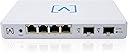
The Alta Labs Route10 is a high-performance 10 Gigabit multi-WAN wired router powered by a Qualcomm quad-core processor with hardware-accelerated VPN and firewall capabilities. Featuring 2x 10 Gbps SFP+ ports, 4x 2.5 Gbps Ethernet ports with 40W PoE+ support, and advanced routing features including VLAN, QoS, and multi-WAN failover, it delivers enterprise-grade security and real-time network monitoring. Designed for advanced home and business users, it integrates seamlessly with Alta Labs’ ecosystem for centralized management and scalable network deployments.


| ASIN | B0DHT7RHZJ |
| Antenna Location | Business |
| Antenna Type | Internal |
| Best Sellers Rank | #6,014 in Computers & Accessories ( See Top 100 in Computers & Accessories ) #206 in Computer Routers |
| Brand | Alta Labs |
| Built-In Media | Power Supply, Wall Mount, Wall Mount Hardware |
| Color | White |
| Compatible Devices | Personal Computer |
| Connectivity Protocol | Ethernet |
| Connectivity Technology | Ethernet |
| Control Method | App |
| Customer Reviews | 4.0 out of 5 stars 95 Reviews |
| Data Transfer Rate | 10 gigabits_per_second |
| Frequency Band Class | Single-Band |
| Item Weight | 1.5 pounds |
| LAN Port Bandwidth | 10 Gbps |
| Manufacturer | Alta Labs |
| Maximum Upstream Data Transfer Rate | 10000 megabits_per_second |
| Mfr Part Number | Route10 |
| Model Name | Route10 |
| Model Number | Route10 |
| Number of Ports | 6 |
| Operating System | [Proprietary OS] |
| Other Special Features of the Product | Internet Security, LED Indicator, Parental Control, Remote Access |
| Router Firewall Security Level | High |
| Router Network Type | Wired |
| Security Protocol | WPA2 |
| Special Feature | Internet Security, LED Indicator, Parental Control, Remote Access |
| UPC | 845882005701 |
| Unit Count | 1 Count |
| Voltage | 24 volts_of_direct_current |
| Warranty Description | 2 Year Limited Warranty |
| Wireless Communication Standard | 802.11ax |
| Wireless Compability | 802.11ax |
D**N
Awesome router! Would recommend
I’ve been using the Alta Labs Route10 for a few days now, and I couldn’t be happier with it. Finding a router that offers 10 Gbps speeds for under $200 felt too good to be true, but this one delivers in every way. It’s fast, reliable, and handles everything I’ve thrown at it without breaking a sweat. Whether it’s streaming, gaming online, or running a bunch of smart devices, it keeps everything running smoothly. What really impressed me is how capable this router is, especially for it's price point. It’s not just great for a home network—it’s more than capable of managing a small business network too. The added features like multi-WAN support and VPN make it perfect for anyone who needs a secure and reliable setup, and the built-in DPI tools give you an easy way to monitor and manage your network traffic without feeling overwhelming. I’ve been following Alta Labs for a while now, and they seem to really care about building great products and improving them with updates and new features. The Route10 is no exception—it’s thoughtfully designed, packed with features, and still really easy to set up and manage, even if you’re not super tech-savvy. If you’re looking for a router that can handle everything from home networking to small business needs, I can’t recommend this one enough. It’s an incredible value for the price and has been a total game-changer for me.
N**N
A very capable router that you can't beat for the features, price and performance.
I've been impressed by this router. I was in the market for a 10 Gb capable router. The router that my fiber provider gave me with my service (Eero) didn't have support for multiple VLANs. I looked at the home Netgear and Linksys routers but not only were they more expensive than the Route 10, but they lacked SFP+ slots and didn't have all the features I was looking for. Any router capable of being flashed with OpenWRT didn't seem to be able to actually push 10G. Next I considered mini PCs designed for OPNsense/pfSense. Most had Intel N100 or N105 CPUs. The reviews weren't super encouraging that these CPUs could handle 10Gb throughput. That and once you added RAM and M.2 to them, they were much more than this router. My network background is strictly Cisco CLI, but the setup wasn't too hard to pick up. For initial setup, you simply create an account on Alta, connect your router to the internet and enter the serial number into your account. This is the default method for configuration (Alta calls it Control) where the router is configured via the cloud. There is no license fee for this option. Alta also provides a free VM/Docker image of Control if you want to run it locally. For my home setup, there wasn't much advantage to running it locally so I opted to use the default cloud method. After a few minutes of clicking around, I was able to set up multiple VLANs with DHCP pools and reservations, tie in some existing non-Alta APs, set up port forwarding and configure additional firewall rules. The documentation on the site is somewhat lacking, but I was able to find any information I needed on the forum. The software is actively being updated with new features. A few months ago, they added the ability to run a Wireguard server on the router. If you're in the market for a 10Gb capable router and feel comfortable with basic network concepts like firewall rules, VLANs port forwarding, etc, I would highly recommend this router.
D**E
Amazing, with a caveat
Amazing* so far! I’ve looked high and low for such a device. Not a lot of companies are catering to the prosumer market. If you’re like me, you want the best of the best all in one nice package. You often walk around shaking your fist at the sky saying “we have the technology for this, why doesn’t it exist!?” What I wanted (needed) was a multi-port 10GbE router with level 3 capabilities for reassigning ports and configuring VLANs. You see, I have a Fiber Optics drop to my house that gives me 1Gbps connectivity to the internet, but my media enclosure is inside a pantry in the house. Luckily, during renovations I ran a few CAT6 lines out to the garage where the ONT drop is. Why is that important? Well, the ONT needs power, but I have no power outlet out there (ironically since it’s next to the house’s electrical panel). Anyhow, turns out, you can power that sucker over Ethernet. So I needed a solution that allowed for my WAN port to include PoE, but virtually no consumer product provides that. I was rocking a standard (albeit beefy/expensive) consumer grade “router” (which is technically a router+ap), which was made to look “pretty”, and thus was bulky and odd shaped, which did not make it conducive to keeping in a media enclosure. I managed anyway (running external antenna outside the effective faraday cage), and it worked fine, but I had to have this massive and annoying PoE injector. Needless to say, the way the media cabinet was “organized” was not ideal. After upgrading to the Alta Labs Route10, and verifying it did work, I decided to commit and I bought the AP6. I ran a new CAT6 line to a spot on my ceiling centered in the house, which took about 20 mins. Punched one end down into the patch panel, and punched the other end down into a CAT6 keystone. Plugged that sucker into the second PoE port on the Route10, and boom, my whole setup was complete. Now, why 4 stars instead of 5? Normally I’d drive my rating all the way down to 1-star to make a point, but I do think these guys show promise and I’m hoping my dream will come true. Maybe it never will, but we’ll see. You see, the problem is that there’s effectively no onboard management software. Ironically it’s mostly all cloud based. So… you can buy ANOTHER piece of hardware to manage the hardware on your network… basically think of it as a fancy RaspberryPi that has the management software installed on it and you plug that into your network and it broadcasts an endpoint you can hit from your browser to then manage the software. Ok… “cool”, but I dropped $200 on a powerful router which is basically the main character in a home network. Arguably, this isn’t exactly “home network” gear, but it does still seem silly to me that a device like this couldn’t also just run the management software. There is an option to run the software via a docker container, and I tried getting that running on my macOS machine, but ironically (considering docker is supposed to be insanely portable) couldn’t get it to work. I may try to fire it up on the NAS, but the question still remains, what happens when I move away and rent the place out? I’ve got an AirBnB unit in the basement which was part of the motivation behind upgrading to this level of hardware especially with the AltaPass feature (very cool). Super easy to configure multiple WiFi networks and SSIDs, as well as providing different passwords for different levels of access. I’m in the process of moving all the IoT devices over to the new profile specifically for IoT devices which limits their exposure to the internet etc. which is crucial in today’s cyber security world. Anyway, that’s why I’ve knocked off 1 star. I hope they hear this plea and work on getting at least some basic management features directly on the Route10. Also, would love if more ports were 10GbE, and or more of them were PoE. As it is, I’m using the SPF+ ports (10GbE) for my desktop and my NAS, so at least they have the best connectivity. 2.5GbE is not shabby, way better than 1GbE, but if you’re gonna call it the Route10… cmon.
S**Y
Don't pay to be a product tester
I have owned this device for 2 months now. And it worked without issues for most of that time. Now, the WAN port is dropping out regularly. This presents a reliability issue. I thought that maybe a firmware update would fix the issue, but nope. The WAN port is still shutting off regularly, meaning that as I type this I need to purchase a new router ASAP. Some sources say to configure a different port for WAN or configure failover on a different port. I thought about doing that; then I thought I paid for a working device, with all working ports. I already have a full time job solving these issues, and it isn't with Alta Labs. No need to let me know when this router exits user-based beta testing. I'll know once I stop receiving the site offline email notifications. Edit: Just for giggles, I did swap to a different WAN port. That port also began shutting off/on the same exact way the original port did.
P**Z
Awesome firewall alternative to Unifi products
Bought 10 of these to deploy in home and small businesses. I also use this in large enterprises to handle the guest network separately. HA feature will be coming soon. Love the ease of onboarding via app. Interface takes a while to get used to but it has everything you need. I like this better than Unifi which has failed me in the past.
J**T
Updated; Support came through and I look forward to continuing to support Alta Labs
UPDATE 5/27/25 - Renewed Confidence Thanks to Follow-Through and Leadership After early frustrations with support following a hardware failure, I’m pleased to report that Alta Labs has made significant strides in addressing my concerns. Most notably, Alta Labs CEO Chase Harrison personally ensured that my case was handled appropriately when other hands had fallen short. That level of ownership speaks volumes. Several support reps, including managers and members of parent company Soundvision Technologies, followed through on their promises with full testing, transparency, and a genuine overhaul of the support experience. The Route10 Router remains a fantastic piece of hardware on paper — and in practice. It offers excellent performance, a robust feature set, and meaningful updates on the horizon. My earlier concerns about being left on my own in the event of failure have been resolved, and my experience has changed for the better. Alta Labs listened, responded, and made it right — and that earns back both trust and respect. Original Review The Route10 is, on paper, a fantastic piece of hardware. It performs incredibly well, offers a strong feature set, and has exciting potential with more updates on the horizon. Unfortunately, all of that means very little when you're left stranded after a hardware failure. After a recent storm, one of the POE ports failed - taking out an AP6 Pro Wi-Fi 6 access point with it. While I understand that hardware can fail, what followed has been far more disappointing: an utter lack of support from Alta Labs. Despite multiple attempts to reach out, I’ve received little to no response. “Matt” from support has gone completely silent, and the only troubleshooting offered was a basic power cycle. No follow-up, no further assistance, and certainly no replacement options. Alta Labs appears to have no functional after-sale support system. If you’re expecting help outside of standard weekday working hours, forget it. There’s no infrastructure in place for real-world, real-time support, which is critical for networking gear... especially in business or mission-critical environments. Great router, but buyer beware: you're on your own if something goes wrong.
P**K
Great for basic home networks (but nothing more)
As a Network engineer I was curious about Alta Labs Route 10. To be clear I knew this wasn’t a SDWAN when I purchased the unit so my expectations were lower than Full Stack SDWAN appliances like UniFI or Meraki. The system performs as a basic router and offers some features like VPN. If you are a homeowner that isn’t well versed on networking this will get the job done. The unit was able to handle basic routing, DHCP requests, some static routing and was very to setup. Static routing, firewall rules like “drop” and “forward” and IGMP are when things get muddy. This is because there is very little control over more complex networks. If you are a business owner with AV over IP systems, VoIP, etc this unit isn't going to work for you. By poking around in the Web Interface I was able to find a CLI Console window and even sent a few basic commands before I was discovered and the system kicked me out. Just a note to the manufacturer, if you don’t plan to evolve this into an SDWAN appliance you should give End-Users access to the CLI so owners could build more complex networks if they know how to do so. Here’s a problem I have with the cloud based interface even for basic networks - What if my internet goes out? How am I to troubleshoot my connection to my ISP since the only way this router works is with an internet connection? Most average home networks don’t have LTE failover. Therefore if the network goes down I’m in the dark as to whether it something local, like say 2 DHCP servers, IP conflicts or if it’s my ISP.
C**E
Works great at a cheap price
This is a great router for only $200. It has 2x 10GB SPF+ ports. It runs fast and stays cool compared to other routers that I own. I have a Sonicwall TZ570 behind this router which handles my IPSec VPN to my customers. I have 5GB Fiber from Frontier into the Route10. My devices achieve consistent 5Gb synchronously of bandwidth. My work PCs behind the Sonicwall achieve 2.7Gb of filtered IPSec VPN bandwidth. Earlier, I tried this with an EERO Max7 and IPSec was not getting throught. So, I'm super happy with my current Route10 setup.
S**N
An amazing device at an even better price!
What a fantastic package for a great price. From the minute you open the box you can tell it’s a quality product everything comes packed nicely and the product looks sleek. Once installed I reviewed the performance of the device and it far outperforms my tplink ax11000 it replaced. Now I can get 10gbps links to my other switch and seamless 2.5gbps speeds to my main devices. For 300 or so dollars this is an amazing device with some functions like IPS and firewall style rules you generally won’t find for under 800. Very happy with this purchase so much to the point that I recommended it to my entire team at work. One of the best features is that I can access my firewall from almost anywhere.
J**A
Compact and fast wired router
This wired router has a powerful hardware and can easily reach 2Gb speed. The firmware doesn't have a lot of features compared to Unifi OS, but it receives regular updates from Alta Labs.
Trustpilot
3 days ago
1 week ago