


🚀 Elevate your storage game with speed, space, and style!
The TERRAMASTER D5-300C is a versatile 5-bay external hard drive enclosure supporting up to 80TB total capacity with 2.5"/3.5" SATA HDDs or SSDs. Featuring a real USB 3.1 Gen1 Type-C interface delivering up to 410MB/s transfer speeds, it offers flexible RAID 0, RAID 1, or single disk configurations. Compatible across Mac, Windows, and Linux platforms, its durable aluminum chassis and quiet cooling fan make it ideal for professional-grade data storage and management.
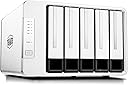


| ASIN | B071S6ZCMM |
| Best Sellers Rank | 110,986 in Computers & Accessories ( See Top 100 in Computers & Accessories ) 490 in Enclosures |
| Brand | TERRAMASTER |
| Brand Name | TERRAMASTER |
| Colour | silver |
| Compatible Devices | PC, Linux, Mac |
| Customer Reviews | 4.4 out of 5 stars 621 Reviews |
| Data Transfer Rate | 410 Megabytes Per Second |
| Enclosure Material | Aluminium |
| Hardware Interface | USB 3.1 Type C |
| Hardware Platform | PC, Linux, Mac |
| Hardware interface | USB 3.1 Type C |
| Hardware platform | PC, Linux, Mac |
| Item Weight | 3.08 Kilograms |
| Item weight | 3.08 Kilograms |
| Manufacturer | TERRAMASTER |
| Manufacturer Part Number | DAS |
| Material | Aluminium |
| Memory Storage Capacity | 50 TB |
| Model Number | D5-300C |
| Network Connectivity Technology | SATA, USB |
| Product Warranty | 2 years |
| Supported Devices Quantity | 5 |
| The Standard Size of the Hard Drive or the Bay the Hard Drive Is Compatible With (in inches) | 3.5 Inches |
P**E
Excellent little unit.
I had a similar unit to this from a different company and finally got sick of it trashing the drives and purchased this as a replacement. I kind of wish I'd bought one of these to start with. It has been sitting on my desk with five 6tb drives humming away pleasantly since I unpacked it and no sign so far of any adverse behaviour. The LEDs are unobtrusive, the power button responsive and data transfer more than satisfactory. As soon as I have the spare cash I will be buying a couple more to replace my other bays as this one not only seems more reliable, it's more user friendly. The primary difference with this one compared to my other stacks is that the hard drives need to be fixed into caddies. All you need is supplied, the caddies, screws, a screw driver, and it only takes a couple minutes to fix the drives and slot them home. While the bays cannot be locked shut, the door is quite a positive fix and does not open randomly on it's own. However it is necessary to make sure that it is out of reach of small inquisitive fingers who might think there are treats behind the shiny doors. I also rather like the way RAID works on this unit. You can either have all five drives as individual units or set it up so the first two are a RAID array and keep the last three drives as individuals. Makes things a bit more versatile, and allows you to run the unit as you want, instead of being locked into one choice only. The unit is quite nicely made, with finished edges and no sharp corners or rough edges. My only less than ideal observation is that the drive doors are plastic rather than alloy. I would have preferred that these were made of a more rigid and tougher material. But, that's a small thing at the end of the day, as once you've mounted the drives, there's no real need to be opening and closing the doors regularly. Power up and down is quick and without fuss and the unit runs fairly quietly compared to other similar boxes. The nice thing with this, it that it is relatively unobtrusive. It is designed in such a way that it sites on the desk without climbing in your face, and doesn't have that "big ugly man box" presence that so many other drive bays seem to have. Simple, versatile and compared to my other units - so far reliable. You can't ask for more than that. Overall, I'm very pleased with this item, and won't hesitate to buy another one later on.
B**N
Terra Master isn’t a Terror Monster - glad I invited it into my home.
Great unit delivered promptly and setup without a problem. Mine is very quiet but will clearly click and clunk a bit as you save to a drive. Extremely cool in operation and for me the setup works well. The first two bays I have set to RAID 1 so that when I save, the file is copied to both drives in a mirrored setup. Bays 3-5 are all single, non-raid drives. The unit accepts any drive. I use one as a backup drive to bay1. Write speeds between bays with Ironwolf 8tb drives is good- around 200mb/s. I purchased an extra bay cassette so that I can remove the backup and store it elsewhere. This gives me redundancy via drives 1&2 and peace of mind via a removable backup updated weekly. I’m planning on installing a SSD in one of the other two spare drives as a sort of scratch disk for direct access and processing. Some have complained of setting up the RAID. Can’t see why turning one screwslot at the rear with a provided mini-screwdriver is a problem myself. I agree with others that instead of four screws to set each drive in its bay slide a tooless solution would be better. However, when you compare this unit’s price to that of competitors, I consider it great value and I’m happier that design costs have saved a bit on form rather than function. The drive bays need to be pressed firmly home as noted in the instruction and I would suggest to anyone who has never installed a new drive that they google it so that you know how to initialise the drive and make it visible on your PC or laptop. To sum up, it’s a cool-running, no nonsense, good value RAID & 3 single drives setup and I’m very happy with it and the buying experience.
P**E
If it fits your use case great, potentially useless for others
After much deliberation I chose the D5-300C because the transfer speed without the RAID controller on all disk appeared to be better based on Terramaster docs. Also I planned using the enclosure as a JBOD software array. I had 3 options to use this DAS which is intended for long term archive backups. Option one was to use it with Unraid natively, as someone else has pointed out this will not work well as the two disks that are controlled with the RAID controller do not expose the disk details to unraid. So that would not work. My other option was passing the device through to my virtual machine. Now this might work if your hardware can pass the whole USB interface of your board but for me this will not work as in linux it was impossible to separate out the controllers for the disks into separate entities. So my remaining plan for this was to use it with MS Storage Spaces and created a RAID 1 array (so one big disk). This so far is working well and has worked for my backup purposes. Have also kept one disk bay free for disk testing and have completed 3 disk tests so far. I tested performance by copying the same 10gb file to 2 disks simultaneously from my PC while also simultaneously copying the same file between 2x disks on the box. For me that resulted in all 4x disks transferring at their maximum transfer speed (about 150MB/s). So for me the performance was ample. So far after quite heavy use in a short space of time I have had no errors or issues with transfers / disks / etc. Also would mentioned that using with Win10 the drive works natively and spins down the disks when not in use and spins down all disks when you shutdown / hibernate or standby.
E**N
Pretty good local storage solution, and ideal software RAID 5/6
I purchased 2 years ago, to be the main storage of my home server, and I think I have used it long enough to finally review it. TL;DR Go for this if you need multiple drives (4/5) or want RAID configuration (either hardware or software). Pretty good value and virtually no downtime. ----------------------- Install: ----------------------- This is pretty much plug and go, you put your drives and it should work out of the box, no firmware needed. ----------------------- My use case: ----------------------- I slotted in 4 1TB HDD with software RAID 5 and use it as my Linux home server main storage and it works pretty well. The only caveat on Linux is you will need to disable USB power saving otherwise it will disconnect the drives after awhile, this was 2 years ago so it might have been fixed. The reason why I chose this instead of cheaper ones with 4 slots was that if you are using this for RAID, you can choose between RAID 5 and RAID 6. I did not try the RAID 0/1 configuration since it doesn't fit my use case anyway and I can do that in software as well. The drive activity lights are also quite helpful as well to see if the configuration is correct, if so the ones configured will be used thus flashing. ----------------------- Maintainance: ----------------------- I have used it for 2 years and there's no downtime to be honest, all the downtimes were from something else that is not related to the enclosure. ----------------------- Noise and R/W speed ----------------------- As for the noise, I think the hard drives and computers would definitely be louder than the fan in the enclosure. I can upload and download files reasonably fast, watching videos is also fine too. I am not expecting too much from this because 4 drives are using the same USB to transfer data. Not saying it is slow but I recommend using it for things that do not require fast R/W speed, such as home server, data backup, cold data storage, etc... and I would not recommend using it for things like video editing, gaming, boot drive, etc. If you have to, maybe use a USB-C to USB-C cable as suggested from other people. ----------------------- Price: ----------------------- It is definitely competitive to other vendors, even though this is a "known brand" one. If you don't need RAID or don't need 5 drives, go for the ones with 4 or 2 slots, which is quite a bit affordable. Kudos to TERRAMASTER for not increasing the price for the past 2 years (189.99)
C**B
Careful what you buy it for. It does not expose all the ports properly
Overall the product is decent, and if you just want something simple to plug in to extend your storage, for backups and alike, it is good. Especially for £150. Their raid 1 solution is crap, absolutely no difference when it comes to sustained reading but that, as opposed to let's say ZFS. But that's neither here nor there, I did not buy it for that. I bought the product intending to create a software raid via Linux. This product does not seem to expose all 5 ports properly 3 are ok but 2 are mixed. I'll try contacting customer support... I wonder what BS they are going to try, lol LE: After a bit of back and forth with the TM support it seems you cannot set the first two drive bays to single and use them as part of a larger raid array, so keep this in mind if you intend to use it for this purpose.
M**S
A Reliable Tool
I purchased this a while ago, and it's been reliable. It's well made, and although the caddies aren't so robust, they work just fine, and the rest of the build is solid, and the machine's pretty quiet, whilst keeping the drives cool. The set-up was seamless, it installs automatically under Windows, and the drives appear as separate drives. It's been completely reliable, and trouble-free, a really reliable and useful tool, which is just what I was looking for. I should note the packaging is simple, and clearly made to be recyclable, and they even provide a few spare feet and screws, nice. Also, you could install the drives toothlessly, since there are locating lugs inside the caddies that hold the drives in place, though I recommend you use screws as well to hold the drives in their caddies more securely. A really well-thought-out product, at a decent price, I recommend it.
G**R
Very stable and fast so far. V. pleased I bought.
I've left it a while after buying my first one of these before I did a review, as I wanted to let it bed in for a bit. I have struggled for years to achieve a high capacity/low cost storage system for my Plex server. I've tried cheap NAS's, e-stata DAS boxes, and more recently just multiple single external USB3 drives, plugged into a multi-USB expansion card. None have been stable, requiring constant checking that all the drives are online. I took the plunge in Oct 21 and bought one Terramaster 5 bay D5-300c, and stripped the 3.5" hard drives from their caddies (varying capacities from 6Tb to 10Tb) and installed them as single disks. The reliability has been spot on so far. Drives never drop off, and this is attached to the same USB card as I was using before. The speed maxes out my 1Gb ethernet connections when I do file copies, so no complaints there. I now have a second one attached to a cheap PC in my garden cabin (in case of house fire) with copies of the same disks and I update any changes nightly. It's all been working like a charm. The box seems to stay cool and makes no noise that I can pick up. If any of the cheap drives fail, I have a spare, and can replace it relatively cheaply, not losing any more than a day's data, which is negligible. I can't comment on the RAID capability, as I'm using it only as single disks. Otherwise, very happy customer.
D**P
Easy way to use desktop drives with a laptop
My desktop died recently so I replaced it with a laptop which left me with the problem of being able to access its HDDs. This seemed like the ideal solution so I bought it. Initial experience was good as the device is very easy to use and pretty quiet, almost too quiet in fact. Turns out the reason it was so quiet was that the cooling fans were broken. First unit was returned to Amazon and a replacement unit ordered. Second unit arrived and worked as it should, there is some fan noise but it's not that bad. The noise of the HDDs and laptop fans masks most of it. I'm using this with software called Drivepool to combine all the HDDs into one and everything has been working well bar one small problem. For some reason when the device is connected to a hub Windows will lose access to the first two drive bays. I don't know if this is a problem with the device or my hub, it is however solved by connecting the device directly to my laptop. Minor hub problem aside I'd be more than happy to buy another one of these should I ever need to.
W**S
Zeer handig en makkelijk, volledig volgens specificatie
Ter vervanging van een server met storage rack. Overgestapt op een gewone pc behuizing met recuperatie van disks in deze attachés storage. De mirrored volumes van Windows heb ik nu aan de hand van de RAID1 beveiligd.
A**A
Ottimo, pienamente soddisfatto
--- Prima recensione dopo due giorni di utilizzo --- Il dispositivo è realizzato con cura e con materiali di alta qualità, sono estremamente soddisfatto e il rapporto qualità prezzo è ottimo. La scocca è solida, ben rifinita ed accuratamente assemblata. Appoggia su quattro piedini spessi di silicone morbido per evitare vibrazioni, e le due ventole retrostanti (che rimangono accese continuamente) sono così silenziose che anche tenendolo di fianco al computer (vedi foto) non sono percepibili. I carrelli per i dischi anche loro hanno inserti in gomma e spugna dove appoggiano i dischi, anche qui per annullare le vibrazioni. I carrelli sono compatibili sia con i 3.5'' che 2.5''. La dotazione è ricca: vengono forniti (oltre all'alimentatore) due set di viti, uno per 5 dischi da 3.5'' e uno per 5 dischi da 2.5'', un cacciavite dedicato, un kit di cacciavitino e spillo di reset per il selettore RAID, 10 etichettine per i dischi da attaccare sui coperchi dei carrelli, e una scorta di due piedini di silicone e due smorzatori di gomma per il montaggio dei dischi. Le cinque baie sono hot-swap: ogni disco viene riconosciuto come un dispositivo indipendente dalla rimozione sicura hardware di Windows, quindi si può connettere, smontare e sostituire uno o più dischi senza spegnere la stazione e senza interferire con la continuità operativa degli altri dischi. Estremamente semplice la selezione del RAID per le baie 1 e 2. Tutte le baie sembrano operare alla stessa velocità: ho testato con un SSD capace di 440Mb/s (il Crucial che si vede in foto, il disco più veloce che avevo sotto mano) e CrystalDiskMark. Il disco testato raggiuinge sempre la sua velocità massima (la stessa che vedo quando è connesso alla porta SATA sulla motherboard del computer) su tutte e cinque le baie. Attenzione: se fate i test di velocità connettetevi via usb3 e avendo cura di scegliere una porta del vostro computer che sulla motherboard sia molto vicina al processore (il mio computer per esempio ha anche alcune porte lontane che sebbene abbiano il dentino blu vanno a circa 4Mb/s). Una sola cosa a cui prestare attenzione: evitate di cambiare le lettere delle unità assegnate automaticamente dal dispositivo. Io ci ho provato ma dopo un riavvio l'impostazione è stata dimenticata, causandomi qualche problema di continuità di servizio con i programmi che operavano sui. Da lì in poi ho sempre lasciato le lettere di default e non ho più avuto problemi. Seguiranno aggiornamenti per l'affidabilità a pieno carico a lungo termine.
G**F
Nice looking and nice working item
Replaced another 5-bay HDD storage unit with this new one (after the old one stopped working after about eight years or so). Looks and feels like its of good quality. Works well. On the recommendation of others here I replaced the included USB cord with another (faster) one.
M**X
Buen DAS a un precio muy contenido
Necesitaba ampliar mi capacidad de discos duros conectados permanentemente y en mi caja no quedaban ya puntos SATA donde conectar más discos. Además lo quería en el exterior para poder sacar fácilmente una vez llenos. Esta caja DAS está muy bien construida, es silenciosas, fácil de instalar y no muy grande. Muy recomendable. Espero que más adelante saquen una versión USB 3.2 o Thunderbolt.
D**E
Fiable & Simple / Unité de stockage idéale
Après être passé par une quantité invraisemblable de Nas, Serveurs et autre Raid en tout genre et de toutes les marques... dont tous m'ont déçu à court ou moyen terme, ce Terra-Master est le premier qui me donne vraiment satisfaction. NB/ J'ai également eu un Nas de la même marque et dont le boîtier était identique (mais qui ne permettait pas de transferts par USB, uniquement par réseau...). Ce Nas ne m'avait pas convaincu non plus, avec tous les inconvénients du réseau (vitesse de transfert, obligation d'être connecté..), des fichiers imaginaires qui apparaissaient en permanence, etc;. et c'est pour cela que je voulais revenir à la version la plus simple en connexion directe, plus rapide et efficace, ne nécessitant plus de WiFi et sans chipotage) En résumé donc concernant ce D5-300C : - Boîtier alu robuste de belle facture et au joli design. - Possibilité de raid sur (HD1 et HD2, personnellement je l'utilise en simple HD de stockage unique pour éviter les risques), - Permet l'utilisation de disques durs de 10To. - Bon refroidissement avec 2 ventillo arrière et silencieux. - HDs faciles à installer et racks faciles à ouvrir et insérer. - Excellente vitesse de transfert en mémoire interne qui assume son travail (pour autant que vous utilisez les HD performants et conseillés, style Seagate IronWolf, WD Red) - Connexions arrières (pas comme d'autres modèles stupidement placés sur le côté), et en USB3. - Bouton d'allumage et voyant led sur la face avant (pas comme sur d'autres modèles peu pratiques dont le bouton d'allumage est situé à l'arrière, non-sens et d'une débilité absolue selon moi... ) Les seuls points négatifs à relever, si il fallait en trouver, serait le cable USB fourni d'origine qui est bien trop court. Prévoyez déjà l'achat d'un cable USB plus long (vérifier que ce dernier soit bien USB3, facilement identifiable par sa couleur bleue au niveau de la fiche) Enfin, le service clientèle européen qui est peu suivi (donc ne compter pas trop sur le Help Desk de la marque ici), mais aux USA on vous répondra sans problème. En bref, je conseille ce produit pour sa simplicité, sa facilité et sa fiabilité.
Trustpilot
2 months ago
1 month ago