Buy anything from 5,000+ international stores. One checkout price. No surprise fees. Join 2M+ shoppers on Desertcart.
Desertcart purchases this item on your behalf and handles shipping, customs, and support to GERMANY.
🎮 Elevate your game and workflow with precision and style!
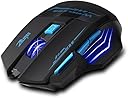
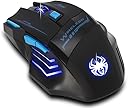
The DLAND ZELOTES Professional Wireless Gaming Mouse offers adjustable DPI up to 2400 for precise cursor control, 7 programmable buttons for enhanced productivity, and intelligent plug-and-play wireless connectivity. Its power-saving auto sleep feature extends battery life, while the dynamic LED lighting adds a modern aesthetic. Compatible across multiple platforms, this mouse balances performance and style for professionals and gamers alike.


| ASIN | B00VE0ZHGM |
| Are Batteries Included | No |
| Best Sellers Rank | 39,518 in PC & Video Games ( See Top 100 in PC & Video Games ) 874 in PC Gaming Mice |
| Brand | DLAND |
| Colour | F14 |
| Customer Reviews | 3.8 3.8 out of 5 stars (581) |
| Date First Available | 13 April 2015 |
| Guaranteed software updates until | unknown |
| Hardware Platform | PC |
| Item Weight | 141 g |
| Item model number | Zelotes T80 |
| Manufacturer | DLAND |
| Operating System | Android, Linux, Symbian, Windows, iOS |
| Power Source | Corded Electric,Usb Adapter |
| Product Dimensions | 15.19 x 11.61 x 5.59 cm; 140.61 g |
| Series | Zelotes T80 |
A**R
Great Mouse For A Great Price.
I purchased this because of the lack of adjustable sensitivity on my previous mouse. The mouse takes some time to adapt to because of its diverse shape, however, after the adjustment period, it's easy to maintain a good grip and maneuver the mouse. The adjustable DPI sold it for me, when it comes to gaming I prefer to use a lower DPI just so I have my aim under full control, however when using it for tasks such as browsing or programming, I use one of the higher DPIs as it allows me to quite easily navigate the mouse at a faster pace. One thing I noticed was that if you leave the mouse for around ten minutes, the sensor turns off which I believe is a method of conserving the battery power; really effective for those of us who accidentally leave the mouse on over night. The mouse has two modes, the initial one only turns on the mouse while the second mode turns on the LEDs within the mouse. The cool blue is rather aesthetically pleasing. Duracell batteries have lasted me a week so far with around 8-9 hours usage on a daily bases. It's generally a great mouse for it's price as it has multiple applications.
C**S
DLAND ZELOTES Professional LED Optical 2400
Performs well, hand area a little large so some might feel it a uncomfortable to use. Still can't fault it for performance, price and it looks good too.
C**K
Excellent Mouse - Feels Great in the hand - Would recommend
I recently purchased this mouse because it fit the criteria of being wireless as well as looking pretty cool. However after using it for the best part of a day, I ended up returning it because I could not reassign the the 'double click' button despite using several applications. In terms of gamers using this, I would not hesitate to recommend this, as it fits comfortably in your hand as well as having a good 'weight' to it. The lighting is a nice feature and is able to be switched off if you find it distracting. Connecting it to my Mac could not be any simpler - simply insert the USB and away you go. Like I said the only reason I returned this mouse was because I could not reassign the various buttons
J**E
Recommend this Mouse highly.
This mouse has been amazing from playing games, video editing and 3D Modeling I hardly ever have to change the batteries and it feels good in my hand compared to some other smaller mice. It is really stable when using it and does wobble or jump about the screen. I am amazed at how good this mouse is for the price I payed I would recommend this mouse to any one other the really expensive ones. The mouse is wireless and this is great because it leaves your desk or work area looking clean and neat which helps me focus on my work. It has a 5 buttons, a scroll able mouse wheel and a DPI button to change the sensitivity of the mouse which comes in handy when modeling because it makes moving the mouse short distances much more precise.
C**S
Disappointed.
the max. acceleration of the mouse is quite clear not 20G. Any remotely fast movement causes the cursor to stick and glitch (which for a gamer will mean this happens all this time!). Its also not the most comfortable mouse.
M**K
T80-WIRELESS Review. [Pictures Attached]
Edit: Here's why I think it is absolutely fantastic. I've had this mouse for well over a year now. It has been dropped, scratched, kept in the bottom of my daily rucksack, banged and squashed. So far, it is scratched to bits and the forward button (entirely my fault) has snapped off. Apart from this, it feels and handles exactly the same as when I got it. If I "flick" shot in games such as counter strike; yes it will glitch out and look at the ground, but that is the only functional downside to it. My previous review is below. Here's why I think of it as "It's ok"; It arrives fast, feels nice, the leds are pretty bright and the mouse is smooth. HOWEVER. If you are like me and move your mouse by swiveling your wrist instead of moving your forearm, then you'll notice (especially in game) that the cursor moves up when going to the right, and down when turning left, so your point of aim does not stay horizontal. In Battlefield for example, it's proving a little problematic, however I can't notice it that much and will most likely get used to it. This is a little annoying. If you aren't bothered by that, then I do recommend it, very good for the price. I got this as my MSI mouse supplied with my laptop's cable is starting to break. As of yet I do not know which one I prefer.
J**E
Lags, broke after 1 week
(Update 3) Failed to send refund to me even though product delivered back... Will not be using this company again! (update 2) Broke after 1 week and sent back for a refund... (update) Dropped a star as the mouse is suffering from lag and jumping about when not in use. Not unusable by any means but annoying and makes working with spreadsheets more hassle than it should. Seems to be an issue, especially at lower mouse speeds. Worked perfectly as soon as it was plugged in. Feels reasonably well made and the lights are a gimmicky but nice touch. Only negatives so far are the double click button is a little awkward to reach and the bottom ridge for your little finger feels a bit out of place. Overall a great product, especially for the price.
S**.
MIGHTY MOUSE! COOL LED LIGHTS.
This product appealed to me because of the LED lights which make it look cool. The position of the buttons on the mouse are all good and it sits in the palm of my hand perfectly, it doesn't stick when moving on mat and is quick where as some wireless mouses are slow. I have always had a wired mouse and decided to give a wireless mouse a chance I now have the freedom I didn't have before. All round great mouse.
L**A
Un mouse perfettamente funzionante, esteticamente molto accattivante ed ergonomicamente impeccabile, soprattutto per un utente come me con una mano dalle dita abbastanza lunghe. Insomma, mi sono trovato benissimo e consiglio assolutamente l'acquisto, specialmente se state cercando un buon mouse da gaming ad un prezzo basso. Inoltre, non utilizzandolo solo per un'esperienza ludica ma anche per motivi di studio legati a utilizzo di programmi CAD, dove la comodità della mano è fondamentale, posso dire che si presta benissimo anche a questo: un mouse a 360°. L'unica cosa che potrebbe fermare qualcuno dall'intenzione di volerlo comprare è probabilmente solo l'estetica, magari non a tutti piace questo look aggressivo, ma se vi piace non pensateci due volte! P.S: consegna Amazon puntualissima pur non essendo un utente Prime.
G**I
idare eder
C**N
souris gadget mais qui fait le travail très pratique avec les boutons ajoutés.
F**I
Mouse dal buon rapporto qualità prezzo. Lo uso principalmente per disegnare in AutoCAD. I tasti non sono nativamente programmabili tramite un software proprietario, ma basta installare X-Mouse Button Control per poter personalizzare la loro unzione all'interno di specifici programmi. Il Tsto "fire" viene però letto come un doppio clic sinistro, e quindi non è programmabile con questo programma. In AutoCAD l'impostazione di stringhe da inserire alla pressione del tasto (come se si inserissero comandi da tastiera) non funziona troppo bene, così ho cambiato il comando. Comoda la memorizzazione dell'ultimo livello di DPI impostato anche dopo lo spegnimento e lo stand-by automatico dopo una decina di minuti. L'unica pecca è che mi sembra leggermente meno preciso del mio precedente Microsoft Wireless Mobile Mouse 3500.
D**E
Tşkler başarılar dilerim
Trustpilot
2 days ago
1 month ago