

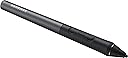
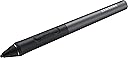

Samsung PW700CB STYLUS PENS
Product ID: 48024076
🔋162 hours battery life
🔘Wiping & back buttons
✍️1024 pressure levels precision
✒️ Elevate your digital canvas with precision and power — never miss a stroke!
The Samsung PW700CB Stylus Pen is a premium Bluetooth accessory engineered for Samsung Galaxy Tab Pro users, featuring 1024 pressure sensitivity levels, smart wiping and back buttons, and an exceptional 162-hour battery life. Crafted from polymers and aluminum, it offers ergonomic comfort and a soft tip that protects your screen from fingerprints and scratches, making it the ultimate tool for professionals seeking seamless productivity and creative freedom.
| ASIN | B01G5VNLSA |
| Are Batteries Included | No |
| Average Battery Standby Life (in hours) | 162 Hours |
| Batteries | 1 Lithium Ion batteries required. |
| Battery description | Alkaline |
| Brand | Samsung |
| Customer Reviews | 3.6 3.6 out of 5 stars (105) |
| Date First Available | 25 May 2016 |
| Guaranteed software updates until | unknown |
| Item Weight | 18 g |
| Item model number | EJ-PW700CBEGWW |
| Lithium Battery Energy Content | 0.1 Watt Hours |
| Lithium Battery Packaging | Batteries contained in equipment |
| Lithium Battery Voltage | 3.85 Volts |
| Lithium Battery Weight | 1 Grams |
| Number Of Lithium Ion Cells | 1 |
| Product Dimensions | 1.14 x 1.2 x 14 cm; 18 g |
| Voltage | 240 Volts |
I**X
Wonderful Pen
Great pen, especially for drawing and highlighting! Great buy! I would recommend getting this pen for The Samsung S Pro Tablet
M**N
Not something you will use a lot! Not worth the price
Pretty poor product really for the price. Big an bulky to use and not at all user friendly, only wished I'd test it sooner and then I could have returned it. Left it too long in the box before using it. Also, how much are you really going to use a pen in reality on a 12" tablet running only 4gb of RAM? If you want a pen, then get a surface.
K**I
It's a good quality product adds a lot of functionality to my ...
It's a good quality product adds a lot of functionality to my galaxy tab pro s the only problem I have is how to reprogram the buttons on it apart from that very satisfied
O**O
Five Stars
Works perfect once the drivers are installed
G**Y
Limited use and overpriced
Good quality construction but a little too bulky to use and the buttons were fiddly. My overall score though is due to the fact this is not very good value for money.
G**.
Very bulky, rechargeable battery very short duration, it ...
Very bulky, rechargeable battery very short duration, it rolls down from the table all the time, there is no place to put it in the tablet case
A**R
I bought This for my cousin but he has tried ...
I bought This for my cousin but he has tried everything to put it to work but with no success due to the lack of support from Samsung! It needs an app which simply doesn't appears in the updates ....
B**S
Waste of time (not waste of money as I returned ...
This just does not work. The reviews said so, but I was desperate as I needed a pen to do some marking of students essays on my tabpro S. Waste of time (not waste of money as I returned it!)
O**.
Guter Stift, perfekt für das TabPro S
Ich bewerte lediglich den Stift und nicht die Installation der Software. Wenn man die Anleitung stück für stück (nicht die beiliegende sondern die auf der Samsung Produktseite) ließt, ist die Installation einfach. Dadurch, dass das TabPro S keine Digitalizer-Schicht zwischen dem Bildschirm hat, hatte ich damit gerechnet, dass dieser Stift lediglich ein genauerer kapazitiver Stift ist. Dem ist allerdings nicht so. Mit OneNote kann man effektiv schreiben und sogar die Hand auf das Display legen. Es gibt beim Schreiben keine Verzögerung zwischen ziehen des Stiftes und Anzeige auf dem Display. Das Paring lief problemlos. Sofern der Stift einmal verbunden ist, einfach eine der beiden Tasten für min. 3 Sekunden gedrückt halten und weiter gehts. Ich finde dies besser als ein Beschleunigungssensor, da mein Stift viel unterwegs sein wird und dieser sicherlich mehrfach aktiviert werden würde. Ich möchte aktiv entscheiden, wann der Stift seinen Akku verbraucht. Zu dem Akku und dessen Laufzeit kann ich aktuell nichts sagen, das Aufladen über das mitgelieferte Micro-USB Kabel lief problemlos.
Y**A
Perfecto!!
Estoy muy contento con el lápiz funciona a las mil maravillas, puedes dibujar, escribir y subrayar entre otras muchas mas funciones, simplemente tuve q descargar el software de samsung y voila ya tenia el lápiz totalmente funcional, para mi funciona mucho mejor q el de la surface
M**Z
OTTIMO PRODOTTO
Il prodotto arrivato velocissimo come e di solito le consegne amazon, complementi. Un consiglio per la installazione. Per uso con tab pro s della samsung, ma da dire che per instalarla e sia riconosciuto el driver Tab Pen Manager, chi usa windows 10 versione 1709 dobra reinstallare la versione 15063, facendo cosi " Samsung update" ritorna a su origine e potrete vedere il aggiornamento e driver Tab Pen Manager e installarlo, dopo aggiornare Windows 10 alla ultima versione e il gioco è fatto. La Tabpro Pen a una ottima durata della batteria, molto versatile e comoda da usare
F**E
Il peggior prodotto mai visto da Samsung
Ho comprato questa penna a completamento del Tabpro S e come unica possibilità per avere una penna su quel tablet. Sono rimasto sconvolto dalla scarsa precisione e dalla scomodità di utilizzo. Un prodotto davvero pessimo. Sono un felice utilizzatore di Samsung Note 5 e Samsung Note Pro: non riesco a spiegarmi perché sul TabProS sia necessaria una penna da 70 euro, a batteria, con una precisione tipo uniposca quando negli altri un pennino senza batteria funziona cento volte meglio. Non acquistatelo.
C**N
Un stylet... dispensable
Un stylet très mal géré par Windows, où la détection de la pression marche une fois sur deux... Probablement plus d'étoiles s'il ne coûtait pas aussi cher !
Trustpilot
1 month ago
1 month ago