




NVMe M.2 2280 SSD Heatsinks Cooler, Universal Type (2nd Gen)
Product ID: 47426733
Details
- BrandAdvancing Gene
- Cooler Heatsink MaterialAluminum
- Cooler Heatsink CompatibilityDesktop and
- Item Weight0.02 Pounds
- Mounting TypeUniversal (M.2
Buy Advancing Gene NVMe M.2 2280 SSD Heatsinks Cooler, Universal Type (2nd Gen): Heatsinks - desertcart.com ✓ FREE DELIVERY possible on eligible purchases Review: Works Well in Alienware 17 R4 - My Alienware 17 R4 has a very fast SSD, but during extended periods of multiplayer gaming, the drive temperature would spike up to over 80C. After installing this heatsink, the temperature has stayed below 70C, which is a significant drop. I recommend trying it out if you're experiencing high temperatures like I did, it seems to work well. In my specific laptop, the heatsink fits, as you can see in the attached picture. However, it does stick out a bit, by about 2mm. I can still close the back lid fine, but the heatsink touches the back of the lid. Just something to be aware of if you have the same laptop. Installation tip: after you attach it to your SSD, take a look at the fitment from the side and make sure the thermal pad is in good contact with the heatsink everywhere on the SSD and that there are no gaps. One of the chips on my Toshiba SSD sits lower than the others, and required me to put two pieces of the thermal padding on top of it to make good contact with the heatsink. Review: Cool Design and nice cooling function - M.2 SSD heatsink: Good quality and good seller, be sure to buy again!!! This M.2 SSD works exactly as described in the listing, I tested it by my Alienware gaming laptop, it dropped my m.2 ssd temp from 76C to 60C, about 16C less, WELL DONE!!! The silicone pad is also pretty good, it can be squeezed out to fill the gaps, and it can also shrink by itself, the seller also provide a detailed Installation instructions, although it’s easy to install, but it is considerate to buyers. Good quality and good seller, WELL DONE!!! The service is pretty good from the seller, answered my questions quickly and professionally, the packing also good, with a hard cardboard box and the parts with independent electrostatic bags, well done!!!
| ASIN | B074Y5DZ4N |
| Best Sellers Rank | #2,669 in Heatsinks |
| Brand | Advancing Gene |
| Brand Name | Advancing Gene |
| Cooler Heatsink Compatibility | Desktop Motherboards and Common CPU Sockets |
| Cooler Heatsink Material | Aluminum |
| Customer Reviews | 4.4 out of 5 stars 275 Reviews |
| Item Weight | 9.07 g |
| Manufacturer | Advancing Gene |
| Model | CF-HD2280-U1 |
| Mounting Type | Universal (M.2 2280 SSD) |
| Part Number | CF-HD2280-U1 |
| UPC | 769891315845 711202935594 754909010027 |
D**E
Works Well in Alienware 17 R4
My Alienware 17 R4 has a very fast SSD, but during extended periods of multiplayer gaming, the drive temperature would spike up to over 80C. After installing this heatsink, the temperature has stayed below 70C, which is a significant drop. I recommend trying it out if you're experiencing high temperatures like I did, it seems to work well. In my specific laptop, the heatsink fits, as you can see in the attached picture. However, it does stick out a bit, by about 2mm. I can still close the back lid fine, but the heatsink touches the back of the lid. Just something to be aware of if you have the same laptop. Installation tip: after you attach it to your SSD, take a look at the fitment from the side and make sure the thermal pad is in good contact with the heatsink everywhere on the SSD and that there are no gaps. One of the chips on my Toshiba SSD sits lower than the others, and required me to put two pieces of the thermal padding on top of it to make good contact with the heatsink.
A**R
Cool Design and nice cooling function
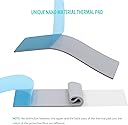
M.2 SSD heatsink: Good quality and good seller, be sure to buy again!!! This M.2 SSD works exactly as described in the listing, I tested it by my Alienware gaming laptop, it dropped my m.2 ssd temp from 76C to 60C, about 16C less, WELL DONE!!! The silicone pad is also pretty good, it can be squeezed out to fill the gaps, and it can also shrink by itself, the seller also provide a detailed Installation instructions, although it’s easy to install, but it is considerate to buyers. Good quality and good seller, WELL DONE!!! The service is pretty good from the seller, answered my questions quickly and professionally, the packing also good, with a hard cardboard box and the parts with independent electrostatic bags, well done!!!
O**L
fine heatsink for simple situations
Does a fine job, but I would suggest EKWB's EK-M.2 NVMe Heatsink instead, if you have a single-sided NVME drive and are especially concerned to reduce temperatures. I think the thermal pad in this kit is probably (just) adequate for most needs, but there are better options if you want to invest bit more money. I refer you to my review of the EKWB heatsink, which I used with some thermal pads I bought separately from that kit. The finned heatsink in this kit is pretty modest. The EKWB one is thicker, more massive, and the fins are taller, giving much more surface area.
I**N
WOW easy install. Make sure and take off stickers and ...
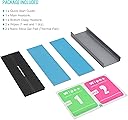
I own a 2017 Alienware M17 laptop and it had a M.2 Toshiba hard drive for OS from the factory. I've always had temperature issues, getting as high as 98, which according to toshiba is critical and will cause failure. Also on games not even on this drive, I will still get issues with temperature; causing games to crash. A couple times I got blue screen (win10). Bought this ultra cheap heatsink after research because the one Dell has for my M.2 is no longer available for purchase. WOW easy install. Make sure and take off stickers and clean the SSD well. My temps are now down to 70; and as a crazy bonus my GPU and CPU temps have dropped which I was not expecting. Again I can not thank Advancing Gene enough! Came with everything for a easy install. As a hint, I would always use the rubber bands (3 of them) instead of the metal clips.
D**S
Helps to keep my NVME PCIe SSD cool
This product was fairly simple to use and is well made. It compliments my motherboard very nicely! To install it, I cleaned my WD Black NVME SSD and inserted it into the heat sink retainer with the thermal pad on one side and then applied it to the top to sandwich it. My temps have never rose above 41 degrees Celsius since install. My case is also optimized for high airflow as I have a Cooler Master HAF 932 with Noctua 200mm case fans. These fans, plus the heat sink, have prevented thermal throttling from occurring with my drive. One last note, I had no issues with clearance on my ASUS ROG Strix X470 motherboard as this heat sink clears the components well.
D**N
So glad I made the decision to purchase a PCIe M.2 SSD card to clone my Win10 boot HDD onto...and this heatsink protects it.
So, I recently bought the Dell Inspiron 5570 with 15.6" (diag.) screen, 1920x1080 resolution, i7-8550U (1.8GHz to 4.0GHz, with 4 cores, hyperthreading, turbo boost, and low power consumption), CD/DVD+-R/W, 32GB RAM, 1TB SATA HDD, Race n 4GB graphics, and Win 10 Pro installed. I mention the laptop specs in case other potential buyers of this NVMe SSD want to compare to their own computers. As fast as this laptop is already straight from Dell, the HDD simply slowed it down. I knew I wanted to swap out the HDD with a SSD for program storage and another SSD M.2 card to boot from. These would definitely speed up my laptop further and, when designing and rendering 2D/3D animation, HD video editing, etc. fast is never fast enough. Well, with intense use of any electronic component, heat is generated and can become a very serious concern. With most laptops, mine included, there is just enough space above the M.2 card after installation for only slight whisps of air to circulate over the component, certainly not enough space for even the lowest profile heatsink to be installed...or so I thought. Introducing the Advancing Gene heatsink for PCIe M.2 SSD cards. I was able to install it and properly close my Dell laptop's case without even the slightest bump or deformation of the back cover. A tight fit for sure, but it fit. Whew! According to the product description and testimonies from others who ran independent benchmarks, it should lower the temp of your SSD PCIe by 5 -10 degrees. Terrific!
P**2
Lowers some but not enough
So to start off, I am using a Termaltake P3 Core case. It is a open air case so there is no air blowing on this heatsink. I bought this so I did not have to use the one on my MSI MEG Z390 Board. I current have a 970 Evo Plus 1Tb Nvme drive installed with this. Idle temps seat around 47c to 49c but load temps are in the high 60's. My old load temps were in the mid to high 70's so it did bring them down maybe 10c but not where I was hoping it would. I would say that it is very easy to install there was no problems there at all. The heatsink wraps around the whole Nvme drive. It gets very hot during a benchmark. Over all I guess I got what I paid for since it was pretty cheap. I am going to leave it on for now but will be looking for something better to help bring temps down even more. Would I recommend this heatsink, only if you have nothing on your M.2 drive right now and do not want to spend a lot of money. If you want really good temps, move on to the next one. This is not worth the money then.
B**L
Perfect for laptops
Dropped the temp of my WD Black SN750 by 20 degrees! Was reaching 80 before I installed this, and now it stays 60 or under while under load. It fit inside my laptop perfectly without clearance issues with the back of the case. I would recommend this heatsink for laptop use since it has a low profile.
Trustpilot
5 days ago
1 month ago