Buy anything from 5,000+ international stores. One checkout price. No surprise fees. Join 2M+ shoppers on Desertcart.
Desertcart purchases this item on your behalf and handles shipping, customs, and support to GERMANY.
🚀 Elevate your dual-PC setup with lightning-fast 4K switching—because multitasking like a pro waits for no one!
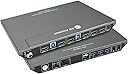
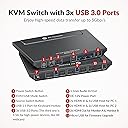
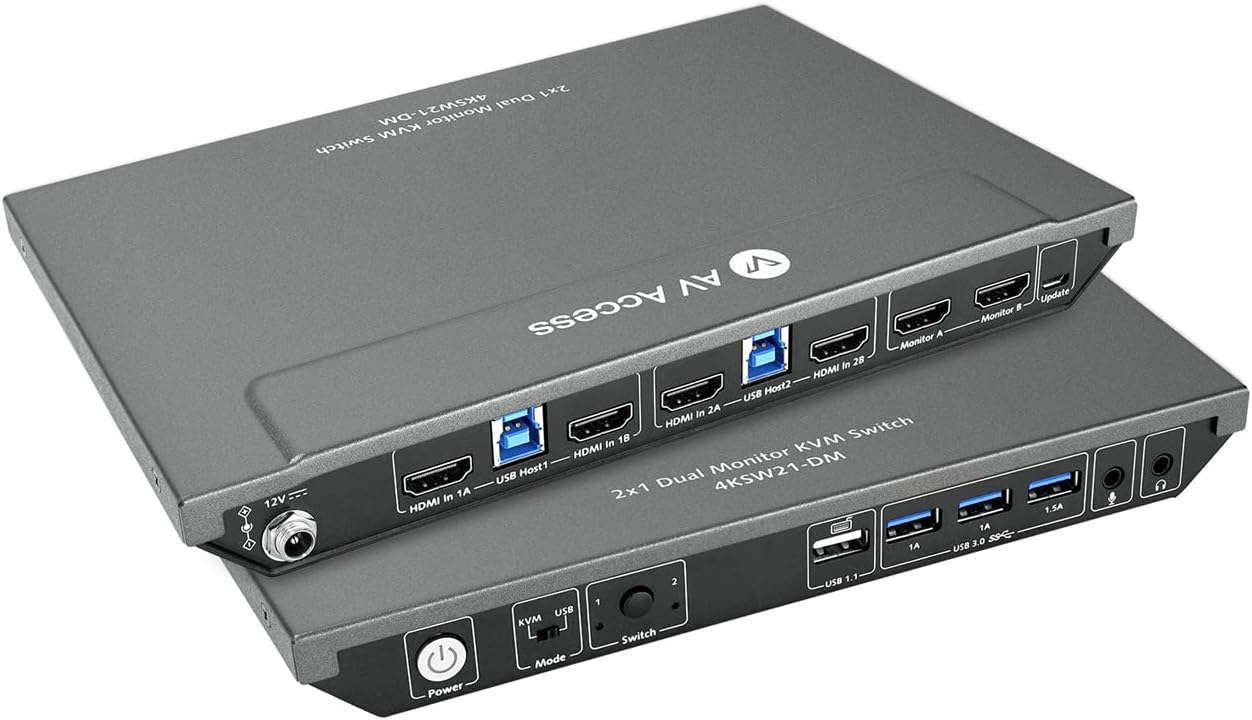
The AV Access KVM Switch 4KSW21-DM empowers professionals to control two computers with a single keyboard, mouse, and dual 4K monitors at 60Hz. Featuring a built-in USB 3.0 hub with 5Gbps transfer speeds, fast hotkey and button switching, and broad OS compatibility, it’s designed for seamless multitasking in office, gaming, or creative environments. Its durable metal build and smart power-locking connector ensure reliable, long-term performance.


| ASIN | B0B72P2DBG |
| Actuator Type | Push Button |
| Best Sellers Rank | #138 in KVM Switches |
| Brand | v AV Access |
| Brand Name | v AV Access |
| Circuit Type | 2-way |
| Color | 4K 2 monitors 2 desktops(4KSW21-DM) |
| Compatible Devices | Desktop Computers, Laptops with HDMI or USB ports |
| Connectivity Protocol | HDMI 2.0, USB 3.0 |
| Connector Type | Hdmi |
| Contact Material | Metal |
| Contact Type | Hdmi Type-a 19-pin |
| Control Method | Touch |
| Control Type | Manual |
| Controller Type | Keyboard & Mouse |
| Current Rating | 3 Amps |
| Customer Reviews | 4.0 out of 5 stars 400 Reviews |
| International Protection Rating | IP54 |
| Item Dimensions | 5.61 x 0.91 x 1.03 inches |
| Manufacturer | AV Access |
| Material Type | Metal |
| Model | 4KSW21-DM |
| Mounting Type | Surface Mount |
| Number of Items | 1 |
| Number of Positions | 2 |
| Operating Voltage | 12 Volts (DC) |
| Operation Mode | KVM Switch |
| Part Number | 4KSW21-DM |
| Specification Met | CE |
| Switch Type | Button Switch+hotkey Switch |
| Terminal | Pc |
| UPC | 795063902667 |
| Unit Count | 1.0 Count |
J**Y
Great value and solid performance so far!
Product working as expected, the quality is great and hopefully it will perform well for a long time. I purchased this kvm for my home office, it need to be connected with 2 HDMI cables and 1 USB-B cable in PC and laptop ends. It make me easy to switch with 2 PCs, so far I'm loving it. The switch features 3 USB 3.0 ports, 1 USB 1.1 port, allowing me to connect all of my necessary peripherals including wireless keyboard, mouse and external USB drives, without any issues. Not like other switches, this unit also includes 3.5mm audio port, I don't need to long cable headset again to enjoy gaming and music. The switch is also well-built and sturdy, grey metel body making it a reliable addition to my work setup. They added a nice additional feature-locked power cord connector, which prevent power cord loose. This is amazing design. Overall, it was very nice for my application. I highly recommend AV Access KVM switch.
C**.
Hand off not always working get static
After many tries with different KVM this one seems to be working the best, not perfect but doable. Lag time between switching is slow, has a feature to keep one monitor to each device running nice feature. My main issues is the EDID handoff not always working. Not sure for this matters I am running a Mac Mini pro 4 and a HP DESKTOP
J**U
Effortless Dual PC Control and More with the AV Access KVM
This AV Access KVM switch is a fantastic addition to my home office setup! It works exactly as expected, and the build quality feels excellent, promising long-term performance. Connecting my two PCs is a breeze thanks to the 2 HDMI and 1 USB-B ports on each end, making switching between them seamless – something I'm already enjoying immensely. I appreciate the inclusion of multiple USB ports: three USB 3.0 and one USB 1.1. This allows me to effortlessly connect all my essential peripherals, including my wireless keyboard and mouse, as well as external USB drives, without any hiccups. Unlike other switches I've used, this one thoughtfully includes a 3.5mm audio port. Finally, I can say goodbye to long headset cables and comfortably enjoy gaming and music. The switch itself feels robust and well-constructed, with its sturdy grey metal body adding a touch of reliability to my workspace. A particularly clever design feature is the locked power cord connector, which effectively prevents accidental power disconnections – a truly amazing detail. Overall, this KVM switch has been perfect for my needs, and I wholeheartedly recommend the AV Access KVM switch to anyone looking for a reliable and feature-rich solution.
K**H
Cannot recommend - Monitor switching failed after 6 months if use.
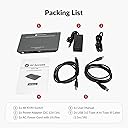
This product seems well made and comes with all the necessary cabling. It worked fine initially, but by the 3 month mark, it was apparent the product reliability wasn't there. First the USB A ports started to flake out, causing the USB headset used for audio calls to get disconnected. (Of course, audio calls are work-only events.) Then the HDMI side started causing one or of the dual monitors to go blank at random times. As Murphy's law would dictate, this would always happen on the side of the switch used for the work laptop. I've given up on this device, and have replaced it with a bi-directional USB C 3.2 2 into 1 (also handles 1 into 2) switch to drive the monitors, and a 2 input USB A switching hub for the kbd., mouse, and headset. The USB C to dual HDMI outputs is handled by 1 of the 2 adapters I had already used between the 2 laptops and the HDMI sides of AV Access switch in the original setup. Cost of the replacement setup, Under $60 complete. Cost of the AV Access switch, $140 and it failed after 6 months. You decide where the value is there.
J**N
We'll see...
I assumed that because AV Access was supposedly a big name in the KVM industry, I would get a quality product. That is not what I experienced. Since getting it, and this is every single day, I have issues with my dual tv setup and my keyboard randomly cutting out. The only thing that fixes it, is if I unplug my keyboard and then plug it back in again, or if I switch over to the other computer, and then back again. Yes indeed, the keyboard does not work, but the switching does. I get the switching sound when not switching, and then the keyboard ceases to work. I wanted to love this, and it's certainly aesthetic and has a quality feel to it, but I'm unable to love it due to its every-single-day-glitches. :/ Update: This is an honorable seller. Readily sought to make it right. They are issuing a replacement of the faulty unit, without delay. In manufacturing, things happen. I'll update this review with the final experience of this product.
G**T
Works, but not very well
This KVM switch doesn't work nearly as well as I was hoping it would for the price I paid for it. For starters, the USB port that they say is specifically designed for keyboards? Doesn't work with my keyboard. When I try to switch devices using the switch the second device is unable to tell what the keyboard is and thus can't use it, but it works just fine if it's plugged into one of the normal USB ports. Second, my monitors have built-in audio, which also seems to go on the fritz any time I try to use it, with audio very noticeably cutting out very frequently through these devices. Lastly, the video seems to struggle every time I turn things on - I put my setup to sleep every night, and every morning one of my monitors has to go through a cycle of turning various things off and on again to get it to stop going black every few seconds. Whole thing is very finicky and doesn't seem to work very well.
S**S
Thoughtfully and Sturdily Made
This is a great device for those working from home, wanting to watch two monitors and control with only one set of peripherals. The device itself is very well made, with the threaded power jack being an unusually high quality and intelligent touch. I think a design decision had to be made with the USB 1.1 port, which is where a lot of people are having trouble with newer/specialized keyboards. I'm guessing they could have made all the USB ports 3.0, but then hotkey capture would not have been possible? I have just a plain Microsoft Bluetooth keyboard that does not work with the keyboard port, so I am just going to buy a simple, wired keyboard so I can maintain the hotkey support. I do feel like one extra USB 3.0 port would have been nice, though, for a total of four. Overall, however, I'm very pleased with the design, construction, and functionality. It's pretty rare nowadays to buy something and it not be a piece of poorly designed plastic slag. This is the polar opposite. I was able to replace a Plugable USB docking station with this, which served its purpose fairly well, but now I can actually use onboard video of both sources. Update: Had an issue where it seemed like the video signal would just drop, causing the display to just blank out randomly for a few seconds. I'm not a fan of troubleshooting new equipment so just got a replacement. Could have been something else, maybe one of the supplied cables. I also took the extra step of looping the cables instead of bunching them with tight bends. I'm not really sure if signal/energy loss is a thing at these frequencies or use cases, but regardless, I no longer have the problem.
G**E
USB and Switch issues
In general, the KVM works decently. But this will depend on what is your setup. Let explain. My PC 1 is a personal computer, i9, RTX2080. My PC 2 is a new laptop XPS 15, i9, RTX4080. I configured this with 2 monitors. High quality HDMI cables, 8K, 16K and different brands to be sure everything works fine. In general, I did not have issues with the image quality, resolution or refresh rates. Let me explain a little why I changed this device after some days of use. Good things 1. This is heavy and feel-good quality. 2. Enough bandwidth to have 2 monitors with 4K@60Hz and 2K@144Hz at the same time with high quality. 3. Support playing video games without issues. 4. Many options of hot keys to change between computers and the configuration is easy (we only need to press two time the key that we want to use and that it). There are many options: control, shift, etc. 5. The hot keys are not an issue if we play video games (I don’t use so much time, but I tried to test to check if this could change of computer while playing) 6. Nice USB mode to use both computers at the same time. But not the option to switch between modes using hot keys or move the mouse automatically between computers (we need to use hot keys to move the mouse in the other computer) Bad things 1. Issues with wireless devices a. In general, the USB ports do not work fine with wireless devices. b. My wireless keyboard was supported decently but sometimes I feel lag and disconnections. c. My mouse has many issues to be detected. This is Razer Viper Ultimate with Charging Dock. I am unable to use the charging dock, because the mouse is not detected through this (this has the option to connect the USB wireless directly on it). So, I had to connect the mouse directly by wire, because the wireless does not work most of the time. d. My Corsair Virtuoso RGB Wireless SE Gaming Headset is detected sometimes, but the microphone was not detected and a message in the computer was shown saying that there were not enough USB ports. Even If I connect only 2 wireless devices. e. My web cam Elgato 1080p60 wired was not detected when I had 2 devices already connected. So, after I connected keyboard and mouse this was not detected. f. In summary, if you try to use this with wireless devices then this is not a good option. The KVM has 4 USB ports, but I could use only 2 with wireless devices. I guess that this should work fine with wire devices (I am not sure, because I did not test). 2. Issues switching between computers. a. When we try to change from one computer to another this take like 3 seconds only to see any reaction on the computer and like 3 seconds more to be able to start using this. For me this is bad because I like to move between computers like many 10 times a day, and this takes much more time that I was waiting for and worst when this fail (continue reading) b. Usually, we need to press the hot key many times to change between computers, because this is not detected at the first time. c. Usually, we need to rebind the default keys because the configuration is lost for some reason (I guess if we are writing and we change the default hot key by mistake, because this is so easy to change ¿Good or bad thing?). 3. Conflict between different resolutions between the computers a. I noticed that if both computers manage different resolutions this can be a big issue with this KVM. For example, if one computer uses 2k@120Hz and another 2k@144hz, then when you try to switch between computers the image is not show and you see only distortion (like when the TV does not have signal). This is the worst thing for me, because sometimes when you need to switch you receive this bad signal and you need to switch again and again and power off the monitor or the KVM to have this working again. I changed this KVM for another option using display port and worked with all my devices without any problem and I could connect all my wireless devices.
A**E
AV Access KVM Switch 2 Monitore
Habe das Gerät vor 2 Monaten gekauft und betreibe 2 Computer, 2 Monitore, Bluetooth Maus + Keyboard und ab und zu eine externe Festplatte. Das Gerät ist zwar nicht ganz günstig, aber bisher bin ich sehr zufrieden. Alle angeschlossenen Peripheriegeräte funktionieren einwandfrei.
D**E
Works great
Works really well, the build quality is awesome. I like that fact that is has a power button and it is externally powered. I use it with my Lenovo ThinkPad and MacBook Pro M2, and it works really well on single 4K 60Hz screen. The hotkey switching could be faster but I that does not bother me much.
A**ー
問題無し
特に問題なく使えてます 発送用の外箱無く、商品パッケージにそのまま伝票貼られて送られてきます。 気になる方はご注意を
L**A
Switch between work and game on a button
I was annoyed about dealing with my work and life on a small screen. This KVM switch came to my eyes, actually at first time I thought it was too expensive until I finally set it up and use it. It is worth the price. What impressed me first is the build quality, it looks not cheap at all. It can switch between 2 PCs in just 2 seconds with 60Hz 4K resolution. I compared a lot before my purchase, and similar KVMs at the about price just support 30Hz 4K, excellent! BTW, it works great with my Mac and Logitech wireless mouse.
D**S
Guter Switch
Der AV Access KVM Switch macht mit seinem hochwertigen Metallgehäuse und sauberer Verarbeitung schon auf den ersten Blick einen guten Eindruck. Aber zum Glück sieht er nicht nur gut aus, sondern macht auch seinen Job perfekt. Ich habe den Switch an mehreren PCs, Laptops und sogar in Verbindung mit Konsolen getestet und hatte nirgends Probleme irgendwelcher Art. Von 1080p bis 4K und von 60Hz bis 144Hz lief alles ohne Probleme, genau wie die USB Schnittstellen. Ich konnte keinerlei Verzögerungen oder Einbußen in der Bildqualität feststellen. Dazu kommt die nette Optik des Switches, die bereits erwähnte hervorragende Qualität, so wie die gute Benutzerfreundlichkeit, durch die man nicht einmal eine Anleitung benötigt. Bei KVM Switches sind Bewertungen manchmal ein bisschen schwierig wenn es nichts zu meckern gibt, denn dann kann man im Grunde nur sagen "Alles töfte", aber das ist ja dann im Grunde auch die einzige Information die man braucht. Mir gefällt er sehr gut und alles funktioniert wunderbar. Und obwohl er nicht unbedingt günstig ist, ist der Preis durchaus gängig für Switche dieser Art. Von daher: Volle Empfehlung von mir.
Trustpilot
1 month ago
1 week ago