Desertcart purchases this item on your behalf and handles shipping, customs, and support to GERMANY.
⚡ Power Your Productivity with Kingwin’s Ultimate USB Hub!
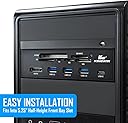
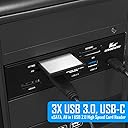
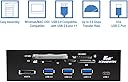
The Kingwin KW525-3U3CR is a high-performance powered USB 3.0 hub designed for professional setups, featuring one USB-C port, three USB 3.0 Type-A ports, an eSATA port, and six multi-format card reader slots. It supports ultra-fast data transfer speeds up to 5 Gbps, fits into a 5.25" computer case front bay, and offers broad compatibility with Windows and Mac OSX. Ideal for managers and creatives who demand speed, versatility, and reliability in one sleek package.


| ASIN | B01K0RPTN0 |
| Additional Features | Powered |
| Best Sellers Rank | #38 in Internal USB Port Cards |
| Brand | Kingwin |
| Built-In Media | USB port bay |
| Color | black |
| Compatible Devices | Card Readers |
| Customer Reviews | 4.0 out of 5 stars 1,533 Reviews |
| Data Transfer Rate | 5 gigabits_per_second |
| Enclosure Material | Plastic |
| Global Trade Identification Number | 00812348012993 |
| Hardware Interface | USB, USB 1.1, USB Type C |
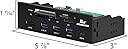
| Item Dimensions L x W x H | 5.87"L x 3"W x 1.69"H |
| Item Type Name | Kingwin KW525-3U3CR Super Speed USB 3.0 supports up to 5 Gbps of bandwidth |
| Item Weight | 9.76 ounces |
| Manufacturer | KWI Technology Inc./Kingwin |
| Mfr Part Number | KW525-3U3CR |
| Minimum Required Operating System Version | Windows 10 |
| Model Number | KW525-3U3CR |
| Number of Items | 1 |
| Number of Ports | 5 |
| Operating System | Mac OSX, Windows |
| Special Feature | Powered |
| Total USB Ports | 5 |
| Total Usb Ports | 5 |
| UPC | 812348012993 |
| Warranty Description | 1 year |
C**S
Good USB hub.
I installed this hub in a 5.25 inch drive bay and plugged it in and it just works. Got it to replace a USB 3.0 expansion card in an x1 slot that would have knocked my second X16 (that only runs at, x4 speed with my graphics card in slot 1) slot all the way down to x1 speed. It appears on 550 motherboards that if you have a graphics card installed in your primary x16 slot your second X16 slot only functions as x4 then if you occupy an x1 slot as well all PCIE slots except for slot 1 are knocked down to PCIE x1. These secondary slots except for the slot 1 graphics card slot are all PCIE 3.0 while the graphics card slot is 4.0. Pay careful attention to this when buying a motherboard in the future folks. I know I will. I consider this something of a serious limitation. The board didn't even have an x8 slot but has 3-4 x1 slots. The board in question is the ROG Strix B 550 F gaming. Great board just some limitations on the PCIE side of things. It's paired with a Ryzen 5 5600X.
O**G
No complaints.
Worked great for me. Only really using the SD, USB C, USB 3 and SATA ports. All appear to function correctly. Mounted easily. I kinda wish the case were made of steel or aluminum. It's made of ABS, I think.
J**S
Works great but if you only have 1 usb 3.2 plug on your Motherboard you will need a splitter
Works great but make sure the inputs are aligned when you receive it. I have purchased a few of these and the last one the front slots for the inputs were off. It was an easy fix as all you have to do is loosen the 2 screws holding the housing to the circuit board and slide the circuit board into the 2 notches on each end of the casing, then it is aligned perfectly.
B**J
Very versital for the price. Met my needs perfectly.
Nice 5.25 bay external device connection plate. Lots of various memory card and USB ports. I did have to add some material inside to prevent micros SD cards from disappearing in the gap. Fortunately a previous reviewer warned of this issue so I made the correction before installation. My new motherboard had all the parts necessary to make all of the connections useable. I can connect my iPhone, charge my MP3 player, connect external drives and the black faceplate matches my PC case. Good deal for the price.
K**C
Mostly works
Out of the box 2 of the USB ports don't work, giving me an error in the Device Manager. It came with a little card saying that they strive for 100% positive customer experience, so I called support. I got voicemail. So I emailed support hours ago. Still no response and it's the end of my work day. Aside from that, it's far from an elegant design. You need a magnetic screwdriver to install it because you need one hand just to hold it into place. It tips backward when placed in the slot because there is not enough material to catch the guiding rails of the slot. And it takes non-standard screws. Instead of machine threads these screws have bigger threads to bite into the plastic body. There are screw holes, at least, but holding a pointy screw on the end of a magnetic screwdriver while you hold the thing in place wasn't the highlight of my busy day. Overall, if it worked or, at least, if "striving for customer satisfaction" was more than just words it seems all right, but not great. I didn't get a chance to test the card reader or eSATA parts, but one USB Type A port and the USB Type C port worked fine. The other two USB Type A ports didn't register anything plugged into them because of the hardware problem. I would bet the card reader portion is USB 2.0 since one USB 3 port is already driving 4 USB ports and one connection can only do so much, but I don't know that for sure. Really needs a slimmed-down design. While 4 USB ports including one Type C is nice, there are already at least 2 on most cases. The eSATA port on this runs at a considerably slower transfer rate than the USB ports do. And I can't even remember the last time I used compact flash, though I'm pretty sure it was a couple years before the last time I used a floppy disc. A whole lot of useless stuff in it. It looks impressive, but realistically nobody will every use anything on it except the USB ports and the SD card reader. And for all that bloat it doesn't even have a MicroSD reader.
D**N
Design Flaw
A word of caution. Installing CF card requires great care. I was able to insert card 3 or 4 times before I could no longer insert the card. Amazon kindly replaced the unit. Before installing the replaced card reader I checked to make sure a CF card could be inserted and there was no problem, however, after installing the card reader the first attempt to insert a CR card failed! After trying several more times to insert the card I discovered that it is a very finicky process. You must delicately try to position the CF card in precisely the right position by using the CF card to feel for the connection pins before attempting to insert the card. Note - examining the first card reader revealed that the top left pin for the CF card reader connection was bent back 180 degrees. I surmise that the time I could not install the CF card I must not have had the card in exactly the right position and the pin got bent when I attempted to insert the card. I have to question how long it might be before I have a similar problem. Inserting a card should not be a delicate operation.
A**R
Just what I am looking for
Thank you
M**E
Works really well to add fast USB ports and a memory card reader to the front case
The Kingwin Powered USB Hub works really well for me. I added it to my extra expansion slot on the front of my case and plugged in the three connectors -- a USB 2.0 cable, a USB 3.0 cable, and a SATA connector. I only had one USB 3.2 Gen 1 header on my Motherboard so I added another with a BEYIMEI USB 3.2 Gen1 to Dual 19 PIN Male Adapter Card. The SD and MicroSD memory card reader works for both read and write. The memory card reader uses the USB 2.0 connector so it's a bit slow -- 19 MB/s Seq Read and 5 MB/s Seq Write -- but I don't use this a lot so it is good enough. The three USB 3.0 Type A ports and one USB 3.0 Type C port all run at the same speed as my Motherboard back panel USB 3.2 ports, which is 234 MB/s Seq Read and 55 MB/s Seq Write, when benchmarking with a PNY Duo Link USB 3.2 flash drive that is rated at 200 MB/s Read. All the ports also have power to charge my phone. I haven't tested the eSATA port yet because I don't have an eSATA cable.
A**N
Muy práctico.
Me gusto mucho, muy práctico porque agregó muchos usb's, yo lo conseguà a muy buen precio, por lo que fue una buena compra. (Edición) Trabaja muy bien y sin problemas, reconoce y transfiere datos a mi Poco X3 Pro y al Y9 Prime 2019, puedo conectar ventiladores y memorias y todo bien, la salida que es de carga rápida, me carga como normal, pero esto no es ningún inconveniente ya que no la compre por eso sino por agregar tantos puertos USB aun buen precio, en México las he visto arriba de los 700 u 900 pesos.
H**N
Plastic.
Likes: True USB3.0 speeds (not fake like some). Tested with hdparm and KDiskMark. Dislikes: Plastic. Not aluminium. Overall: Works well so far. Recommend.
J**O
Buen costo beneficio
Funciona genial y es justo lo que necesitaba, plástico suave lo que provoca un poco de dificultad de instalar correctamente en algunos gabinetes. Pero es muy buen producto con tods prestaciones que da. Completamente compatible con Windows 10 y una tarjeta madre Asus con Ryzen
A**R
Great little unit
Works great as an upgrade for older PC to bring ports to front of tower.
A**.
Perfect way to expand connectivity
This was pretty straightforward to install - but being in the CD slot, I had to remember what to do. It was installed in 5 minutes - the cord just reached the USB3 slot as I did have one CD slot occupied. Booted up immediately with no drivers as advertised and is working with my existing slots without issue. We will see how everything goes in time. I am writing this the day after installation.
Trustpilot
2 weeks ago
5 days ago