Buy anything from 5,000+ international stores. One checkout price. No surprise fees. Join 2M+ shoppers on Desertcart.
Desertcart purchases this item on your behalf and handles shipping, customs, and support to GERMANY.
🚀 Power-packed Mini PC, Big on Performance, Small on Space!
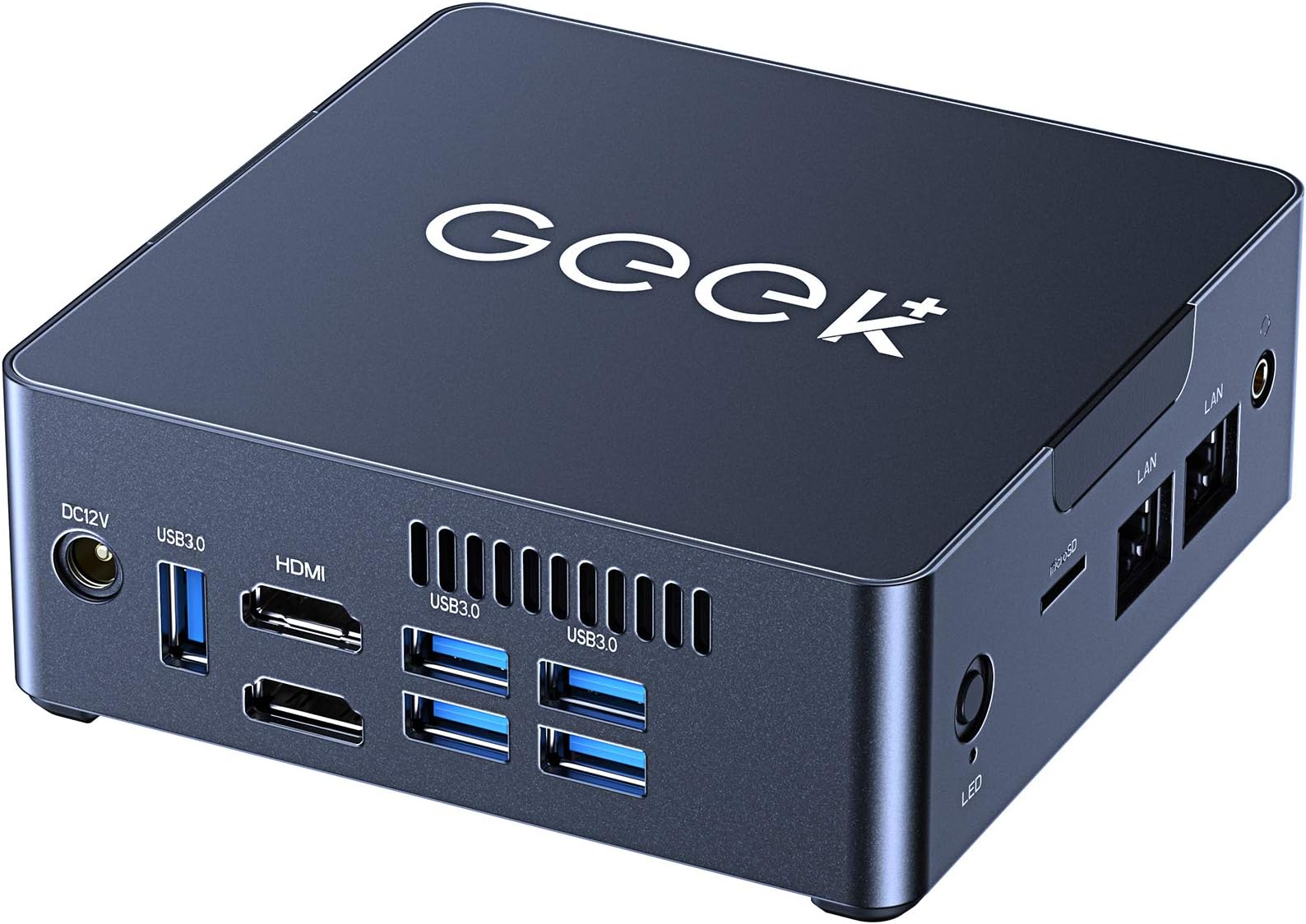
The GEEK+ Mini PC G34 is a sleek, ultra-compact desktop featuring an Intel Celeron J3455 quad-core processor, 6GB DDR4 RAM, and a 128GB SSD. It supports dual 4K HDMI outputs for enhanced productivity and entertainment, offers robust wireless connectivity with dual-band 802.11ac WiFi and Bluetooth, and runs Windows 10 for a full PC experience in a tiny footprint. Perfect for professionals seeking a powerful yet portable computing solution.


| ASIN | B08SQS7NWQ |
| Additional Features | Mini pc |
| Aspect Ratio | 16:9 |
| Best Sellers Rank | #173,462 in Computers & Accessories ( See Top 100 in Computers & Accessories ) #5,571 in Mini Computers |
| Brand | GEEK+ |
| Built-In Media | 13 |
| CPU Model | Celeron |
| CPU Model Number | i5 |
| CPU Model Speed Maximum | 2.3 GHz |
| CPU Speed | 1.5 Hz |
| Color | Grey |
| Connectivity Technology | Bluetooth, HDMI, USB, Wi-Fi |
| Customer Reviews | 4.2 out of 5 stars 140 Reviews |
| Display Resolution Maximum | 3840x2160 |
| Display Type | LED |
| Graphics Card Description | Integrated |
| Graphics Card Interface | Integrated |
| Graphics Card Ram | 4 |
| Graphics Coprocessor | Intel HD Graphics 500 |
| Graphics Description | Integrated |
| Graphics Ram Type | GDDR4 |
| Hard Disk Description | SSD |
| Hard Disk Interface | Solid State |
| Hardware Interface | Bluetooth, HDMI, MicroSD, USB 3.0 |
| Human-Interface Input | Dial |
| Item Dimensions | 4.5 x 4.5 x 2 inches |
| Item Weight | 14.1 Ounces |
| Keyboard Description | QWERTY keyboard |
| Keyboard Layout | QWERTY |
| Manufacturer | GEEK+ |
| Memory Storage Capacity | 128 GB |
| Model Name | 1 |
| Model Number | G34 |
| Native Resolution | 3840 x 2160 |
| Number of Component Outputs | 2 |
| Operating System | Windows 10 |
| Optical Storage Device | BD-R DL |
| Personal Computer Design Type | Mini PC |
| Power Plug Type | Type A - 2 pin (North American) |
| Processor Brand | Intel |
| Processor Count | 4 |
| Processor Series | Celeron |
| Processor Socket | BGA 413 |
| Processor Speed | 1.5 Hz |
| RAM Memory Installed | 6 GB |
| RAM Memory Technology | DDR4 |
| RAM Type | DDR4 SDRAM |
| Ram Memory Maximum Size | 2 GB |
| Resolution | 3840 x 2160 |
| Screen Size | 1 |
| Specific Uses For Product | Business |
| Total Number of HDMI Ports | 2 |
| Total Usb Ports | 2 |
| UPC | 714394980861 |
| Video Output | HDMI |
| Video Output Interface | HDMI |
| Video Processor | Intel |
| Warranty Description | 1 |
| Wireless Compability | 2.4 GHz Radio Frequency, 5 GHz Radio Frequency, 802.11ab |
| Wireless Network Technology | Wi-Fi |
| Wireless Technology | Bluetooth, Wi-Fi |
D**R
Affordable mini PC with great performance
wanted to buy a mini pc for sometime already. Decide to go with this GEEK+ G34 . Have been using this for the past TWO weeks now and have to say it really is an awesome desktop device. It connected to my TV, and stream games and videos. So far it did a wonderful job at that. It has plenty of ports, USB ports, Ethernet, HDMI, a 3.5 mm headphone jack. Love the small and slim design,can’t believe it is a fully functional PC with impressive performance. After activated windows 10, there's all features that come with any normal PC has, except this comes in a very small tiny and cool box. This has completely replaced my decade old laptop. There's also Bluetooth built into and very smooth connecting with my WiFi 5.0 GHz. The device is very quiet when running. I got the 128gb SSD version with 6GB of ram. plenty for using Chromeand other things. Window 10 boots up really fast. Quite impressed with this little tiny PC. I think this can also be used as a learning tool for kids who want to learn programming. You can install all sorts of programming environments. Love this product.
J**E
Solid Mini PC for PFSense
Purchased device to serve as a network router using the open source PFSense software. Realize PFSense can be installed to any old desktop PC but decided to purchase this appliance to minimize power consumption as this router is only for my home network. Of all the dual LAN mini PCs on Amazon, this was far and away the best deal as the J3455 processor benchmarks significantly higher than those offered on competitively-priced units. For my purposes the device has performed wonderfully - was easy to flash the new software to the device and the unit has performed admirably to date. Only qualm of note is that the device comes with Realtek NIC drivers which have been known to cause problems in router applications and, as such, required a couple of additional drivers to be installed on my PFSense interface (took maybe 10 minutes, tutorials available online). Couple hints if you are planning to load PFSense: -- Press F7 at boot to choose USB drive as boot device -- When looking at device, port re0 is the left LAN port and re1 is the right LAN port -- Remember to install realtek-re-kmod drivers to fix NIC issues (tutorials on Google) Would encourage you to consider your application before purchasing - this device is phenomenal for processing applications but don't expect it to be a graphics processing powerhouse as its hardware is ultimately limiting.
M**G
Good form factor for a very efficient, low power processor.
I have been using the J3455 for low power servers and desktops for years. But the minimum cost of a DIY putting together a build with case, motherboard, ram, storage, power supply, is in the $150-$200 range (subject to change, don't know about availability today), and you end up with an unnecessarily bulky MicroATX case or the like. This MiniPC is price competitive with the build your own, you get the Windows license it ships with, a second ethernet port, wifi built in, and the very compact form factor. CPU has AES-NI, QuickSync, and virtualization extensions, so suitable for all sorts of workloads. I gave it 4 starts because I found the automatic blower fan to be loud, ramp up quickly, and at questionable times when the system isn't warm or under load. Only the CPU sensor shows a temperature and it does not appear to be correlated to the fan speed. Anyway, because of the fan noise and inability to control it manually, it somewhat limits the use. Nevertheless, I would rather have more cooling than less. Customer support was friendly and accommodating.
M**M
The Geek + mini PC was a winner!
I bought this little mini PC to be a Netflix/YouTube/Amazon Prime/Hulu machine to hang off of my big TV and stereo system in our living room. Nothing fancy, just pretty much a streaming machine. And in this duty, it has performed admirably. It is NOT a gaming machine, but as a simple workstation and internet streaming device, it works great! I was impressed with how fast it boots up and shuts down. It's simple and it simply works. This unit replaces an old Dell workstation machine that finally died after many years. In comparison, the Geek+ mini PC is quiet, doesn't collect a lot of dust because it doesn't have a big fan on a hot power supply and processor. It's tiny and takes up very little space compared to the old Dell. I plugged it in and the only issue I had was getting it to stay connected with my DHCP server and that took a little tweak to the registry to add an entry to stop gratuitous ARPs. (I hate windows 10 but it's what we have to work with and this WORKS! But after that got that sorted out it has worked perfectly and we have spent the last week watching Netflix and YouTube on it constantly. I would definitely buy this again and recommend it for this light duty use!
S**O
good
I'm going to be completely honest. I was extremely skeptical about spending around $200 on a mini PC from an unknown brand. But I needed something light that can handle basic internet browsing and word processing, and let me tell you: I am blown away!!!! I hooked it up to my 4K monitor and it looks and works incredibly!!! Will it handle 4k video editing and graphically intense gaming? I doubt it. But for anybody looking for a home computer, I promise you will not regret buying this one. Noise: Honestly, it's extremely quiet. I have never heard the fan turn on once yet, even when running multiple chrome windows at once. Build Quality: Fantastic for the price. It has a metal build, and I believe it can even be mounted. It comes with extra screws for that. Storage: While it only has 128GB of internal storage, I doubt anybody using this type of computer will need more. Like I said, this computer is not meant for running all different types of software. It is a home computer and does a fantastic job at that. Speed: I have never had this computer lag yet! I've watched youtube, ran like 20 chrome tabs, and even played a few light games. Really powerful for the price.
W**E
Failing device, no support, no available drivers
I tried three different OSes with this device: Untangle as a router/firewall, Proxmox as a hypervisor, and Windows 10 Home as a desktop OS. This device did NOT WORK for any of these things. The Untangle installation takes over an hour before hanging and does not continue. I tried the same installation USB drive on two other devices where it worked just fine. I tried multiple USB ports on this PC. Proxmox installs correctly, and you can create containers and virtual machines, but both the host and anything virtualized randomly becomes inaccessible on the network. At these times, when I tried to troubleshoot using a keyboard and monitor, the device was unresponsive. Sometimes, a reboot would temporarily resolve. Other times, simply waiting it out would resolve itself. Of course, having all virtual machines and containers randomly become unavailable is not viable at all. I tested the Ethernet cable and switch port on other devices, and that problem did not exist. Finally, I gave up and decided to use it as an HTPC running Windows 10 Home on my living room TV. Everything works fine except sound. There are no sound input or output devices. Device Management shows an unknown device called “Multimedia Audio Controller.” Even on the latest version of Windows 10, having installed all available updates, there are no updates available in Windows Update that have this driver. There are no “Optional Updates” or “Recommended Updates.” I went into properties for the unknown device, copied the hardware ID, and searched google for a driver for the hardware ID. The only results were shady “driver update” spyware. I installed Intel’s driver management tool, which said all drivers were successfully installed. I did endless google searches of “multimedia audio controller driver windows 10” and other variants of the search terms and found no viable options. I did all of the usual things - remove the device from device management to let it rediscover the device. I tried using device management to auto-discover the driver in Windows Update. I tried manually selecting a driver from a list of hardware - which only resulted in a BSOD. The problem is that I don’t know what the hardware is. CPU-Z is software that identifies motherboard, chipset, and more, but it did not provide info about what to install. The vendor’s website contains no drivers for this PC. Another review on Amazon mentioned having to email the company for drivers. I did that, and I have gotten no response. I gave “video quality” 5/5 stars because the HDMI video works well on my 4K TV. I gave “for gaming” 2/5 stars because I was able to successfully install Steam and play Nidhogg. I was able to use my Xbox One Wireless Controllers to pair with an Xbox wireless adapter USB device and play with two controllers. When I paired the controllers directly with the Bluetooth in the PC, performance was flaky. So if you want to use Xbox One controllers, don’t rely on the Bluetooth. Use the Xbox wireless adapter USB device. Ultimately, I can’t use this device for anything. It’s entirely useless to me if I can’t install a hypervisor, a Linux OS, or get sound in Windows. I did not test the device with the pre-installed Windows before formatting the SSD and installing my first OS attempt - Untangle. I assume that the device was shipped with a working audio driver in Windows. However, if you reformat, you will lose that driver and it cannot be recovered as it can’t be found anywhere and the vendor does not respond to email.
G**W
Very satisfied with mini pc and Fantastic for the price
This little guy is truly amazing. I was so astounded by how lightweight it is that I thought it was fake at first! In fact, this little PC booted right into Windows 10, preinstalled and already activated for you! I was assuming I would have to install my operating system, but nope! Ready to go out of the box, just as you would expect from Dell or HP. This guy comes with 6GB of DDR4 memory (soldered), a 128GB SATA 2280 M.2 SSD, and a Celeron J3455E, an ultra-low power consuming quad core processor. If you take the bottom cover off, there is room to fit a 2.5 inch laptop drive AND another M.2, NVMe OR SATA. The one cooling fan that's installed is a blower style fan, which works quite well for this setup. It's not loud, and doesn't ramp up very often. I use it in place of my power-hungry PoE Network Video Recorder, and it handles the load of 6 cameras just fine. Keep in mind, that the processor also encodes the video from each camera, so it is processing the video stream into a VLC playable file while recording that very same footage. So far, it has been running 5 days without a hiccup! If you're needing a tiny PC for on the go, general web browsing, or even an entertainment/living room PC, I would HIGHLY recommend this device!
S**5
This device makes a pretty good pfsense firewall.
I bought this device to replace an existing pfsense firewall. I set the bios boot order to usb first, hdd second, inserted the usb drive and the device booted into the pfsense installation without any problems. Installation was uneventful with no errors. interface re0 is the network port on the left with re1 on the right. I restored the configuration backup I had from the existing firewall, and was asked to re-associate the new wan/lan ports to the new NICS. Everything worked after this last step. The device will always power on and boot when power is applied which is what you want for a firewall after a power outage. This can be changed in the BIOS. Performance is good with no errors reported by interface statistics. I'm really very happy with how easy it was to set this up with pfsense and use it to replace a more power hungry device. There are a few things to note about this device. You have to pull the rubber feet off to open the device. The M.2 drive will not accept a NVME drive, SATA only. The memory is attached to the main board so 6GB is it. The USB ports are upside down, if you use a YubiKey the button will face down. There doesn't seem to be a support site for downloads so you have to email them for any drivers. This kit comes with an adapter for a normal ssd but I could not get the connector on the mainboard to open. I didn't want to apply too much force and break it, so I didn't use it. I'm happy with this device so far and will update this if anything changes...
M**O
Silenciosa y rápida
Compre 2 equipos similares, pero a diferencia de los dos este me pareció muy cómodo, silencioso y rápido, responde muy bien si usas widnows 10 con office y solo haces actividades de trabajo. Excelente selección para ahorrar espacio.
B**M
Buen equipo
El único inconveniente es la ubicación del botón de encendido en la faz donde están los puertos de red. Me parece que debería estar en la faz de los puertos USB.
Trustpilot
2 months ago
3 weeks ago