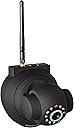
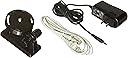
Wireless/Wired IP Pan/Tilt/Night Vision Internet Surveillance Camera Built-in Microphone,two-way audio
Product ID: 2793465
🌙Night vision
📡Wi-Fi module
🔄270° Pan
👁️ Keep an Eye on What Matters Most!
This Wireless/Wired IP Pan/Tilt/Night Vision Internet Surveillance Camera features a built-in microphone and two-way audio, allowing for real-time communication. With a 270° pan and 120° tilt capability, it provides extensive coverage. The camera supports both WAN and LAN browsing, offers day/night vision, and includes intelligent motion detection for enhanced security.
E**Y
Better than expected, but not easy to set up
Final Edit 10/26/2018 - The camera has finally stopped working for me. I am unable to connect to the web server to configure and after many reset attempts, I think it is finally dead. Currently searching for a replacement*** EDIT *** The camera has held up outside since I initially wrote this review. 10/2011 - 9/2015 so far and its still chugging along---------------------------------------------------------------------------------------------------------------------------------------------------------------------------------------------------I was apprehensive about this camera because it was so cheap, but I am fully satisfied by the current state of it.I fully recommend this camera if you are confident enough to get through the setup. In fact, I just purchased a second one before starting this review.First off, the manual is garbage. Ive built a few ikea furniture pieces before and those instructions are vastly superior.General review: The daylit picture quality is fine for me. Color seems to be ok. Im not broadcasting a movie, just monitoring my yard. Night viewing seems fine also. Quick moving objects show blurred in infrared mode. LOL, I just got a motion alert and then got a picture of the guy mowing my lawn while writing this review. There is no daylight motion blur but in the mixed bright light/shadow area (trees and sunlight) I got an over exposed picture and could barely make out the face. Might need to knock the brightness settings down a hair. See the note in the outdoor mounting below... The infrared and glass do not play well together.Some background: My home network is a mix of apples and linux pcs. No Windows. My wireless network is set up with MAC (address) filtering.The camera defaults its IP address to 192.168.1.126, if you have a network on a different subnet (mine is 192.168.2.X) then you will need to either switch the network back to .1, do it on someone else's network, or use a crosscable. I hooked up to an old router I had and configured through the wired. I figured Id set everything up through the wired connection first. Hit up the <...> address and logged in (admin, blank password). The Device ID is supposed to be the MAC address...and it is, but its not the wireless MAC address. I still dont know how to find it through their software btw. Anyways, I updated the admin password - 30 second reboot occurs. Next I went through the Basic Network Settings and this is where it took a while. In fact, I still need to go back and modify this again now that its working. Since I do MAC filtering, I couldnt set it to "Obtain DHCP" yet which is what I need to go back and switch now. In order to find the MAC address, I had to set the static IP settings and then turned off MAC filtering on the router. **IMPORTANT** Reboot the camera and while it is doing its countdown, unplug the ethernet cable. It took me an hour and a half of cursing and trying different things to figure that out. At this point the camera connected to my router and I was able to check the 'status' section in the router settings to pull the MAC address. Turned filtering back on and it was good to go. I set up the "Mail Service Settings" to my gmail account. I like that you can specify multiple recievers, I send to myself and my wife but I think you can specify up to four addresses. GMAIL SMTP settings - Server: <...>, Port: 465, Protocol: TLS, Need auth: check, username: me, password: my password. You have to click set before you can test, dont forget. Moving onto the Alarm Service Settings... Im still tweaking these. Now that the camera was configured, I mounted it outside. The manual says not to, but Im not too concerned about it. Last night, the motion sensitivity was set to 8. I didnt start receiving motion alert emails until about 5am, maybe four of them. Since 8am, whoa boy. I got an email every two minutes. Its now 1:30pm and somewhere around 120 emails later. I just dropped the sensitivity down to 3. Emails are still coming at the same rate. Checking the live feed, I can see the wind is blowing tree branches and there is a lot of shadow movement in the monitored area. Also, the shadows have moved from the sun location. I think I will need to set up the scheduler in the alerts to only run motion sensing at specific times during the day. I figured email option (smartphone) was the quickest way to get alerts, but its proving to be a bit annoying with my setup. Oh well, performing as advertised.I wanted this camera to be undetectable and that was not going to happen with the obnoxious green flashing light on the front. Two pieces of electrical tape blacked it out. When the light sensor 'activates', you can see the ring of 'infrared' LEDs around the lens but it is fairly dim and not attention grabbing.The install CD that comes with the cam isnt necessary. The manual implies that software will be installed on your windows computer that will help you configure and view the camera. This is not the case. Looking for the wireless MAC address, I ended up (always the case with computers) going down a path seemingly unrelated to what I was doing. I ended up having to update my vmware software - compiling modules etc, ugh - and fired up a Windows XP VM. I ran the CD expecting to have some more intimate connection with the camera...but it was just an executable version with a modified interface than the web interface....waste of time.If I remember, I will post an update on the outdoor durability... Its currently mounted on the underside of an overhanging roof section. Its October 2011, hopefully it lasts through winter (NJ) into 2012. If not, lesson learned I guess. ***NOTE*** I originally thought I was going to sit the camera in a window to monitor a section of my yard. It was fine for daylit viewing, but once the infrared came on, there was a nasty glare on the window that made the night viewing nearly useless. Once moved outside, the picture was fine.Hopefully this will help anyone trying to set up the camera, I felt like a fool having spent so much time setting up such a simple device AND being computer literate. Knowing the steps above, I dont think setting up camera2 will take more than 10 minutes, and thats with the camera doing its 30 second reboot cycle after each step.
P**O
Good camera but has flaws.
Camera works well after a bit of a set up but with exceptions. Still cant get any remote view over the internet after numerous videos and emails. Even just local use the camera view goes out at least every half hour and has to be refreshed often. A shame because the picture is good and pan and tilt work great also the night vision is perfect. No zoom but not a big deal. If I could see this cam from work (LIKE I BOUGHT IT FOR) or didnt have to refresh so much this cam would get a five. But until then....Im being generous at a three. Only because it frustrated me. I could have bought a cheaper webcam for what Im getting now.
B**H
great value, good performance, poor documentation, customer support
This is a great product at a good price, but it could use better documentation and software. Pan & tilt are smooth but there is no zoom. The IR works fine and there is ample mounting hardware. If camera maker (Hootoo?) could make this plug and play, they could sell a lot more of these cameras. I used the browser interface and noted that Firefox and IE offered different features. I did not try the mobile phone interface.Update: I lost the CD that came with the unit. A call to HooToo customer support produced no help at all. If anyone has one of these cams, I would like to buy a copy of the CD.
E**P
One out Three was Bad
I previously purchase this same camera from another vendor and was very satisfied with the camera.Needed 3 more and decided to ordered from this vendor ( different from previous order ) in Dec 2011.Just found time to config them and discovered 1 out of the 3 is defective. Hoping this vendor will replace it for me....?
D**N
Good value for price
Works well until it get hot then it tends to reset itself and hang. Then it needs power rest to recover.
S**Y
... have paid attention to the reviews on this camera better. I still haven't been able to hook it ...
I should have paid attention to the reviews on this camera better. I still haven't been able to hook it up even after spending time with the support of the company. I would not buy again
K**S
Good if you need it for 24 hours only
This product worked for a day. After that, video stopped. Everything else worked ... wireless networking, rotate the camera from via browser controls and so on. But no video. Black screen. Returned it. Great product when it works. Recommend you order twice as many as you need; then return the bad ones!
J**S
Five Stars
Very Nice for the money
Trustpilot
2 weeks ago
5 days ago