Buy anything from 5,000+ international stores. One checkout price. No surprise fees. Join 2M+ shoppers on Desertcart.
Desertcart purchases this item on your behalf and handles shipping, customs, and support to GERMANY.
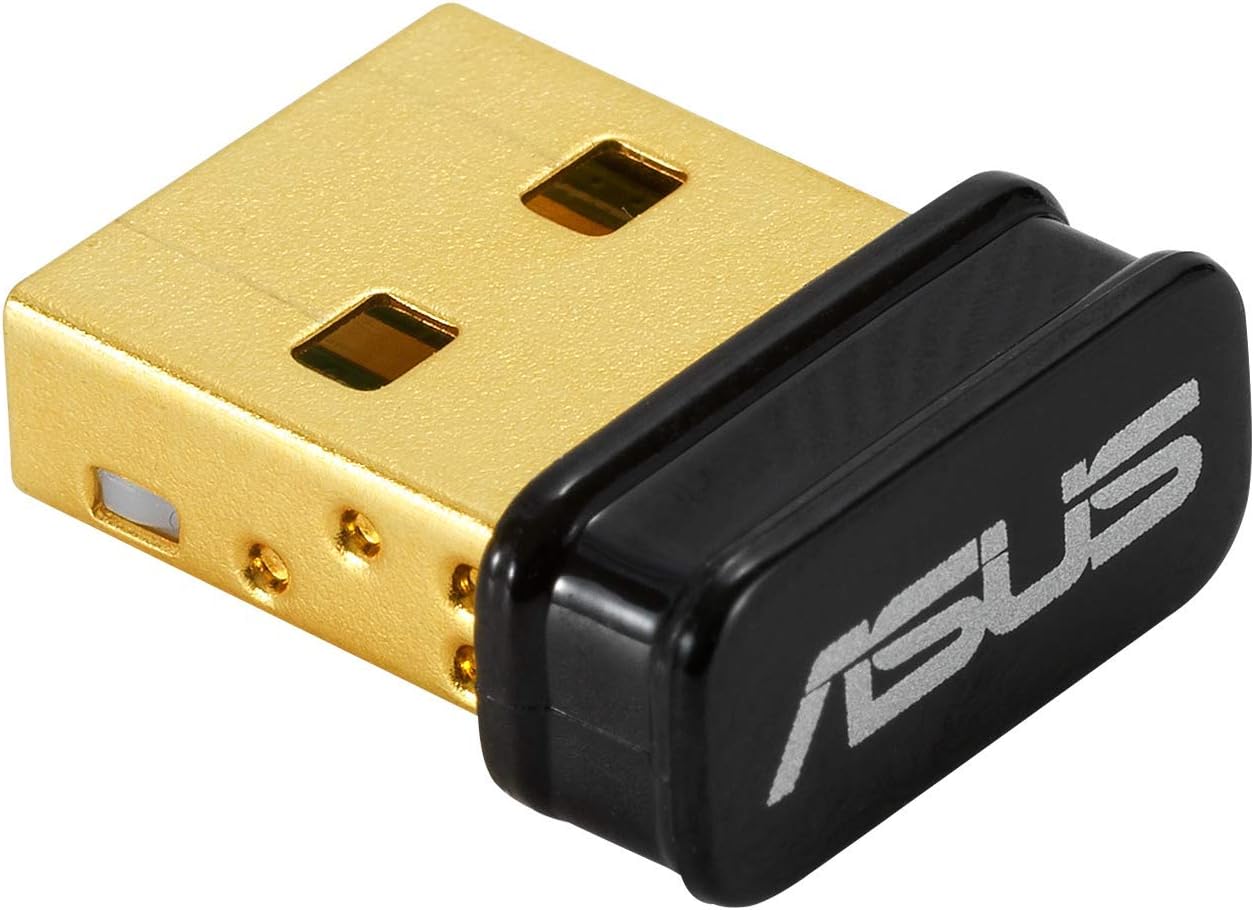
🚀 Elevate your wireless game with ASUS USB-BT500 — small size, massive reach!
The ASUS USB-BT500 is a TAA-compliant, ultra-small USB Bluetooth 5.0 adapter delivering up to 2X faster data transfer and 4X greater range than previous versions. Backward compatible with Bluetooth 2.1/3.x/4.x, it ensures broad device support and energy-efficient wireless connectivity. Ideal for professionals upgrading desktops or laptops, it offers reliable, low-latency connections for audio, peripherals, and more, backed by a 3-year warranty and strong user acclaim.


| ASIN | B08DFBNG7F |
| Best Sellers Rank | #9 in Bluetooth Network Adapters |
| Brand | ASUS |
| Built-In Media | USB-BT500 Adapter, Warranty card |
| Color | Black |
| Compatible Devices | Desktop, Headphone, Laptop, Speaker |
| Compatible Operating System Family | Windows |
| Customer Reviews | 4.5 out of 5 stars 6,417 Reviews |
| Data Link Protocol | Bluetooth |
| Data Transfer Rate | 4 Megabits Per Second |
| Hardware Interface | Bluetooth, USB |
| Item Dimensions L x W x H | 0.59"L x 0.28"W x 0.69"H |
| Item Type Name | ASUS USB-BT500 Bluetooth 5.0 USB Adapter with Ultra small Design, Backward compatible with Bluetooth 2.1/3.x/4.x |
| Item Weight | 4.54 g |
| Manufacturer | ASUS |
| Mfr Part Number | USB-BT500 |
| Minimum Required Operating System Version | Windows 10 |
| Model Number | USB-BT500 |
| Product Dimensions | 0.59"L x 0.28"W x 0.69"H |
| UPC | 192876476772 |
| Unit Count | 1.0 Count |
| Warranty Description | 3 Years |
M**W
High quality product
Worked perfectly and instantly. I plugged it in and had my brand new device paired within 30 seconds. Very intuitive.
F**C
Works good in Linux with some effort
I bought this to interact specifically with ble 5.0 devices from my PC and possibly some SBCs. This was a huge pain to install but here's what I did which will hopefully spare someone else the agony. The documentation on the Asus site is pretty abhorrent. It's mostly Windows oriented, and even for Windows the documentation is awful and you are pretty much on your own. It's a "plug and pray" situation with this thing until you get it setup correctly. Yes, it's supported in Linux so should work on Raspberry Pi as well. Once it's running it's actually really nice so far. Also the drivers include the source which is a win. How I got it working (old Ubuntu 18.04 with kernel version 5.4.0): First, download the driver from the Asus website. Second, blacklist all default bt drivers by creating the file /etc/modprobe.d/bluetooth-blacklist.conf then add this to it: blacklist btrtl blacklist btusb blacklist btintel blacklist btbcm This was necessary for me as the two devices were fighting for attention so to speak. It may not be needed for you (you can skip this and try it later if needed). Third, reload the kernel module settings (part of the above step): sudo systemctl restart systemd-modules-load.service Note that you will probably lose your bluetooth control panel, but you can undo this later by deleting the conf file then reloading the settings again. Fourth, install the driver after unzipping it and cd'ing to the folder: sudo make install INTERFACE=usb Fifth, you must copy the firmware to the correct location. Go into the folder /rtkbt-firmware/lib/firmware inside the driver folder and copy these two files to /lib/firmware/ on your system: rtl8761bu_config rtl8761bu_fw Now see if the device is listed: hciconfig -a the device should appear there. If not, unplug the device then turn bluetooth off then on. Depending on your distro, it could one of these (Deb/Ubuntu/fedora): sudo service bluetooth stop sudo systemctl stop bluetooth Plug it back in, run hciconfig -a again and it should be working. If still nothing, run: lsmod | grep bluetooth and see if 'rtk_btusb' is listed next to bluetooth (with some others, probably). If so then the driver is probably installed. Now let's see if your firmware is correct: Type dmesg and see if there are any errors there. If you are seeing a cryptic message in dmesg like: rtk_btusb: fw name is rtl8761bu_fw rtk_btusb: This is not 8723a, use new patch style! then the firmware has not been copied to the correct folder which will prevent it from working. Locate the correct firmware folder for your distro then redo the steps from that point again. Hopefully it should be running now. Now you can play with it in bluetoothctl. Type bluetoothctl then type scan on and see if there are any devices. Type help for a list of commands... have fun! If all else has failed, remember to register your device on the Asus website then you should be eligible for support (didn't try this, your mileage may vary).
M**R
Works great, but make sure to install official drivers for best quality!
Works great with my google pixel buds. I tried a different USB adapter that gave me more range, but terrible audio quality. This adapter on the other hand has a range of maybe 15 feet, but excellent audio quality for my wireless ear buds. And it also works on linux!
O**M
Works great for Linux !
As advertised , works great, use it in Linux Mint and Fedora , under VM For Kali .
B**N
A little choppy at times while using it for a bluetooth speaker but overall good
The ASUS USB-BT500 Bluetooth 5.0 USB Adapter has been a valuable addition to my tech setup, and here's why: Ultra Small Design: This adapter's ultra-compact design is a standout feature. It's incredibly small, almost flush with the USB port, and doesn't obstruct adjacent ports, making it perfect for laptops and PCs where USB space is limited. Seamless Connectivity: The Bluetooth 5.0 technology ensures stable and efficient connections. I've experienced consistent and fast pairing with various devices, including headphones, speakers, and smartphones. Plug-and-Play: Setting up the ASUS USB-BT500 is a breeze. It's a true plug-and-play device, so there's no need for complex installations or driver updates. Simply plug it in, and it's ready to use. Wide Compatibility: I appreciate its backward compatibility, allowing it to work with older Bluetooth versions as well. This versatility ensures it can connect with a wide range of devices. Reliable Range: Despite its small size, the range of this adapter is impressive. I can move around my room without losing connectivity to my audio devices. Stylish Look: The sleek and modern design blends seamlessly with my devices. It's not an eyesore and actually adds a touch of style. Affordable: Considering its performance and features, the ASUS USB-BT500 is competitively priced. It offers great value for upgrading non-Bluetooth devices.
G**E
Must have
Life saver flawless setup and use had this a or so
I**.
It saved my sanity
I’ve got a brand-new PC and was losing my mind with Bluetooth audio issues - dropouts, no sound, “paired but not connected,” the whole nightmare. I bought this dongle as a last resort, and it fixed everything instantly. Important tip: Don’t bother with the ASUS driver that the instructions point you to. On Windows 10/11, just let Windows install its built-in “Generic Bluetooth Adapter” driver through Device Manager. Once I did that, my headphones paired and worked perfectly. If your PC’s built-in Bluetooth is flaky, this little adapter is a lifesaver.
A**E
Works great once installed correctly
Installed on Windows 10 64bit OS. Definitely had to download/install the driver but that wasn't difficult, it prompted me to do it and I just had a few clicks and it was done. I have not noticed any lag issues, but I'm not using it for audio at this time so I can't rightly speak to that. File transfers are OK and it works great for mouse & keyboard. The rest of this won't apply to like 99% of people but I'm putting it here in case anyone encounters the one gotcha I experienced with this device, which was starting up the PC cold (from being turned off). It was taking too long after I installed this device. Windows did come up, but it sat at an empty screen for a couple minutes whereas this computer used to just blast open whenever I'd start it up. I messed around a while before I found something online about similar issues. The article I found suggested that even though my motherboard did not "have" bluetooth onboard, sometimes there is something buried in the BIOS (or UEFI) related to bluetooth, and apparently some mainboard manufacturers actually ship boards with bluetooth only disabled as some arcane marketing strategy to sell the boards at a lower price (??). My mainboard definitely wasn't supposed to come with bluetooth and I had no signs of any pre-existing Bluetooth devices in Device Manager, but sure enough I entered my BIOS at bootup and there were two bluetooth items listed, one was already disabled and the other (named something like "connectivity wifi/bluetooth") was enabled. I disabled it (this computer uses an ethernet cable, not wifi) and the PC boots very quickly again. I gotta think that was it, I DON'T think you want multiple bluetooth adapters enabled like that. Weird problem that only occurred on cold boot - Standard restarts weren't affected. Anyway, I could be the only one in the world who had that problem, and I'm enjoying the bluetooth now. I'd buy it again
G**C
Good performance
working well, no lag , range also very good
D**A
Excelente opción para controles BT
Después de comprar más de 5 adaptadores chinos, me decidí a comprar un buen adaptador de marca. Este adaptador BT Asus es excelente. La señal es fuerte y de buen alcance, no hay Lag, no hay desconexiones. Lo utilizo para mi control 8bitDo Pro 2 y funciona de maravilla.
M**.
tres bien
Super produit ! Très facile à installer et fonctionne immédiatement. La portée est excellente et la connexion est rapide grâce au Bluetooth 5.0. Parfait pour les accessoires sans fil !
A**R
أفضل USB Bluetooth على الإطلاق!!!
صحيح أنه باهظ الثمن كقطعة صغيرة جداً لكن كأداء ومحيط ونطاق التقاط الإشارات من الأجهزة التي تمتلك Bluetooth قوية جداً. قوة ومدى الترددات والإستجابة عالية جدًا تصل حتى 10 أمتار, ولا يوجد تأخير إلا بسيط ممكن أقل من 15 مللي ثانية!! لدي جهاز تحكم للـ Playstation 4 وسرعة استجابته رهيبة! لا تبخل على نفسك من اقتنائه. شركة التايوانية Asus لن تخيب ظنك أبداً 🖤 ملاحظة: "ليس تطبيل للشركة, لكن جودة صناعتهم رائعة".
R**O
Bom!
Muito bom, coloquei e não precisei configurar nada, funciona perfeitamente.
Trustpilot
2 months ago
3 weeks ago