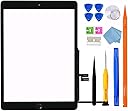
![for iPad 7/8 (7th 8th Gen) Screen Replacement Digitizer Touch Glass 10.2", for 7th 8th Generation A2197 A2198 A2200 A2270 A2428 A2429 A2430, Full Repair Kit+Home Button[NO Fingerprint Reader] [NO LCD]](https://m.media-amazon.com/images/I/51QqaL3d-aS._AC_SL3840_.jpg)



Buy anything from 5,000+ international stores. One checkout price. No surprise fees. Join 2M+ shoppers on Desertcart.
Desertcart purchases this item on your behalf and handles shipping, customs, and support to GERMANY.
๐ง Fix it yourself, save big, and stay connected in style!
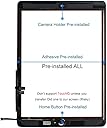
This GoodFixer replacement digitizer touch glass is engineered exclusively for the iPad 7th and 8th generation 10.2-inch models, providing a precise fit and restoring touch functionality without the LCD. The kit includes a pre-installed home button (without TouchID), a comprehensive set of professional-grade tools, and manufacturer-backed support for installation mishaps, empowering you to confidently repair your device and avoid costly service fees.
| ASIN | B08C9JV9R9 |
| Best Sellers Rank | #3,856 in Electronics ( See Top 100 in Electronics ) #1 in Tablet Digitizers |
| Brand | GoodFixer |
| Brand Name | GoodFixer |
| Clarity | 10 |
| Color | Black |
| Compatible Devices | Setting->General->About->Model Name: iPad (7th generation) || iPad (8th generation) |
| Compatible Phone Models | iPad (7th generation) || iPad (8th generation) |
| Customer Reviews | 4.2 out of 5 stars 4,330 Reviews |
| Finish Type | Glossy |
| Global Trade Identification Number | 00086291344740 |
| Item Dimensions L x W | 10.2"L x 10.2"W |
| Item Hardness | 9H |
| Manufacturer | GoodFixer |
| Material | Tempered Glass |
| Model Name | GoodFixer iPad 7/8 2019/2020 10.2 inch |
| Model Number | 2019-B |
| Number of Items | 1 |
| Part Number | 2019-B |
| Product Dimensions | 10.2"L x 10.2"W |
| Screen Size | 10.2 Inches |
| Screen Surface Description | Glossy |
| Special Features | Scratch Resistant |
| UPC | 086291344740 |
| Unit Count | 1.0 Count |
| Warranty Description | 1 Year Manufacturer |
H**M
Super Easy Repair!
I ordered this replacement screen for my 2020 10.2-inch iPad, and I couldnโt be happier with the results. Initially, I was hesitant because I had no prior experience repairing electronics. However, after watching a few repair videos, I felt confident enough to tackle the job. I chose this product because it came with a complete tool kit and had excellent reviews. The kit arrived in a sturdy box, ensuring the screen was well-protected during shipping. Inside, I found everything I needed: multiple plastic opening tools, a screwdriver, a scraper, tweezers, and even a razor blade, which was especially helpful for removing the old adhesive. The only additional tool I had to provide was a heat gun. The repair process was straightforward. It involved removing the old screen, unscrewing about eight screws, disconnecting the digitizer, and unplugging four ribbon cables. Once the old screen was removed, installing the new one was just as simple. The adhesive tape on the new screen worked perfectlyโjust ensure you remove all the backing before attaching it. I also appreciated the detailed instructions with pictures, which made it easy to follow along step by step. To my surprise, the kit even included a screen protector, which saved me the expense of purchasing one separately. From start to finish, the repair took me about an hour. This kit exceeded my expectations. It was affordable, included more than enough tools to complete the job, and ultimately saved me a significant amount of money compared to taking it to a repair shop. Plus, the bonus screen protector was a fantastic touch! I highly recommend this product to anyone looking to replace their iPad screenโwhether youโre a beginner or more experienced.
B**T
iPad Replacement Screen
I recently purchased this iPad replacement screen to fix a cracked display on my iPad (10.2-inch, 8th Gen), and I couldnโt be more impressed with the results. The screen came well-packaged with all the necessary tools, including a screwdriver, suction cup, adhesive, and plastic prying tools. The instructions were clear, but Iโd definitely recommend watching a tutorial video if youโre a first-timer โ it makes the process a lot easier. The screen quality is excellent. The touch response is just as good as the original, and the display is bright and sharp. The digitizer worked perfectly with no lag or dead zones. After installation, everything aligned well, and the adhesive held firm. What really stood out to me was how affordable this replacement was compared to having it done professionally. It saved me quite a bit of money and gave me a satisfying DIY experience. Just take your time during installation. Pros: โข Great display quality โข Responsive touch โข Comes with all necessary tools โข Good value for the price Cons: โข Installation can be tricky for beginners Overall, Iโd highly recommend this replacement screen if youโre comfortable with a little hands-on work. Itโs a solid fix and brings new life to a damaged iPad.
G**A
iPad Screen Replacement
Great screen replacement. Easy to install, seller very prompt in answering questions.
P**R
Works, but not easy. Home button didnt work. Bonus screen protector is fragile...careful.
Dropped my older iPad and cracked the screen enough that chunks were missing and small shards ended up in my fingers. Watch several videos before trying to perform a replacement. Each video has a useful tip or two that you can combine for a relatively easy job. Once the old screen and glass were out I worked on the replacement. This comes with a strip of double sided tape to use around the edges. Some units have adhesive on the screen itself which is likely easier. I found the biggest issue with the glass being the corner where the two sockets attach to the iPad under the digital screen. Even though everything seems good, there is more material than OEM and that side doesnt want to sit flat. Maybe I did something wrong, but couldnt figure out where the electric strip goes to sit flat. After taking it apart several times I gave up and will just live with it. The home button set off a warning that it didnt function. I tried to replace with the original and it doesnt work now either. The iPad can function without the home button, but more of a hassle. I'll find some case that goes over the edge to ensure the glass doesnt come off, but disappointed I couldnt get it to work better. They did provide a screen protector to put over the glass, but I held it by the corner and it broke. It still works, but that is a lot more fragile than anticipated. Be very careful handling it and also placing on the screen to prevent air bubbles. Because it is a stiff protection glass you cannot roll it on to eliminate bubbles. Someone with skill could probably do it well. I could not. Overall, I didnt spend much and have an intact screen on the iPad I mostly use on my gym equipment, so still worth it.
A**R
IT works! I highly recommend this specific listing.
IT WORKED!!! I am not that tech savvy and was very scared to do this. But, i chose this vendor because they state they will help you 1x if you break it when installing it. I know that sounds silly, but it for the extra 2-3$ more then the other vendors, i chose this listing. I also installed it well following online videos and their directions. It wasn't hard either. One step at a time. Anyways, i am so happy that it worked, i am here to let others know - if you are scared to do this, get this one. You probably won't mess it up, but even if you do, they will help you which is awesome.
C**.
Great Fix and even better customer service!
I bought this as a last resort for my son's ipad, His screen was completely shattered and I figured I would try this out instead of shelling out $100+ to have a professional do it. The instructional video isn't too helpful as far as installation goes but there are plenty of videos to follow online. If you choose to go this route though, I hope you are good working with extremely tiny screws and very delicate items. The process was easy enough once I got the screen off. Now the ipad works perfectly! I'm not sure why there are reviews saying that the touch was unresponsive. You just have to take care to do the installation of the screen carefully and everything should work just find. The screen didn't adhere well but they supply more tape to help. In the process of finishing, I accidently pressed too hard and ended up immediately cracking the new screen. I was devastated. Inside the package, the company included a card detailing their warranty and noted their email address if you have installations accidents. I emailed them with honestly no expectations. They got back to me within a few hours. They just had me send my order number and pics of my screen and they had a replacement sent. I received it within two days! I will definitely keep this company in mind whenever I need to order replacement screens. I have three young boys and this avenue is definitely cheaper that apple care or anything else. If you're on the fence about this item, just order it! The customer service alone is worth it!
H**6
Cheap replacement but not as good as original screen
Kit came with everything we needed and was easy to use but the new screen cracked as my husband was pressing it on towards the bottom. It still works for now but the screen isnโt as responsive as the factory one was originally so will be replacing this again when the crack gets bad enough.
T**M
Good replacement overall
A few tips before starting: 1) be sure to watch youtube videos before doing so. The video in the description is not enough to know all the steps. 2) Be super careful for the bottom "right" of the ipad. You can cut the "touch panel" wires since you will be replacing that. But you want to be sure not to cut the "button" wire. This is because the button that comes with the iPad is touch sensitive. The replacement button is not. So if you use the button that the vendor sends you will no longer have touch id ability. 3) USE A HEAT GUN! While others say a hair dryer may work. I recommend a strong heat gun that you can adjust the temps. You must heat up the sides just enough to start to pry off the glass. Since this glass is super easy to crack I recommend having a space where you can have lots of small piece's of glass. 4) I recommend using latex gloves. This is both to protect you from the heat but also the shards of glass. If this is your first time replacing a screen on any device (ipad, iphone, etc) take your time. It will likely take 1-3 hours. The slower you go the more likely you have a better result. Be sure to remove all old adhesive glue. This kit comes with some additional adhesive to attach the screen. I ended up putting this along the entire edge. Just before closing everything up I put some "gel super glue" on the 4 corners of the ipad. I would only recommend this if you intend to do this once. My ipad had some LCD damage (color warping) but was not too bad. So I figured this would likely be the last repair before I get a new one. The 7th generation iPad is still pretty decent for web browsing, youtube, etc. But will likely get a replacement in a year or two. That said overall the install was a bit longer than expected but I wanted to be sure I did not break the LCD or cut any wires. That said, I recommend watch the entire youtube video before beginning. Vendor Notes: I would recommend adding a few of the screws in the kit. I ended up loosing one of the screws to hold the LCD and touch panel wires in place. Since it needed 3 it was not that big of a deal. The screw was so tiny I still can't seem to find it. For each of the screws I would recommend at least 2 of each just in case. Other kids I have done for switches, iphones, etc. They tend to have replacement screws in case they become damaged on removal or lost. If it does not add much extra cost it would totally be worth it.
L**E
Great replacement and far cheaper than paying someone to replace it.
Followed a YouTube video to instal. Removing the old screen was messy as the glue was stuck tight, despite warming it up, which meant the glass broke into tiny pieces. But once off it was easy enough. Had to contact customer support as after instillation the screen developed a problem but I was refunded then bought a new one. Fitting and it works fine. One issue with both however was the fact that the fingerprint scanner no longer worked but this is not an issue for me as itโs my 9 year olds. The button works to return to the Home Screen which is the main thing. Customer support were very quick to reply and sort any issues I had and I learned a new skill in the process.
S**R
ู ูุชุฌ ุชุงูู
ุชุฃูู ูุง ุงูุตุญ
A**Z
Very friendly support
The Product is pretty good and the Support is Great, always getting a prompt reply for any question and quite helpful and understanding
N**C
Perfect replacement screen and tools
Many videos recommend using the old home button, but if I did it again, I would use the one that comes installed. This is an excellent purchase. There is an excellent install video on YouTube which is slower and helps more. Heat pad or gun is essential.
K**Y
Instruction Video
Looks ok
Trustpilot
2 days ago
1 week ago