Desertcart purchases this item on your behalf and handles shipping, customs, and support to GERMANY.
โก Power Your Home Network Like a Pro โ No Outlet Left Behind!
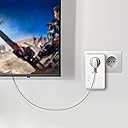
The Zyxel AV2000 Powerline Ethernet Adapter Starter Kit delivers ultra-fast 2000 Mbps data speeds over your existing electrical wiring, enabling seamless 4K streaming and lag-free online gaming. Featuring dual Gigabit Ethernet ports and a convenient pass-through power socket, it maximizes connectivity without sacrificing outlets. With advanced MIMO and HomePlug AV2 technology, plus easy plug-and-play setup, it extends stable, high-performance wired networking across your homeโperfect for smart TVs, gaming consoles, and multiple devices.

| ASIN | B0173CGWFY |
| Best Sellers Rank | #483 in Powerline Network Adapters |
| Brand | ZYXEL |
| Built-In Media | Network Adapters, Powerline Networking Products |
| Color | Better - AV2000 |
| Compatible Devices | Game Console |
| Customer Reviews | 4.2 out of 5 stars 782 Reviews |
| Data Link Protocol | Ethernet , Gigabit Ethernet |
| Data Transfer Rate | 1800 megabits_per_second |
| Global Trade Identification Number | 00643749351530 |
| Hardware Interface | Ethernet |
| Item Dimensions L x W x H | 9.2"L x 7.4"W x 3.8"H |
| Item Type Name | ZyXel COMMUNICATIONS PLA5456KIT AV2000 Pass Through Kit |
| Item Weight | 1.6 pounds |
| Manufacturer | ZyXel |
| Mfr Part Number | PLA5456KIT |
| Model Number | PLA5456KIT |
| Number of Items | 1 |
| Number of Packs | 2 |
| Product Dimensions | 9.2"L x 7.4"W x 3.8"H |
| UPC | 643749351530 760559123772 |
| Unit Count | 2 Count |
T**R
Easy to install and works better than I had hoped
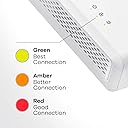
Ever wonder how to get wired internet into another room of the house without having to snake an Ethernet cord through the walls or up the stairs? Years ago someone discovered you could use your home electrical copper wiring to transmit your internet signal, but the technology had been pretty flaky. Until now. I just bought the ZyXEL PLA54526 HomePlug AV2 Powerline Ethernet Adapter. I had been holding off on buying a home powerline adapter for over a decade. ZyXEL finally put a unit together that meets all of my criteria: high speed, two 1-gigabit Ethernet ports on each unit (for use with say a computer and a home video system), outlet pass-through design so it doesnโt eat up the available outlet space, really simple to set up, encryption, and it works great. I have a pre-internet circa-1980 house without the best wiring. My modem and router are downstairs and my Roku 3 and computer are upstairs. (I have a Roku 3 instead of renting a second cable box from the evil empire). I had been using Wi-Fi to stream upstairs, which works great for my computer, but no so great with the Roku 3. Several channels took way too long to load streaming content and many gave up in the process. So I researched powerline adapters and jumped all over this one. The box includes two adapters, two 4-or-5 foot Ethernet cables and a set of quick setup instructions. Basically I connected 1 end of an Ethernet cable to my router and the other end to the first powerline adapter and plugged it into the wall. I then went upstairs and connected an Ethernet cable between by Roku 3 and the second powerline adapter and plugged that adapter into the wall. Both units powered up and gave me 3 green bars (best case scenario). I turned on the Roku 3, changed my network setting from Wi-Fi to wired, andโฆ it didnโt work. Easy fix. I went back downstairs and unplugged both the modem and router; waited 15 seconds; plugged them both back in and returned to the Roku 3 to set up the wired network connection again. It quickly found the network and was working like a champ. All the channels that werenโt working well under Wi-Fi were suddenly lively. I am very pleased with this purchase. Only downsides I have found so far are that: 1. The unit takes up a little too much space on the lower outlet plug, to the extent that I cannot plug in a 3-prong cord into the upper outlet. A 2-pronger is no problem. And of course a 3-pronger can be plugged into the powerline adapter itself. 2. Although you may not need it, the full manual can only be located as a download on ZyXELโs website. Search for model #PLA5456. 3. The utility software (also a download) is not yet compatible with Windows 10. Again, you may not need it.
N**R
Quick affordable solution when Wifi or Cabling not an option
This is my 2nd set of Zyxel powerline adapters. I bought my first set of Zyxel PLA5405 back in 2018 and they've been incredibly reliable. Now, I needed to add 2 more locations. And, I wasn't sure if these newer PLA5456 units would be backward compatible (turns out they were!). This is a good solution when you have a situation where the Wifi isn't strong enough in a particular part of the house. Or, maybe for special reasons, you don't want Wifi. Obviously, a Category 6 cable is the optimal solution, but that can sometimes be an impractical under taking. (and expensive). Speed: you need to set realistic expectations on speed. These units are transmitting network data across you house's electrical wiring using radio signals. Electrical wiring was never designed for such use. And, even though this is amazing technology, the speeds are not blistering. But, they are consistent. Having said that, I'm not sure this would be the best solution for heavy online gamers. Setup: You don't need to be a techie to set these up. I minimal understanding of what/where is your router and knowing what an Ethernet cord is should be enough. They provide a quick start guid which lays it out pretty basic. And there is ZERO programming involved. Can you use this in an apartment? Yes, I did for the first 2 years that I owned my older units and they worked great. I live in a house now and they continue to work great.
M**.
Nowhere near advertised transfer rates, but a noticeable improvement.
For the last eight years, I have had a trusty pair of NetGear Powerline AV200 adapters that have been very reliable. However, we are thinking of cutting the cord to our cable provider and, while Netflix does stream to our TV over these old adapters, I thought it might be time to upgrade for higher-definition, lag-free streaming. NetGear had claimed that these older adapters had a data transfer rate of "up to 200 Mbps with real throughput greater than 80 Mbps". Before swapping them out for the Zyxel adapters, I did several speed tests. With a 100 Mbps up and 5 Mbps down connection from my cable provider, I was consistently getting transfer rates of 8.8Mbps down and 5.2Mbps up using these old adapters. I know, I know ... you are wondering how the heck I was even able to stream anything, but the 8.8 Mbps download speed apparently worked quite well when watching Netflix on our 55" LCD. These new Zyxel adapters are so big that they cover both outlets, but Zyxel was thoughtful enough to provide a pass-thru plug on the adapter, so you don't lose any outlets. As others have mentioned, installation was quick and easy (as it was with my older adapters) and I was connected in just a few minutes. These Zyxel Gigabit AV2000 Powerline adapters claim that I would "enjoy speeds up to 1800 Mbps" or a speed of up to nine times as fast as what my old NetGear Powerline adapters had advertised. So, now for the "real world" test. Using the same Cat 5e cables that I had used with the NetGear AV200's, my new Zyxel AV2000 adapters were consistently getting transfer rates of 51 Mbps down and 5.2 up. So, while these new Zyxel Powerline adapters are five times faster for downloads and streaming, and a noticeable improvement from my old adapters, they are only providing half the speed of the 100 Mbps transfer rate that I enjoy to other wired devices. Overall, I'm very happy with these new adapters and they were well worth the money for the speed increase. Just a little disappointed that I couldn't get the full 100 Mbps from an adapter supposedly capable of up to 1800 Mbps and wondering where manufacturers come up with these "real throughput" and maximum speeds that they advertise.
J**B
Works well
Have been using this for 2 months. + This products works. Its not bullet proof but it works well. I am able to get 800 Mbps from my server. I think that's about all it will push anyway. + This product is working in a 3 way configuration with 3 AV2000. + It was easy to set up in two way + Setting up in a 3 way configuration was a little more difficult as it required an application to run on windows to configure it. + Customer service is responsive. I had one question about setting up a 3 way configuration and one question about a problem I was having (turned out to be one of MY cables was bad) + Two Ethernet connections per device is REALLY handy. - "Noisy" electrical devices can and will cause problems, particularly devices with larger motors. Although throughput was impacted it still worked at > 100Mbps when the noise was present. I think it was the dryer causing the problem. - The AV2000 tended to block the upper power outlet for all but the smallest of plugs. 3 prongs wouldn't work in general but 2 prong plugs (light cords) fit. - 1800 Mbps is a little deceptive. How are you going to do that between two devices on a 1000 Mbps connection...
D**.
Great Compatibility and Stability
I have a set of the Netgear Powerline 2000 and ended up needing more powering adapters now that I moved. I did research to determine if I would be able to use different brands and settled on trying the Zyxel as a comparable alternative at a much better price to performance. I have 500 down and 50 up but routinely get about 20% more when wired with my ISP out of the netgear. Using the Zyxel through the netgear for my TVs I get roughly 200 down and 50 up which is great. More than enough for what I need and the drop in speed was less than I anticipated given the different brands. Iโm happy that it worked at all. The connection stability and ping are also rock solid.
P**Z
Don't bother with this one
Short Version: Don't bother with this one. Long Version: After researching for a powerline setup for several days and reading several reviews and articles like TheWireCutter and CNET, decided to pull the trigger with ZyXEL PLA5456. The reason why I wanted to go with a powerline setup is due to on-going problems with wifi. Apple Airport Extreme to be exact. After receiving the product from Amazon and testing it out, I immediately regret purchasing it. Setting it up was easy. Plug and play. Similar to majority of the powerline adapters out there. Once the 2 powerline adapters were plugged in and connected, I started to perform basic network tests. The two powerline adapters are plugged on the opposite side of the house. One being on the bottom floor and the other being on the second floor. House is 3000 sq/ft built in 2005. Quality of electricity wiring in the house, hopefully shouldn't cause any problems. With a background in networking for at least 8 years, the first test I performed was a ping test to my default gateway (router). The product failed miserably. Packet loss of close to 30% over 100 pings. Howver, latency to gateway was between 3ms - 8ms which was good. Compared to TP-Link TL-PA4010 kit in which I borrowed from a friend, it was able to perform ping tests with 0 packet loss over 1000 pings before and after testing out the ZyXEL PLA5456. Latency was between 3-5ms which was great as well. More consistent. Standard deviation of latency was very low. Tried several combination with the poperline setup. With and without anything plugged into the passthrough outlet. Same results. Performed speedtests with ISP's speedtest (Charter). Was able to download and upload at max speeds. However, I was able to see that the speeds would drop at certain periods of the tests which is most likely caused by the dropped in packets. At this price point and being that the product is new, I would expect it being able to perform better than a $30 unit (TP-Link TL-PA4010). Unfortunately it didn't. This is definitely going back in the box and shipped back to Amazon. Setup: Macbook Pro Retina 15" Fortigate 60D as Firewall/Router ZyXEL PLA5456 TP-Link TL-PA4010 AV500 (borrowed from a friend) Update: Jan 16, 2016 Decided to order a TP-LinkTL-PA8010P. Hopefully it works as great as the TP-Link TL-PA4010 AV500 or better.
W**N
and although I thought the hype was too good to be true
Blown away. Seriously. I upgraded from Cisco Linksys Powerline units that have been working "ok" for a couple years. However, for my basement home theater, the speeds I've been getting with the Cisco unit (<7 Mpbs) just haven't been cutting it, resulting in buffering and pixelated video in my Netflix HD streams. I read a review of the ZyXEL units, and although I thought the hype was too good to be true, figured I'd give it a try. I should mention that the wireless signal I receive in my basement from my router (located on the 1st floor) is almost nil, so I really need an ethernet connection, but don't want to run a hundred feet of cable. Some test results...I apologize in advance -- I'm pretty good with tech, but don't consider myself an IT expert by any means, so some of the terminology might be off a bit. As a baseline, I have Comcast internet and get download speeds of about 180 Mbps. I had a Cisco Powerline unit located next to my main router (1st floor) and extension units on the other side of the 1st floor, and one in the basement. Download speeds on the 1st floor were ~25 Mbps. Basement test result was ~6.5 Mbps. I use speedtest for all my testing. I installed the ZyXEL units to replace all of the Cisco units. I didn't have to go further than the steps in the "quick start" guide. Setup was a breeze. FAR simpler than with the Cisco units. After installing the new units, I recorded the following new test speeds: 1st Floor: 128 Mbps. Basement 100 Mbps. The most surprising result was the basement--not only is it on the other side of the house, but it's on a different circuit than the router and the main ZyXEL unit. Some additional points: 1) I cannot stress enough how easy the setup was. It "just worked." I've wasted countless hours messing around with the Cisco units since I first installed them a couple years ago. 2) I like that the ZyXEL units are all the same model number, unlike my Cisco units. With Cisco I have one model as the base and different model numbers throughout the house. Maybe that's not necessary, but it's how my system was set up. I like one model number with ZyXEL because you just need to figure out how many locations you want to setup--then you buy that number of units +1 (the extra unit for the "base" near your router). Tip--try to buy the ZyXEL units in a 2-pack---it's cheaper. If you need an odd number of units, you can always buy that last one as a single. But try to buy them in pairs to save some $$. 3) One drawback. The Cisco unit I had in my basement also had a wireless repeater built into it, so I used it as a wifi extender in my basement for our cell phones. One workaround solution for me would be to use one of my old wireless routers and set it up as a repeater and connect it to the ZyXEL unit with an ethernet cable (each ZyXEL unit has 2 ethernet ports). 4) Did I mention how easy the setup was? For many, including me, setting home home networks can be a real challenge at times. So far, I'm really pleased that for probably the first time ever, I've truly only had to use the "quick start" guide for a home networking product. 5) This comment isn't technical by any means, but when you feel the heft of the ZyXEL product compared to the Cisco unit, it really "feels" like a better product. Also, ZyXEL includes a plug outlet built into the unit, so no issues trying to get the unit plugged into the outlet where you also have other things plugged in--and often with awkward-shaped plugs. 6) And finally, I consider the ZyXEL upgrade (from Cisco Powerline) a bit "future proof." I'm now streaming 4K content seamlessly with no buffering on netflix through my 1st floor 4K TV. When I eventually upgrade to a 4K set in my basement, I'm confident I will have the same result. With Cisco Powerline that never would have been possible.
G**.
Poor instructions. Device did not work initially for a few days, but working OK now.
Update April 23, 2018 Following my review about 10 days ago, I'm upgrading my review to 3 stars. As I was getting ready to pack up the Zyxel devices to ship them back, they suddenly showed a connection to our 4k TV. I subsequently tested the connection for several hours, during which time it lagged only once. I tested it by streaming live CNN via the Sling app; live streams seem to require more bandwidth than e.g. recorded movies, tv shows. I see live stream TV as the hardest test. And overall the devices continue to perform well. I would still recommend however that Zyxel take a serious look at the instructions supplied with their devices (see below) ORIGINAL REVIEW The tech support person (Rafael) was very helpful but ultimately not able to get the device to work. The instructions that come with the device are very poor. 1. The instructions use terminology which are obvious to a technical person but mean nothing to a semi-technical or non-technical person 2. For example, they refer to โPLAsโ - it took me 10 mins to figure out what is a PLA? 3. Steps 1 and 4 contradict each other. 4. The steps do not tell you how to find the network after you connect the devices 5. And it would be better if they were written by a native English speaker. 6. The instructions also fail to point out some simple things like making sure that if you have a separate modem and router, then plug the device into the router not the modem (it took the tech support guy and myself 30 minutes to even address this question Ultimately after 90 minutes we were able to prove that the product worked on a laptop, but Zyxel could not tell me why it would not work on my TV which is the main reason I bought it, and where I think most customers are experiencing lag problems over wifi. So Now we Are stuck deciding whether to pay a tech expert to install it, or just send it back.
S**N
Arrived on time. Works as advertised.
Arrived on time. Works as advertised. No concerns.
J**R
Bon produit
Excellent produit
Trustpilot
3 days ago
5 days ago