🔌 Power up your productivity—never miss a beat with CyberPower’s intelligent backup!
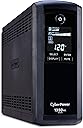
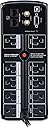
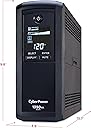
The CyberPower CP1350AVRLCD is a UL-certified mini-tower UPS delivering 1350VA/815W of power with Automatic Voltage Regulation to protect against power fluctuations. Featuring a multifunction LCD panel for real-time monitoring, 10 total outlets (5 battery-backed), and a 3-year warranty including battery coverage plus a $500,000 connected equipment guarantee, it’s engineered to keep your professional workspace and entertainment systems running smoothly and securely.


| ASIN | B000OFXKFI |
| Amperage | 2.1 A |
| Battery Average Life | 3 years |
| Battery Cell Composition | Sealed Lead Acid |
| Battery Cell Type | Sealed Lead Acid |
| Best Sellers Rank | #2,168 in Computer Uninterruptible Power Supply Units |
| Brand | CyberPower |
| Built-In Media | UPS System, User Manual, USB A+B Type Cable |
| Color | Black |
| Connector Type | NEMA |
| Customer Reviews | 4.4 out of 5 stars 1,521 Reviews |
| EU Spare Part Availability Duration | 3 years |
| Enclosure Material | 1 |
| Form Factor | Tower |
| Global Trade Identification Number | 00649532013500 |
| Input Voltage | 120 volts_of_alternating_current |
| Item Dimensions | 14 x 3.9 x 11 inches |
| Item Dimensions D x W x H | 13.7"D x 3.9"W x 9.8"H |
| Item Highlight | 1350VA/815W, 10 Outlets, AVR, Mini-Tower, UL Certified |
| Item Weight | 22.4 pounds |
| Manufacturer | CyberPower Systems |
| Material | 1 |
| Maximum Power | 815 watts |
| Mfr Part Number | CP1350AVRLCD |
| Model Number | CP1350AVRLCD |
| Number of Items | 1 |
| Number of Outlets | 10 |
| Output Voltage | 120 volts_of_alternating_current |
| Output Wattage | 600 watts |
| Power Plug Type | Type A - 2 pin (North American) |
| Product Dimensions | 13.7"D x 3.9"W x 9.8"H |
| Runtime | 14 minutes |
| Specification Met | UL 1778, cUL, Energy Star |
| UPC | 649532013500 |
| Unit Count | 1 Count |
| Voltage | 120 volts |
| Warranty Description | 3 Year & $425000 CEG |
| Wattage | 815 watts |
A**R
Sharing this info - Problems SOLVED: (1) Red light wiring fault, (2) Comcast modem, and (3) Apple Time Capsule
My CyberPower CP 1350 AVR LCD Intelligent UPS device (battery backup and surge suppression) arrived two days ago (purchased on Amazon). The first thing that happened when I plugged it in was a red light on in the back of it, "Wiring fault." I looked it up and on the Cyberpowersystems.support page it says, "The wiring fault light indicates that the outlet that the unit is connected to is either not properly grounded or has reversed wiring. First, try connecting the unit to another outlet. If the unit still displays the electrical wiring fault, contact technical support for assistance. If the unit does not display the wiring fault light in the new outlet, you will need to have an electrician correct the problem with the faulty outlet." So, after trying it on another outlet and also got a red light with that one, I called CyberPower. I just want to say how polite and attentive the CyberPower guys are on the telephone. I have since called them with more questions about hooking up the unit, and each time (3 different guys) they were knowledgeable and solved the problem quickly. The red light problem went as follows: they said that the outlets probably are not grounded, and if all your outlets give the red light, it could mean that your house doesn't have grounded outlets. I was surprised, since almost all of my outlets have 3-prong plugs; the 3-prongs are supposed to be for grounded units, but people can install a 3-prong on an outlet that is not grounded, and that still does not make it grounded. Very important to know! So, I bought a "receptable tester" at Lowe's for $5 and tried out the outlets in my house and discovered that certain rooms did not have grounded outlets, while other rooms did. (Just want to add that you can do this without buying a receptacle tester, if you have a surge protector power strip with the two lights on it that say "Protected" and "Grounded." If the "Grounded" light doesn't light up or is DIM, then that outlet is NOT grounded - same thing with the receptacle tester - the two lights on the right should be fully on - if the middle one is bright and the one on the right is DIM then your outlet is NOT grounded. My electrician confirmed this. At first, he thought maybe the center light was reflecting in the right light, but it was DIM. He tested the outlet with his other tools, and said it was NOT grounded.) It dawned on me that the rooms that had grounded outlets were built 1970s or later, and the rooms that did not have grounded outlets were installed with the original house, built in 1955. Unfortunately, the rooms I need to use the CyberPower device in are the old part of the house where my office is. I'm sharing this information, because there are likely to be others who will experience this same situation. If your house is an older house, it is likely that the outlets in some rooms (the older ones) are not grounded, which means you need to call in a professional electrician and have a new, grounded, outlet installed. A new grounded outlet involves putting in a separate line from the main electric box in your house, all the way to the spot where you want an outlet to hook up your UPS device. For many people this isn't difficult. For me it was problematic since my basement is finished, with paneling and ceiling tiles all around, and there were only two teeny possible places in the ceilings of closets where the electrician could try to drill a hole up into the wall for an outlet on the first floor. It took him several hours, but he was finally about to get around the heating ducts and struts, and with the aid of a special drill extender he was able to get two new, grounded, outlets installed in my first-floor office. I had him install two, although I only needed one, so I'd have plenty of outlets for digital devices that need grounding. It did cost me, but now I can be confident that my electronics will be protected with grounding, surge suppression, and battery backup. The second problem I faced was when I hooked up the UPS to my new (replacement model) Comcast "wireless gateway" modem/router, and wanted the WiFi signal to go out, not from the Comcast unit, but from my Apple Time Capsule unit. I'm sharing this info because I feel certain that others will run into this, too. I followed the Comcast instructions with one exception - the Comcast cable comes out of the wall and into the cable "input" of the CyberPower UPS device. Then you need another cable coming out of the CyberPower unit, from the cable "output" into the Comcast modem/router. So, I thought I had everything hooked up correctly, but it didn't work. I called Comcast and had to talk with an intake person for about twenty minutes before they would pass me to a tech specialist. They helped me get it set up, but after we got off the phone, my Apple Time Capsule continued to blink amber (yellow) and didn't go to the green light. When I checked in the Time Machine app, there was a message, "Double NAT." I looked that up, and it means you have two WiFi systems running. So, even though the Comcast guy told me he was disabling the WiFi on my Comcast unit so that signals would go out through my Time Capsule, there was still this problem. The Comcast guy told me he couldn't help me any more, have to call Apple. So I called Apple. Apple is always very nice, but the intake person didn't know what to do about the yellow light. He passed me to a WiFi specialist at Apple, and that guy knew exactly what to do. So here is what you should do if your Apple Time Capsule keeps blinking amber (yellow) after you have your CyberPower and Comcast set up: Look in Applications - Utilities - AirPort Utility. The Internet icon should have a green light to the left of it. If the Time Capsule icon has an amber (yellow) light to the left of it, simply double-click on the amber light in the picture. It will open a small window. Again, see the yellow circle there and click on it. You will see a small drop-down that has the option "Ignore." --> CLICK ON IGNORE. That is the solution. The Apple guy says "We get this all the time." There are other solutions you will see online, including something about "bridge." Don't do that. Just click "ignore" and you'll be all set from there on out. One other difficulty I had was plugging devices into the CyberPower unit. I thought something was wrong. The situation is, when you plug things into the unit for the first time, it takes a lot of muscle to shove them into the sockets. Right out of the factory, the plugs are tight. So just use your strength and force them in. After that, it's no problem at all. I set the CyberPower unit on the floor near the Comcast outlet and modem, and hooked up my computer speaker system and Time Capsule near it. That keeps all the wires in the same area, and off my desk. I have a 14-gauge (9-foot) heavy duty extension cord running from the CyberPower unit to my iMac desktop. I purchased the extension cord on Amazon, too. The CyberPower guys said to get a 14-gauge "one-to-one" extension cord. That means that each electronic device you put on an extension cord coming out of the UPS device needs to have its own extension cord - this is important. This is why I moved my Time Capsule and speakers over to plug in directly to the CyberPower device on the floor. So my desk has just one cord coming off of it, no spaghetti mess of wires all over the place, just on the floor in the corner. The extension cord I picked is a neutral gray, and very flexible: http://www.amazon.com/Heavy-Conditioner-Major-Appliance-Extension/dp/B013Q5DOZ8?ie=UTF8&psc=1&redirect=true&ref_=oh_aui_detailpage_o02_s00 One last comment - this is a most impressive looking machine. It is big and very solid. It is also VERY HEAVY. Other than the things I mentioned, I have had no problem with the device. I have a new grounded outlet now, and I managed to get a Comcast modem hooked through it, and the WiFi signal to go through my Apple Time Capsule, which I'm sure many of you have. So I hope this info helps some of you out there. I am very happy with my purchase, and now thinking I will buy another one for my TV and sound system in the recreation room (which is in the newer part of the house and has grounded outlets!). If I ever do have a problem with it, I will report back! Happy customer, and very happy with the CyberPower tech guys!
M**L
I'm Impressed
My old UPS battery seemed to be dying. Every few hours it was turning off my main PC. So, after doing some research I purchased the CyberPower 1350AVR , a unit more powerful and with more features than my old APC unit to solve the outage problem and provide more uptime in case of a power outage. My plan was to also plug my Internet modem and wireless router into it. I unpacked the unit and plugged it in until it indicated that the batteries were fully charged. Then I followed the provided instructions - first unplugging it, connecting the equipment to be protected, and then plugging it back into the wall. There are eight power outlets on the back, four with battery and surge protection and four with only surge protection. Curiously, the instructions state that four of the outlets are spaced to accommodate AC Adapters (wall warts.) Actually only one was spaced far enough away from the others to accommodate a wall wart and it was located on the battery-backed side. I also connected the optional included USB cable to the server to control and monitor the unit from my PC with the included PowerPanel software. Once everything was connected, I pushed the button below the LED screen and graphs were displayed indicating the load capacity and the battery capacity or charge status. It was fully charged, of course, but that graph will be useful during a power outage to see how much power is left before total blackout. The capacity in use was at two bars out of five and the estimated run time was eighteen minutes. So, I was using 20% of the units capacity and could certainly plug in more equipment in the future. I wanted the unit to automatically shut-down the server in the event of a power outage, so I loaded the PowerPanel Personal Edition software that was included, and under Runtime, configured it to shut-off the computer two minutes after any power outage. I tested this by unplugging the CyberPower, and it did indeed shut down my PC in an orderly fashion, closing all open applications and files, right at the two minute mark. I also tested the scheduling function of the software by setting it up to turn my computer off at midnight and back on at 4 AM. It shut the computer off at the proper time, as evidenced by Windows log entries, but although it restored power at 4 AM. The PowerPanel software also provides statistics and other information about the operation of the UPS, most of which can also be seen on the LED screen on the front of the unit by holding down the button. The software also allows the settings to be changed, such as turning on or off alarm sounds, setting tolerances for voltage fluctuations, and running tests. I left all of the default values, other than the one for shutting off the PC, which was set at five minutes out of the box. Along with the USB cable, telephone and Cable TV cords are also supplied. The unit provides surge protection for Cable TV and a telephone or Ethernet network connection. No Ethernet cable was provided. I did not test surge protection for cable TV, telephone of Ethernet. I have had the unit for nearly a month now, but there have been no power interruptions to test its performance in that regard, though I simulated outages by unplugging it a few times and it performed flawlessly by triggering the alarm and shutting down the computer. I'll update the review if I encounter any problems. The unit has a Three-Year Warranty against defects in design, assembly, material or workmanship and further protection is offered by a $500,000 Connected Equipment Guarantee. The connected equipment guarantee only kicks in if the damage was caused by a defective UPS, and then only after all other "primary" protections, such as insurance, have been exhausted. The unit is quiet and generates no noticeable heat.
N**A
Features rich and the output sinewave looks nice!
I bought the cyberPower CP1350avr after the 500W APC ups failed on me. I like the fact that this AVR is upright and the outlets are at the rear panel. This form factor allows for very practical equipment layout on and around the desk. The custom LCD status screen is large. Since my unit sits on my desk and faces me, there is no problem at all for me to read the screen at all; however, I can see that some users might find it difficult to see the screen if he/she has decided to place it against the facing wall. There just isn't enough viewable angle this status screen has to offer. The driver software is nice and is very versatile. It even has a simple calendar to set up controlling of the start and stop of the computer! I think what is missing from the software is a setup for periodic self-test because periodic self-test is an important part of any fault tolerant AVR/UPS system. I don't understand why it didn't get included as a standard software feature since it is obvious that it has a form of a clock setup in the software; otherwise, the software would be 5 starts. The CyberPower reports that my AMD quad core box plus dual 21" monitors consumes 186 watts at boot up, and 128 watts after everything settles. I think that is about correct since the CPU peaks at 90 watts. There is no spindle drive in my system (3 x 256GB SSD), total of 16GB system memory, video card is an older Nvidia 7200 fanless card with 512MB, my system isn't too power hunger. With all these components running, the CyberPower reports of a 21% load and about 30 minutes of run time. I removed AC and stress tested the AVR feature of the CyberPower for about 15 minutes. I was able to shutdown system gracefully. Since I am on SSD, my boot up time was about 18 seconds so I was able to restarted/shutdown for a couple more time to test for largest power draw. I was also able to perform some additional application load, web browsing, and code builds while on AVR. All went well and satisfactory. By the time I stop the test, the capacity showed 3 out of 5 bars left. This proves that the CyberPower can actually protect my work and allow me to complete additional tasks during power outage. Although I am not planning to work without actual power, this new addition of my system really gives me the peace of mind that I can rest assure that I won't lose my work during a serious power event.
A**.
Does it have a timed killswitch?
I bought this on November 4, 2011 and got it a few days later. It's been protecting my two computers for exactly six years (the first computer passed away years ago), and it did so faithfully despite a few quirks, as Doug Demuro would say. Yesterday on November 5, I came back to find my workstation off (it is a Linux machine which is on 24/7), and the Cyberpower UPS had weird voltage and battery capacity measurements. The small and loud fan did not turn on upon rebooting the UPS like it usually did, and it would make a clicking noise. The poor thing was toast, rest in peace. The reason for a star off is the few quirks it had. The screen has an extremely bright blue screen which is not bad because it goes off normally, but the power button is always on with a potent blue light. I had to use blackout tint to be able to properly sleep. The fan is extremely loud, and the beeping noises for when it is on battery power is also crazy annoying. So the biggest problem is this little guy is both noisy and bright, though it is silent while on power and the bright LED problem can be solved with some window tint. Overall it did it's job wonderfully and kept my workstation safe from power fluctuations as well as from blackouts.It lasted a stunning six years of continuous work, so it is clear the low reviews got lemons (or I got lucky?)
A**R
Cyberpower Takes Over
Once upon a time I used to only purchase the old big brand battery backups (APC), but they let me down. Since then I have converted all of the units I had to the Cyberpower brand and I am extremely happy! I won't go back. This unit is quiet and works very well. I use it to provide constant power to my Cable Modem (also provides my digital phone) as well as my Firewall/Router. Since installing this device we have not missed a call or lost connectivity. It is also much more power efficient than the other manufacturer's unit it replaced and only draws slightly more current than the equipment it provides power to. Overall, I would recommend you do your research and make sure this unit will meet your specific needs. In this price range it is the best of the best in my opinion and meets my needs quite well. I have two of this model, the one mentioned above and another purchased in February 2009 that is attached to my entertainment center. It provides backup power to a 46 inch LCD, the Xbox 360, a PS3, and a Yamaha receiver. I cannot count the number of times the power has gone out and this thing saved us from crashing a game system or having to reset all of the channels on the TV. The only thing I don't really like about this model is the bright blue lite coming from the power button. When all of the lights are out and you are watching a movie on the big screen it is noticeable sometimes even though I have it behind the entertainment center. I'm thinking about putting a piece of black electrical tape over the power button. I also have the Cyberpower brand on all of the computers in my home as well as on the computers in my mom and daughter's homes. Background: I've been working in IT for the past 7+ years and the many years before that were in Electronics, so I understand how and why this stuff works. Trust me when I say this product is as good as it gets in this price range.
R**O
Love it!
Had this gem for about a week. Impressed with it so far. After unpacking it and reading the directions, I plugged it in to charge w/ nothing plugged into it. Just buy itself. Within 6 hours, the unit was fully charged. I let it go for another 24. I have the following plugged in to my 1350 UPS: LCD monitor, CPU, router, WIFI, speakers, LED lamp w/WEMO, and a few AC adapters. My PT (total power) is <80W, with and input line voltage of 122VAC (measured with a Fluke 85). I downloaded the app, set it up so it will shut my equipment down when battery power had 5 minutes left. I decided to give it a test this morning. Prior to going to the store, with everything on, I unplugged the line cord. The app immediately kicked on indicating a power failure, with 99 minutes (1hr, 39 minutes) of available UPS power. I departed the house. I returned 2 hours later to find out that the UPS was still supply power to said items, with <10 minutes left! I plugged in the line cord. The UPS when into charge mode (indicated by the app) with NO power differential noted (i.e. monitor and lamp brightness increase). Yes, so far it works as advertised! I took my old APC 500 UPS, and use it to power my Emergency WX radio, Google Mini, and my cats water fountain. I'm happy. As an Aircraft Electrician, I think the reason that some give it a negative is, because they are so anxious to get it installed without allowing the battery to FULLY charge prior to usage. Like a kid at Christmas. Unpack it and play with it. As with any battery(ies) that has laid dormant for several months, they need to be FULLY charged prior to use. The directions clearly tell you, "If the unit is to be stored for an extended period, recharge the battery every 3 months to maintain battery life." As with any battery. In conclusion, YES, I do recommend this product. Thank you.
M**L
*updated review - good value
1-7-22 update. this UPS has worked fine for years, although it never truly kept the minimal power consumption my DVR uses running long, like the calculated specifications. it did manage to pull through momentary power outages, so that was the main thing. i'm assuming the batteries finally shot craps, as it just started blinking and doesn't allow power through the battery back up plug-ins all of a sudden. ...but, i wouldn't know for sure. i've been attempting for five business days in a row to contact CyberPower for help. i followed their site recommendation to generate a help ticket, fully completed the questions with model, serial, etc. waited for a response. nothing. i emailed. nothing. i called and used their 24/5 support, no answer. i tried again, and was disconnected. i tried again, and pressed (1) to talk to a support rep. disconnected. tried again, and pressed (1) twice so my number was logged with their recording saying they would call me back when a rep became available. that was 36 hours ago. my hunch is the batteries simply need to be replaced. this is pretty normal for a UPS of this age. ...and they offer them for sale on their site and through amazon, both. but i can't possibly do that until i know for sure, and my surveillance system has been down for nearly a week now. the product worked fine. now it doesn't. the support is a literal zero. i can't recommend a product that is designed to be used as a support to my system if they won't support the support. lol. no more cyberpower chinese junk for me i guess... ************ i back up a video system with this and an LED light to see during power outages. it seems to work just fine and while i haven't had an outage that lasted more than an hour or so it ran my 12 camera system for that period of time. granted, my cameras are new and very efficient, so the draw on the system isn't tremendous, but all in all, i don't have anything to complain about.
K**S
A powerful UPS!
This is my first UPS, I've never even had any "hands on" time with one before this. After a lot of research I picked this Cyberpower unit. I wanted one that could handle at least 10 minutes to make it worth the money. This UPS is able to do far more than that, for my situation at least. I put it in my server closet to back up a Media server, network gear and even a business server. We use our media server to record and serve TV to 4 different extenders using Media center. Its our primary TV source so it gets a lot of use. It also used to store and stream all of our ripped blurays and DVDs. We've had some spotty power around here lately, its a new neighborhood and theyre patching new houses into the line daily. We were getting some nasty brown outs almost once a week causing certain PCs to be in a half on half off state (hardware is on but the PC is not booting or showing anything on the screen). The UPS has plenty of battery backed plugs and even acts as a great surge protector. Even though this thing is in a closet I still wish the screen would stay on...just for my nerd excitment. Theres not a ton to say about this UPS but the main thing I wanted to share is the run time on battery. Heres what I've got plugged in: Media server - AMD Quad Core, 4 internal hard drives an 8600GT graphics card with a 550 watt power supply Netgear Wireless router, Cable modem, Linksys wireless access point and a 16 port Netgear switch. All of that uses around 105 watts running idle which gets around 46 minutes of battery and can get up to 130 watts during heavy use so can run for around 34 minutes. I recently added a small business server which ups the wattage to around 200-215 in high use. Even with that added it runs for about 20 minutes on battery. There is no monitor connected to the UPS since I just control these remotely but imagine a small LCD monitor wouldnt add much to the wattage. I'm quite pleased with this unit, I feel a lot better about my hardware. I used to be afraid to leave the house for long periods because if the power went out the business server wouldnt always come back on as it should because the power was never fully out (brown out). We have employees relying on this to work and I'd have to run home quickly to get it back online. I figure 20 minutes is plenty of down time, we've only had a max of 10 minutes. I havent actually had a single brown out or power outtage since I bought this thing, which is funny and good I guess but I almost wish for one now days!
R**S
Muy buen producto
Llevo 4 años y la baterial se a desgastado poco, creo que me salio muy bien este no break
M**T
Works very well for Aquarium life support
I purchased this for my aquarium. During a recent four hour power outage in the middle of the night, my fish were gasping for air when I woke up. In order to maintain adequate oxygen levels, I needed something that could supply power to one of my canister filters and the air pump till I can hook the systems up to a generator especially if not aware of the power outage. I received and tested this unit which claims 2 hours on 50 Watt usage and though did not test to its limits, it worked flawlessly. The draw for the one canister filter and pump is only 33 Watts so I anticipate getting at least the two hours claimed. The switch to backup power was seamless. The fact that you can silence the alarm till it is at its last 20 minutes is a big plus. Will update if I have new information over time. Buying air pumps with battery backups are expensive and don't work as well as with the UPS. Besides that, I maintain filtering during the outages so no Ammonia spikes. Update September 14, 2015: I hooked up two canister filters and an air pump. To date it has worked flawlessly during a couple of power outages and did not have to resort to the generator. Very pleased with the product. Update November 14: Still working strong and kept my fish alive through a number of outages. One longer than 2 hours.
9**K
The display is easy to read and provides useful information
I bought this unit a few months ago so it's been subjected to a few power failures and it has handled them all perfectly. The display is easy to read and provides useful information. A great feature is the software that lets you also monitor the UPS via USB cable. If the battery runs low the monitoring app safely shuts down your (Windows) computer, rather than letting your computer die from lack of power. So far I haven't put this to the test because power has been restored before the UPS battery ran out. The surge-protection only outlets are a nice feature. You can protect peripheral devices from spikes but save the emergency power for critical components, like the CPU, modem, and especially in our case the VOIP phone system.
A**Z
Perfecto
Lo compre para mi computadora y cumple muy bien su función y estoy más tranquila.
D**S
Big capacity but outlets are too close together
Big capacity for the price and some nice information, but the layout of the plugs on the back isn't very good. There are 10 outlets on total, 5 with Surge+Battery, and 5 which are surge only. Each group of 5 has one outlet with more space around it to accommodate a larger 'wall wart' style transformer; the rest of the outlets are packed in tight beside each other which means you might not have room to plug things in beside each other. In my case I had to skip 2 outlets because the adapters took up too much space. The power cord itself long (6') and has a low-profile, offset style plug so you can plug it in even if the outlet is behind a book case or something/ From screen offers some good information like current line voltage, draw (amps and KWh), charge level, estimated runtime. Output is not pure sine (not expected at this price) but there's a lot of power to give you time to safely shut down if the power goes out. Would be nice if there was a USB outlet for charging devices.
Trustpilot
1 week ago
1 month ago