


Desertcart purchases this item on your behalf and handles shipping, customs, and support to GERMANY.
๐ฎ Power up your playtimeโcharge smarter, game longer!
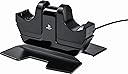
The PowerA DualShock Charging Station is an officially licensed, compact tabletop charger designed for PlayStation 4 DualShock 4 controllers. It simultaneously charges two controllers via a 1.1A AC adapter with a spring-loaded dock for easy alignment and secure placement. Featuring lithium-ion battery-safe technology with auto shut-off, it ensures fast, safe, and convenient charging while matching the PS4โs sleek design.


| ASIN | B00ENFVJJO |
| Amperage | 1.1 A |
| Best Sellers Rank | #81 in Video Games ( See Top 100 in Video Games ) #6 in PlayStation VR Accessories #11 in PlayStation 4 Chargers |
| Brand | PowerA |
| Built-In Media | Item |
| Color | Charging Station |
| Compatible Devices | Game Consoles |
| Compatible Phone Models | sony playstation 4 |
| Connectivity Technology | USB |
| Connector Type | USB |
| Current | AC |
| Customer Reviews | 4.2 out of 5 stars 11,550 Reviews |
| Enclosure Material | Plastic |
| Form Factor | Tabletop |
| Global Trade Identification Number | 00617885005756, 20617885005750 |
| Included Components | Item |
| Item Weight | 3.52 ounces |
| Main Power Connector Type | 2 Pin |
| Manufacturer | PowerA |
| Mfr Part Number | CPFA141325-02 |
| Model Name | Charging Station |
| Model Number | CPFA141325-02 |
| Mounting Type | Tabletop Mount |
| Number of Items | 1 |
| Number of Power Levels | 1 |
| Output Current | 1.1 A |
| Output Voltage | 5 volts |
| Power Plug | Type A - 2 pin (North American) |
| Power Source | Corded Electric |
| Specification Met | Qi |
| Total Usb Ports | 1 |
| UPC | 617885005756 |
| Unit Count | 1 Count |
| Wattage | 5.5 watts |
| Wired Charging Connector Type | USB Type A |
G**L
... 360 controllers for a couple of years and always loved the convenience of being able to leave the controllers ...
I had a Nyko drop-in charging cradle for my Xbox 360 controllers for a couple of years and always loved the convenience of being able to leave the controllers in the cradle when not in use and have them available with a full charge at any time. Alas, the relatively short battery life compared to rechargable AAs eventually made me give up a little convenience for the much longer battery life. I never saw any need for something of this nature with my PS3 controllers, as their 30-hours on a charge battery life made charging the battery a once a week at most affair. The 4-hour charge of the Dualshock 4 is a different story. An easy to use daily charging solution was needed. For awhile I used a 4-port USB hub located on the table next to my seating area, but the frequent use of the micro-USB port worried me when it came to the frequent charging required of this generation of controller. I looked at the various cradle types of chargers and found most had a feature that wasn't to my liking. Storing a controller upside down connected to micro-USB port on the top struck me as possibly too stressful on the port, with the port seemingly supporting the entire weight of the controller and had the same frequent insertion and removal of the USB cable as a potential problem. Perhaps this isn't an issue and I'm worrying where it isn't warranted,but the upside down positioning also seemed . . . inelegant. The Nyko drop in charger appealed due to its familiarity with a product I liked a lot, but the dongle constantly attached to the USB port looked ungainly and caused fear of putting undue stress on the port. The PowerA port seemed to be what I was looking for. It uses the sturdier port on the bottom of the controller, the spring-loaded design allows for easy alignment without close inspection, the controllers are stored in a more attractive (to me) upright position, and it has the drop-in functionality of my old Nyko without the dongle. It works just as I hoped. Installation was easy - plug the adapter into the outlet, the micro-USB cord attached to it into the port on the bottom of the cradle, and thread the cord through the channel built into the side for that purpose. The separate components area nice touch. Lose the cord and you can substitute any micro-USB cord to replace it. Lose or damage the cradle and the cord will still function to charge the controller directly. Use is simple. Drop the controller into the cradle, press straight down until it clicks. The flashing light on the controller itself tells you the charging status (flashing yellow - charging; off - charged), so there is no need for lights on the charger itself. One last note - the Dual Shock 4 comes with a lithium battery. Unlike older rechargabley nickel cadmium batteries, lithium batteries don't become "conditioned" by frequent charging and don't have a "memory". There's no need to periodically drain them completely to refresh the battery. It's perfectly safe to recharge them after every session and leave them plugged in (cradle down position) all the time, as the controller has a built in voltage regulator that turns off the charger when the battery is full. The spring loaded design is there to ensure that the controllers are aligned properly when seating them, not for storing without connecting to the charging port. There is no danger to storing your controllers plugged in (cradle down position) all the time, or to "topping off" the charge after a relatively short charging session. You do not have to drain the battery between charges, and shouldn't drain it completely. Lithium Ion Batteries are fundamentally different from the nickel cadmium batteries of some early smartphones, which would be damaged if left in the charger every night. This is not the case with any modern device with an internal battery, almost all of which now use lithium batteries. It can actually be harmful to fully drain them every session and they should be charged as soon as the "low charge" warning comes up rather than waiting for the controller to shut off completely. And to reiterate - there is no harm to charging your Dualshock 4 every day, topping it off, or leaving it plugged in all the time. None of this causes a lithium battery any damage or shortens its lifespan. There is a misconception regarding frequent charging shortening the lifespan of a battery due to frequent charge cycles. A "charge cycle" isn't every time you charge your battery, it's a full charge from an empty battery, or with some devices, from the point at which you get the "low battery" warning, usually at 15-20%. Thus, draining a battery halfway and recharging it is half a charge cycle. Store your lithium battery devices on their chargers while you're not using them. It does them no harm, doesn't shorten battery life, and you always have a full charge. Also note that if you use NIMH rechargably AA batteries, such as with a 360 or Xbox One controller, go ahead and empty those suckers completely between charges. Different technology, different usage.
J**G
Perfect charging station
This dual charging station is fantastic. The station is small in size, so it takes up very little table/counter space and the power cord gets tucked away underneath + to the side, so the cord being in your way is a non issue (assuming you use common sense to place it). Placing your controller into the charging station is very straightforward - simply place your controller(s) in their slot (which takes no effort), and gently push down. Once your controller is pushed down, the charging begins and the light on your controller will turn yellow, which provides a nice visual queue to know that your controller is indeed charging (some other chargers are not so obvious). When the controller is done charging, the light will turn off, so it is easy to see when your charge is complete. To release the controller out of the charging station, simply push down on your controller once more, which will pop the controller out of its locked charging position, allowing it to be picked up and moved. Simple as you like. I've owned and consistently used this charging station for 3+ years, and have yet to run into any problems with it. This charging station is everything I want in a charger. In addition to charging my controllers with ease, it provides a compact, safe storing area for my controllers as well. Even if your controllers are fully charged, you can keep the controllers locked in their charging position, and the charging light will remain off (it will flash once to show it is locked in place, but will not stay on if the battery is full). When both controllers are docked in the charging station, the controllers are placed back to back with each other and are each facing outward rather than upward, so it actually takes up less space than resting two controllers next to each other (loosely), while also locking them in place so you won't need to worry about accidentally knocking loose controllers off your table, or wherever you are storing them. There are only two things I can think of as potential negatives. Number one, the charger does make a slight high-pitched noise while charging. For me, it is quiet enough to not bother me while sleeping, and my charger is placed on a bedside table directly next to my pillow. If you are an extremely sensitive to noise while trying to sleep and absolutely need to charge the controller at night, you may want to place the charger away from your bed, or perhaps experiment with placing a towel or some type of thick cloth over it to reduce the noise. Number two is regarding the light, and again this relates to sleep. If you are somebody who can't stand a little bit of light in your room at night, this light may bother you a bit if you are charging your controller while trying to sleep. But again, simply place a cloth over your charging station to block the light, and that problem will be solved. My overall opinion: This is a perfect charging station, and a must-own for all PS4 owners.
C**N
Best controller charger I've used.
This is the second PS4 controller charger I've bought, and it is by far the best one I've had. When I first bought my PS4, I immediately bought a second Dualshock 4 and with having kids, I had other items plugged into my PS4 (Skylanders Portal and Disney Infinity base), so I had to find a way to charge my controllers. I initially bought the Nyko Charge Base - PlayStation 4 and it worked for a while. I thought, "hey, I have the perfect set-up, just drop and charge" right? WRONG. First off, I noticed that the clips on the back of the controller were chipping and my wife was telling me the controller wasn't charging half the time. Turns out, the issues with THAT charger is that if you don't set the controller on the sensor JUST PERFECTLY, it wont charge, AND the slightest bump will take it off the charging mode. So needless to say, I'd put it in there to charge, and come back the next day and come to find out, something as simple as a strong gust of wind or a "house groan" would cause it to not charge. Imagine my surprise when I sat down to play and my battery was dead. :/ NOT ANYMORE. This PowerA controller charger ROCKS. No longer do you need the clips, no longer is the guessing game of "is it charging?" It's simple, it's easy. Set the controller in the molded slot and push it down. You'll hear a click. The yellow light bar will come on, BOOM, you're charging. The yellow light bar on the controller will fade in and out. That means it's charging. When it stops, it's charged. It won't "overcharge" your controller and it won't kill the battery life. AND it's endorsed by Sony. For $13 and change right now for Prime members, its a steal
K**Y
Works as advertised and charges just as fast as the PS4 itself.
Overall I am happy with this product and I will definitely be keeping it. I only have a few negatives which are pretty minor. PRO's --Does what it says, it charges my controllers. They glow and pulse in orange color when charging just like they do when you plug controllers directly into the PS4. Once they are fully charged the orange glow turns off and they sit there until you pop one off to play with. So I like that they dont keep glowing once fully charged. --When you put your controller into the cradle you can either depress it down until it clicks/locks in to charge it, or you can "rest" it in the cradle without locking it down all the way. Resting them lets your controllers sit safely in the cradle without having to charge if you dont want to. I like this having the option to charge if I want or just to use it as a stand for holding my controllers. --This is not made by Sony, but it is officially licensed/approved by Sony and indeed carries the "PS" trademark and packaging. The other stands I looked at did not have this. --Charged a nearly dead controller to full in about 2-2.5 hours. About the same rate as the PS4 itself. For me, a fully charged controller is good for about 8 hours of gaming. --Its nice not to have to keep my PS4 on or in 'standby' mode just to charge controllers. I much prefer using this stand. --Its nice that it came with its own power adapter, as opposed to using the PS4's USB or something. I like that its completely seperate from my PS4. CON's --When locking controllers on/off the station it is very easy to accidentally activate the "PS" button on the front of the controller, since the cradle design covers the "PS" button on the front when locked in place. A couple of times when I have been finished gaming, I will power down my PS4, and go to lock the controller into the cradle. And in doing so the "PS" button gets hit, and suddenly my PS4 turns itself back on! So you have to be careful.
P**O
PowerA has poor design, controllers don't sit on EXT connector well
I bought two of these devices because they utilize the fast-charging connector, and I wanted to have something to charge all four of my family's PS4 controllers. I also appreciated the inclusion of a true AC adapter instead of relying on yet another USB cable with yet another wall charging brick. I also liked the fact that they used the fast-charging EXT port on the rear of the controller, next to the audio port, instead of the rear micro-USB connector. I mentioned I ordered two, well the first one was inoperative on arrival and promptly returned. But the working one still had problems. The design of this product is just bad. Whether I am using Sony-branded DualShock 4, or 3rd party compatible controllers, they do not slide onto the EXT charging connectors properly, and just won't charge. You would assume that because they are oriented vertically, that gravity would help the controller sit onto the charging port better, but in fact, it's at a slight angle so you have to keep fiddling with the controller's position in the dock to get it to actually charge. I should have anticipated there would be a problem, as the PowerA-branded "Darth Vader"-style Wii Sensor Bar Holder is also a bad design. Unfortunately, it took far too long for me to figure this out, and now I cannot return it. The whole experience has really soured me on PowerA products. I purchased an OIVO charger that uses the same EXT connector and it works great out of the box even with 3rd party controllers. My advice is to stay away from this charger. (I bought this in March 2025, review written April 2025)
B**N
The Perfect Charging Station - Look No Further
This is the charging station to get. Period. Compared to some of the other models out there, and the official Sony charger (as opposed to officially licensed like this one is), this charger works exactly as I expect it to. The controllers sit upright in the holder, not upside down. The nice thing about this design is that not only is feel natural to place the controller that way, it leaves the light bar on top which gives you indication of the charge status (slow flashing glow indicates charging, no glow indicated charge complete). The controllers plug directly in through the bottom port (the one to the left of the 3.5mm headphone jack on the controller) to charge, so there are no clip on or additional items to plug in. It fits in a solid manner, and there is never any fumbling around to line it up. Some other notes that aren't apparent from the photo/description, the cradle actually rises and drops. Essentially you place your controller on the cradle and then press it down and it drops into place, seating on the prong to charge. When you want to remove the controller you don't just pull it up (you can, but that is more work than needed). You actually press the controller down like a button and it pops up out of the charging prong and you can easily remove the controller from the cradle. There is a little flex in the base as well (you can see the middle section is raised slightly from the sides in the picture). That flex assists in the springy inserting and removing of the controller. The only caveat I would give here is that if you use or intend to use a plug in keypad, those typically plug into that bottom port on the controller so this wouldn't work for you unless you remove the keyboard first (which is a pain). In that case, you would probably want one of the versions where you place the controller in upside down. But to be honest, the keypads I have seen just seem so lackluster and cumbersome for the amount of typing I do with the PS4 so that probably isn't an issue for most people.
N**E
Very handy charging station!
I got this station since I needed to give my other usb port on my ps4 (the non-pro version) to a external hard drive and picked this charging station based on the reviews and price. I've had it now for roughly a week and haven't had any complaints about it! I was worried upon reading reviews of it being unruly to use and possibly sapping/lessening the lifespan of the battery but I haven't noticed anything terribly drastic after pretty much non-stop playing my PS4 with my two controllers staying up for less time. They of course last longer when I'm watching youtube or Netflix but only because I turn them off when watching but with playing games I've not noticed anything on terms of less power than normal. I probably wouldn't charge both my controllers at the same time since I charge one and use the other while it's buddy is charging lol. For use the stand has a little indent where the Playstation symbol fits into, line the controller up to that and push down from the top of your controller into the cradle until you hear a click and you'll see the light on top pulse orange to show its charging. Charging takes about an hour and a half or there abouts but I haven't personally timed it to really check. Once it stops pulsing orange on the light its fully charged and you again push on top of the controller to unclick the cradle and your controller can sit there and not be jacked into the stand. Do make sure to not wiggle or move your controller while it is locked in for charging as the connection is rather tempermental and movement will stop the charging from happen. Best keep out of reach of animals and small children to avoid any potential lapse in charging! Overall I am very happy with this charging station and it was a good buy for the price on offer!
J**L
...and going, and going, and going, and going, and going, and going...
Maybe a little late, but 10 years strong, and it's still going!
Trustpilot
2 weeks ago
3 days ago