Buy anything from 5,000+ international stores. One checkout price. No surprise fees. Join 2M+ shoppers on Desertcart.
Desertcart purchases this item on your behalf and handles shipping, customs, and support to GERMANY.
🚀 Elevate your 3D printing game with the smartest display upgrade around!
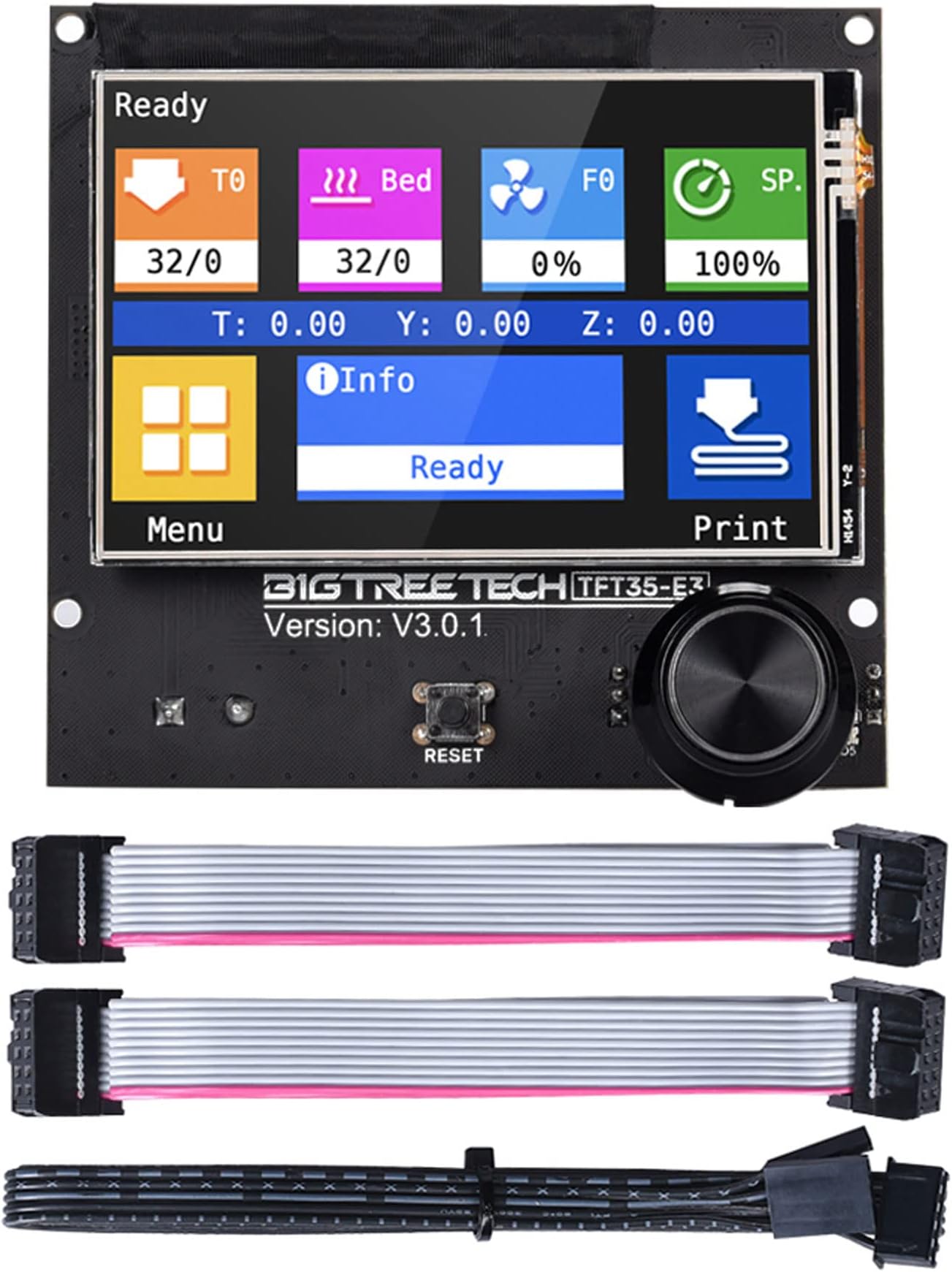
The BIGTREETECH TFT35 E3 V3.0.1 is a high-performance 3.5-inch graphic smart display panel designed for Ender-3 and compatible with multiple SKR control boards. Powered by a 120MHz 32-bit ARM Cortex-M3 CPU, it offers dual work modes (UART serial touch and 12864 LCD), easy firmware upgrades via SD card, and reserved ports for WiFi, filament detection, and automatic shutdown. This display ensures seamless integration, enhanced usability, and future-ready expandability for professional-grade 3D printing.
| ASIN | B08182XHZZ |
| Best Sellers Rank | #130,488 in Industrial & Scientific ( See Top 100 in Industrial & Scientific ) #2,309 in 3D Printer Accessories |
| Brand | BIGTREETECH |
| Brand Name | BIGTREETECH |
| Color | black |
| Customer Reviews | 4.4 out of 5 stars 626 Reviews |
| Display Type | TFT |
| Included Components | BIGTREETECH TFT35 E3 V3.0.1 Touch Screen |
| Item Dimensions L x W x H | 3.68"L x 3.43"W x 3.43"H |
| Manufacturer | BIGTREETECH |
| Material | PCB |
| Material Type | PCB |
| Model | TFT35 E3 V3.0.1 |
| Operating Temperature | 20 Degrees Celsius |
| Part Number | ZZB000378 |
| Product Dimensions | 3.68"L x 3.43"W x 3.43"H |
| UPC | 778601688131 |
| Unit Count | 1.0 Count |
| Voltage | 5 Volts |
S**I
It just works perfectly
I use this with a BTT SKR MINI E3 V1.2 controler board which allows me to use either the touch screen or the Marlin screen. I don't think you could use both screen modes on the Creality control board but I'm not sure. Most of the time, I use the Marlin scroll menu but having the touch screen is great for things like homing it. For the price point, I think it is well worth it for the convenience. Updating it is easy too, just follow the instructions on the bigtreetech/BIGTREETECH-TouchScreenFirmware github site.
N**A
Good Screen...but needs more functionality
To be honest I dont think its 100% worth switching to touch screen. I still left a 5* review since its not the screens fault. but a ton of functionality is missing from the firmware for touch support. (things like filament switch)
A**S
Nice upgrade, poor board assembly - Updated
Touch screen control is a nice upgrade for the Ender 3 Pro. Only issue is the LCD screen was off center. See picture. On the bottom of the board there were lines where it should have been mounted. Not sure if all boards are like this or I just got a bad one. Update 01/09/2020: Vendor reached out and offered a replacement board which had a centered screen. Very happy with this new one. Changed my rating to reflect this.
B**E
Great upgrade!
I upgraded my old Anet AM8 printer with an SKR Mini E3 V3 mainboard. Knowing that the old display is not readily compatible with the new board, I purchased the TFT 35 display. Compared to the problems I had to work through with the mainboard, the install of this was pretty straight forward. After installation, I updated the firmware to the Round Miracle Theme. It looks great. I like that you have the option to switch back to the LCD mode if you so desire. This was a great upgrade from the stock display.
K**R
Works great on my CNC
I used this board with an SKR Turbo 1.4 on my Lowrider2 CNC. It's worked great for that purpose. I like that you can load custom firmware/graphics to the screen and that it does both the touchscreen and "old-school" mode. The built-in terminal was great to troubleshoot during building by sending G-Code without having to hook up a computer or Pi.
J**S
Not worth the headache.
Purchased the TFT35 in the hopes that it would increase my bed leveling accuracy and overall printer efficiency, what I got instead was a nightmare of random freezes and a labyrinth of barely comprehensible broken English github posts. I'm currently using the BTT SKR Mini E3 V3 as my main board for my Ender 3 and thought the TFT35 would be a great compliment. Once the unit arrived I updated the firmware and got right to printing... and then the random freezes started. After navigating github for DAYS (while still dealing with freezes) I tried everything from specific settings to checking my SKR updates, swapping SD cards and fresh formats, nothing worked. The only post that I could find with any decent solution was a post babbling about buffer size and actually changing the code manually. I decided to send the unit back and opted for a replacement just to be on the safe side. Once the new unit arrived I again updated the firmware and went straight to printing a 15 hour print. Everything looked good for the first 13 hours then... Frozen. Again I checked everything and I noticed that there was a new Firmware patch out.
D**E
Perfect upgrade
I love this screen for my Ender 3. It’s easy to navigate, responsive to touch, colorful and best of all you can switch between the touch screen interface or back to the old Marlin interface at anytime. I haven’t tried using the sd card slot or anything on it but you do get those plus two expansion ports on the board!
K**N
This is a for sure game changer for your 3d printer
I got this for my Ender 3 pro, I modded the heck out of this thing and wanted something a little easier to work with then the factory screen. This was a perfect fit. I have a SKR mini V1.2 and needless to say installation was pretty simple. Teaching tech has a fantastic video to help if you aren't super tech savvy. Touch screen is great the LED on the knob is super nice. I would highly recommend this.
S**E
Easy to install and use
I installed this on to my machine that already had a BBT mainboard after my old monochrome Marlin display broke. Installation was pretty straight forward and I had no issues getting it working. I particularly like the option of switching between touch screen and the old marlin display modes. Since installing this screen I've had no problems and it has remained responsive and pretty intuitive to use.
A**K
Excellent en combinason de la carte SKR mini E3.
Facile d'installation, écran nette et surface tactile facile à utiliser. Possibilité d'utiliser des cartes SD ou USB grâce aux ports de l'écran. Possibilité de rajouter un capteur de fin de filament sur un port de l'écran, que demander de plus? Attention, l'écran ne fonctionne que mode Marlin émulé avec la carte originelle de l'Ender 3. pour utiliser l'écran tactile et les fonctionnalités additionnelles comme les ports SD ou USB, il faut une carte SKR de Bigtreetech!
C**R
En tråd felkopplad. Började lukta rök
Vara kom i tid och allt vekade bra tills jag skulle starta den.. den svarta kablen som medföljer levererades felkopplad och de började lukta rök.. efter jag dubbelkollat alla kopplingar så såg jag att kablen såg lite konstig ut.. jag flyttade på pinnarna och allt startade som vanligt.. dock så tror jag att högtalalarna fick sig en smäll efter felkopplingen och låter nu konstigt..
M**E
📟 Upgrade perfetto per il controllo della stampante! ⚙️
Ho installato il BIGTREETECH TFT35 E3 V3.0 sulla mia Sunlu S8, abbinandolo alla scheda madre SKR 1.4 (compatibile anche con Ender 3), e devo dire che è stato un bel salto di qualità! Con un firmware custom, il display si è dimostrato reattivo, intuitivo e con tutte le opzioni facilmente configurabili. Il dual mode (touchscreen + Marlin mode) è comodo e il layout grafico è chiaro e ben organizzato. Se volete un controllo più fluido e moderno della vostra stampante 3D, è un upgrade che consiglio senza esitazioni! 🛠️🔥
E**.
Calidad
Funciona táctil en marlin tambien consegui usarla con kliper es una maravilla me gusta mucho lo rapido que responde
Trustpilot
1 month ago
4 days ago