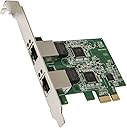
🚀 Double your network speed, halve your wait time!
The Syba SD-PEX24066 is a high-performance PCIe network card that adds dual 2.5 Gigabit Ethernet ports to any compatible PC. Designed for professional-grade networking, it supports all PCIe slot sizes, includes a low-profile bracket for compact builds, and offers broad OS compatibility. Ideal for demanding environments, it ensures fast, reliable, and secure connectivity with VLAN support and hassle-free installation.


| ASIN | B07XJ8CMQX |
| Best Sellers Rank | #41 in Internal Computer Networking Cards |
| Customer Reviews | 3.9 3.9 out of 5 stars (1,091) |
| Date First Available | September 6, 2019 |
| Is Discontinued By Manufacturer | No |
| Item Weight | 3.17 ounces |
| Item model number | SD-PEX24066 |
| Manufacturer | Syba |
| Product Dimensions | 4.2 x 0.5 x 5.5 inches; 3.17 ounces |
| Release date | September 6, 2019 |
| Type of item | Electronics |
R**.
Drop in and works under Linux with default drivers (Debian 11/12)
I have three of these in a Proxmox cluster of machines, and all of them have worked out of the box with no issues. Repeat iperf3 tests has them pushing full speed without complications.
C**S
Works on FreeBSD if you install kernel module
I wanted it for the uplink on my cable router to match my cable modem's ability to push 2.5 Gbps (even though I only get 1.5 Gbps service). The motherboard's stock ethernet port is only 1Gbps, so I used it for initial configuration. Using FreeBSD 13.1, I got it to work with pkg install realtek-re-kmod And adding if_re_load="YES" if_re_name="/boot/modules/if_re.ko" to /boot/loader.conf A little annoying that it doesn't work out of the box on my particular operating system use case, but that's not really the card's fault, so not docking stars for that.
X**X
Needs some setup with Linux.
Using it in proxmox, had to install the r8125-dkms drivers.
A**N
Great for Windows Machines, Proxmox Is a struggle
Will work great for a Windows Workstation or server, Proxmox if you update, it will have issues (Currently)
J**N
Absolute Garbage
Absolute garbage. I purchased 2 of these. The first one I installed in my daily driver desktop and with the card inserted the computer just flat out failed to boot. When I turned the computer off to remove the card it was very hot for the few moments it was on, so that one was DOA. I installed the second into my desktop and it booted. I removed the card and installed it in my NAS. I had it installed for about a month, connected an ethernet cable to it once, did not function for adhoc (not sure why, I even tried crossover cable). Now I went to reboot NAS for Windows update and NAS refuses to boot. After half a day of troubleshooting and reflashing the BIOS, I narrowed it down to the NIC. I removed it and the computer boots as expected again. Reinsert the card, the computer hangs during POST. Absolute garbage. And I ended up buying them for $35 each.
C**E
Worked fine until Sparked and let out magic smoke
I purchased this card Nov 2021 and installed in my computer the same day it arrived. It's worked fine (albeit only using one of the two plugs for most of the time due to a last minute upgrade) at a single gigabit speed, running nearly around the clock. Today July 14th, 2022 while I was watching a YouTube video there was a the fable spark and computer instantly turned off. Nothing had moved, been added, no pets, etc....Just puff the magic dragon and the smell of magic smoke. Luckily once I removed the card there was no damage to the PC itself. I rate overall 3 stars for the product, it worked hard...but hot dang did it go off if it didn't get my heart racing. (Yes the ethernet cable is plugged into a surge protector)
D**L
This is a PCIe 2.0 x1 card, peaks at 3.2gbit
Despite various reviews here saying that you need to check that your system has enough bandwidth to use the card to the fullest potential, it would appear that this is a PCIe 2.0 x1 card. That bus has a speed of 500MB/s with 20% PCIe header overhead, leaving 400MB/s, or 3.2gbit. Sure enough, a single connection in iperf3 achieves a (somewhat modest, but what do you expect from a Realtek chipset) 2.3gbit/s. When trying to saturate both ports the bandwidth is split, leading to 1.60gbit/s for each port. Below the iperf output from a single run. [ ID] Interval Transfer Bitrate Retr Cwnd [ 5] 0.00-1.00 sec 275 MBytes 2.30 Gbits/sec 0 580 KBytes [ 5] 1.00-2.00 sec 272 MBytes 2.28 Gbits/sec 0 614 KBytes [ 5] 2.00-3.00 sec 272 MBytes 2.28 Gbits/sec 0 643 KBytes [ 5] 3.00-4.00 sec 271 MBytes 2.28 Gbits/sec 0 643 KBytes [ 5] 4.00-5.00 sec 214 MBytes 1.79 Gbits/sec 0 643 KBytes [ 5] 5.00-6.00 sec 191 MBytes 1.60 Gbits/sec 0 643 KBytes [ 5] 6.00-7.00 sec 191 MBytes 1.60 Gbits/sec 0 643 KBytes [ 5] 7.00-8.00 sec 191 MBytes 1.60 Gbits/sec 0 643 KBytes The port itself is not the limiting factor here as it happily runs a 10g nic such as an Intel X550. Based on the description and other reviews I was assuming this was in fact a PCIe 3.0 x1 card, which would have sufficient bandwidth to saturate both links. Below the output of lspci -vv showing a target link speed of 5GT/s: 03:00.0 Ethernet controller: Realtek Semiconductor Co., Ltd. RTL8125 2.5GbE Controller (rev 04) Subsystem: Realtek Semiconductor Co., Ltd. RTL8125 2.5GbE Controller Control: I/O+ Mem+ BusMaster+ SpecCycle- MemWINV- VGASnoop- ParErr- Stepping- SERR- FastB2B- DisINTx+ Status: Cap+ 66MHz- UDF- FastB2B- ParErr- DEVSEL=fast >TAbort- <TAbort- <MAbort- >SERR- <PERR- INTx- Latency: 0, Cache Line Size: 64 bytes Interrupt: pin A routed to IRQ 19 Region 0: I/O ports at d000 [size=256] Region 2: Memory at df110000 (64-bit, non-prefetchable) [size=64K] Region 4: Memory at df120000 (64-bit, non-prefetchable) [size=16K] Expansion ROM at df100000 [virtual] [disabled] [size=64K] Capabilities: [40] Power Management version 3 Flags: PMEClk- DSI- D1+ D2+ AuxCurrent=375mA PME(D0+,D1+,D2+,D3hot+,D3cold+) Status: D0 NoSoftRst+ PME-Enable- DSel=0 DScale=0 PME- Capabilities: [50] MSI: Enable- Count=1/1 Maskable+ 64bit+ Address: 0000000000000000 Data: 0000 Masking: 00000000 Pending: 00000000 Capabilities: [70] Express (v2) Endpoint, MSI 01 DevCap: MaxPayload 256 bytes, PhantFunc 0, Latency L0s <512ns, L1 <64us ExtTag- AttnBtn- AttnInd- PwrInd- RBE+ FLReset- SlotPowerLimit 26.000W DevCtl: CorrErr- NonFatalErr- FatalErr- UnsupReq- RlxdOrd+ ExtTag- PhantFunc- AuxPwr- NoSnoop- MaxPayload 256 bytes, MaxReadReq 4096 bytes DevSta: CorrErr+ NonFatalErr- FatalErr- UnsupReq+ AuxPwr+ TransPend- LnkCap: Port #0, Speed 5GT/s, Width x1, ASPM L0s L1, Exit Latency L0s unlimited, L1 <64us ClockPM+ Surprise- LLActRep- BwNot- ASPMOptComp+ LnkCtl: ASPM Disabled; RCB 64 bytes, Disabled- CommClk+ ExtSynch- ClockPM- AutWidDis- BWInt- AutBWInt- LnkSta: Speed 5GT/s (ok), Width x1 (ok) TrErr- Train- SlotClk+ DLActive- BWMgmt- ABWMgmt- DevCap2: Completion Timeout: Range ABCD, TimeoutDis+ NROPrPrP- LTR+ 10BitTagComp- 10BitTagReq- OBFF Via message/WAKE#, ExtFmt- EETLPPrefix- EmergencyPowerReduction Not Supported, EmergencyPowerReductionInit- FRS- TPHComp+ ExtTPHComp- AtomicOpsCap: 32bit- 64bit- 128bitCAS- DevCtl2: Completion Timeout: 50us to 50ms, TimeoutDis- LTR+ OBFF Via WAKE#, AtomicOpsCtl: ReqEn- LnkCap2: Supported Link Speeds: 2.5-5GT/s, Crosslink- Retimer- 2Retimers- DRS- LnkCtl2: Target Link Speed: 5GT/s, EnterCompliance- SpeedDis- Transmit Margin: Normal Operating Range, EnterModifiedCompliance- ComplianceSOS- Compliance De-emphasis: -6dB LnkSta2: Current De-emphasis Level: -6dB, EqualizationComplete- EqualizationPhase1- EqualizationPhase2- EqualizationPhase3- LinkEqualizationRequest- Retimer- 2Retimers- CrosslinkRes: unsupported Capabilities: [b0] MSI-X: Enable+ Count=32 Masked- Vector table: BAR=4 offset=00000000 PBA: BAR=4 offset=00000800 Capabilities: [d0] Vital Product Data pcilib: sysfs_read_vpd: read failed: No such device Not readable Capabilities: [100 v2] Advanced Error Reporting UESta: DLP- SDES- TLP- FCP- CmpltTO- CmpltAbrt- UnxCmplt- RxOF- MalfTLP- ECRC- UnsupReq- ACSViol- UEMsk: DLP- SDES- TLP- FCP- CmpltTO- CmpltAbrt- UnxCmplt- RxOF- MalfTLP- ECRC- UnsupReq- ACSViol- UESvrt: DLP+ SDES+ TLP- FCP+ CmpltTO- CmpltAbrt- UnxCmplt- RxOF+ MalfTLP+ ECRC- UnsupReq- ACSViol- CESta: RxErr- BadTLP- BadDLLP- Rollover- Timeout- AdvNonFatalErr- CEMsk: RxErr- BadTLP- BadDLLP- Rollover- Timeout- AdvNonFatalErr+ AERCap: First Error Pointer: 00, ECRCGenCap+ ECRCGenEn- ECRCChkCap+ ECRCChkEn- MultHdrRecCap- MultHdrRecEn- TLPPfxPres- HdrLogCap- HeaderLog: 00000000 00000000 00000000 00000000 Capabilities: [148 v1] Virtual Channel Caps: LPEVC=0 RefClk=100ns PATEntryBits=1 Arb: Fixed- WRR32- WRR64- WRR128- Ctrl: ArbSelect=Fixed Status: InProgress- VC0: Caps: PATOffset=00 MaxTimeSlots=1 RejSnoopTrans- Arb: Fixed- WRR32- WRR64- WRR128- TWRR128- WRR256- Ctrl: Enable+ ID=0 ArbSelect=Fixed TC/VC=ff Status: NegoPending- InProgress- Capabilities: [168 v1] Device Serial Number 00-00-00-00-00-00-00-00 Capabilities: [178 v1] Transaction Processing Hints No steering table available Capabilities: [204 v1] Latency Tolerance Reporting Max snoop latency: 71680ns Max no snoop latency: 71680ns Capabilities: [20c v1] L1 PM Substates L1SubCap: PCI-PM_L1.2+ PCI-PM_L1.1+ ASPM_L1.2+ ASPM_L1.1+ L1_PM_Substates+ PortCommonModeRestoreTime=150us PortTPowerOnTime=150us L1SubCtl1: PCI-PM_L1.2- PCI-PM_L1.1- ASPM_L1.2- ASPM_L1.1- T_CommonMode=0us LTR1.2_Threshold=0ns L1SubCtl2: T_PwrOn=10us Capabilities: [21c v1] Vendor Specific Information: ID=0002 Rev=4 Len=100 <?> Kernel driver in use: r8169 Kernel modules: r8169
A**R
Works, but if you work with Linux; you'll need to do extra steps
Was building my own router with pfsense, since routers that have 2.5gbs WAN and LAN are easily $300+. Pfsense/Debian does not recognize realtek cards out of box, so you'll need to download drivers and install them to get these recognized.
Trustpilot
1 month ago
2 months ago