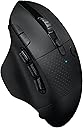
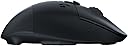
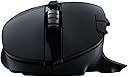
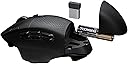
🎯 Own your edge with precision, power, and control — no wires, no limits.
The Logitech G604 LIGHTSPEED is a wireless gaming mouse engineered for professionals and gamers alike, featuring 15 programmable buttons, a cutting-edge HERO 25K sensor with up to 25,600 DPI, and dual wireless connectivity modes (Bluetooth and 1 ms LIGHTSPEED). Its remarkable battery life of up to 240 hours on a single AA battery ensures uninterrupted performance, while the dual-mode hyper-fast scroll wheel enhances navigation and gameplay efficiency. Compatible with PC and Mac, this mouse blends precision, customization, and endurance for a superior wireless experience.


| Brand | Logitech G |
| Colour | Black |
| Connectivity technology | Bluetooth, USB |
| Movement detection technology | Laser |
| Number of buttons | 15 |
| Special feature | Wireless |
E**S
True Hands on Keyboard-And-Mouse (HOKAM) Gaming Experience
Decided to upgrade to G604 from G700s (owned 3 of them). At the moment I am happy with the upgrade. First of all, technical specifications of G604: - Sensor: Logitech HERO 16, Optical, 100 – 16,000 DPI, adjustable with steps of 50 - Image processing: 12 megapixels / second. - Maximum acceleration: 40 G - Maximum speed: 400 inches / second - USB Receiver report rate: 125 - 1000 reports / second - Various battery consumption modes: Yes - Buttons: 15 programmable - Weight: 141 grams = 114 grams mouse + 27 grams battery - Left/Right button: OMRON D2FC-F-7N(G) Micro Switch. - WxHxD: 80mm x 45mm x 130mm Build Quality: My previous Logitech mice models lasted for 2 years on average. It is clear that Logitech made a mistake by using low quality hardware components for main buttons in G604, which is the core part of the mouse. I am on my 3rd G604 mouse, because buttons are developing double click issue: 2020-05-28 – 1st mouse. Developed double click issue after 2 months. 2020-07-26 – 2nd mouse. Developed double click issue after 12 months. 2021-09-24 – 3rd mouse. Let’s see how long it will last. I am still using G604 model, because its design is excellent and Logitech comply with 2-Year warranty commitment. G604, when compared with old G700s: Have 2 extra buttons, double DPI, 240% faster tracking speed. Can handle 25% times faster acceleration and weights 11 grams less. Sensor, on the bottom of the mouse, was moved backwards i.e. further from fingertips, but closer to the mouse's centre of gravity. Battery lasts 22 times longer i.e. up to 240 hours of non-stop gaming. Battery access is much easier and can be replaces with one hand. This mouse doesn’t have cable i.e. can’t charge battery inside and includes non-rechargeable AA battery. This means that you have to spend on rechargeable batteries and charger. AA Battery: - Panasonic Eneloop 1900 mAh rechargeable batteries. Fully charged battery, lasts about 36 days in USB receiver mode. I’ve used it daily for work and for gaming during weekends. I am considering switch to Duracel 2500 mAh, which would give me 32% extra time without replacement. Note: You should keep USB receiver closer to your mouse in order to reduce power usage. USB Battery Charger: - Sanyo NC-MDU01 USB charger. Very small charger, which can charge 1 or 2 USB batteries at the time. Charger gives ability to change battery in 2-3 seconds during the game. Note: I’ve tried Panasonic BQ-CC80 USB charger but it has major disadvantages, like inability to charge 1 battery at the time, charging speed is 4 times slower than Sanyo NC-MDU01. Panasonic also twice as large as Sanyo and makes extraction of a battery with one hand a little bit harder due to its design. Another compact alternative is Universal Magnetic USB Battery Charger from Olight on Amazon, but I haven’t tried it. This mouse has all what it needs to make it the best gaming mouse now: Pros: 1. Comfortable ergonomic grip with robust build quality and individually sculpted buttons. 2. Mouse has thumb rest. 3. Good button layout, allowing easy access to main buttons. 4. Grip feels rubberized and smooth. 5. 4-Way (up/down, plus 2 extra side buttons), dual-mode mouse wheel. 6. Extremely responsive (Up to 1000Hz) in wireless mode. 7. Uses a standard AA rechargeable battery. 8. All buttons are fully programmable and can be saved as profiles to on-board memory. You can create even more complex scripts when combined with "Logitech G HUB” software. 9. Ideal for MMORPGs. 10. You can connect mouse to 2nd device or PC via Bluetooth. Cons: 1. Minor: Mouse don’t have cable connection and can’t charge the battery. Good thing that it lasts much longer than G700s model. 2. Minor: No dedicated profile switch button on the bottom of the mouse (like on Razer Mamba). 3. Major: Logitech software like G-HUB and Logitech Options is prime example of incompetence i.e. buggy and irrational navigation. It is like hardware department hired people based on merit and software department is full of beginners who have no clue. Extra mouse buttons and "true gaming mouse": Proper gaming mouse, like HOTAS Joystick, allows you to keep left hand on movement keys (W,A,S,D,SHIFT,SPACE) at all times, while performing most basic FPS functions (shoot, aim down sight, throw grenade, melee attack, crouch, prone, draw side gun, ...). This requires more than 5 mouse buttons. True gaming mouse must have at least same amount of action buttons as a standard gaming controller which is 14 (A, B, C, D, LS, RS, LT, RT, LB, RB, D-PAD Up, D-PAD Right, D-PAD Down, D-PAD Left). Logitech G604, with 15 programmable buttons, comes very close to perfection. Extra buttons are exactly what makes mouse a "gaming mouse", because extra buttons give advantage over other players. Of course, higher DPI, faster pool rate, memory profiles and scripting are important features of a "true gaming mouse" too :). There is a room for improvements and new features: - Top-left side buttons could be higher and more sculpted, which would separate them better from the main Left mouse button and accident clicks of it. - 2 Extra buttons could be added on the top right side. - Analog buttons (sliders) could be added with support of pulse-duration modulation (PDM) key macro, which could turn G604 into a game controller replacement :). HOKAM: For example, I’ve used this sequence very frequently in Battlefield when trying to resurrect friendly: With my left hand: I was running ('SHIFT') forward ('W'), while strafing to left ('A') and right ('D'). At the same time, with my right hand, I selected, charged defibrillators and resurrected friendly ('G7'), dropped medical kit (SCROLL-LEFT) took out main weapon ('G8') or side arm ('G5'), zoomed ('RIGHT-MOUSE') and was shooting ('LEFT-MOUSE') at enemy in order to provide cover for resurrected soldier, then immediately crouched ('G9') or laid down ('G6') into cover myself. With G604 I can do it in a flash with ease, while constantly moving at the same time, because G604 is a real gaming mouse. Any mouse with 5 or less buttons will force you to use keyboard to perform extra actions. It means that in game character will stop moving, which makes you and easier target for the enemy. Mouse with 14 and more buttons can be called HOKAM (Hands on Keyboard-And-Mouse). DPI and muscle memory: It is important to make sure that mouse sensitivity in Windows is the same as in the Game, because it allows you to move windows cursor to a specific location or move in-game target onto the enemy without conscious effort. You must to make sure that mouse movement on the desk mirrors the movement on the screen. In Windows, to enable that: a) Open Control Panel -> Mouse -> [Pointer Options] tab and… c) Uncheck “Enhance pointer precision" in "Motion" group. DPI higher than 6400 is mostly a marketing gimmick, because many games does not support DPI higher than 3200. I prefer low sensitivity settings and use 10.8 inches swipe on the mouse pad to turn 360 degrees in the game. Sensitivity of 1600 DPI is most convenient for me: 1. Most games allow to set 360° Turn = 10.8" 2. With 80° in-game Field on View (FOV) and 1920-pixel wide monitor it allows me to shift in-game world with 1/2-pixel precision exactly. This gives two advantages in FPS games: a) Partly removes "pixel snapping" effect and results in smooth and high quality precision movement when sniping far away targets, which occupies 1-2 pixels on the screen. b) Removes the need to use medium or long-range scopes in FPS games when using high precision weapons, when aiming at far away targets, because "pixel snapping" is no longer screws precision and forces you to miss. In Windows, I have to: a) Open Control Panel -> Mouse -> [Pointer Options] tab and… b) Select a pointer speed, in "Motion" group, at marker 3 (11 markers: from 0 to 10) In game, I have to use mouse-sensitivity .com website to convert distance (10.8") and mouse DPI (1600) into in-game sensitivity value. Button mappings: Windows do not support more than five mouse buttons, so, you have to assign keyboard keys to them in order to use them in games. Mapping Option (Simple) You can assign just most popular keyboard keys (1,2,3,4,Z,C,F,Q,H,G) with "Logitech G Hub" software. Configuration in most FPS games would look and work like this: Main Buttons: G1 – M1 – Fire. G2 – M2 – Aim down sight (ADS). G3 – M3 – Alternative Fire. Thumb Buttons: G4 – 1 – Side weapon. G5 – 2 – Main weapon. G6 – Z – Stealth mode. Prone. Dodge roll if SPACE is jump. G7 – 3 – Close-quarters combat (CQC) weapon. G8 – 4 – Long-range, heavy weapon. G9 – C – Stealth mode. Crouch. Top Buttons: G10 (+) – F – Melee. G11 (-) – Q – Spot / Command Interface. G12 (<) – H – Scroll Left – Use Defensive Item (Med-Kit, Supply Box, …). G13 (>) – G – Scroll Right – Use Offensive Item (i.e. Grenade, C4, …). G14 (^) – Scroll Up – Next Weapon. G15 (v) – Scroll Down – Previous Weapon. Mapping Option (Advanced): This option allows to assign up to 3 different keyboard keys to one mouse button. Such configuration allows you to keep your Hands-on Keyboard-And-Mouse (HOKAM) at all times. First: Assign physically hidden function keys F13-F24 of keyboard, because they are usually free to map in all games: G4=F14… G9=F19… G13=F23. Second: Use "AutoHotKey" open-source app to create combos, which will make one function key to act like 3 keys, depending on how you press it (SINGLE - Single click. DOUBLE: Double click. HOLD: Click and hold for 500ms). Keyboard (Left Hand): AWSD – Move: Left, Forward, Backward, Right SHIFT – Run Mode SPACE – Jump Mouse Buttons (Right Hand): M1 – Fire. M2 – SINGLE HOLD: Aim down sight (ADS). DOUBLE HOLD: Scope. M3 – Alternative fire. Thumb Buttons: G4 – 1/5/9 – Side weapon. SINGLE: Pistol. DOUBLE: Shorty. HOLD: Select Item 1. G5 – 2/6/0 – Main weapon. SINGLE: Assault Rifle. DOUBLE: LMG. HOLD: Select Item 2. G7 – 3/7 – Close-quarters combat weapon. SINGLE: Shotgun. DOUBLE: SMG. G8 – 4/8 – Long-range, heavy weapon. SINGLE: Sniper. DOUBLE: Rocket. G9 – C/P – Stealth mode. SINGLE: Crouch. HOLD: Prone. Top Buttons: G10 (+) – F – Melee. SINGLE: Kick. DOUBLE: Kill. HOLD: Incapacitate. G11 (-) – Q – Command Interface. SINGLE: Spot. DOUBLE: Target. HOLD: Menu. G12 (<) – H – Scroll Left – Use Defence Item (Med-Kit, Supply Box). CLICK: Drop. DOUBLE: Heal. HOLD: Revive. G13 (>) – G – Scroll Right – Use Offence Item (Grenade, C4). SINGLE: Throw. HOLD: Aim. G14 (^) – Scroll Up – Next Weapon. G15 (v) – Scroll Down – Previous Weapon. "AutoHotKey" script example: - Aim with the normal sight when you "mouse-right-click and hold" or aim with sniper scope if you "double-mouse-right-click + hold". - Assign 3 different keys to G4 button: Single Click - 1, Double Click - 5, Hold - 9: ; ------------------------------------------------------------- G4s := "1", G4d := "5", G4h := "9" ; F14 ; ------------------------------------------------------------- #UseHook, On HoldTime := "T0.5" DoubleTime := "T0.2" DblClickTime := DllCall("GetDoubleClickTime", "UInt") ; ------------------------------------------------------------- ; G2 / M2 - Aim. ; SINGLE HOLD: ADS, RDS or Iron. DOUBLE HOLD: Scope. ; ------------------------------------------------------------- RButton:: MouseClick,right,,,,,D If (G2h != "") and (A_TimeSincePriorHotkey < DblClickTime) and (A_TimeSincePriorHotkey <> -1) { MouseClick,right,,,,,U ; Scope / Double Click Send {CTRL down} keywait %A_ThisHotkey% Send {CTRL up} }else{ keywait %A_ThisHotkey% MouseClick,right,,,,,U } Return ; ------------------------------------------------------------- ; G4 / F14 - Side weapons. ; SINGLE: Pistol. DOUBLE: Shorty. HOLD: Select Item 1. ; ------------------------------------------------------------- F14:: If (A_TimeSincePriorHotkey > DblClickTime) global G4 := "" keywait, %A_ThisHotkey%, %HoldTime% if (errorlevel = 1) { Send {%G4h%} ; Hold global G4 := "H" return } keywait, %A_ThisHotkey%, d, %DoubleTime% if (errorlevel = 0) { Send {%G4d%} ; Double global G4 := "D" return } if (G4 != "H") { Send {%G4s%} global G4 := "S" } return ; -------------------------------------------------------------
S**T
Brilliant wireless, multi-button mouse.
This mouse is almost perfect - Logitech actually managed to improve on the previous generation G604, which was already excellent. The connection to the receiver is strong (I have the dongle plugged into the front of my PC). I've not suffered a single drop-out and the mouse remains responsive at all times. The good bits: + The primary buttons click positively with no excessive travel or missed clicks. + The side buttons are responsive and all accessible with the ball of your thumb. + The precision scroll wheel works well and is not accidentally set off when gaming. + The mouse feet don't suffer from too much friction. + The programmable buttons mean you don't have to redefine your keys in your games; you just leave them and program the mouse. + Per-program profiles are great for productivity, media work and gaming. These can be shortcuts, macros, sensitivity switches. The profiling software, G Hub, really is very useful. The bad bits - The G Hub software is a bit janky. If you alt-tab out of a game, the software quite often does not detect the game in full-screen again. As profiles switch based on the active program, this can be problematic. Ctrl+W closes tabs in Firefox and can be mapped to a button on the G604. If you alt-tab out of, say Battlefield V and into Firefox and back, G Hub doesn't always detect that you've alt-tabbed back. Hitting what you thought was the key to select your rocket launcher (3) will actually trigger Ctrl+W (the same button on the Firefox profile) and close the game. I have a Logitech keyboard with programmable RGB, so I can see when the profile is incorrect, so this isn't a big problem. If you only have the mouse, however, there is no RGB so you can't see which profile is active. - The G Hub workflow to associate games with profiles and to set up your profile actions and assignments isn't very intuitive. - G Hub tries to connect to other apps on your machine, such as Discord, without telling you how to turn it off. - The mouse-wheel left/right buttons are easy to trigger if you use the mouse-wheel-click. For instance, I use wheel-click in games for melee attacks. I can't have the left/right wheel clicks mapped because meleeing might trigger them. - The battery life is good, but not great. Batteries in the original G604 lasted longer than the lifetime of the universe. They only last about 4 months in this iteration when set to gaming mode (1,000Hz report rate).
D**O
Amazing Mice, wish it lasted longer.
Writing this review after replacing my G604. I had 2 of these and both lasted a couple of years before the rubbered top layer started to peel off however this wasn't a huge problem for me. For all its features, this mouse is amazing. Quiet clicks, enough buttons for games, free spin scrolling wheel and DPI LED indicator on top! What I didn't like: Sadly as with any of my other Logi mice, the switches start to go. Starting with double clicks and eventually missing clicks, meaning a faulty switch. Unfortunately you cannot use this mouse plugged in for charging the battery as it relies on the usual AA battery (1), also making it a heavy mouse so if you're going to buy the G604 ensure to have a pack of batteries to avoid running out and not being able to charge.. The battery life is amazing though, it will last for ages and even longer if you use it on BT mode. Performance on BT is good as well although 2.4 mode is even better for smooth gaming. Very often I accidentally pressed the right click button and this has become an annoyance with the years. This is a heavy mouse I believe it sits at around 140g with battery. In 2025 I haven't found a decent replacement for it yet. There's the Naga v2 pro but it's not even close as there isn't fully free spin wheel as in their Basilik or the G604 and clicks are super loud. If you can live with that, go for it but beware, it is even more expensive than the G604.
K**I
SUCH a good mouse.. from a very picky person
I've bought a lot of mouses recently because the cords keep getting chewed. I had a great wired mouse and knew I needed a very fast wireless one to match. I tried a £150 one recently and HATED it. The design was awful and the wireless didn't even work. THIS one is almost perfect! The only thing I'd change is the scroll wheel because it's incredibly sensitive which caused a lot of weapon changes in game when I'd move the mouse to vigorously or tapped it on the mouse pad. I managed this by changing swap weapon to the side wheel bottoms it has (revolutionary). The scroll can be a bit annoying because of this even when just browsing the web etc. If there were a way to tighten it the mouse would be perfect. I originally thought it was going to be too big but while it's very large it's perfect for my tiny girl hands because of its comfortable design and buttons. The side buttons are absolutely amazing. Having everything within the slightest movement is so helpful. And you can program them to be ANYTHING. I can now change song mid game without exiting out!! I've had no issue with the wireless, it's fast and accurate. I did have an issue with the software, it didn't like the DPS being taken from very high to low, it would freeze every time. But I managed to find a quick work around. It's comfortable, easy to use, functional and it looks nice. There's really not much else to say! I'd recommend getting the protecting with it just in case though because I can imagine it will need replacing within the first couple of years but I could be wrong
B**D
An improvement on the G602
The Logitech G602 was already an incredible mouse, so good I've been using it for about 4 years and only ever bought replacements of itself over time. If you've used a G602 before you'll know what to expect and how Logitech wireless mice are amazing. For those that haven't, they are almost faultless mice with long lasting batteries, zero connectivity drop, accurate precision and feels great in the hand (I have medium/above average sized hands for a male). So, how does the Logitech G604 improve over the G602? - More robust materials/build. Feels like a more solid plastic that could take a number of minor impacts without issue. - Scroll wheel is much easier to grip with its new design and allows better tilting from side to side. - There's a scroll wheel lock/unlock now that allows for uncontrolled scrolling or fixed rate scrolling. - The side buttons have seen a major improvement. On the G602 some of the side buttons felt awkward to reach or clumped together that could lead to the wrong clicks but the G604 have separated them and revamped the design. - Using only one battery for a longer charge than the G602, the G604 weighs less and just glides effortlessly across the surface. - There's a new software suite by Logitech that allows a lot of customization in an easy to use program. I couldn't come up with any disadvantages of this mouse over the G602. It really does feel like an upgrade and I'm looking forward to using it over the oncoming years. The one way I wish this mouse could be upgraded further is adding in lighting to the buttons and possibly RGB features. In its current state the mouse is very dark and I feel it almost might get lost in a dark room. It'd be nice if they added RGB as an optional feature with the ability to disable the lighting if that's not your thing. By the way, I bought the 'East European' variant of this mouse and it came in a multi-lingual packaging with English as the primary text so don't worry if you thought the East European version was inferior in some way. Great mouse all around, highly recommended. East
P**E
An (almost) perfect switch for G602 users
Update October 2023: well, that timeframe certainly looks to be consistent based on my level of use - double click issues plus the scroll wheel's almost given up at the same time on the replacement from November 2021. Harsh, given that I've been happy with it, but the score's getting dropped to a 3 due to the lifespan - my Logitech Master 2S at work is still going strong, having outlasted this G604 replacement. Update November 2021: double click issues finally encountered at the 22 months mark, granted of particularly heavy use. Why am I leaving it as 4 stars? It's otherwise been ideal, and have now bought a replacement of the same model since it's suited my needs better than the Razer Naga Pro. As a replacement for a G602, the size and layout makes for an easy transition - the only striking differences on first use are the reduced weight (roughly 135g compared to the G602's approximate 155g, all due to the newer mouse only using a single AA battery), and the 'clicky' all-plastic scrollwheel (the G602 had a fairly smooth scroll and a slightly rubberised scrollwheel). The latter's the only thing that's proven to be a downside thus far - whilst you can switch between the 'clicky' scroll and a free-scroll, the wheel looks a bit cheap and, worse still, feels the same. Dimension comparison: G602: 83 x 139 x 44mm G604: 80 x 130 x 45mm The main difference is length, but this is largely down to the oversized right-hand button on the G602 which overhangs the rest of the design. I've attached a couple of comparison photos beside the older model. Software forces you onto the new Logitech G-Hub, although it seems to be better handled to manage multi-key shortcuts being assigned to the. All bar two of the buttons can be reassigned, sensor can be switched from 100 – 16,000 DPI. Customisation, sensitivity and comfort are the key sellers for me, and this ticks the boxes. My only concern is Logitech's susceptibility to the infamous double-click faults, previously due to use of cheap switches (a reasonably simple fix in the G602, but still something you don't want to be doing at all when spending a decent amount on a new mouse). It's very early days for mine, but given my relatively heavy-usage I'll update this review and score if this fault was to crop up, as it has on my last three 602s. Gripes with the low quality scroll-wheel aside, if you found the G602 the right shape, size and feel, it's a natural switch to the G604. If they come out with a G604A with a better scroll-wheel though, I'm going to be first to swap. nb. I picked up the 'Eastern European Packaging' version listed on Amazon - the only difference between it and the West European version seemingly being that the warning label on the single Duracell battery has the 'not for resale' warning printed in a different language. Box and included leaflets all include English variants of any text. At the time of writing, for a difference of ~£32 (I paid £53, compared to the £85 being asked for the other version), which one to go for is a no brainer unless you desperately need next-day delivery (mine took three, shipping to the UK from Germany).
M**S
Comfortable, customisable mouse. The best I've owned!
I have tried A LOT of mice this year, hunting for the best one. I don't play many games but I was looking for a comfortable mouse for work with extra buttons, infinite scroll, side scroll etc, and this is the one. I did try the MX Master but found it a bit uncomfortable. It may just be me but my hand kept getting caught on the right underside of the mouse. Everything else about it was great but it wasn't for me. This mouse on the other hand is a joy to use. It has a good weight to it, has 6 fully customisable side buttons that i've already personalised for my work use, and the infinite scroll works well (tip: adjust your scroll on windows to scroll 1 line at a time for a smoother experience). I only use the infinite scroll now. The ratchet scroll is fine, but a bit on the noisy side for me to use in a quiet office. It takes a single AA battery which, while not so good for the environment, it does mean you don't have to worry about charging it, and the battery life is great! As I said I haven't tested this for gaming, so can't comment on the refresh rate, compatability etc, but this is definitely a recommended mouse for productivity.
A**G
Borderline Perfect (for me)
Pros: 1. Good build quality 2. Quick switching between modes (Bluetooth to 2.4, vice versa, useful if you want to connect to two PCs) 3. Lots of programable buttons which is especially useful for games that use a lot of key-combos. 4. Sleep mode if the mouse doesn't move for a while, which is useful if you forget to switch it off. I turned off the mouse maybe 3 times? and I have been using it for a month or so and the GHub app shows that my battery is full (4/4 bars). 5. Mouse feet are of good quality, they don't scrape the mouse mat surface. 6. Being able to swap batteries is a great touch, meaning battery degradation is non-existent. 7. The back of the mouse stores the receiver and the battery, and is held by strong, but not too strong magnets. Cons(?): 1. Mouse is relatively heavy, not too much of an issue for me, it can be for others. 2. The scroll wheel is the loudest I have ever heard, but I wear headphones so it does not bother me. 3. Rest space for the pinky would be nice. 4. Albeit minor, the left and right click don't stay perfectly flush with the main body of the mouse. 5. No third connectivity option, such as a USB Type-C, so if the Bluetooth and receiver break, your will need to fix it or replace the mouse. 6. No RGB. I really don't care as it will reduce the battery life, but others may want RGB.
R**S
Ratón top. Muy recomendado. Algo pesado.
o tenía reservado para el día 27/09 pero al final se retrasó y me llegó hace una semana. Venía de un Logitech G403 con el que estaba encantado, pero le comenzó a fallar el botón central y he tenido que cambiarlo. Probé un Corsair Dark Core RGB SE hace un mes y lo devolví porque no me convenció nada (una pena porque tenía pintaza). El G604 acaba de salir y de él, destacaría positivamente: 13 botones programables con el software de Logitech (6 en el pulgar). Los 6 del pulgar están bien, no es algo exagerado como el Razer Naga que tiene demasiados y le resta practicidad. Excelente autonomía tanto en modo lightspeed (240h) como en modo bluetooth (5,5 meses). Son las cifras que indica el fabricante pero bueno, digamos que le dura mucho la pila. En mi antiguo G403 que ya tenía bastante autonomía (unas 30h) era un poco rollo cargarlo cada 3 días, sobre todo si trabajas y juegas con él. Rueda de scroll con doble modo (normal y rápido) Sensor hero con 16000 dpi (aunque todos los logitech g decentes lo están incorporando) Funciona con una pila AA (incluida) por lo que es fácil sustituirla En el aspecto negativo, no es mucho lo que hay que comentar, pero algo hay: Se nota pesado, son 136 gramos con la pila (135g indica el fabricante). El G403 eran 107 gramos. Los botones G4 y G7 del pulgar no son fáciles de presionar. En parte es normal pues tampoco hay mucho sitio físico donde ponerlos. Los botones + y - del índice, si los programas, tampoco son muy accesibles (por lo pequeños que son). Por defecto aumentan y reducen los DPI. La rueda de scroll en modo normal se nota pesada (es de metal, eso es bueno) y ruidosa. Por lo demás responde muy bien con 1ms, una gozada usarlo con monitor de 240Hz. El cambio entre el modo bluetooth y el lightspeed es prácticamente instantáneo y el botón de cambio está situado arriba con lo cual es muy sencillo usarlo con dos equipos alternando entre lightspeed y bluetooth. La rueda tiene scroll horizontal, son dos botones que se activan al presionar la rueda horizontalmente (también son programables) El apoyo del pulgar y la palma es de goma del mismo color negro que el resto del cuerpo del ratón. En la parte más próxima a la muñeca tiene un compartimento para cambiar la pila y para guardar el receptor usb. Esto último se agradece mucho para transportarlo sin perderlo. El software de logitech, un poco regulín, han cambiado y ya no se usa el logitech gaming software de toda la vida, ahora es otro y le llaman G Hub. No me acaba de convencer el cambio pero bueno, al menos no es tan malo como el de Corsair. Permite hacer macros, cambiar los botones, etc… el tema perfiles no me queda muy claro, pero bueno…supuestamente puedes utilizar perfiles por software que se cambian automáticamente, por ejemplo al lanzar un juego X se activa ese perfil o usar los perfiles integrados de la memoria interna del ratón (tiene 5). El ratón carece de luces y leds. A algunos no os gustará pero a mi esto me encanta. Los leds es lo típico que está muy chulo al principio pero luego cuando ves que te quita horas de autonomía es lo primero que desconectas. Como accesorios sólo trae la pila AA de Duracell y un cable alargador por si no es posible enchufar directamente el receptor USB. Yo la rueda de scroll la tengo puesta a rápida. En este modo no tiene resistencia con lo que se hace scroll casi sin esfuerzo, es ideal para trabajar. El inconveniente que le veo, hasta que me acostumbre, es que es muy sensible y a veces lo muevo sin querer cuando presiono el botón central o muevo rápidamente el ratón. Los botones del pulgar se pueden programar con macros para aumentar la productividad. Es bastante práctico (Ctrl+Z, Ctrl+V, macros complejas…) No es sólo un ratón de “gaming”. Yo desde que me llegó lo uso más para trabajar, la verdad. Comentar que existe la posibilidad de asignar un botón que cambia entre un doble perfil denominado G-Alt, es decir, al presionarlo cambias la programación con lo cual tendrías un número doble de botones. Yo no se lo activé porque me llegan y me sobran con los que tiene. Por último comentar que, como muchos ratones de este estilo, el diseño es para diestros. Los zurdos que conozco que usan este tipo de ratones al final se han acostumbrado a usarlos con la mano derecha con los años... El precio es caro, pero es un ratón top y eso se paga. En fin, espero que me dure lo mismo que otros de la marca que tengo, desde hace más de 20 años (aún tengo operativo el Mouseman Dual Optical y alguno de bola).
J**Z
Sehr gute und effiziente kabellose Maus
Ich benutze seit Jahren diverse verschiedene Logitech Lightspeed Mäuse und Spiele mit denen verschiedenste Genres an Games. Also sind sie eigentlich fast immer unter Dauerbelastung und die ein oder andere Rage im MOBA/FPS Bereichen ausgesetzt. Ich hatte eine G900 Chaos Spectrum, G903, G Pro, G502. Keiner der genannten Mäuse ist so ergonomisch und perfekt passend zu meiner Hand und die Griffart wie die G604. Ich benutze die Maus schon seit Monaten und es ist immer noch die erste Batterie drinne, die mitgeliefert wurde. Ich finde es super, dass man die Batterie einfach austauschen kann wenn die Leer ist ohne dass die an den Stecker muss wie die anderen Mäuse. Die Qualität stimmt wie von Logitech zu erwarten. Was manche kritisieren ist das Drehrad, welches ein bisschen locker ist, das ist bei Logitech Mäusen eher eingebautes Mechanik, damit das Rad frei drehen kann. Der Sensor ist wie der Vorgänger der PWM Sensoren sehr präzise und es gibt kaum spürbaren Inputlag zwischen Bewegung, Klicken, Scrollen etc. Alles in Allem eine sehr gute Maus, die ich wieder kaufen würde, alleine aus dem Grund dass sie sehr effizient mit der Batterie/Akku und sie auch austauschbar ist.
F**F
I use this mouse for a long time and I am happy with it
The batteries last a pretty decent time, even if you use cheap ones from Action (Dutch Dollar Stores). It works with its own wireless dongle and via Bluetooth. I have tried it with MacOS and Windows. No issues either. Decent design. Ergonomy could be better for small hands but I can't expect them to design a device for small hands and multiple buttons, I guess. I like the macro abilities, but be warned you might have to edit some files manually depending on what you want to do. Still worth it. Helps me a LOT on my daily routine!
S**F
Poor quality switches.
It was great while it worked but started double clicking a mere 3 months after purchase. Really disappointed with Logitech.
D**K
Very comfortable.
After changing clicker few times, my G402 finally died. Love the ergonomics, a slight twist of the wrist, plenty of buttons and a great sensitivity. It has all that I need, plus I'm familiar with the design. On the bad side, the mouse is all plastic. From a longevity standpoint, it is good, but it feels cheaper in hand compared to G402. Additionally, the wheel in restricted mode is very 'cranky'. The turning feedback is very harsh and not pleasant at all. Besides the above I highly recommend this mouse as a daily driver.
Trustpilot
2 months ago
2 days ago