Desertcart purchases this item on your behalf and handles shipping, customs, and support to GERMANY.
💼 Secure your digital legacy with style and speed!
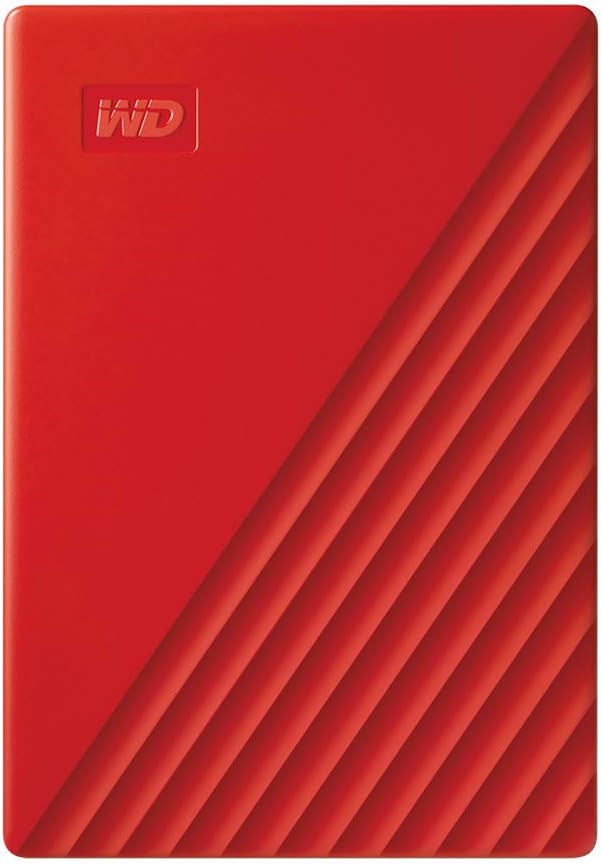
The WD 2TB My Passport is a compact, durable external hard drive featuring 2TB of storage, hardware encryption, and password protection. Compatible with USB 3.1/3.0, it offers fast data transfers and comes bundled with smart backup software that includes ransomware defense. Its sleek red aluminum design and 3-year warranty make it the perfect portable storage solution for professionals on the go.


| Additional Features | Hardware Encryption, Portable |
| Asin | B07VTW2LQ5 |
| Best Sellers Rank | #15 in External Hard Drives |
| Brand | WD |
| Built In Media | My Passport portable hard drive, Quick Start Guide, Software[2] for device management and backup with password protection, SuperSpeed USB-A cable (5Gbps) |
| Cache Memory Installed Size | 2 |
| Color | Red |
| Compatible Devices | Desktop, Laptop, Tablet |
| Connectivity Technology | USB |
| Customer Package Type | Standard Packaging |
| Customer Reviews | 4.5 4.5 out of 5 stars (23,272) 4.5 out of 5 stars |
| Data Transfer Rate | 1 megabits_per_second |
| Digital Storage Capacity | 2 TB |
| Enclosure Material | Aluminum |
| Form Factor | 2.5-inch |
| Global Trade Identification Number | 00718037870168 |
| Hard Disk Description | Mechanical Hard Disk |
| Hard Disk Form Factor | 2.5 inches |
| Hard Disk Interface | USB 2.0/3.0 |
| Hard Disk Rotational Speed | 1 |
| Hard Drive Size | 2 TB |
| Hardware Connectivity | USB 2.0, USB 3.0, USB 3.2 Gen 2 |
| Hardware Platform | PC |
| Installation Type | External Hard Drive |
| Item Dimensions L X W X Thickness | 4.22"L x 2.95"W x 0.44"Th |
| Item Weight | 120 g |
| Manufacturer | Western Digital Technologies, Inc. |
| Mfr Part Number | WDBYVG0020BRD-WESN |
| Model Name | My Passport External Hard Drive |
| Model Number | WDBYVG0020BRD-WESN |
| Number Of Items | 1 |
| Specific Uses For Product | Business, Multimedia, Personal |
| Unit Count | 1 Count |
| Upc | 718037870168 |
| Warranty Description | 3-year manufacturer's limited warranty |
User
Random/Sequential Writes Faster Than 2016 Model, Reliable, Improved Smaller Design
This model is the latest generation of the many My Passport drives I've owned or purchased for clients. They have proven reliable and good performers. They have incrementally improved with each new generation. This model features a new case design which I feel is much better looking and is slightly smaller than the last version.BOTTOM LINE (for the impatient):This model is a little bit faster than the last (2016) model I bought. I got the black 2TB model and this generation offers up to a 5TB model as well as the usual smaller capacities. This model is just noticeably faster than the last generation on sequential reads and writes when I tested using CrystalDiskMark.This My Passport has a new design that returns to rounded corners and soft-look matte case. I like this much better than the older one with its cheap-looking (to me) styling. The drive is slightly less thick, wide and long than the 2016 model. In my laptop bag that’s welcome even if not a lot smaller.I’m very pleased with this My Passport drive as with ones purchased over the last decade plus. It’s reliable, fast for a USB mechanical HD and gives a lot of space for a low price.If you want more details, read on...SUMMARY:The My Passport USB 3.0 drives are simple to use and come with reasonable software tools and backup/sync software. These are now in a single installer on the drive. I have my own backup solution and do not want encryption on this drive, so have not explored this software. If these are of interest, be sure to check for newer versions on the WD web site.Pluses:+ This drive works fine with Windows, Linux or Mac out of the box. With Linux or Mac (where it is read-only with NTFS). They generally performs best when reformatted with a native file system to the respective operating system. Mine came formatted with NTFS for Windows.+ This generation has 5TB, 4TB, 2TB, and 1TB models. The 500GB models were dropped a couple of generations ago and more recently the 3TB models.+ This drive is faster than the last generation, but just a little. Up to about 3% faster in benchmarks, but barely noticeable in practical use.+ The form factor of the new drive is lighter and slightly smaller before with a much nicer case without pointy corners and scratch/fingerprint prone glossy finish.+ The warranty has been returned to 3 years from 2 years on the 2016 generation.Minuses:- It comes with the same very short USB 3.0 cable as previous versions. I like a longer 3ft (or more) USB 3.0 cable: a very good upgrade purchase for the My Passport drives.IN THE BOX:The My Passport comes in a easy to open retail package containing the drive and a annoyingly short USB 3.0 cable. There are a couple small pieces of paper for warranty and quick-start. That's it. The cable in this model is the same as previous versions. This may be just fine for a lot of folks but I keep some 3ft (or more) USB 3.0 cables handy for longer runs to my desktop or even on top of a tall computer.FORM FACTOR vs. PREVIOUS GENERATION:I'll compare the new generation of My Passport with my 2016 My Passport UltraThis Model My Passport's dimensions:1TB-2TB: 0.27lb, 4.22in X 0.44in X 2.95in4TB-5TB: 0.46lb, 4.22in X 0.46in X 2.95in2016 My Passport's dimensions:1TB: 0.37lb, 4.33in X 0.64in X 3.21in2TB-4TB: 0.54lb, 4.33in X 0.85in X 3.21inTESTING:I tested both my older 2016 My Passport 4TB drive and my new My Passport 4TB model using CrystalDiskMark benchmark software and by copying 11GB folder of updates and files to the drive. This was to compare the benchmark with real-world copying. The 11GB folder has a broad mix of file sizes and types including files an over 2GB iso DVD image.Using CrystalDiskMark I found sequential reads were about 3% faster and writes about 8% faster with the new model. Random reads were just a tiny bit slower and writes were about 8X (!!!) faster. While the benchmarks showed significant differences using them in my real-world copy test the difference was most noticeable with lots of smallish files, but not so much with large sequential reads/writes. If you need to write smallish files this drive is noticeably better than the 2016 model and about the same for large files.For my testing the My Passport drive was connected to built-in USB 3.0 controller on my Dell 7710 Precision Mobile Workstation. I also tried it on a older add-in card with the Renasas USB 3.0 chip set on my Dell Precision T7500 tower. I have the latest Renasas drivers installed. Both are running build 1903 of Windows 10 Pro and both have SATA SSD boot drives. I used CrystalDiskMark V7 64bit version.CRYSTALDISKMARK Results:The New Generation My Passport:Sequential Read (Q8T1): 129.18 MB/sSequential Write (Q8T1): 119.75 MB/sSequential Read (Q1T1): 120.37 MB/sSequential Write (Q1T1): 118.08MB/sRandom Read (Q32T16): 4KiB 0.6 MB/sRandom Write (Q32T16): 4KiB 10.8 MB/sRandom Read (Q1T1): 4KiB 0.49 MB/sRandom Write (Q1T1): 4KiB 7.8 MB/sThe 2016 My Passport:The New Generation My Passport:Sequential Read (Q8T1): 125.5 MB/sSequential Write (Q8T1): 113.7 MB/sSequential Read (Q1T1): 119.1 MB/sSequential Write (Q1T1): 113.7 MB/sRandom Read (Q32T16): 4KiB 0.573 MB/sRandom Write (Q32T16): 4KiB 1.290 MB/sRandom Read (Q1T1): 4KiB 0.505 MB/sRandom Write (Q1T1): 4KiB 1.305 MB/sREAL WORLD COPY:In my real world copy test the new My Passport drive was just noticeably faster than the older My Passport Ultra. More on the writing than reading side and more noticeably with smaller files than larger files. It peaked out at about 70MB/s with large files. I never dropped below 35MB/s even with large amounts of small files being copied to the drive. The 2016 My Passport Ultra peaked out at about 68MB/s and dropped several times to 30MB/s.I'm thinking the newer drive may have a larger on-drive write cache or maybe it's just a bit faster drive. Maybe both. On big copies the new My Passport may save you a few seconds here or there but if copying a lot of small files to it the difference was much more noticeable.CONCLUSIONS:The My Passport line of drives from Western Digital has been very good to me and to my clients. This reliable and good to excellent performing line has a long positive history with me.This WD My Passport model is an evolution over the 2016 My Passport. I'm picking it for new purchases over the older model, but won't rush out to replace older drives. I like this 2019 My Passport’s rounded corner case better than the 2016 sharp edged and glossy one, but it's very minor point for me. Overall it's an excellent evolution to a 5 star predecessor and continues to be a very good external storage choice.For making improvements in small file write performance and correcting the 2016 bad case design issue this new 2019 generation of My Passport drives is worth 5 stars in my opinion.Hope this helps someone!
User
Good little External Drive
Best deal I could find, works solid, good brand, small and convenient, and it came in a timely fashion
User
Works great
The disk was already formatted for Windows so it was plug and play. The connectivity is fast. No data has been lost. Great size, very small. It mounts almost immediately. I ran a system check and it is the actual size it was advertised. Very pleased with the product and price.
User
GREAT PRODUCT. DO NOT HESITATE TO BUY IT!
Great product and easy to set up.
User
Great drive but DEFECTIVE/mis-toleranced CABle included - DO NOT USE!!
Great drive but TERRIBLE mis-toleranced/defective cable included. See below for details.Great drive. I wanted to get a 5 TB size HDD to store all my Ripped CDs to be able to stream them on my network.Ive been using WD drives for a long time. Never had any issues. I have a Windows system1) Great Drive. I checked the drive integrity using the included WD tools and it checked out fine. I deleted the utilities to leave a blanl drive. This left 4.54 TB of available space (Formatting drive takes up 0.46 TB)2) The included CABLE is 100% Junk. Throw it away. It is designed improperly with bad specs that do not fit into ANY of the USB-C ports I have. It is very loose and falls out. I had read a few reviews that mentioned this fact so just in case along with my order I got this Anker Powerline II USB-C to USB-C cable:https://amzn.to/3gK8reuIt sucks to have to spend an additional $10-20 for a cable to be able to use a product that should included a good one but....Oh well.The included ADAPTER is GREAT perfectly fine with the Anker cable. It locks/clicks in place as it should. But the included WD cable just falls out/is very loose and will not work. I made sure to line up the arrows on the cable. Tried it on my laptop USB-C port and the WD HDD and my Android cell phone all of which have USB-C ports and it did NOT work / lock in pla ce. I will be contacting both Amazon and WD to complain about this. Not acceptable. Terrible Quality control to not test the fit of the cable to a mating device.3) I ran benchmark tests using Crystal DiskMark 7.00 x64 bit to test the empty drive out. I ran two scenarios. One going direct from laptop USB-C port to USB-C port on WD HDD (no adapter) and one test when using the included USB-C to USB 3.1 type A adapter in between the laptop and the WD HDD. You can see the results in the attached image, Not much difference in using the USB-C port directly or the USB 3.1 port so thats good to know. Your result will vary.Im using a Dell XPS 15 hi spec machine on Windows 10 ProOf note: The disk LED light is always flashig on the HDD even when its not reading/writing data. I think you can turn that off but my other 3 WD external HDDs dont do that. They only flash the LED light when actually reading/writing.Hope this is helpful.Keep the drive. Ditch the cable.Good luck
User
Good product for the value
I've had this product for months now and it has not given me any problems or lost any data or needs to be reformatted to clear problems. I use it as a back-up external storage unit for my MacOS with the M1 chip but I have to use NTFS software to recognize it as Apple is phasing out support for Intel based hardware. Price point was within my range. Recommended.
User
quick, compact, good capacity
A fast, compact drive powered by its USB-C connector. A solidly built cable is included plus a USB-A converter. There's a single activity LED near the connector.Write performance on a USB-C 3.1 host interface was decent, with 1MB sequential writes running at 112MiB/s, but dropping to 94MiB/s presumably along the slower (outer) parts of the spinning disk.Linux/BSD people, here's how the drive showed up for me:WD My Passport 260D 2007 Fixed Direct Access SPC-4 SCSI device1907697MB (3906963456 512 byte sectors)Note the enclosure shows up as a separate device, BSD sees it as:ses1: WD SES Device 2007 Fixed Enclosure Services SPC-4 SCSI deviceses1: SES DeviceUSB-C is a selling point for me despite some skeptical reviewers here. It isn't meant to be faster, necessarily, that's a function of the interfaces on each end. But it's always a more robust & simpler connector. It lasts long than microUSB (by design) and doesn't need to be flipped back and forth repeatedly until it finally fits. I generally won't buy a device with an older USB connector unless there's no option. USB-C all the way.A great little drive, and nice-looking too. I might wish it were SSD or that the LED was on the front, but otherwise no complaints.
User
Sent the wrong cord & it won't 'safely disconnect'
I am stupefied; I genuinely am. Media attached.I made this purchase because my laptop broke and I needed to take it somewhere in the hopes of salvaging the terabyte of information I had on there. I've also had 2 Western Digital external HDD's in the past; a one tb elements many years ago & a ten tb elements more recently. This one is for portability rather than desktop replacement.The moment it came in, I didn't even take it out of the box. I went straight to my nearby computer repair place with my old laptop and this drive. When it was all plugged in and my old hdd tested, it looked as if it would transfer over everything, I was thrilled!!! I had a lot of work related items I couldn't risk losing. I should mention, I'll be using this drive specifically for work (video editing, so large 2k and 4k raw video files).Then, when we plugged in this Western Digital 5tb drive, it worked, but the cord didn't fit in properly. It wouldn't go in all the way, barely half way and it kept disconnecting. It was extremely stressful for me and it was irritating the tech who was helping me because he had other business to attend to.We ended up using one of his spare cords (a usb-c to usb-c) and it fit properly and worked perfectly.In the video I posted, I thought the cord was defective at first, but when I compared it to my phone cable (usb-c to usb-c) it looked completely different!!! (See attached pic). My phone cable works with this drive, it fits securely. I had another cable that was a usb-c to usb 3a and that usb-c fit snug.Also, the cord I was given was pathetically small. 6 inches. What is the point of having a 6 inch cord? Even if you're using this on a desk, it barely gets out of your way. I'm using it with a laptop, I travel, it's extremely inconvenient to have this thing dangling because there's no length to place it nearby. This is just wrong. I mean, what is Western Digital thinking? It's completely irrational. Provide a respectable cord, and the proper one would be nice as well.Lastly, and this makes me very nervous! When you go to 'safely unplug' your peripherals from your computer by clicking on your taskbar and clicking to safely remove hardware and eject media, this always says that it can't close while a window is open or while it's in use (even when it's not in use). I had no windows open, I wasn't connected to the drive in any way other than the cord (by which I mean, I didn't have a music player open or video player or file location window accessing the unit) but when I tried to safely remove it, it began spinning or "being active". ???I double checked everything, it wasn't being used, but the light was solid and you could feel it at unrest, if you will. I tried to wait it out, 5 minutes, 10, 20, 30... It wasn't stopping. so I restarted my computer. I should also mention that I'm using a brand new Lenovo Legion 7i less than 2 weeks old.After the restart, the only thing I tried to do was 'safely remove the Western Digital HDD and the exact same thing happened! It's clearly NOT being used!!! So I just unplugged it. I hate doing that. I plugged it back in just to be sure that everything was still on there, and it was, but now I'm unsure of the device as a whole. I have very little confidence in it. Is this going to be a recurring issue? It better not be!!! The entire point of the purchase was to SAVE information, not to lose it!When I have clients that have invested tens of thousands of dollars on a commercial, and then I'm sent the media to begin the post production process, I need to have confidence in all my gear, my computer, my headphones, and ESPECIALLY my HARD DRIVES!!!Needless to say, I'm weary and uncomfortable with my purchase to this point.At these prices, one would think you would be buying a quality piece of equipment, as of right now, this isn't worth half of what I spent. I don't mind spending for quality, for sturdiness, practicality & longevity. It does work, but I have to say, if I'm being totally honest... just barely.I'm considering returning it; it's just going to be such a chore to have to re-transfer a terabyte of information from this drive to another. This whole experience has been a real pain, and I am dissatisfied and unhappy.
User
Huge Storage in a Tiny RED pocket!
Needed something reliable to back up years of photos, videos, and random chaos—this 5TB WD My Passport totally delivered! Super compact and lightweight!The transfer speeds have been solid (nothing to complain about unless you're expecting SSD speeds
User
Ottimo
Ottimo
User
Great product
Excellent product. Plug-in and ready for use.
User
Klein und vollständig
sehr gutes Fahrradset mit allen gängigen Werkzeugen
User
Léger rapide et performant
Super design en aluminium, fin, léger. Il est en plus performant (idéal pour faire passer des gros fichiers du PC de mon bureau en USB-C 3.1 vers mon macbook air perso en USB 3.0 (adaptateur fourni). La capacité de 2 TO (ou 1,8 TO formaté environ) suffit amplement pour tout type de fichiers !
Trustpilot
1 week ago
3 weeks ago