Desertcart purchases this item on your behalf and handles shipping, customs, and support to GERMANY.
🖱️ Elevate your workflow with the ultimate touchpad command center!
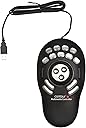
The Contour Design Shuttle Pro V.2 is a sleek, battery-powered input device featuring 15 programmable buttons and an integrated touchpad. Utilizing infrared connectivity, it offers wireless freedom and broad compatibility across Mac, PC, PlayStation, and Xbox platforms, making it a versatile tool for professionals seeking precision and efficiency in their digital workflows.


| ASIN | B0032XQP1K |
| Are Batteries Included? | No |
| Are Batteries Required | No |
| Brand | Contour |
| Brand Name | Contour |
| Button Quantity | 15 |
| Colour | Black |
| Compatible Devices | Mac, Personal Computer, PlayStation, Xbox |
| Connectivity Technology | Infrared |
| Customer Reviews | 4.2 out of 5 stars 693 Reviews |
| Global Trade Identification Number | 00743870004982 |
| Hardware Platform | Desktop, Laptop |
| Item Weight Unit of Measure | 0.55 Ounces |
| Manufacturer Part Number | 00498-0 |
| Model Number | SPROV2 |
| Network Connectivity Technology | Infrared |
| Number of Buttons | 15 |
| Power Source | Battery Powered |
| Product Features | Touchpad |
| Special Feature | Touchpad |
| UPC | 743870004982 795327721270 191120090443 |
R**I
100% original product.
Thank Amazon and seller, product is original and working perfect, price is higher from local market, but all ok. Packing and all is fine. 100% recommend. M use this for vmix reply, it's working great. Very easy to use.
D**.
Awesome equipment
nothing to dislike, I use this with Software Defined Radio application SDRuno RSPDX and makes using this application a breeze.
V**I
Estensione della tastiera/mouse con funzioni programmabili per montaggio video e audio
Il fatto che questo prodotto sia presente in commercio da circa 20 anni la dice lunga sulle sue qualità e utilità. Orientato ad un uso per il montaggio video con software professionali, il software di controllo lo rende utile anche su altri software, dove si sono consolidati l'uso di mouse e tastiera. Interamente programmabile con opzioni fini e precise lo uso in ambiente Mac con Final Cut x e devo dire che mi aiuta molto, bisogna prenderci la mano ma poi diventa uno strumento indispensabile, preciso e funzionale. i 15 tasti sono programmabile a propria discrezione come le due rotelle che personalmente uso per muovere la timeline a destra e sinistra e il cursore in modo molto preciso al fotogramma. I 9 tasti superiori possono essere personalizzati anche con una cover, fornita con il kit; i driver di controllo vanno necessariamente scaricati dal sito della Countour ma pesano circa 30mb. Nel mio caso ho notato che il coperchietto trasparente di questi tasti tende a venarsi, quindi ho contattato il supporto tecnico che si è prodigato a spedirmene di nuovi. Si sono accertati del numero di serie del prodotto (riportato sotto la base) e dove fosse stato prodotto poichè pare che alcuni di questi Made in China, abbiano i copritasti difettosi......(appunto). L'importante è avere il supporto e devo dire che sono stati immediati, gentili e precisi. Per chi fa montaggio video, audio anche con moviemaker o iMovie, Logic Pro x lo consiglio.....
S**T
Stebo.at Review: Perfektes Geschenk – endlich ein Controller, den er wirklich nutzt
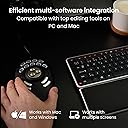
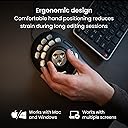
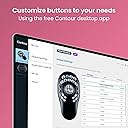
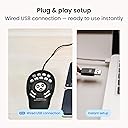
Ich habe meinem Freund die Contour Shuttle PRO v2 geschenkt, und es ist eines der wenigen Geschenke, über das er sich wirklich gefreut hat – und das er auch tatsächlich nutzt (etwas, das er sich wohl selbst gekauft hätte). Die Shuttle ist ideal für Videobearbeitung, Audio- oder Bildbearbeitung. Das Jog/Shuttle-Wheel fühlt sich sehr präzise an, die 15 programmierbaren Tasten lassen sich flexibel belegen, Shortcuts und Makros sind einfach einzurichten. Die Software ist übersichtlich und erkennt automatisch die genutzte App, sodass sich die Steuerung sofort anpasst. Sie funktioniert sowohl auf Mac als auch auf Windows problemlos (USB-Anschluss, Treiber leicht verfügbar), und das ergonomische Design liegt gut in der Hand. Besonders praktisch für komplexe Workflows in Programmen wie DaVinci Resolve, Adobe Creative Suite oder Final Cut Pro. Ein kleiner Hinweis: Die Einrichtung erfordert ein wenig Geduld, aber sobald alles läuft, wird die Shuttle zu einem unverzichtbaren Werkzeug. Preis-Leistung stimmt absolut – für jeden, der regelmäßig digitale Projekte bearbeitet, sehr empfehlenswert.
K**A
Speed up editing
Wow. Only had this for a day and really impressed. Once the software is downloaded it works with most programs out of the box effectively. The software detects the current software in use and automatically maps the keys according to presets. I use for Davinci Resolve 16 and its brilliant. There are pre-named button labels included and also blanks so you can name them yourself. It has really speeded up my editing in Davinci already and i'm not used to it so looking good for the future.
R**G
Muy buen producto.
Excelente para edición en Final Cut
Trustpilot
2 months ago
2 weeks ago