Desertcart purchases this item on your behalf and handles shipping, customs, and support to GERMANY.
โก Elevate your network game with pro-level cable control!
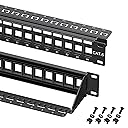
The Cable Matters 1U 24 Port Keystone Patch Panel is a versatile, heavy-duty solution designed for professional-grade structured cabling. It supports a wide range of keystone jacks including Ethernet, HDMI, USB, and fiber, fitting seamlessly into standard 19-inch racks or wall mounts. Featuring a removable cable support bar with zip tie slots and writable labels, it ensures a clean, organized, and scalable setup that stands the test of time.


| ASIN | B0072JVT02 |
| Best Sellers Rank | #2,362 in Electronics ( See Top 100 in Electronics ) #182 in Electrical Cord Management |
| Brand | Cable Matters |
| Brand Name | Cable Matters |
| Cable Type | HDMI, USB |
| Color | Black |
| Compatible Devices | PC |
| Compatible Phone Models | Likely compatible with smartphones, specific models not listed |
| Connectivity Technology | HDMI |
| Connector Gender | Female-to-Female |
| Connector Type | Auxiliary, HDMI, RJ45 |
| Customer Reviews | 4.8 out of 5 stars 1,720 Reviews |
| Ethernet Cable Category | Cat 6 |
| Indoor Outdoor Usage | Indoor, Outdoor |
| Item Length | 19 inches |
| Item Shape | Flat |
| Item Weight | 16 ounces |
| Manufacturer | Cable Matters |
| Maximum Voltage | 12 volts |
| Model | 180013 |
| Model Name | 180013 |
| Number of Items | 1 |
| Number of Pins | 8 |
| Other Special Features of the Product | Heavy Duty Construction, Lifetime Warranty, Removable Cable Support Bar |
| Outer Material | Metal |
| Part Number | 180013 |
| Recommended Uses For Product | Cable management, network racks, cabinets, or wall mount brackets |
| Special Feature | Heavy Duty Construction, Lifetime Warranty, Removable Cable Support Bar |
| Specification Met | RoHS |
| UPC | 738435981334 |
| Unit Count | 24 Count |
J**N
Looks nice is makes the jobs easier.
I really like these Patch Panels. They look nice and are easy to use and flexible. They also have a really nice cable support on the back side. If you look in the first picture at the red cables, you can see how each one is zip tied into place. Nice!!! You can see in the first and second picture I'm using 23 Normal Cable Matters Keystones. Plus 1 Blank Plug in the 24th spot. The nice thing about this is you can install the cables onto all your cables FIRST and then pop them into place after. This makes the job so much easier. I got a different one where you would have had to mount all the wires onto the patch panel at once, really making a bulky mess and really hard to do in my small closet. So I ended up going this route instead. On the Second Patch Panel, you see in the 3rd picture, There are 2 Keystones on the right side. These are 2 of the 9 NEW Cat6 cables I ran and those 2 go to the garage for future Security camera's. Then there's a number of blanks in the middle and on the left side are passthrough Keystones. This allows me to run cables from the other devices on this rack, from the Router, the Tivo Stream, HD HomeRun, etc to plug in behind the Patch Panel, where the cable can be hidden, and then the short cable into the Router like all the others making for a better looking professional job. Instead of just running a cable out from whatever hole and into the Switch. That 3rd picture shows a nice clean setup with all the same cables out front. I have empty slots for future expansion. I don't think that's likely. But then I figured I wouldn't have to crawl around on my belly ever again 5 years ago when I first ran all the Cat6 wires. Here I am running another 9. 3 in one room, 4 in another room, and 2 into the garage. By the way, I threw in a 4th picture. This was How it was just before I changed it all. This was my 5 year old setup so you can see the Before and After. Really how much I've learned over the years and what I could afford and had time to do back then. I did that job right after I got this house 5 years ago. But you can see all the different color cat6 wires, and they're just all over the place. So I'm a big fan of these Cable Matters Patch Panels. I did have a few Keystones that didn't install how they are supposed to go in. The bottom wasn't quite is and then it makes them hard to get out. I found that you can push up on the bottom and in on the Keystone and it'll pop fully into place and all is good. I like that it makes the job easy when you're not trying to install all the wires onto a single board on the back of a Patch Panel like many others out there. You also get the flexibility of using any number of different Keystones to fit your own needs. You don't even have to use Black to match as I did. Maybe you use different colors. Like Red for one room, and Blue for another and so on and so on. You can use HDMI Keystones and Audio keystones and on and on. That's what's so great with this design. The final results is it looks really nice. The options on what you can do is almost unlimited. But what takes it over the top, is the excellent cable support in the back of this Patch panel. It's solid!!! You don't want future issues with your cables. You want a setup that's going to last you for many years to come. Using my label printer, and double line printing, I was able to make small labels to label what every port went to. There's a spot to label each port on this thing. I also have every port labeled around my house. So I know Port 3 in the Master Bedroom is this one exactly. I also tested each and every wire to make sure they were all perfect as I did booboo a few times. I used a Fluke Networks MS2-100 Cable Tester. So, what do you think? You can't go wrong with this Cable Matters 24-Port Cat6 Keystone Patch Panel. I'm a big fan and would recommend it to anyone that is going to take on a job like this. All this stuff is really not that hard. The hardest part? sliding around on my belly all around under my house in the dirt, and the spiders and so forth to run the cables. Cut the needed holes in the walls, and down under the house to run up the wires, fill holes up when done with expanding foam. Did it ALL by myself. There was no one else here. All this other stuff, other than time, not that hard. My Dad is completely clueless about it. But it's something you can learn to do. It's pretty straightforward. A little planning on what YOU want and the pieces fall into place. 11-17-2019 update I added another picture close up to see how I labeled my ports. As you can see there is not a lot of room. I used a normal brothers labeler. Then I used 2 line printing which makes the text a lot smaller. I would make sure to add a few spaces in between each work for more space to carefully cut out. You can only fit 3 to 4 letters or numbers or a combo. So MB1 would be Master Bedroom 1. DR1 would be Dadโs Room 1 since he lives at my house. RMC would be Remote Management Control which is for my UPS, etc. at the Keystones in the wall at all my locations, they have the same markings. So it makes it easy to figure things out if there is ever a issue. I am using Cable Matters Keystones with these, the normal ones, along with their pass though keystones, which allows me to plug things like my router or NAS cables that are sitting on those shelfโs to plug in on the back side of the keystone, then just add a short patch cables line everything else for a clean look. Iโm also using some blanks from Cable Matters to fill in some holes I didnโt need to use for keystones at this time to clean my rack up better. Keystones like this is the way to go.
S**3
Great patch panel, comes with all needed hardware
As I've said in other reviews, Cable Matters makes the best network cables and infrastructure peripherals. This panel is perfect, compact, with great cable management, includes all the needed hardware and a pack of zip ties to secure the individual cable runs. Pair this with their 19" wall mount bracket and you're set. You will need the CatX keystone jacks, but you knew that already! :-)
J**R
Wort it
Well built and work great
E**F
Decent product, decent price.
Needed a Keystone style patch panel as some keystones were not all Data, they were Coax, HDMI and USB., these worked well and fit keystones perfect. Ordering a few more after trying this one to see if it works for install I needed.
M**C
Great quality except 1 small thing...
Excellent quality front plate, hinge, printing, etc. The only thing I have issue with is the removable wire tie/support that attaches to the rear. I was very picky about tje brand and design of that rear support bar that I wanted and this is the one that's positioned and shaped exactly as I wanted - except it doesn't snap very securely to the rear of the panel to the point where I asked my neighbor to "tack weld" it in a few spots to permanently attach imthe two. I'm sure (in retrospect) that skme crazy glue could probably have done the job as well. But it is what it is. Besides that minor design flaw I still find this to be exactly what I am looking for - bothCAT5, CAT6 + CAT6A Keystones from 2 or 3 different brands manufacturers fit snugly into this panel. Still worth buying. Still recommended!
T**Y
It doesn't get better than this
It DOES get cheaper, but not better. The separate jacks for each connection means if one goes bad or you have to reterminate it for some reason you're not damaging the rest, and most of the them these IDC connections will only work properly ONCE. That turns into a problem over time with the standard 110-style punchdown blocks with connectors on them. Not with these -- remove the bad one, replace it, no problem with the rest. In addition the strain relief is fantastic. The only downside to this design is it requires more space behind the panel .vs. the common style "integrated block" but IMHO its a trade-off worth making if you have the room. Hint: Don't use CCA wire; over time it can have galvanic issues with the termination. I know its cheaper -- buy 100% copper unless you're doing an install that you expect to rip out and replace within five years.
D**E
Great value, excellent quality!
I've been in telecom for years now, and we've used everything from Belden to Panduit, and Systimax. The Cable Matters hardware is just as easy to install and passes the same TIA certification tests at a fraction of the cost. For the DIYer, this is a no-brainer. Even for pros looking to lower the hardware cost, without sacrificing quality, this may just be the patch panel for you! I'm a BIG fan of the strain relief with the included short zip ties. Helps keep the cable runs managed, and clean. You can see the back of the patch panel in the photo, the little retention tabs and zip ties go a long way for a neat install.
Y**D
Works with all types of keystone, even metal one
Great patch panel! Fits metal keystones, durable, has nuts and bolts for attaching to the cable cabinet.
B**B
Very good patch panel, found after much trial and error purchases
This is the patch panel to get, nicely spaced to take both punch down and passthrough. Others are too tight but this is nicely spaced
A**H
ูู ุงูู ูุชุฌ ูุงู ู
ุงูู ูุชุฌ ู ู ุชุงุฒ ูููู ูุตููู ูุงูุต ู ุณุงู ูุฑ ุงูุชุซุจูุช
K**R
Passt und Funktioniert.
D**D
A quality keystone patch panel
This is a well constructed patch panel. The VCE keystone accessories (RJ45 couplers, HDMI couplers, blank covers) all fit snug and feel secure. The added cable management bracket is designed nicely and prevents cables pulling on the couplers if I move my rack out to manage it.
J**S
Muy buen producto
Buen producto, se ajusta bien al rack
Trustpilot
1 month ago
2 days ago