

๐ Boost Your Signal, Own Every Corner!
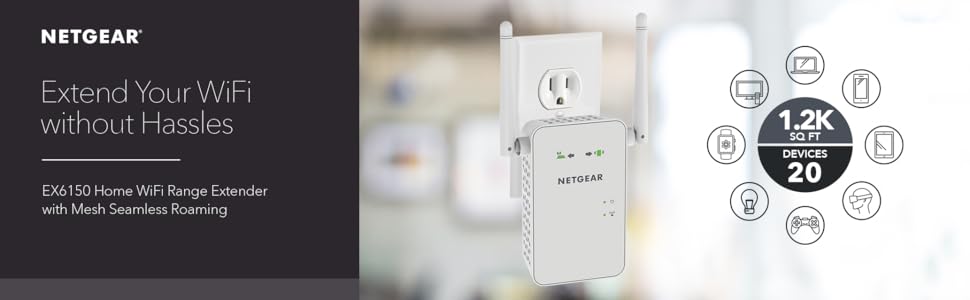
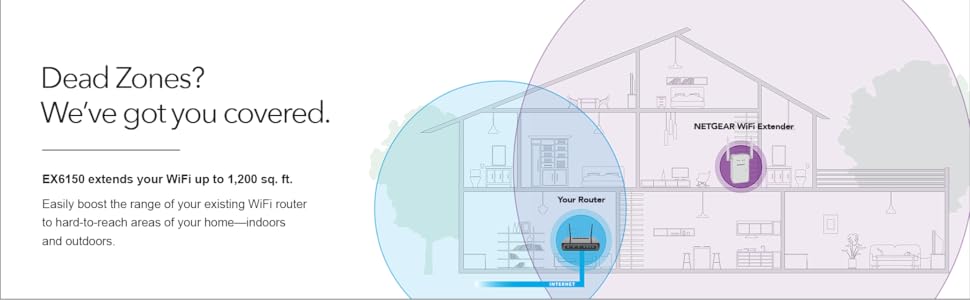
The NETGEAR EX6150 WiFi Mesh Range Extender enhances your home or office network by expanding coverage up to 1200 sq.ft. and supporting up to 20 devices simultaneously. Featuring AC1200 dual-band speeds up to 1200Mbps and patented FastLane technology, it ensures smooth HD streaming and gaming. Its Mesh Smart Roaming lets you stay connected on a single SSID without interruptions, while a gigabit Ethernet port provides wired connectivity options. Compatible with any router, this extender is a plug-and-play solution to eliminate WiFi dead zones.



| ASIN | B00R92CLCW |
| Best Sellers Rank | #1,254 in Repeaters |
| Brand | NETGEAR |
| Built-In Media | Quick start guide, WiFi Mesh Extender (EX6150-100NAS) |
| Color | White |
| Compatible Devices | PC; Mac |
| Connector Type | RJ45 |
| Customer Reviews | 3.9 out of 5 stars 6,274 Reviews |
| Data Transfer Rate | 1200 megabits_per_second |
| Frequency Band Class | Dual-Band |
| Frequency Bands Supported | 2.4 GHz, 5 GHz |
| Global Trade Identification Number | 00606449105056 |
| Item Dimensions D x W x H | 1.5"D x 2.91"W x 4.8"H |
| Item Weight | 0.39 kg |
| Manufacturer | Netgear |
| Mfr Part Number | EX6150-100NAS |
| Model Number | EX6150-100NAS |
| Number of Items | 1 |
| Range | 1 |
| Special Feature | Mesh Network Technology |
| Special Features | Mesh Network Technology |
| UPC | 606449105056 |
| Unit Count | 1 Count |
| Warranty Description | 1 year warranty |
| Wireless Communication Standard | 802.11a/b/g/n |
| Wireless Compability | 802.11a/b/g/n |
K**G
Works as advertised so far
Before I leave my opinion about the product, I want to talk about Amazon, as I've brought it used from Amazon Warehouse deals. When I brought the item from Amazon, Amazon has it listed as Used - Like New, "Item is in original, pristine packaging." Now I'm not sure what Amazon consider to be pristine, but the item I've received can't be considered "clean and fresh as if new; spotless." The packaging for it was opened, the manual gone, the device has smudges on it and the box itself is beat up (box not a big deal, device itself is most important). Anyway, my point of leaving this message first if there are any potential customers that would prefer to buy it used, BUT "Like New" as Amazon would describe it, I wouldn't risk it, as this isn't my first time to be duped by Amazon's descriptions of their used products. All scores are subject to change as I use it more. Installation: 5 / 5, super easy to do and takes less than 3 minutes altogether. Now the thing was, I have brought my item used, so it was missing the manual to set it up. The box itself was old and didn't have any how to description on it. Luckily, it wasn't a big deal as NetGear themselves did a short guide on how to set it up themselves on their youtube channel. Search "NETGEAR WiFi Extender Setup: How To" on youtube if you happened to want to see how to set it up. It was simply plug it into a wall outlet, wait a minute for the red light on the device to turn green, click a button (WPS signal to router), go to router, click your router's WPS button, wait a minute for connect to set up... and you're good to go... for real... it is THAT simple. Wifi Extender: 5 / 5, Wow am I impressed (at the moment) since it works and works well. Now for those curious, how I am using it is having it connected in my basement. My router is on the second floor on my house. The NetGear itself is in the basement floor of my house. What was once my device struggling to receive one bar of wifi signal to absolutely no connection at all in the basement is now three bars of wifi. Of course, at the moment, I have only tested the 2.4Ghz band and haven't touched the 5Ghz connection. Will test it out when I decide I need that extra speed. Complaints: One thing I've noticed was that when I set up the connection with my router and the NetGear device was that I completely lost my internet connection for all my devices connected to the router for about 2 to 3 minutes. NOT SURE if it is NetGear related issue but I don't think it will be that coincidental. Either way, after that several minute of confusion, everything went back to normal. Also, when I plug the device into an outlet, it takes at least a minute, no more than 2 minutes for the device to connect to my router and become ready to extend the wifi range. Would I recommend: For the price of new, at of this review (~$90 + tax) but even then I've brought it used for around ($60 with tax) and I find it hard to justify that price (It should be more between the $30 - $40 range, but that is just my opinion). On hindsight, I should have gotten a cheaper device. All I really needed was the 2.4Ghz band wifi extension that supports up to 600 Mbps. The reason I brought it was to allow my grandparents and parents to get a strong enough signal on the ground level so that won't have to walk up two flight of stairs to get decent access to the wifi. So in the end, it isn't just about extending the wifi but how and why I am using it for. If you're using it to just extend the wifi, there are cheaper alternatives. Personally, I would wait til it dips into the $60 (new) range if I want to purchase another one, and yes, I would definitely buy this device (or newer versions) if I ever again come across a similar scenario.
V**N
Excellent WIFI Extender where ease of configuration and speed makes up for the greater then $100.00 price tag
I wasn't getting signal in parts of my house and needed something to boost the wifi. I looked at all the options out there from getting a better router to getting another access point then to getting a network extender. I couldn't get the first one since I just upgraded my Verizon Fios Router and it would of just been a big waste of money. As for getting another access point.. I really didn't want to run an ethernet cable from my orginal router to another device. So I just ended up deciding on a network extender. Now the choices on this alone is HUGE. I did additional research and came down to a Netgear ex6200, Linksys re6500, and a Netgear Nighthawk ex 7000 and a Netgear ex 6100. Well after hours of research it come down to a few main things before I made my decision. 1. Speed most of the cheaper wifi extenders eat up more additional wifi to give you wifi and are just plain garbage I would certainly try to avoid those at all cost since your just tossing money away. 2. Ease of setup.. I mean i'm technically savvy but I know most of us aren't and just setting the god darn thing up is a challenge among itself. 3. Cost... well we all know this one. So with all that said and done I ended up getting the Netgear ex 6150. I wanted the more current version of the Netgear ex6100 and didn't mind paying a lil' bit more for it. I've had it for almost a week now. 1. The speed. It does exactly the same speed as my fios router and haven't been dropped yet. I've done the speed test and this thing rocks. Can't even noticed the difference between the extended network compared to the actual network. 2. Setup. This can't be more easier to setup folks. I did the following setup but there are other ways just to let you know. - Plug it into an outlet near your router. - Pick either Access Point for Extender from a switch on the side of the Netgear box. - Wait for light to turn from orange to green - Log in the WIFI_EXT network from your computer ( i did this wirelessly and from a Mac Computer) A Netgear_WIFI_EXT wifi network will show up. - Type in the web url listed in your direction pamphlet and WHAMMO the netgear web genie pops up. - Input what you want ( ex. setup extender; pick 2G/5G, Name the network, set password, ) - Done....easy peassey - Unplug and plug it where you need the wifi to extend to.( Oh if it's too far from the router the light in the front will let you know) 3. Cost. Well it was just over 100.00 bucks but with the ease of setup... It was well worth it.
T**2
Not tech savvy, but easy to install
For someone who isn't super tech savvy, this was pretty easy to install. It took me probably an hour or so to get connected to my network, download the app and get it all set up. For someone who is more tech savvy than me, it might not take as long, but I don't think an hour is an unreasonable amount of time even for someone who's a noob. So I can't speak to how it works or any of that, but I can comment on how my wifi signal has gotten better since installation. I started working from home in 2020 during the pandemic and before installing the Netgear extender, my computer would routinely drop connection or suffer from frozen screen during my virtual calls and meetings. Now those moments are few and far between and that matters when you're trying to conduct business. And that's about the extent of my knowledge of the product. Based on that, and the ease of installation, I can recommend.
G**G
Poor performer that drops connections frequently
Some upfront items. The default IP for this is 192.168.1.250. You do not have to use the phone app, or create an account to set this up. With fastlane, you only get one freq. 2.4 or 5, not both. Expect this disconnect a lot during setup, and during use. The Pros: 1. I can return it. 2. I got it on sale for under $65.00 The Cons: 1. Keeps dropping connections. 2. Slow, even with fastlane on. 10-12 mbit on a 50 mbit connection. It takes a long time to get to that 10-12 too, and often slows back down giving a final speed of 6-7 mbit. I verified it was the device, and not my network. I connected to my regular network, and got a full 49 mbit up and down. I used the same speed test site and test server. I did this test many times. 3. Tech support was zero help. I think they just read a script. 4. Keeps saying it is out of range, even with less then 30' from the router. 5. I tried the app, and when I clicked on the privacy and other links for that info, they were all blank. What are they hiding? End result: I do not recommend this product. Its slow, drops connections often, and the tech support is useless. Story: I powered it up (it is very slow to boot) and waited until it was ready. I checked to see that I was on the correct network, and was, so I went to http://192.168.1.250 - nothing. I rebooted it. Same result. Next I did a factory reset. This time the login page worked. However, it kept disconnecting me, which would force me to log back in. (I was about 10' from it) Once I finally got the wizard started, it said it could not find my network - 2.4 or 5 ghz. My network is pretty strong where it is at. I was adding this to extend out another 12 feet or so, to the ring doorbell. It gets a good signal, but not a great one, which causes a bit of delay. I typed the SSID in by hand, and went to the next step. Booted me out again. Eventually, I was able to get it all setup. I started doing some speed testing. Horrible. My first attempt was 4 mbits. I have a 50 mbits connection. I switched on fastlante (Supports onlly ONE freq! Do not expect to get both) I ran it a few more times, and it eventually would hit about 12, but fall back down to 6 or 7. It took most of the test to get to 10-12 and would drop off quickly. I tired a few other speed test servers, but the results were the same. I disconnected and connected to my regular router network. I was sitting in the exact same place. Speed test, 48-49 up and down multiple times. All in all, this was a waste of money and time. As someone who has worked with Cisco and other high end networking equipment (including Wi-Fi), I did not expect this to be comparable at all, but this is beyond bad. I was just hoping to get 30 or so mbit out of it, with anything more being great. Not even close. I thought about running Wireshark and graph the up and downs of this thing, but decided its a waste of time. Its going back.
D**G
Works fine but incredibly difficult set up and management
Update: After writing the review below, I spent a couple hours with a very competent representative of Netgear who helped me correctly reset and then configure the extenders. First, a factory reset requires should be initiated AFTER the extender is fully booted, with the Client LED (upper right) green, and requires the reset button be pressed for a FULL MINUTE. Apparently, less than that does not fully complete the reset; the Netgear rep started a timer and made sure I held it pressed down until her timer expired. is pressed for a full minute; a flashing power LED doesn't necessarily indicate that the factory reset was complete. Secondly, we used the web interface to configure the extender. After connecting to the extender's WiFi network ("NETGEAR_EXT") browse to 192.168.1.250 to configure the interface. For me, this was much more robust and easier to use than the NigthHawk app. Tho my criticisms below remain valid, I did not encounter a failed extender and am not working on refunding a unit. ----------- Perhaps my problem is that I spent 40 years designing and implementing networking products and network protocols, but I found this range extender incredibly annoying to manage. The setup process is probably fine as long as one stays on the "happy path"; unfortunately that path is quite narrow and it is easy to get off into the weeds. In particular, its important to wait, Wait, WAIT because it takes a long time to boot and to change modes. One "off the happy path" task is changing the Wifi network (SSID) being extended. To do that requires resetting the device to factory settings and then going through the setup process again. However, it appears that the factory reset does not bring it back to the "fresh out of the box" state: in my case either the EX6150 or the NightHawk app retained enough context that I was asked for a password. In addition, the bootup process seemed to run the lights differently. I have had to change the SSID several times due to changes in my campus network. The first few times the changes were annoyingly difficult and time consuming - an hour each time, a lot of waiting for the EX6150 to settle into the new configurations. This last time, it would never allow a connection to the NightHawk app for the configuration process to start despite factory resets, power cycles and unplugging. This drove me to give up and use a new instance of the EX6150. Finally, I'm not certain about the reliability of the EX6150 firmware. There were instances where performance was terrible until a reboot - classic symptoms of memory leak - and other instances where the extender would not connect with the NightHawk app though it continued to extend the network. Though I generally have a good impression of NetGear, these lower end products are sketchy. I've given up on the first one, putting a second one into service. Will be contacting Netgear to get a refund on the first.
A**R
Solid, efficient and reliable
I decided to switch to Netgear because my Linksys extenders were causing trouble in a couple of ways. I completely got rid of every problem with this extender. Right out of the box the extender looks pretty good. The design could very easily blend nicely in almost any wall. It doesn't really matter if you've used extenders before, you'll find this one extremely easy to set up. The manual is well explained and well illustrated. The web browser setup is so straightforward that you might not even need to look at the manual once in it. Now for the performance. The range is great; enough to cover an entire floor of an average house and a little bit more. I got this for the first floor of my house and now I have Wi-Fi in my garage and garden too. It deals great with concrete walls (I would imagine wooden walls shouldn't be any problem). The speed has been consistent no matter how many guests are connected from their cellphones or how many computers are streaming a movie; this router will extend your signal with no quality loss. No crashes so far. No need for re-configuration due to network errors. No problems with any kind of security protocol. I only have one complaint. The power plug is ideal for walls where the router can rest vertically. But all of my house sockets are placed horizontally. The design of the router is remarkably solid; however the router weighs on the sockets with a rotational force because I can connect it only horizontally. I can't help to feel the sockets may come a little loose as a result of this. However, you would have a very similar problem with the majority of routers out there because no manufacturer seems to address the issue. This router will meet the needs of most houses. I am very satisfied with the product so far and recommend it.
C**R
I just got this yesterday and love that it works very well so far
I just got this yesterday and love that it works very well so far. I have a Linksys dual band router and am typing this off my Laptop in an area of my house that is tapping off the extender. On my laptop I can see that signal strength of either 2 or 3 bars out out five form the 2 bands off my router directly. From the extender I get 5 out 5 bars and can see my laptop operating significantly faster because of the improved signal strength. As others have said you will see the extender signals as the same SSID (network name) as always with an EXT on the end so you will need to enter your password to access them presuming you have a secured network as most people do. This is my experience in setting it up. * Took me about 15 minutes * The instructions ask you to set the switch on the extender to "Extender" but it came shipped that way so that was simple * Plugged into a nearby outlet to router to "sync" together and recognize each other. * Press the WPS button on the Extender (It's the one that has an antenna symbol * Press the WPS button on the Router (This was the only confusing part for me). The router does not label it, but it was the only button on the router other than the reset which requires a pin to access so I took a chance and was right) * Wait till they both stop blinking (about 1 -2 mins) * Repeat for second band * Move the extender somewhere further but still within range. (You can identify this by the green light indicators) I see that some had issue with their set up and maybe I got lucky, but seemed very simple to me. So far so good and hope it stays that way. Great product!!
A**S
Helped my Japan wifi - all the way to the kitchen sink
All that it said it would be. I was so worried I was just kidding myself that my wifi issues could be solved so simply. Buy this, plug it in, and go. Pretty much what I did. My 5g is running from a different system, so that took a few minutes to get figured out (for me, not the Netgear) but it was a total of 15 minutes and this was working great. I live in a 2-story concrete house, have always had great wifi though every tech guy who came to do something about our box said they thought it would be terrible. Upstairs in the kitchen at the sink, the farthest point from the box, was iffy at best before. Then my provider upgraded my box and their firmware and I lost wifi beyond the downstairs office where the box actually sits. They said, again, oh, it's your concrete house so you should buy an extender or place a second router. I researched several options - asked the tech guy there about the ones you can just plug in - and he said, don't do it. They've been wrong all along, so I ordered this one. Now I have wifi all the way to the kitchen sink, and in my garden. No more "Dad, is the wifi off?" We have several iPad mini's and notebook computers and phones using the system full time. I didn't put a gauge on it, but it is streaming video on multiple devices simultaneously without a hitch. So, yes, I'd recommend this.
L**N
PSA - dont forget to setup FastLane technology
Initially i was a bit unhappy with this wifi extender because the connection kept cutting out and restarting especially when i was watching streams online which caused videos to be buffered constantly. I had also ruled out any issues with my NBN router / setup so i knew the problem was my wifi extender ... until i discovered the FastLane technology option in the extender's options AFTER you set it up. It basically optimises your connection for streaming and/or gaming, and now my internet NEVER cuts out, and i download at the highest rate that my ISP allows. I also watch videos online without ANY buffering issues as well. To the manufacturer, have FastLane enabled by default or give users the option to install it when they are setting up the wifi extender for the first time. At the very least, mention it in your product manual. I can imagine a lot of customers have returned this product by mistake because they thought it was not functioning very well... OR they blame NBN! :)
J**Z
Suficiente
Excelente extensor, lo use poco, tiene sus complicaciones para ponerle en funcionamiento pero competente contra otras marcas
D**G
Buen producto
Muy buen producto, puedes extender tu red de 2.4 o 5 ghz, al mismo tiempo, e incluso puedes extender una de 2.4 a 5 para obtener toda la potencia del dispositivo
N**Y
works well, easy to install
Works well, easy to install, compact. Set it up about 20m from router in my shed outside and relayed the signal with full wifi strength.
M**E
Works perfectly BUT comes with travel adaptor
Works perfectly and does the jobs. Very easy to connect. Unfortunately it doesn't have an Australian plug so it arrived with a very flimsy travel adaptor. I didn't trust this adaptor (it was really unstable) so I went to Officeworks and purchased my own surge protected adaptor. It was unfortunate that I incurred another purchase for this product. Other than that, all was well.
Trustpilot
1 week ago
2 months ago