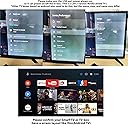
🎮 Elevate your couch command game with precision and voice-powered ease!
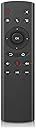
The WeChip G20 Remote is a versatile 3-in-1 air mouse featuring a built-in microphone for voice input, a 6-axis gyroscope for precise cursor control, and a 2.4GHz wireless connection with up to 10 meters range. Compatible with Nvidia Shield TV, Android TV boxes, PCs, and multiple operating systems, it offers plug-and-play convenience with 18 functional keys, making it the ultimate upgrade for effortless media navigation and smart device control.
| ASIN | B07RRTT1ZT |
| Best Sellers Rank | 21,156 in Electronics & Photo ( See Top 100 in Electronics & Photo ) 1,753 in Remote Controls (Electronics & Photo) |
| Guaranteed software updates until | unknown |
| Item model number | G20 |
| Manufacturer | WeChip |
| Product Dimensions | 15 x 5 x 1 cm; 0.11 g |
B**Y
Great replacement
Great remote, I purchased to replace the original Nvidia shield one, which seemed to drain the CR2032 batteries fairly fast This one works well and takes 2 AAA batteries (much handier) the air mouse feature is very handy for typing on an on-screen keyboard.
T**U
Okay
Okay worked well with TV
W**H
You can have any colour as long as it's black
Excellent remote for Android TV boxes, I have two Android TV boxes and this remote works with both of them (obviously only one at a time depending which one the USB receiver is plugged into - in fact that's the main reason I bought one in the first place, previously I used an IR remote which triggered both boxes at the same time). You can use it for both d-pad menu navigation and as a mouse-like pointer. I'm also pleasantly surprised to discover that the built-in microphone works for speaking exercises if you run language learning apps such as Duolingo or Rosetta Stone on your Android TV box. Sound quality isn't great if you're recording with it though, I also find that the microphone stops working after a while, but that this can usually be fixed by unplugging and replugging the USB receiver. My main criticism is that it's not available in multiple colours, it's only black. Did I mention that I have two Android TV boxes? I also have multiple Logitech wireless mice, and multiple Xbox One bluetooth gamepads, in different colours so that I can tell them apart. I suppose these remotes are cheap enough that you can put a blob of paint on them, or maybe wrap coloured tape around them if you prefer to undo your colour choice.
A**R
amazing remote
my remote broke for my nvidia shield on checking the cheapest i could get 1 was £70 on fleabay for the original, one quick check on amazon and found this little beauty next day delivery and to be honest i didnt hold much hope that it would work with my shield ,delivered next day put the dongle in the back and hey ho it works even better than the origininal and has a load more features on it and for under twenty quid this makes this remote an absolute bargain whoever designed this has done a wonderful job a peach of a remote and everything works on it .
M**E
Remote does not support IR Volume Control
The control itself seems nice enough. Comes with a USB dongle or you can pair it via bluetooth by pushing 'OK' and 'Back' Until the red light flashes. The instructions are awful - the are missing how you pair via bluetooth and make no mention that you can only program the power button to use IR. All other buttons are not included in IR. If your TV supports volume control over CEC then all good but most older Samsung TVs implementation of CEC is hot garbage. The remote also is not backlit - which is a great feature when sitting in a dark room to watch movies. Working with Nvidia Shield Pro 2021 and seems to be as feature complete as the triangle remote. The remote itself for an Nvidia Shield Pro 2021 is perfect. If they released an updated version of the remote with IR for all buttons I'd probably buy it.
S**R
Works Fine As A Replacement For The Nvidia Shield Remote
My old Nvidia Shield Remote broke while I was replacing the internal battery. To be honest, the remote that came with the Nvidia Shield was pretty poor. The touch surface never worked properly; the accelerometer inside would power down the remote to save on battery power and getting it to wake up again could be a nightmare involving removal of the battery. As tech goes it was poor. Anyway, mine broke and this replaced it. The WeChip G20 is not as polished and shiny as the original, but it has three brilliant features that make it ideal to replace the Nvidia original: 1. It takes standard batteries; 2. It doesn't have a touch surface on it; 3. It actually works better than the original. It has all the same features as the original Nvidia remote (although finding them can be a bit of a puzzle since the included "instruction manual" is rubbish - so trial and error is needed). Oh, i forgot - there's a 4th good reason for buying the WeChip G20 - it's roughly one quarter of the price of a new Nvidia remote. Recommended.
B**V
Not all its cracked up to be
Bought for a replacement for the nvidia shield 2017 remote that frankly has seen better days and the voice search hasn't worked in years. Quality is absurd for the price. Its so cheap plastic and awful to use with very sharp edges along the sides. Pairing was hit and miss with Bluetooth but eventually we got it and to be fair, everything, including voice, worked well after this point. Until you loose focus of the Nvidia Shield or not use for a while, let me explain. So, hitting the power button doesn't give you any options and just turns the nvidia shield completely off, no warnings or anything. OK, no big deal, at least we know right ? And you have to go physically up to the shield and turn it back on, nothing on the remote will do that. No biggy, we just wont hit the power button. However, on rebooting the shield, the remote doesn't work. So i had to force unpair and then pair it again. To test this wasn't a one of i tried the same procedure and had to do the same again. Ok ok, our shield is rarely turned off, i wont hit that power button and all should be good. Not so however. We have a smart TV so we regularly switch between the shield and the TV throughout the day. Each time you do that, the remote will then refuse to work on the shield, likewise, leave it for sometime and the bluetooth will just stop working, as if its gone into sleep mode and never wakes up. So disappointed as it was nice to get the voice facility back. But ill just opt in for the official one now as this really isnt up for the task.
M**L
Använde som alternativ kontroll till min Nvidia Shield TV. Fungerar bra förutom för en sak: mata in text fungerar inte. När tangentbordet kommer upp kan man navigera bland tecknena men inte välja något. Uppdatering: man kan tydligen koppla upp fjärrkontrollen via Bluetooth istället och då går det att skriva text. Aktivera Bluetooth genom att hålla inne OK och Tillbaka-knappen samtidigt. Det kan krävas ett par försök att koppla upp den.
R**R
Cumple expectativas.... me costó conectarlo porque no funcionaba en todos los usb, pero después genial
J**E
Werkt me een bijgeleverde usb dongle. Je moet deze usb port stroom laten hebben als de Shield in sleep gaat. (Via instellingen). Anders kan je hem wel uitschakelen maar niet terug aan. Een logisch weetje.’’
D**L
Die Originale Shield Fernbedienung war der absolute Mist. Besonders die Lautstärkeregelung war einfach nur nervig. Jetzt nach einem Jahr ist sie defekt und reagiert nicht mehr. Deshalb mußte eine Ersatz Fernbedienung her. Ich stand vor der Wahl zwischen der G20 und der vor kurzem neu erschienen Shield Fernbedienung. Zur Shield kann ich nichts sagen, außer das sie mehr als doppelt so teuer ist und Nvidia sich viel zu lange Zeit gelassen hat eine neue Fernbedienung für Shield TV Box zu entwickeln. Trotz der vielen Kundenkritik in den Foren über Jahre. Ich habe mich für die G20 entschieden und kann nur sagen, absolut Top! Mini USB in die Shield Box und fertig. Reagiert schnell und hat ein paar Funktionen mehr. Aber vor allem eine vernünftige Lautstärkeregelung. Druckpunkte sind gut und fasst sich gut an. Klare Kaufempfehlung!!! .
A**I
Ho trovato questo telecomando molto ben fatto, con click che restituiscono un ottimo feedback e materiali molto buoni. Premetto che ho una mano di dimensioni medio/piccole, non credo di poterlo consigliare per mani grandi. La ricerca vocale funziona molto bene, l'ho provato su Android x86 (per PC) 8.1 e funziona ... attenzione che il tasto del riconoscimento non va tenuto premuto, si preme una volta e si attiva l'assistente e poi si parla liberamente, veramente una bella sorpresa. I tasti vengono riconosciuti immediatamente, manuale molto ben fatto, essenziale, in italiano, come al solito lillipuziano ma fa niente, basta armarsi di una buona lente di ingrandimento o scansionarlo. Veramente soddisfatto, a parte la misura forse uno dei migliori in circolazione.
Trustpilot
2 weeks ago
3 days ago