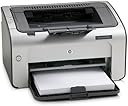
โก Print smart, print fast โ the monochrome marvel for the savvy professional.
The HP LaserJet P1006 is a compact monochrome laser printer delivering up to 16 pages per minute at a sharp 1200 x 1200 dpi resolution. Featuring USB 2.0 connectivity and a 160-sheet capacity, itโs designed for efficient, cost-effective printing with minimal setup timeโideal for professionals seeking reliable, high-quality black-and-white output without the hassle of ink cartridges.
| ASIN | B000UZH526 |
| Additional Printer Functions | Print Only |
| B&W Pages per Minute | 16 ppm |
| Best Sellers Rank | 237,760 in Computers & Accessories ( See Top 100 in Computers & Accessories ) 359 in Laser Printers |
| Box Contents | Paper |
| Brand Name | HP |
| Color Depth | 1 bits_per_pixel |
| Colour | black |
| Compatible Devices | Laptops |
| Customer Reviews | 4.2 4.2 out of 5 stars (187) |
| Dual-sided printing | No |
| Duplex | Simplex |
| Global Trade Identification Number | 00883585164479, 00883585164585 |
| Hardware Interface | USB 2.0 |
| Ink Colour | black |
| Item Weight | 17 Pounds |
| Manufacturer | HP |
| Maximum Copy Resolution Black and White | 600 dpi |
| Maximum Copy Speed Black and White | 17 ppm |
| Maximum Print Resolution Black and White | 1200 x 1200 dpi |
| Maximum Sheet Capacity | 160 |
| Maximum Supported Paper Size | A3 |
| Model Name | Laserjet P1006 |
| Model Number | CB411A#ABA |
| Model Series | 1000 |
| Network Connectivity Technology | USB |
| Number of Licenses | 1 |
| Number of Trays | 2 |
| Other Special Features of the Product | Monochrome |
| Output sheet capacity | 160 |
| Print media | Envelopes, Paper (plain), Transparencies |
| Printer Output Type | Monochrome |
| Printer Type | Laser |
| Processor Count | 1 |
| Resolution | 1200 x 1200 |
| Scanner Type | Flatbed |
| Series Number | 1000 |
| Specific Uses For Product | Office |
| Total USB 2.0 Ports | 1 |
| Total USB Ports | 1 |
| UPC | 883585397044 883585164585 883585164509 883585164479 |
| Unit Count | 1.0 count |
| Warranty Type | limited warranty |
| Wattage | 200 watts |
J**D
Great and easy to use
Received this printer from amazon a couple of weeks ago, and i have to say this printer is well worth the money. This printer is used on the windows vista platform so i cannot comment on how it runs on mac, but with vista it took only 5 minutes to setup, its so easy to setup and having used inkjet for years i am so suprised at how unbelievebly fast it prints. It does only print in mono, however i use my computer only for personal use in the house and if i want any pictures printed i get them developed in the supermarket where the quality is a lot better than with an inkjet and cheaper. With the laserjet printer i don't have to worry about the inkjet ink drying up if i don't use it that often as i did with the black ink on many occasions and in the long term it will work out a lot cheaper than an inkjet. If you are thinking of a laser printer i have to recommend this one its brilliant quality and will workout cheaper longterm than the inkjet.
P**E
A great little printer
In contrast to earlier reviews I am happy to report that this printer performs outstandingly well on a Mac! Its installation this evening has been remarkably straight forward: the drivers just asking where to install to. Moments later and with the USB cable plugged in, the printer was ready to print. Warm-up time is very quick: from stand-by, the first page appearing within about 4-5 seconds. The lack of LCD display is mitigated by Self Test / Configuration / Supply Status Page options within the print driver, which give an indication of Total Jobs printed, Approx Pages Remaining from the toner cartridge, amongst other things. The printer has a very small footprint. Print quality is excellent - both text and image production are on a par with more expensive LaserJets that I've used. An Eco print mode is available for conserving toner and when comparing Eco to 'normal' print quality, I can't see a great deal of difference. If I really had to nitpick... the P1006 is a touch louder during operation than my old Samsung ML-1210 (which this printer replaces), but it really isn't a big deal. Overall, I'm very pleased. The P1006 is step up from my ML-1210 and is an absolute bargain at under ยฃ60!
L**N
Great little printer
Great little printer. Having used Inkjets for years and spent ยฃ100's on refills I decided to give Lazerjets a go. Having reviewed cheap and cheerful mono lazerjets I opted for the P1006. Unit well packed, possibly too well packed. Initial removal of the toner cartridge to get at the packaging was a bit worrying. It took more force than expected (I worry over the strength of plastic components). However once removed it reinstalled very easily. Setup time minimal. Works fine on my Evesham desktop running XPpro and on my Apple MacBook running Mac OSX. Can't comment on toner usage as still on the original unit, but output rate much faster than my old HP inkjet. For colour work I'm still using my Cannon but for all black and white the P1006 in now my default printer
B**L
HP1006 - Does what it says on the tin
I was looking to replace my previous HP Laserjet printer, which gave me good service for years. This printer appears to be made to a good quality. I can't say I really notice an improvement in the speed for the first page being printed. However, additional pages appear to print slightly faster than my old printer. Noise-wise, I can't really say it's that much quieter than my old printer. My old printer was a Laserjet 4L, and stored the paper inside the casing. This printer doesn't. I must admit that I prefer the paper inside the casing, as when I don't use it for a while dust can settle on the paper in the tray. I know I can always remove the paper from the tray, but generally, who does. As the printer is on the bottom shelf of my workstation (I'm unable to put it anywhere else), the paper tray sticks out slightly. I'm always a bit worried in case my feet/legs hit it and damage it in some way. Don't get me wrong about the HP1006, it does what it says on the tin, and if it gives me as good a service as my old printer then I'll be more than happy.
S**H
Flaky Software - No Resume Button - Not Recommended
I've happily used HP printers since the early Laserjets but this one has defeated me. It's the first printer I've come across without a "Resume / Continue" button and instead it relies on an on screen "continue" button in the software. But the software seems really really flaky. Often when trying duplex the screen at the point where you turn the paper over shows an "ok" button instead of "continue". Clicking this then closes the wizard and leaves me with a half done job and nowhere to go. Similarly if paper runs out there is a screen saying "error" and an ok button - the only way out is to restart the pc. Also I can't print envelopes - again an error screen with an ok button which just closes the wizard. I've tried a reinstall and a new driver - a massive download by the way. I've worked in IT and am quite technical - pc is windows XP SP2. Not recommended at all - look for a printer with a "resume" on the printer itself.
L**E
Bad for Apples, but a good printer
This is a good printer - or would be if HP had bothered to make a decent driver for the Apple Mac I use! It works fine for my windows desktop, but is a real pain when I want to print out from my Apple laptop. Invariably I have to delete the driver then reinstall from the disc - EVERYTIME! Come on HP, pull your collective fingers out and give me a proper driver for my apple that works.
Y**E
A good little printer
This is a good little printer with a small footprint, good build quality, very easy set-up, the reassurance of HP reliability, and a design that is easy on the eye. It took me only a few minutes to set up, following HP's step-by-step instructions, and immediately delivered a good quality print. It was recommended by a technician friend as worth the few extra pounds it costs compared with its cheaper rivals and I have not been disappointed. A 'kettle lead' to connect the printer to the mains is supplied. If you do not already have a current-style printer cable (4 pin USB type A to 4 pin USB type B) you will need to buy one.
L**L
I ordered this printer to replace a similar one that I damaged. It was over 50% less than STaples (where I got the last one on sale) and was "new in Box" as advertised. For some one that just needs a standard black ink printer this is a real good deal. It is small, relatively fast and works well with Windows 7 and Vista. One word of caution. Follow the setup directions to the letter and never, and I mean never, plug the USB Cable in while the printer is powered up. When HP says it may damage the printer they are correct. It caused the plug and play software/hardware to fail on my original one. They warned me but I forgot one day and paid the price. As far as the print quality goes, and the day to day operation this is one good printer. HP has been producing Laser Printers for years nd they didn't fail with this one.
G**L
Simply and outstanding B&W laser printer for bringing information off the computer. Easy to set up and is literally set and forget. It is very fast, I have not timed it, but certainly the copy is there when you turn around. Reasonably quiet, not objectionable, just a slight whirring noise. Small footprint and enough weight to keep it anchored. Good paper capacity. We have two of them, one much older. Recommend keeping an HP toner cartridge on hand because when it is done, that's it - no warning. Runs for a LONG time on the HP regular cartridge. (don't remember how long with the intro cartridge that comes with it, but seemed a good while) Cartridge is not cheap, but definitely worth it for the quality and convenience. Can't imagine what more one could want for B&W. Highly recommended.
A**W
This printer has been serving my black and white printing needs since 2010 - and it is a workhorse. The ink cartridges have lasted through many reams of paper (I buy non-HP cartridges off of Amazon), and no matter the amount of time that goes between print jobs, once I start it up it goes and goes. Aesthetically it's not the "cutest" printer on the market, but who cares when you're served with a high functioning device that can stand the test of time. The print quality is great, and 14 years later I'm still very happy with my purchase.
J**Y
This little printer serves my purposes perfectly. I use the HP1012 on my main computer, but this little one was purchased for the very occassional printing I need to do off my laptop. I found some very weird things when I opened the box. First...there are no written instructions at all, either for installation or operation of the printer. It just includes a sheet with those indeciperable line drawings. Fortunately, I know how to install a printer, so it wasn't a problem for me. But if you've never connected a printer before, you'd best have someone on hand who knows how to do this. The other really strange thing is that the box did not contain the cable to connect the printer to a computer. Again, not a problem for me because I have extras around. I wonder if this is the way the printer was supposed to come, or if I just got an incomplete one. All that said, I'm still very pleased with my purchase. The printer is inexpensive, fast, quiet and makes nice clear copies. And that's all I needed.
P**Z
The HP LJ P1006 is an excellent entry level simplex laser printer. It is very compact. The input bin holds enough paper for average use. The quality matches any high end HP LJ. It was excellent value from the retail store I planned to buy it from. It became superior value (33% savings)with the savings I realized by buying through Amazon. The installation process is very easy. I did not need the backing of a retail store because HP has a very accessible online help desk ... perhaps the best in the industry. HP offers direct inexpensive extended service, if needed. But for this productive little printer, extended service was not necessary. Again, excellent value. The printer will last years and years.
Trustpilot
4 days ago
1 month ago