We remain fully operational. Our teams are working around the clock to ensure your deliveries continue safely.

Laden Sie die App herunter


Kundendienst
Copyright © 2025 Desertcart Holdings Limited
Laden Sie die App herunter

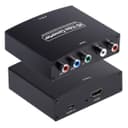


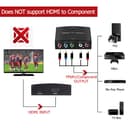
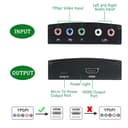
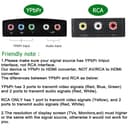

Buy anything from 5,000+ international stores. One checkout price. No surprise fees. Join 2M+ shoppers on Desertcart.
Desertcart purchases this item on your behalf and handles shipping, customs, and support to GERMANY.
🔗 Bridge the past to your future screen — never miss a pixel!
The YPbPr to HDMI Converter by Anber-Tech transforms analog component video and stereo audio signals into crisp HDMI output up to 1080p Full HD. Compatible with a wide range of legacy devices like DVD players and gaming consoles, it offers plug-and-play simplicity powered via USB, making it the perfect solution to integrate vintage tech with modern HDTVs and projectors.


| ASIN | B07JCDR32J |
| Best Sellers Rank | #47 in Video Converters |
| Customer Reviews | 4.2 4.2 out of 5 stars (1,235) |
| Date First Available | October 12, 2018 |
| Is Discontinued By Manufacturer | No |
| Item Weight | 1.41 ounces |
| Item model number | ypbprtohdmiconverter |
| Manufacturer | Anber-Tech |
| Package Dimensions | 5.08 x 3.66 x 1.42 inches |
R**R
Works
Worked perfectly to get my PS3 connected to my modern TV through HDMI after its HDMI port stopped working
A**R
Pretty good, may mess up at first, keep testing
Got this a couple weeks ago in hopes of using it with retro consoles (specifically PS2, Wii). At first, I thought it was a dud. Just wouldn’t display video effectively, sometimes it would just for it to completely mess up again in the process of loading a game or simply restarting the console. But, somehow, a couple days later I decided to try it again and lo and behold; it works beautifully. Having played on high refresh rate low latency monitors before, I can hardly tell a difference between with and without the adapter. To my surprise, it has ran flawlessly ever since. Colors are beautiful and 100% better than any prior video via composite or s video ESPECIALLY for the price.
A**W
works good
Nice product. It works good for now.
R**N
Get's the Job done with some issues
so i bought this because i wanted to hook my ps2 to my HDTV in my room, but this TV just has HDMI and composite inputs. Composite looks horrible so i figured i could use this converter to use my component cables and connect to an HDMI port on the TV. first i had to switch the output setting from RGB to ypbpr in the PS2's settings. picture looks fine, the audio is an other issue. it works fine for the most part, but when there is alot of sound to process, im guessing the converter's built in sound processor is not too good. in situations where there is intense gun fire for example, the sounds becomes distorted, like trying to bump music on a crappy speaker. so if you have an external sound source, that would be a better option. since the problem is not always apparent, it should not detour you from buying this because for the most part it does sound good. another issue could be specific to just my apartment, but whenever my air conditioner kicks ink, it causes the screen to flicker. im guessing that a huge amount of juice is used to get it started, so things that make your lights dim may cause the screen to flicker like a washer or dryer being started. all that being said, i still recommend this. i am certainly happy that i own this. it does what i need it to do, what else can you ask of something? Update 7/256/19: so i just learned that it isnt my air conditioner that causes the screen to flicker, it is my water cooler. it is basically a 1 second flicker, the a huge deal.
S**G
Junk
Bought this for my PS2 slim. Video looked great, but only worked for about 2 minutes, then the black screen flickering began. I tried different HDMI cables and none of them fixed the flickering. I then went into the PS2 settings to see if everything was correct and it was. Video was set on component, not RGB, disconnected the box and reconnected, still flickered. You must set the PS2 settings to component, if you select RGB it will go completely black. Luckily, I have an HDMI adapter for my PS2 and connected it to set it back to component. I then reconnected this converter box back, only this time it was completely black and never got a picture again. I guess I'm stuck playing with my HDMI adapter connected to my 4k t.v, the only reason I don't like using it is because it does not use the signal from component, only RGB picture which is horrible. Waste of money, avoid this converter like the plague.
B**T
Works as advertised
I had a component video cable running to my projector in my home theater which I replaced with a wireless HDMI transmitter/receiver when I upgraded my equipment to HDMI. While the wireless HDMI worked, it took a while (sometimes over a minute) to initially synchronize, and seemed to get less reliable over time. So I switched to a HDMI to component converter on the equipment side and this component to HDMI on the projector side (because my projector is HDMI also. Works great.
J**S
Does its job nicely
Works real good sadly the cables I got to hook the dvd player to this thing ended up being terrible But this itself works real good transferring video from vcr/dvd player combo to my tv through hdmi And it was nice that it has a USB A to USB C power source cable to just plug into my tv to power it instead of dealing with needing to shuffle plugs around in socket to use
S**R
An okay YPbPr to HDMI converter
This is a converter that allows you to connect an older device that has the YPbPr component cables (such as an X-Box 360) to an HDMI input. While many newer TVs still have ports available for these cables, they generally only have one, and if you still have more than one working device that uses the YPbPr cables, then this will allow you to still use them. It is powered via a supplied cable that can be plugged into a USB port or a power adapter that plugs into the wall. It will provide an okay, but not great picture as the output, but it does work.
P**S
It did not work with 4K HD TV. Useless waste of money.
J**A
doen,t work
S**K
The horrible product , doesn’t work at all , moreover they did not even returned the product
TrustPilot
vor 1 Monat
vor 3 Wochen