We remain fully operational. Our teams are working around the clock to ensure your deliveries continue safely.

Laden Sie die App herunter


Kundendienst
Copyright © 2025 Desertcart Holdings Limited
Laden Sie die App herunter
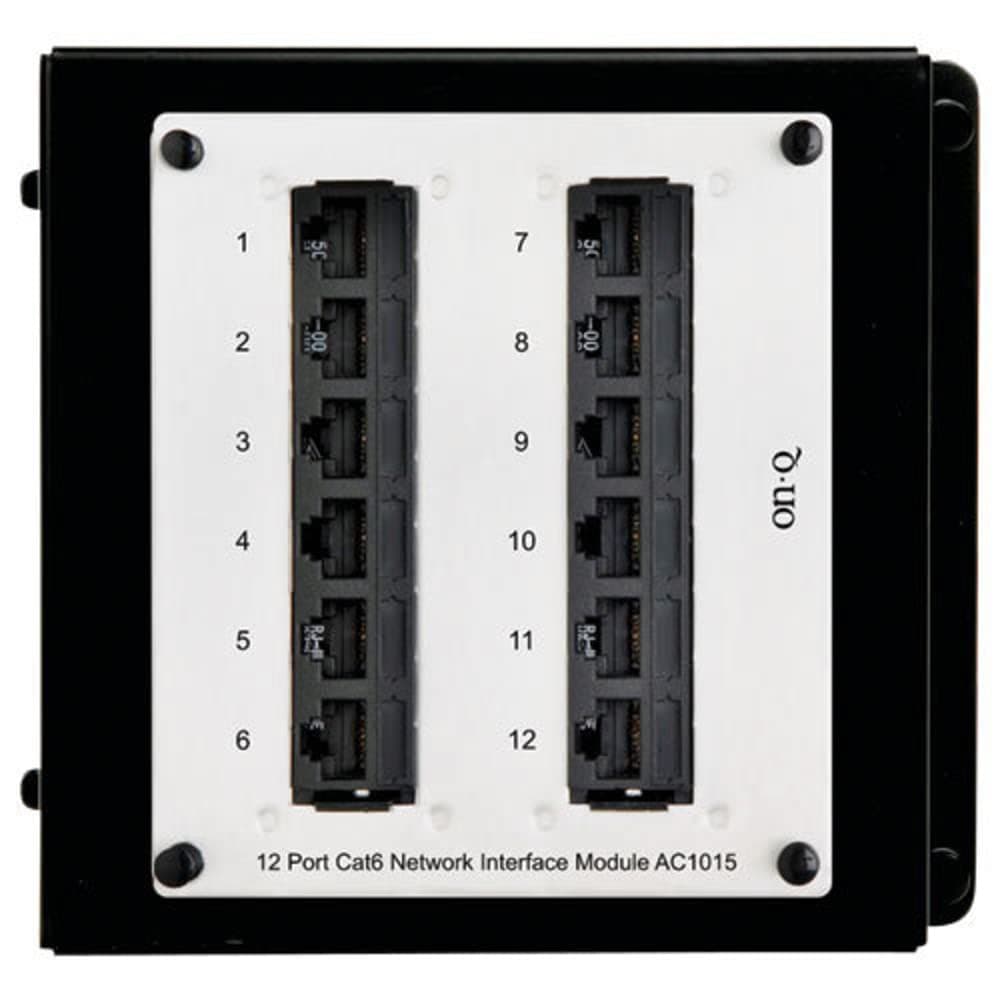
🔗 Upgrade your network game with sleek, smart connectivity!
The Legrand On-Q 12-Port Cat6 Network Interface Module is a high-density mini patch panel designed for professional-grade home and office networking. Featuring 12 labeled RJ45 ports, it supports gigabit Ethernet speeds and allows easy switching between voice and data applications. Its compact design fits On-Q enclosures perfectly, while color-coded punchdown blocks ensure quick, error-free installation. Compatible with major ISPs and built with durable 18-gauge steel, this module delivers reliable, scalable connectivity for modern network demands.


| ASIN | B002MXVAIO |
| Best Sellers Rank | #46,904 in Computers & Accessories ( See Top 100 in Computers & Accessories ) #69 in Computer Networking Hubs |
| Brand | On-Q |
| Built-In Media | 12-Port CAT6 Network Interface Module |
| Color | Cat 5e |
| Compatible Devices | Modem |
| Connectivity Technology | Ethernet |
| Customer Reviews | 4.2 4.2 out of 5 stars (64) |
| Global Trade Identification Number | 00804428029670 |
| Internet Service Provider | Xfinity, Cox, Spectrum, and others |
| Item Weight | 1.1 Pounds |
| Manufacturer | Legrand On-Q |
| Maximum Upstream Data Transfer Rate | 1000 Megabits Per Second |
| Modem Type | Cellular modem |
| Number of Ethernet Ports | 12 |
| Number of Ports | 12 |
| UPC | 804428029670 |
D**E
Quality construction.
This patch panel makes your structured cabling cabinet neat and tidy. Color-coded- punch down blocks on the back side make it hard to mess up.
N**N
Five Stars
Works as advertised and looks good in my AV panel
J**Y
It makes cable connections much tidier.
I'm satisfied with the overall result. It makes the ethernet cable connections in my enclosure much tidier. And it does what it's supposed to do - connecting CAT6 cables. The LAN speed remains at 1Gbps after adding this CAT6 patch panel. The installation was quite easy. There is ample space behind the panel for all twelve cables. It's a bit overpriced though. Thus taking one star off.
B**R
Great for ethernet cable organization
My new construction house came with a LeGrand OnQ Media Enclosure built-in a closet near the central portion of the house. All of the cat6 ethernet drops (and unused coax, analog camera) converged here. The ethernet cables the builder installed were not long enough to route them outside the enclosure so it made sense to terminate them to this patch panel/interface module. I wasn't sure if an off the shelf patch panel would work without major modification so I bought this for the clean look and exact mounting fit into my enclosure. The downside is that it is pricier than a normal patch panel due to being designed to fit in Legrand enclosures This was my first time using a patch panel, a punchdown tool, and creating ethernet cables (as evidenced by the termination quality in the pictures!) but with the Trendnet Punchdown tool and the Klein Tools LAN cable tester, it was straightforward. The fitment is great and it has cleaned up my enclosure and closet space considerably. I liked it enough to buy the shelves and organization accessories to fit my Ubiquiti PoE switch, and surge protector One thing to note is that the labels are only for T568A wiring standard. I used T468B wiring reading online it seems to be more common and then handmade T568B labels to glue on top.
M**7
No T568B docs
I can not believe they do not have a T568B sticker for the unit. Not even a doc on the web that shows the more common T568B wiring. You can not mix T568A and T568B wiring on the same run. Almost every other similar unit has a flip able card on the unit to swap from A or B. Even a pdf would have been helpful. Otherwise, it worked fine.
C**A
Should give instructions for 568b along with 568a
M**S
Punch down
AS described
C**.
T568A Only
It's a great panel, but T568A markings only and not the more common (in USA) T568B. Just swap the orange and green pair and it's fine, but it would be nice to have T568B markings like most other panels.
TrustPilot
vor 2 Monaten
vor 1 Woche