⌚ Elevate your wrist game with power, precision, and style!
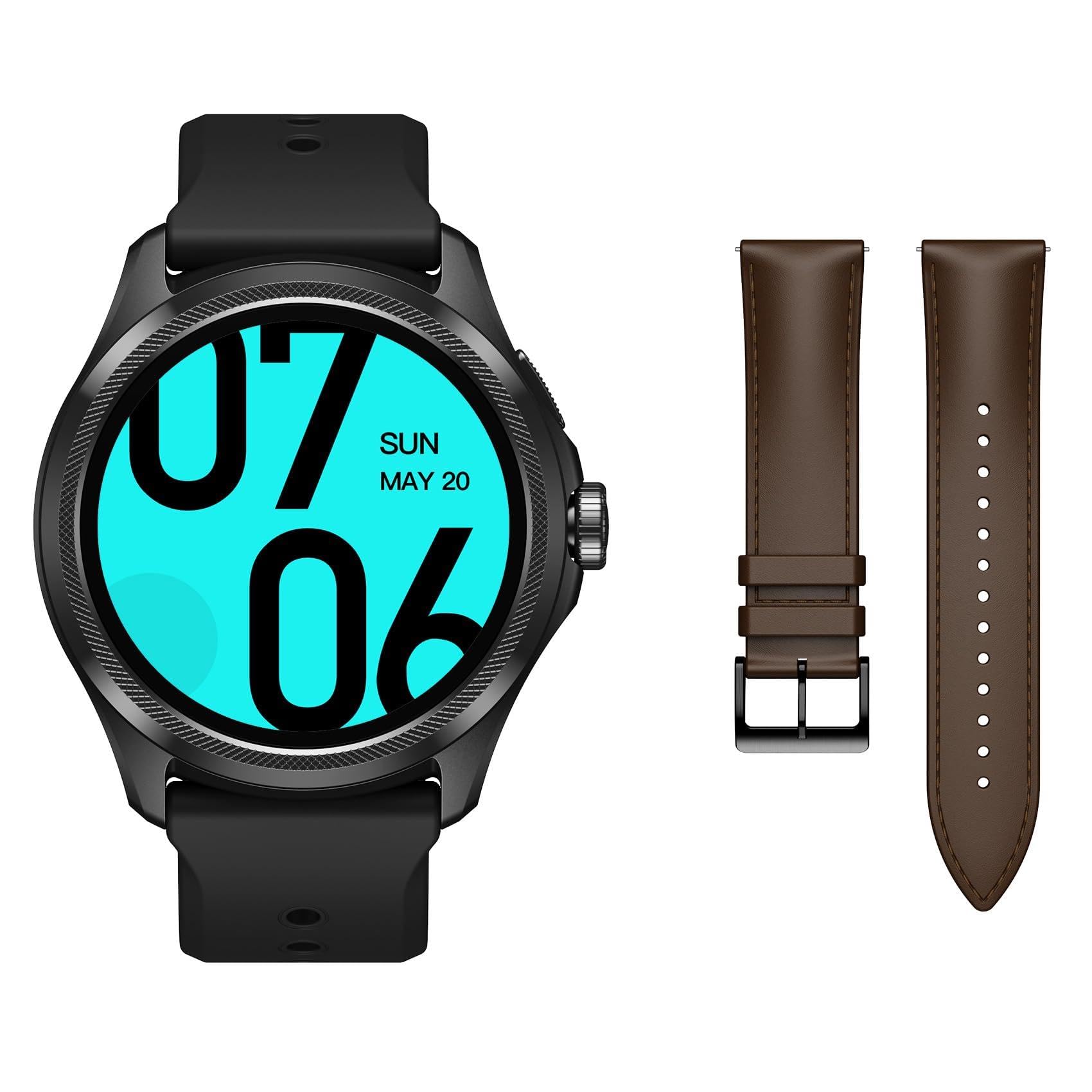
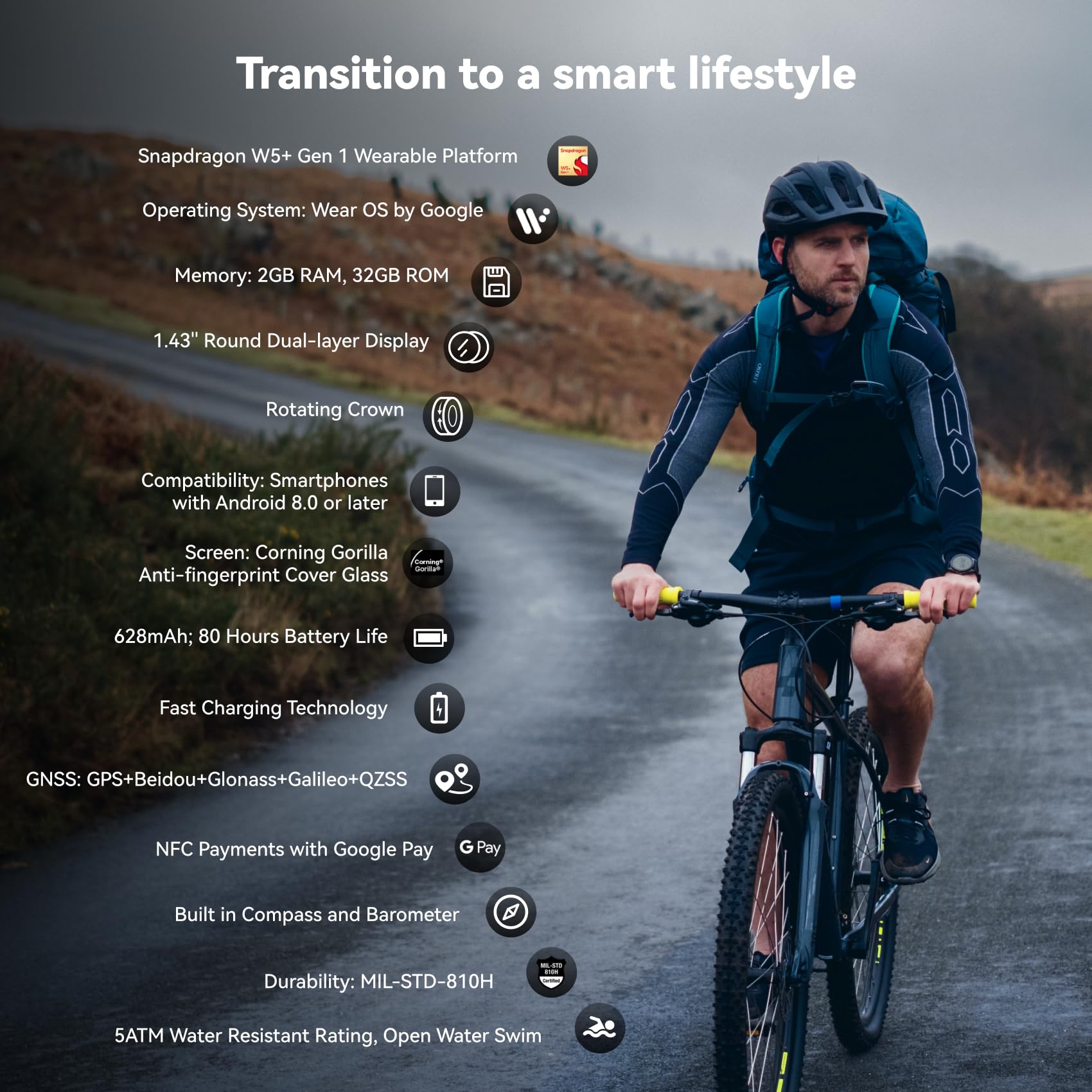
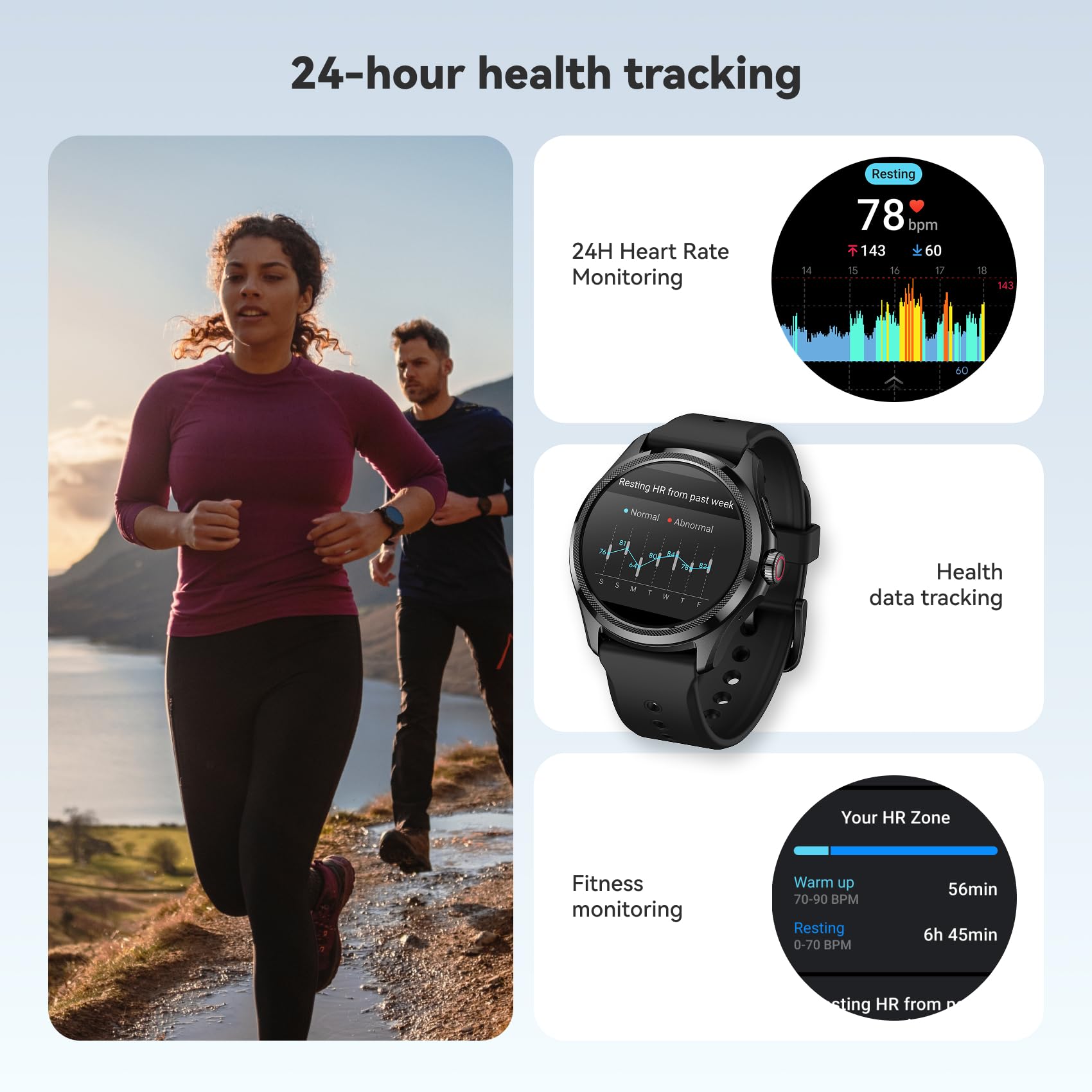
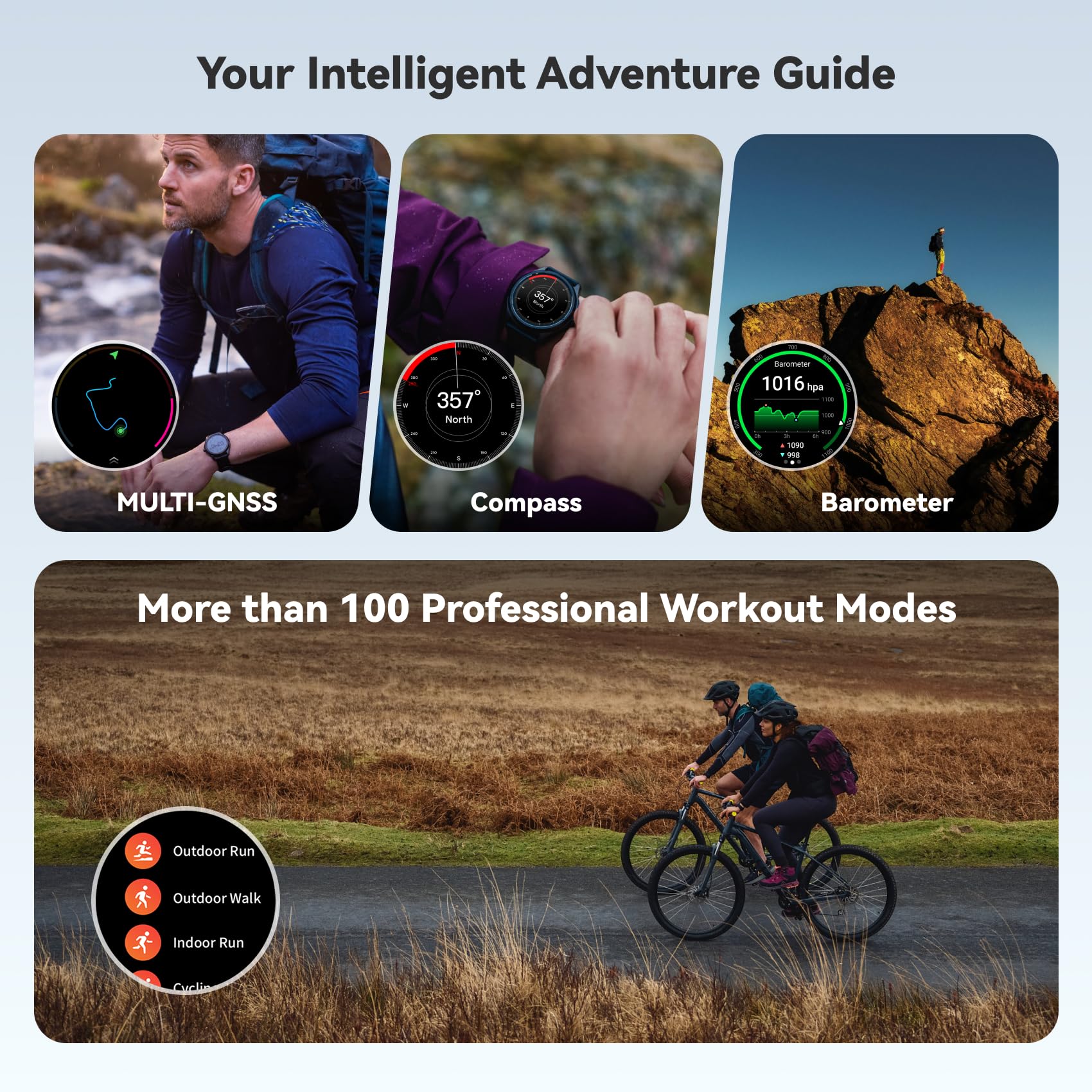
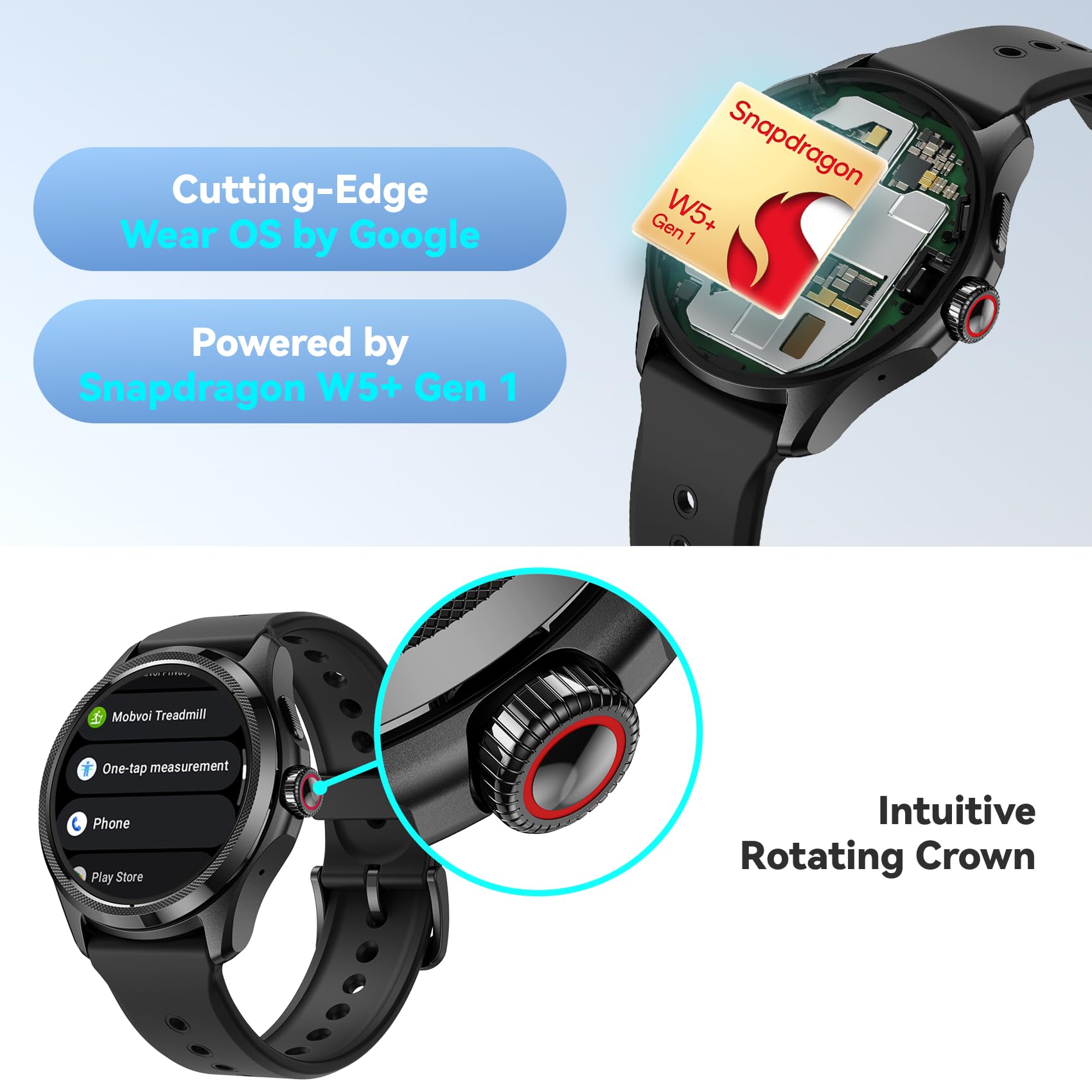
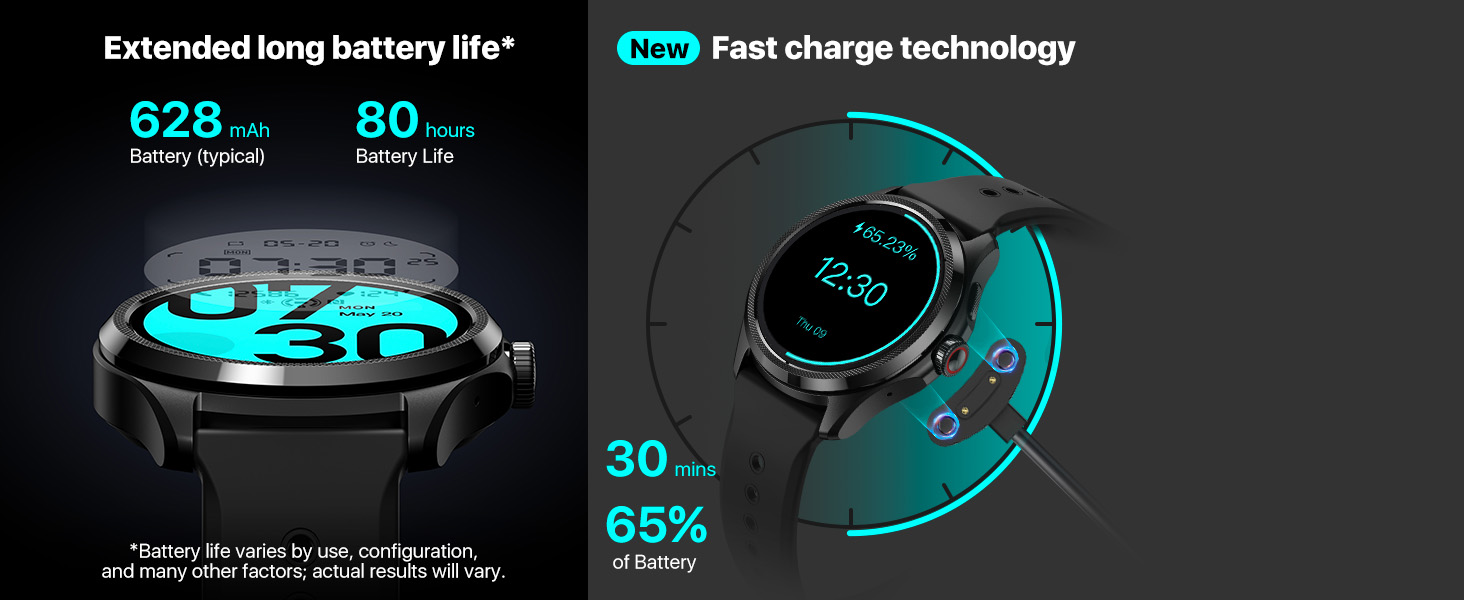
The TicWatch Pro 5 is a cutting-edge Wear OS smartwatch featuring the Snapdragon W5+ Gen 1 chipset, dual-layer OLED and ultra-low-power displays, and an industry-leading 80-hour battery life. Designed for professionals who demand seamless performance, it offers advanced health tracking including 24/7 heart rate, blood oxygen, stress monitoring, and irregular heartbeat detection. With built-in GPS, 5ATM water resistance, and a rotating crown for intuitive control, it combines rugged durability with sleek style—complete with two premium watchbands for every occasion.


| ASIN | B0F946LV63 |
| Additional Features | Activity Tracker |
| Band Material Type | Leather |
| Band Width | 24 Millimeters |
| Battery Capacity | 628 Milliamp Hours |
| Battery Cell Type | Lithium Ion |
| Best Sellers Rank | #93,964 in Electronics ( See Top 100 in Electronics ) #1,575 in Smartwatches |
| Brand | Ticwatch |
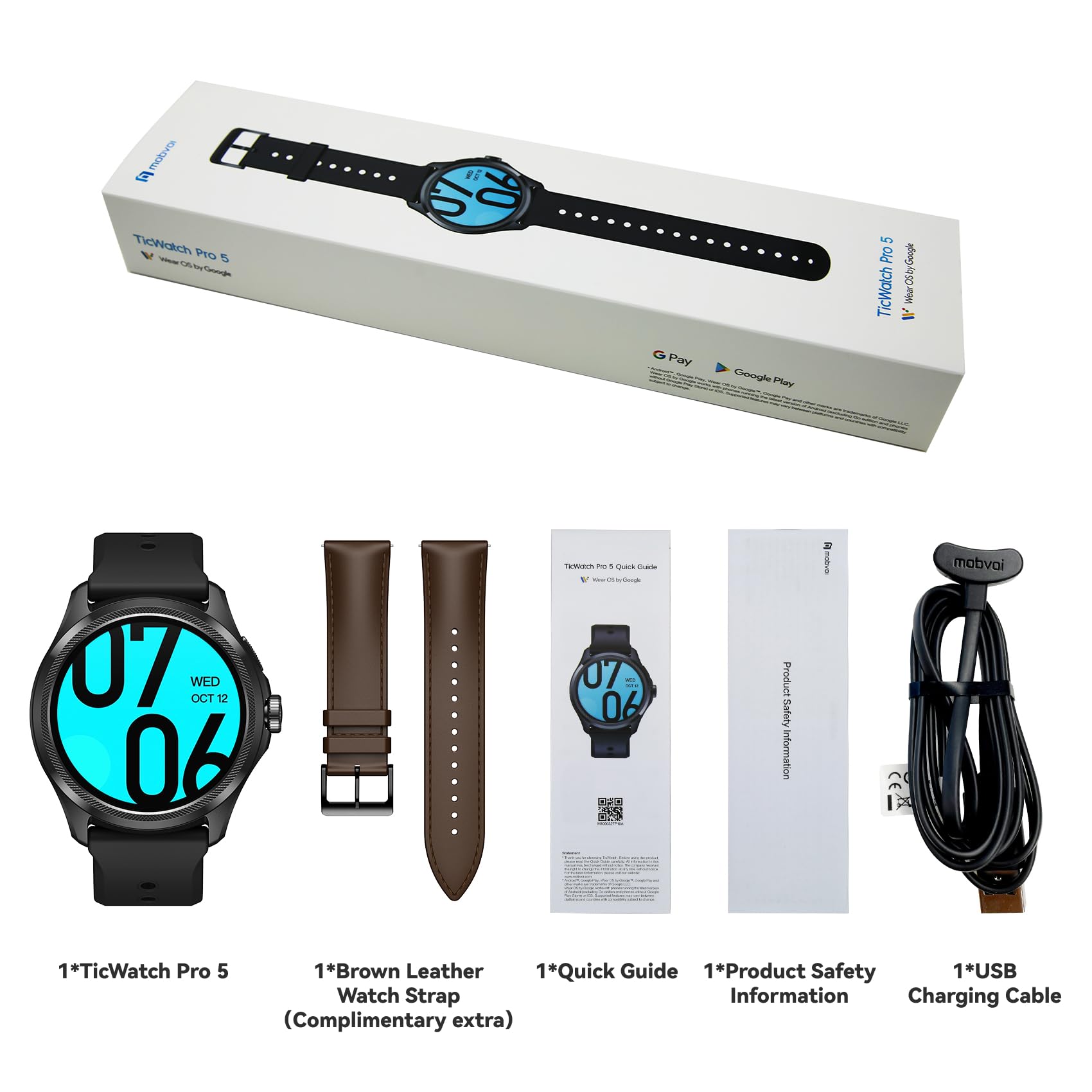
| Built-In Media | Charging Cable, User Manual, Watch Band |
| Color | Black+an extra watchband |
| Communication Feature | Cellular, GPS |
| Compatible Devices | Smartphone |
| Compatible Phone Models | Compatible with iOS and Android devices |
| Connectivity Technology | Bluetooth |
| Customer Reviews | 3.9 out of 5 stars 3,762 Reviews |
| Display Type | OLED |
| External Testing Certification | SDS |
| GPS Geotagging Functionality | Built-in GPS |
| Human Interface Input | Buttons, Touchscreen |
| Item Dimensions | 1.97 x 1.89 x 0.48 inches |
| Item Weight | 305 Grams |
| Manufacturer | Mobvoi |
| Memory Storage Capacity | 32 GB |
| Metrics Measured | Distance, Step Count, Calories Burned |
| Model Number | Obsidienne |
| Operating System | Wear OS 3.0 |
| RAM Memory Installed | 2 GB |
| Screen Size | 1.43 Inches |
| Shape | Round |
| Special Feature | Activity Tracker |
| Style Name | Modern |
| Supported Application | Alarm, Blood Pressure Monitor, Calendar, Camera, Contacts, Elevation Tracker, Find My Phone, Fitness Tracker, Heart Rate Monitor, Messages, Multisport Tracker, Music Player, Pedometer, Phone, Photo Gallery, Reminders, Sleep Monitor, Social Media, Time Display, Video Record, Voice Assistant, Voice Control, Weather |
| Supported Satellite Navigation System | GPS |
| UPC | 191307001323 |
| Warranty Description | 1 year warranty |
| Warranty Type | Limited |
| Water Resistance Depth | 50 Meters |
| Water Resistance Level | Water Resistant |
| Waterproof Rating | 5ATM |
| Wearable Computer Type | Smart Watch |
| Wireless Communication Standard | 2.4 GHz Radio Frequency |
| Wireless Compability | 2.4 GHz Radio Frequency |
| Wireless Provider | Go Mobile |
J**N
Great watch made even better.
I picked this watch up as an upgrade to my TicWatch Pro 3, which I have been using for almost 3 years now. I will say I am quite happy with the upgrade. I've been using it for almost 2 weeks now, and figured I would share my thoughts. The Pro 5 looks almost identical to the 3. It is, IMHO, a great size for a watch. It's not a giant clunker (which some watches are), but it's not so small that you can't easily make out what's on the screen if there's a lot of data on it. It's comfortable to wear; I wear it 24/7 except for when I'm in the shower. Where the 3 had two big buttons, the 5 has one button in the size bezel, and one large button that's a rotating crown. The crown is great for easily scrolling through menus and lists, the button mappings are nice and easy to access previous and most used apps. It would be nice to be able to change what the button mappings are (I was really surprise that it wasn't an option in the phone app), BUT: 1. I find them useful (double press on the top button opens up Wallet), and 2. there are other options (below). It uses a new app, Mobvoi Health, which has all of the bio data that the watch tracks, and also allows you to control the watch. When I say "control the watch", I don't mean it lightly. The app is pretty impressive, you can easily set things like screen timeout, what alerts you get from the phone, what calendars you want, ability to zoom the watch screen, etc. You can pick from some really great watch faces (I had been previously using Facer, but honestly there were some really great out-of-the-box faces, and I didn't find any reason to reinstall it). Some faces even have mappable complications that you can set from the phone app. What I couldn't do by mapping a button, I could easily map any app installed on the watch to a complication. I found that I use the app for my car a lot, so on my watch I swapped out the default complication (heart rate) for my car app. The "quick actions" (not sure what they are really called) you get from pulling down from the top have expanded (now two pages worth), and you can edit the screen and put the ones you use the most in whatever position you want, which is super convenient. Oddly enough, you CAN'T do this for the main app list (where you could do it on the 3). I was pretty disappointed that you couldn't click and drag to reorder the apps, but again, there's another solution: Pressing the crown in brings up the app list which you can PIN apps to the top (can't reorder), or you can press the top button to bring up the last 6 or 8 most recently used apps, and between the two of those options make it pretty easy to get to whatever app you want to use. I feel like I'm rambling a bit, but I have to comment on the power use of this watch. I stuck with the Ticwatch Pro 3 for so long because of how well it handled power. I would charge it about every other day and that's really all it needed. The 5 puts the 3 to shame. I first got the 5 on Tuesday afternoon...Saturday afternoon it was down to 12%, which included set up and playing around with the phone. It uses the same proprietary charger as the 3 (THANK YOU MOBVOI), so now I have two :) It charges quickly, and you get an alert when it's all done (minor, but I REALLY appreciate this). Not only that, but it handles it's mode switching SO much better. If you aren't aware, the TicWatchs have 2 screens, one a general LED screen (forgive me, I don't know what flavor of LED screen it is), but over that it has an LCD screen (like an old-school digital watch) for always-on screen with low power consumption. If the 3 got really low on power, it would enter this "essential mode" where it basically only used the LCD screen, and you lost access to apps and LED screen (which I thought was great: instead of a dead watch you still have a functional digital watch). To get out of that mode, you would need to charge & reboot the watch. The 5 not only effortlessly switches in & out of essential mode without any reboots, but it still tracks all of the biometric functions (sleep, O2, heart rate - all great, btw, but I'm not writing War and Peace here) AND you can now modify the LCD screen to display different information on it. I really have to say this is a great watch. It's a big improvement over the 3, and I thought that watch was a big improvement over the other watches that I've had (a couple of Samsungs and one other). I could go on - there are lots of great QoL things, like the flashlight has two modes (one turns the screen white and the other turns the screen red so you don't kill your night vision), lots of other nice touches, but this is already TLDR. If you get this watch, you will not be disappointed. I'm quite happy with it.
R**H
Still early but am impressed
My last watch was the Mobvoi Ticwatch Pro 3 that I have had since Oct 2020. It still works and I have had no problems with it but the new one, the Pro 5, caught my eye and after a couple of weeks and as many reviews I could find I purchased it. Pricey? Yeah a little bit but so far worth it, in my opinion. I am a 69 year old guy, retired, who does not use most of the extended exercise routines included with it but the Pro 5 is much more refined than the Pro 3 as you would expect. It is the little things that have made a difference for me so far. It arrived on 8 Jun 2023 and the first 24 hours the drain on the battery was a lot but this is because I was checking everything on the watch and there is plenty to learn and figure out how to apply to your needs and wants. Weight wise on the wrist I have not noticed any difference from the Pro 3. I replaced the included band with a stainless steel one because it suits me better. There are more details on the Ultra Low Power (ULP) screen than before which I have found helpful. You can also check a few other things from that screen so that helps with power usage. The watch face is slightly bigger which allows both watch faces to display more information. I like the Android 11/Wear OS 3.5 that is included. The Pro 3 had Android 9/Wear OS 2.42. The layout is different with the Pro 5 and to me seems less cluttered than the Pro 3 and you don't have to hunt as much to get to a feature. The rolling crown is a nice touch. It is fast and responsive just as the Pro 3 was when I first got it. If I had any complains or wants or wishes, it would be nice to be able to change/add tones for the alarm, same with the ringtones. The ones included are not really appealing to me but they work. None of these are necessary changes but it would ne nice. My first digital watches were Mobvoi back in their infancy and were affordable for me at the time. So I have seen the company excel and progress over several years. The one-tap measurement (heart rate, blood oxygen, respiratory rate, stress and overall heart health) can be done in approx 90 seconds for a quick look at everything. Very nice feature! No Google Assistant but I have never got into it talking to inanimate objects. Now the big thing, the battery! My test started with a full battery at 1330 (1:30pm) on 9 Jun 2023. It is now 1630 (4:30pm) on 12 Jun 2023 and I am at 50%. 75 hours if my old school math of fingers and toes is correct. Not bad but I am sure that will adjust down and up depending how busy I might be as it would for anyone else. Keep in mind I am not out much and not running around all day either like most people are and if I was there would be some more power use. I was getting about 30 to 36 hours on my Pro 3 when I set it aside and 24 hours while I was still working. Not bad either for a 2020 watch tech. Essential mode when sleeping is bound to help with battery life too. It measures the essentials while sleeping and you can set the start and stop time. GPS accurate within feet and the compass feature is good also. Health monitoring features have been refined and are more accurate in my opinion. Plenty of exercise options available in many forms. Is this the watch for you? Only you can make that decision but this has a lot of features others currently don't have along with latest Snapdragon 5+ Gen 1 chip which helps things along including a slightly larger battery than the Pro 3. Like any other Tech you are interested in, no matter what you get a better version will come long later on. Is it worth the price? I think it is. Mine came out of the box with a watch face called Color Run and I like it as it displays a lot of information and surprisingly it is readable even to an older guy like me that needs glasses to read. I am an old school guy who got into the computer revolution in the beginning, early 1970's. In 50 years we have come a long way, some good, some bad, but this watch is something else as far as wearable tech goes. A lot worry about making a fashions statement, I want something that works good and is durable, like this watch is. Like I said at the beginning, it is still early but I am impressed. Definitely recommend! Update: 13 June 2023 - 1330 (1:30pm) - At the 96 hour mark there was still 37% listed for the battery. Once again, I am an older guy who is not as active as he used to be so there is a good possibility that a more active person wearing this watch will not get quite these types of results but it should still be very good. It took 50 minutes to go from 37% to fully charged. Not bad but then again it is new and hasn't been cycled many times yet. Based on the cycling life of other rechargeable products I am sure things will drop down some percentage points and extended time limits to charge but will still be impressive by today's standards. This is a remarkable watch with a lot of features not currently available on other watches I have researched and all in one package. Yes it is pricey compared to other watches but....it all depends on what you want one for and your particular needs, and of course your wallet. And it is just a durable as the Pro 3 is meaning you don't have to be overly careful. Even though I will probably never use even half of the features this watch has available, I am still glad I got it! Update 17 June 2023: 91 hours this time, 40% battery left. The past few days I have been busier than usual and watch did its job as you would expect and hope. Accurate readings, etc. Charged early because of a long day ahead and didn't want to risk it getting out of juice even though I probably wouldn't. Just more cautious in my old age I guess. 55 minutes from 40% to 100%. So far this watch has more than lived up to the standards it advertises and I have no doubt it will continue to do so.
C**T
Junk.
I bought one of these in March. For the first seven months, I absolutely loved it. Great battery life. Great functionality. Very cool. Seven months in, it all went to crap. And, Mobvoi's refusing a refund. Bad product. Worse company. If I had to do it over, I would buy a competing brand. The problem started when the health monitoring just stopped working. I contacted Mobvoi's customer service and they were unhelpful. Talked me through doing a "shipmode" which, I found out later, completely resets the watch to factor settings (and, loses everything you've done on it, which is a PAIN.) Didn't fix the health monitoring. I submit a warranty claim. The warranty folks want me to do an "off wrist calibration" but don't send me any instructions on how to do it. Redit had some information and I did that, and it got the health monitoring back. (I'm a week in, going back and forth with Mobvoi at this point.) After doing all of this to the watch, it's started just suddenly locking up. You know that battery saving dual screen thing they tout? Well, it will just suddenly display the Ticwatch logo under the low res screen and freeze. Or, it'll just freeze at a specific time and stop working. At this point, the only option is to reset. When it comes back on, it's usually lost steps or other health tracking data from the day. This is an increasingly common problem, making the watch completely unreliable for health data tracking. (The whole reason you BUY one of these things.) Another concern I have with Mobvoi is the "water proof" watch. They advertise it as completely waterproof. Reading the warranty, as I have had to do several times this last month, I notice that they have multiple exceptions including: showering or bathing with the watch on, WASHING YOUR HANDS with it on or, basically, anything other than swimming gently in calm water. The first thing the warranty folks ask is if you have showered or bathed with it on, and I've been asked that probably a dozen times dealing with Mobvoi. Basically, it's NOT WATERPROOF and if it gets screwed up getting wet, odds are that it VOIDS THE WARRANTY. I view this, quite frankly, as straight-up false advertising. Also, Mobvoi's warranty submission process is extremely inconvenient and byzantine. The website to do so had significant tech hiccups and I had a hard time even initiating the warranty process. As it stands, they're hassling me now saying it is "beyond the 30 days return period" and, generally, declining a refund. At the price point, I would have expected this watch to work for more than seven months before turning to junk as it has. And, I would have expected a reputable company to honor the warranty in a situation like this. Overall, poor device and worse company.
J**U
Great watch overall, but software is a bit lacking
**I will preface this review with the caveat that this is my first time using a smartwatch on a daily basis (I have used the Ticwatch Pro 3 in the past, but only for research/development purposes) so this review may be less useful for you if you're looking for how this watch compares to other smartwatches since I am a bit of a smartwatch novice. I am also writing this initial review after using the watch for a week, so there are some features that I may not have tested thoroughly yet.** I have an overall positive impression of this watch and didn't have major complaints. The watch looks good (I tried the black color) and even though I have a very slender/spindly wrist, it wasn't too bulky and is more compact than previous iterations of the Ticwatch Pro and feels comfortable to wear especially after I got used to wearing it daily. The rotating crown is easy to use, although I do wish I could reprogram what it could be used for from the settings (I'd prefer the rotation feature to be used for controlling the volume at all times, since I didn't personally use it often for scrolling). I did hear others say that it gets pressed accidentally easily, but I only experienced that once while exercising and it was remediated by moving the watch higher up my wrist. The battery life is great and the watch lasts for over two days without charging. As far as the fitness/health tracking features, I found that most of the features looked more or less accurate to my eye. In particular, the sleep tracking seemed to be accurate to my knowledge. Some of the sensors (such as the heart rate sensor) have a bit of a lag in their readings but seem to make up for it in terms of accuracy. I did find that the step counter seemed to overestimate the number of steps by quite a bit, but otherwise the fitness tracking seems to be more than adequate. I only tried the free style, outside walk, and indoor cycling exercise features on the TicExercise app, but there are tons of other exercises listed that I look forward to trying. The biggest downside of the watch preventing me from giving it a five-star rating is the quality of the Mobvoi software. Given the price of the watch, I'd expect the software to be a bit better. Most of the Mobvoi apps on the watch itself seem okay, but the Mobvoi Health app seems a bit disappointing in terms of its user interface. In addition, I found some bugs in the app; for example, there is a watch face available on the app that allows users to choose a custom image, but when you select the watch face, it goes to a blank screen with no way to select an image. Not a huge deal since there are plenty of ways around this using third-party software, but, again, for a watch of this price, I would expect the software to be more polished and robust. Another example of an issue I encountered was on the watch's onboard software/firmware. At first, the watch would not play any audio to the bluetooth headphones that I connected to it when using non-Mobvoi apps such as Spotify, Calm, etc. This problem occurred for about a day, and eventually fixed itself although I am not fully sure of how it got fixed. There are little bugs and glitches like this that aren't dealbreakers but I imagine would diminish the Ticwatch compared to its competitors that are better known for a good software experience. I also tried setting up the watch with three different phones for testing purposes: an old Motorola smartphone, a Samsung phone, and a Google pixel. While setup on the Google pixel worked relatively smoothly, there were errors with setting up on the other two devices (didn't work on the Motorola but eventually worked with the Samsung after a few struggles). On the Samsung, I also had a lot of issues with setting up bluetooth audio. As a whole, the software seemed functional but a bit clunky and some things just didn't work out of the box and required multiple tries to get it working with minimal documentation online on how to perform troubleshooting/setup. Lastly, I know that the long-term software support of this watch is the biggest concern for a lot of prospective customers. I can't speak to that yet (did receive a couple updates in the past week though!) so may update the review after using the watch for a longer time. TL;DR The watch is good in terms of appearance and hardware, but the software could be improved.
T**U
Ticwatch Pro 5 is a worthy successor to the Ticwatch Pro 3 Ultra!
Mobvoi Ticwatch Pro 5 Review Review/comparison: The Mobvoi Ticwatch Pro 5 is my second Mobvoi Ticwatch; the first was a Ticwatch Pro 3 Ultra. The feel of it: The Mobvoi Ticwatch Pro 5 seems very similar to my Ticwatch Pro 3 Ultra in the size and the feeling of wearing it. The band feels comfortable and the watch body feels like it is the right size for a man's watch. Spec comparison: Ticwatch Pro 3 Ultra vs Ticwatch Pro 5 Ram: 1 Gb vs 2 Gb (Ticwatch Pro 5 should run faster) ROM: 8 Gb vs 32 Gb (Ticwatch Pro 5 should store more stuff) Battery: 577 mAh vs 628 mAh = 8.8% delta (Ticwatch Pro 5 should last longer) Size: 47.0 x 48.0 x 12.3 mm (Pro 3 Ultra) vs 50.1 x 48.0 x 12.2 mm (Pro 5) It looks like the Ticwatch Pro 5 is about the same size as the Ticwatch Pro 3 Ultra except the Ticwatch Pro 5 has the crown that sticks out on the right side producing the 50.1 mm width. Weight: 41.0 grams vs 44.3 grams. Ticwatch Pro 5 weighs 8% more. Wrist band size: 22 m vs 24 mm. Why did Mobvoi change the band size? I have no idea. Finally a second color available! When I bought my Ticwatch Pro 3 Ultra it was only available in black. Now the Mobvoi Ticwatch Pro 5 is available in black or a sandstone color. Sandstone and black strap: I was surprised the sandstone color really refers to the color of the watch band; not the watch body itself. The band has a black clasp that contrasts nicely with the sandstone strap. There is a sandstone strap keeper band that keeps the strap from flapping after the clasp and I wonder if that would have looked better if it was also black? There seem to be more holes on the band that are closer together and I am happy with the way that the band fits now. I always felt my old watch the holes were too far apart and I always felt like the band was either too tight or too loose. Gold body: The watch itself is mostly a muted gold color with a shiny gold strip around the bezel. I thought the watch would be sandstone color but it is really gold. The bezel face has a knurl pattern that catches and reflects light and looks fancy. I like the color but it surprised me because some of the Mobvoi photos on their website the watch body appears silver colored to me. Buyer beware that this watch body looks gold. That said I’m impressed how much cooler this watch looks than the all black color. With certain watch faces/colors it looks much more upscale. Color Update: My wife says the body doesn’t look gold to her. She says it looks like metallic sandstone and matches the band pretty well. Red crown stripe: I was surprised to see that the rotating crown also has a red accent on it. I wasn't expecting to see any red color on the watch. Screen: the screen looks slightly larger (old watch was 1.4 in 454x454 326 ppi, New watch 1.43 in 466x466 326 ppi) and brighter? But when using the always on display the screen auto dims too much when in sleep mode. My old watch would be about twice as bright in sleep mode. The screen seems more responsive than my old watch too. It is easier for me to push on screen buttons without accidentally pushing the wrong thing. Setting up the watch: The set up seemed easier without the separate WearOS app we used to have to install on our phones. I got a notification about Essential mode that couldn’t be dismissed. I had to at least go into Essential mode settings and look around. I found that I needed to adjust the start and stop times of the automatic essential mode to match my personal schedule versus the schedule set at the factory. App and OS updates: I needed to update 12 apps including Wear OS from within the Google Play store on the watch. Essential mode: The Essential mode screen that can save power is amazing! The Mobvoi website describes this as ‘Two watches in one’ and I agree; it does feel like you can transform the watch into a different watch! Sometimes I like the look of a basic LCD watch. It is much more visible in sunlight than the always-on display. I wish there was a way that I could have always on display on when I'm in a building but automatically switch to the essential mode display when I'm outside. I found myself switching this manually a lot on my old watch. I see that there is an automatic adaptive brightness setting so I know the watch has a light sensor. It would be nice if the sensor was reading daylight if it would switch to essential mode and when it senses less light switch back to the always-on display. Essential mode Use Case 1: Camping away from power sources but need time, date, long battery life, etc. Essential mode Use Case 2: Situations where I don't want it to look like I'm wearing a smartwatch or don’t want the distractions of a smartwatch. Essential mode now has…modes! Essential mode used to be just one screen with very little available data. Now Essential Mode has multiple screens of data that you can scroll through with the crown! Big improvement and much appreciated! The Mobvoi website says, “switchable tiles such as heart rate, blood oxygen, calories, and a compass.” This is actually pretty awesome that you view so much data in super low power mode. Tilt-to-wake: The twist your wrist to wake the screen seems much more responsive than my old watch. It works incredibly well and is very sensitive. I think it works perfectly and I kind of super love it. Giant settings shortcut menu: There are now 14 customizable icons in the new settings menu! I don't even know what they all do. My old watch only had 6 icons that couldn’t be changed. Rotating crown dial: The rotating crown really makes this watch so much nicer to navigate. The scrolling animations associated with the rotating crown are really smooth and look great. The app drawer: The circular app drawer with circular icons is gone and now replaced with pill shaped icons that scroll vertically. You can’t scroll around the bottom to the top; only up and down. It’s a little boring but it’s legible and it works. Recent apps (Top button): This seems like it is just the app drawer filtered by ‘recent’ instead of ‘alphabetical. So maybe a little redundant since pushing the crown button one time opens the alphabetical app drawer and double tapping the crown opens the most recently used app. Recent app (Double tap crown button): This seems like a good idea to be able to access the recent app so easily. Button change: The Ticwatch Pro 3 Ultra had 2 buttons that looked like rotating crowns. The lower button would always get accidentally pressed when doing pushups so I'm glad that button is relocated. Will the new crown button get accidentally depressed when doing push ups insatead? I'm wondering if I will miss the ability to program one button to a favorite app? I used to have that button set to launch the Stocard app to show my planet fitness scan code since that works so much better and faster than the planet fitness app. It looks like it is technically possible to remap buttons by sideloading apps. https://github.com/TransitNow/wearos-btn-remap/ Compass: The Ticwatch Pro 5 has a working compass. I went outside to avoid any possible interference and was easily able to calibrate the compass using the figure 8 motion shown on the watch screen. The compass is really neat and I’m sure I’ll use it from time to time. The Ticwatch Pro 3 Ultra had a compass at the time of its release but by the time I bought the Ticwatch Pro 3 Ultra the compass feature had been taken away never to return. Mobvoi said this was due to a conflict with Google software. I wonder if that kind of thing will happen again? Will the Ticwatch Pro 5 will lose its compass functionality over time? Facer app: I was surprised Facer let me install it and use my account on a second watch without disconnecting the first watch. Heart rate monitor seems to work better with Facer. My old watch didn't do a good job monitoring my heart rate and displaying that data when using the Facer app. Weather app: The Weather app and it’s Tile did not work on my watch when I first tried it. I tried ensuring location was set to on for both watch and phone, watch reboots, and other Google search solutions to no avail. I finally gave up and installed the Accuweather app. Accuweather asked several permissions questions and worked. This seems to have also healed the Google weather app because it now works as well. This also caused all the weather related data to show up on my Facer watch face. One Tap Measurement app: One tap health measurement is cool to watch. With one tap it measures heart rate, blood oxygen, respiratory rate and stress. If you want to add ‘Heart Health’ as a 5th metric as shown on the Mobvoi website launch the TicPulse app, scroll down to Heart Health and tap the ‘Measure’ button. Wear OS updates: The Ticwatch Pro 5 first shipped August 16th 2023 with Wear OS 3.5 (which was released October 2022). This means Mobvoi had Wear OS 3.5 for 10 months and couldn’t have the watch ready for Wear OS 4 (which came out July 2023, one month before the Ticwatch Pro 5 was released). The Ticwatch Pro 3 Ultra was slated to get Wear OS 3 but it has not gotten it for over a year past when Mobvoi promised to release it. This makes me doubt that Mobvoi will be able to upgrade the operating system of this watch to Wear OS 4 in a reasonable time frame. Mobvoi user groups constantly complain about this and I am doubting that they will be happy with the update schedule for this new watch. If you demand timely Wear OS and security updates you would probably be better off with a Google Pixel Watch or a Samsung Galaxy watch. Google assistant or the lack thereof: The Ticwatch Pro 3 Ultra came with Google Assistant as standard software. I was able to launch it using one of the buttons on the side of the watch and I could send texts or make phone calls or turn the lights on and off at my house using voice command. As time went by the ability to make phone calls or send texts was taken away and I could only use a limited set of Google Assistant commands. Even worse the Google Assistant was eventually removed completely and I could launch it but it no longer had any functions. Today when I launch Google Assistant it just says, “Google Assistant is not available for this version.” The Ticwatch Pro 5 does not have Google Assistant at all. I wonder if Google Assistant will be available again once the watch gets Wear OS 4? Some people have said they don't care if Google Assistant isn't available on the watch because they never used it but I really liked it and used it all the time. There is a youtube video where it is shown how to sideload Google Assistant. https://www.youtube.com/watch?v=lqnD2iWeQBI Google, Do no evil: Google has released its Pixel 1 watch and now it's Pixel 2 watch and all of the features ‘magically’ work; whereas they are ‘somehow’ blocked on other manufacturer’s watches. This is unfair to handicap other manufacturers and keep all of the best features for yourself. It is short-sighted for Google to behave this way and I'm sure companies like Mobvoi don't appreciate it. If Google wants Wear OS to grow and gain market share it needs to treat all its manufacturers equally and fairly. Soarking Charger 3 stand not compatible: The Ticwatch Pro 5 does charge on the Soarking charger 3 and the charging screen looks way better than the old one. It displays the charge in percentage with hundreds of a percent which is entertaining to watch. However, it seems the health sensor on the back of the Ticwatch Pro 5 is larger than the Ticwatch Pro 3 Ultra and the new watch doesn’t fit on the charger stand very well. It doesn’t seat on the charger as well as the Ticwatch Pro 3 Ultra did. Soarking has updated their charger stand design. It used to be called the ‘3 Charger stand’ but it is now called the ‘5/3’ charger stand. It looks like the cutout in the stand has been enlarged to fit the Ticwatch Pro 5. Pixel Buds Pro and Multi Point Technology: I connected my pixel Bud Pro headphones to this watch which worked well. Using the Pixel Buds Pro multi point technology should ease the transition from phone audio to watch audio. The Ticwatch Pro 3 Ultra was a pain to switch headphone audio from phone to watch until I got the Pixel Buds Pro headphones and enabled multi point. Conclusions: Is it worth buying this watch versus a Google or Samsung watch? It depends how much that Essential mode LCD screen and the resultant extended battery life is worth to you in comparison to Google's Pixel Watch OS and Security updates because you are literally making that trade off when you purchase a watch from Mobvoi. Knowing yourself well enough to pick a smartwatch that has the features you need and will have use cases for helps to make this decision. I think this will be a great watch for me as long as updates come in a reasonable rate and features don’t start disappearing. Is the Ticwatch Pro 5 really an upgrade over Ticwatch Pro 3 Ultra? With the additions of gmail, calendar, rotating crown, larger battery, more responsive screen, better looking Sandstone color, 2X RAM, 4X ROM, Wear OS 3.5, noticeably faster operation, faster battery charging, much improved Essential modes with multiple data modes, working compass, and less change of Google disabling features for the time being I think the Pro 5 is a tangible upgrade over the Pro 3 Ultra. You may need new watch bands and a new stand charger if you are upgrading from a Ticwatch Pro 3 Ultra since the older accessories may not be compatible.
T**H
3rd Time Does the Trick - Great Bang for Your Buck!
This is my 3rd TicWatch Pro, having had both the previous TWP 3 and TWP 3 Ultra, and I can say they keep getting better. Originally I chose it over the other smartwatches like Samsung or Fossil because it had the same, or better, specs at a better price. The first one (TWP 3) sadly died within 17 months, but I had a promotional 18-month warranty which they honored (good customer service) and they allowed me to get the 3 Ultra (for a small upgrade fee). They made some minor improvements of which I liked, but nothing too groundbreaking. With this TWP 5, when it came out, I was intrigued with Wear OS 3 and the promise of a better battery life. I think a classic complaint for any smartwatch is the battery life (no matter the brand), and since my TWP 3 Ultra was only lasting about 2 days without going into essential mode, I decided to give the TWP 5 a shot. I’ve had it for a few weeks now, and I can say, without a doubt, that TicWatch keeps getting better, and the upgrades of the 5 far outweigh the upgrades from the 3 to the 3 Ultra. I’ll list the PROs and CONs below and you can be the judge if it’s right for you. PROs: * While the interface is exactly the same, there's some new-ness that has improved with the upgrade to Wear OS 3. Like when you swipe down, there are more default options in there to access like settings, airplane mode, DND, flashlight, etc. There's like 14 options in there now. This just allows you to find something quicker. Also, the swipe right and left tiles (widgets) that you can customize have seemingly grown giving you more options allowing you to quickly get to a timer, workouts, weather, etc. * The battery life has vastly improved. The TWP5 does a better job and lasts at least a day longer than my previous TicWatches (so that’s like 50% more). They have added a new Smart Essential Mode feature allowing you to schedule it so it auto-switches your watch to Essential Mode when you’re sleeping, for instance. Essential Mode still tracks key things (steps, heart rate, etc.), but it's basically minimizing your watch to the bare necessities to save power. Plus there’s even additional settings you can play with to save more power as well. For example, it’s always monitoring (24/7) to see if you’re sleeping, but I was able to change that to only track at night time in order to conserve energy. I don’t nap so I didn’t need it to continually monitor if I was sleeping or not during the day, and so it allowed me to customize that. That’s just one example (among several others) of ways to preserve battery life. Overall it’s very clever. * With the upgraded Snapdragon processor and twice the RAM, it has a very quick reaction to everything - tapping, swiping, etc. - which you would expect in any smartwatch. My TWP 3 Ultra reacted well too, but I would notice things like tapping the watch to wake it up may not take right away. When I touched the screen, sometimes it wouldn't wake with a quick tap and I'd have to tap it again to wake it up. With the Pro 5 that doesn't happen anymore. * The Fast Charge Technology they boast is a real thing as charging has dramatically improved. Before I upgraded to the 5 I was testing the charge of the old watch and I was getting about a 1/2% (0.5) increase in battery for every minute I was charging. So if I needed to go up 30% in battery life, it would take at least an hour of charging (60 minutes). With the Pro 5, it's vastly different. Using the supplied charging wire it was going up about 2% every minute, so like 4 times as fast. * The Mobvoi Health App is better because it incorporates the Wear OS app now, so no need for both (more on that later in the CONs section). Also, I feel like its sleep tracking is more robust, giving you more insights than before. I always felt it didn’t compare with my old Fitbit and now it seems like it caught up. Also, when going through the health stats, there are a few new ones that they didn’t to track before, like blood oxygen and stairs climbed (at least I don’t remember seeing those in the old Mobvoi App). * The haptic vibrations are way better than before, and you can further customize the types of vibrations there are. This doesn’t sound like a big deal, but I use the vibrating alarm clock on the watch, and not having to wake up to the sound of an alarm is awesome. However with the TWP3 Ultra, the vibration was aggressive and loud enough to wake up my spouse when it went off in the morning. However, now, with the TWP5, they have softer vibration pulses that do the trick. This is a small detail, but one I appreciate. * One-tap Measurement. This is new and they now have the ability to click one button and it performs all the health monitoring in one fell swoop. In 90 seconds it says it will measure heart rate, blood oxygen, respiratory rate, stress and heart health. All of these also have options for continual monitoring, but it’s nice to have it all in one spot like this. * It now has a built-in Compass (TicCompass), Barometer/Altimeter measuring and even tracks floors climbed. Those are new and I enjoy that. * The new Rotating Crown is neat. You can control the watch face by touch, of course, but you can also scroll by rotating the crown instead. I don’t use it often, but it did come in handy when I was in the water and the screen wasn’t as reactive to touch. It’s not a deal breaker, but it’s a neat feature. * I don’t use a lot of watch faces, but they do incorporate a TimeShow app that has a bunch of watch faces and makes it easy to switch them. There are a bunch of “premium” ones, but I steer clear of those and just find free ones. CONS: * The TicWatch 5 no longer supports Google Assistant. I’m not sure if this will be a future update or not, but for now it’s not there. I thought this would be a bigger deal for me, but it turns out it’s not. I have that Assistant everywhere it seems. I have Google Home Minis (or Nest Minis), a couple Google TVs, Android Auto, and of course my Android phone, and so I have an Assistant pretty much anywhere I go. I never used the Assistant on my watch too much, so it’s not a big loss for me. I think others have talked to their watch to open an app, or start a workout, but it’s so easy to customize those things on this watch that I don’t think the work around will be too annoying. But still, if you liked having the Google Assistant on your watch, you won’t have it here. * The TWP 3 & Ultra used to have a customized button that you could add a specific action to it. I used it to put my flashlight on that button and found it very useful to quickly access it. That customized button is no longer here, however I can see the potential that an update can fix it. For example, when you double press the power button it takes you to Google Pay. The problem is, I don’t think there’s a way to change that action (or at least I haven’t figured it out yet). Furthermore, the crown button is another spot that maybe they’ll allow you to customize. For now, one press brings you to your apps, and a double press brings you to the last app you used. Perhaps one day they’ll update it so you can customize what opens up when you press the power button, or that crown button, twice. Either way, getting to the flashlight isn’t that hard. You can swipe down and click it, or you can customize a watch face to put it on there, so it’s not a huge deal, but I would still find the customization of double tapping one of those buttons to be useful. * Going from the 3 Ultra to the 5 was a bit confusing and they don’t explain it at all in the packaging. When I opened it up, it had a card within the packaging that asks you to scan the barcode with the Amazon app to see a video explaining it, but this wasn’t intuitive enough. Scanning took me to the watch’s Amazon product page and I didn’t quickly see this video, so I gave up. The thing is, apparently, the TWP 3 Ultra uses Wear OS 2 and so its Mobvoi app is only for watches that run Wear OS 2. With the TWP 5 it runs Wear OS 3 and you need the Mobvoi Health App (there’s a difference) instead. Furthermore, when I fired up the TWP 5, I went to my Wear OS Google app and much to my surprise it said it couldn’t find the watch. This was confusing and I had to do some research to figure it out. With the TWP 3 Ultra, I was able to go into my Wear OS app and adjust some watch settings and notifications and such, but now the Mobvoi Health App does all the Wear OS stuff. I don’t think this would have been confusing if I didn’t have previous TicWatches, but since I had to use both those apps with the 3 and 3 Ultra, it would have been better if they somehow explained that within the packaging. It was confusing. Overall this watch is great and I would recommend it over my past TicWatches. The PROs far outweigh what I consider to be minimal CONs. I enjoy the improvements of Wear OS 3, and the 50% better battery life & fast charging ability are game changers for me. While I haven't used other Android smartwatches, I did find after doing some online comparisons/research, that the TicWatch Pro 5 seems to stack up well and offers great bang for your buck. Hopefully this review will help you make a decision one way or the other.
J**E
Watch Runs Pretty Great - But STILL Has Anemic Haptics
Not sure why I expected anything to change. I bought the TicWatch Pro 3 and really liked it for several reasons...however, there were 2 glaring issues I had with it before I sold it. And I am sad to say both of them are still front & center on the Pro 5. Let me get them out of the way first. Haptics. Mobvoi's haptics are so weak they are virtually useless unless you have absolutely the greatest sensitivity known to man. I saw a review from a nationally known YouTube reviewer who came out and said that they had been noticeably improved on the Pro 5. Well, apparently he received a different watch than I did. The haptic engine on the Pro 5 is literally no different than on the Pro 3, which was crazy anemic. I looked for apps which may help get around this with zero results that actually worked. For me, the #1 reason I have a smart watch is for notifications. What is the use if you receive a message but the haptic motor is so under-powered that you miss the microscopic notification? Now, before the haters come a-knockin'...this is a well-known issue with Mobvoi smart watches and I am absolutely not alone in this. Go ahead, look it up online. There are hundreds of threads you can find online detailing this very issue. With that said, if you have an ultra sensitive wrist and have no trouble feeling such small notices, or you've used a Ticwatch in the past and found the haptics to be adequate for you, then the Pro 5 will be an absolutely fantastic buy for you. However, if you were frustrated by this before, I'm afraid the Pro 5 has not made literally ANY positive advances in this area. The other frustrating issue for me is the fact that the watch has 32GB storage, and I like to use music for mine...but as with almost all Wear OS devices (the exception being the Galaxy Watch 4 & 5 - and presumably the upcoming 6) downloading music for offline listening is, shall we say, annoyingly and almost intentionally difficult. If you wish to pay for Spotify or YouTube Music, this will not be an issue, but why should I have to PAY to listen to MY music?? With my Galaxy Watch 4 & 5, you simply transfer it using the Wearable app and voila! The same can be said of the apple watches as well - although still not as simple as with Samsung. But without paying for an app, or a monthly service, with Wear OS those extra gigs of memory are damn near useless. I've already shelled out $350 for the watch, why do I need to spend even 𝙢𝙤𝙧𝙚 to listen to music easily? For me personally, this is the biggest and most overwhelmingly major flaw of Wear OS. If I'm being honest, I much preferred Samsung's own proprietary Tizen run smart watches to Wear OS. Sure, it had pitifully few apps by comparison, but I don't use many apps on my watch to begin with. I mean, the real estate is so small on a smart watch that for my tired, old eyes, depending on it to play a game, or constantly use apps rather than on my phone is a bit of a challenge for me - and I realize it may not be for others, but it's a pretty big one for me. Aside from these 2 issues...the Ticwatch Pro 5 is an exceptional Wear OS device. Probably the best you can buy outside of my 2 personal dislikes. The operation is the smoothest I have ever experienced running Wear OS. My experience with Android's own OS for smart watches has been disappointing since the very beginning, back when it was known as Android Wear. I bought the Moto 360 (remember that flat tire on the screen?). It was a product rushed to market far sooner than it should have and was simply terrible. The battery life was astonishingly poor - even by standards of the time in which it was released. Then you had the stuttering, the hiccups, the delays, the spontaneous app closures, one after another after another. What a joke. With the Pro 5 however, this seems to have (𝙁𝙄𝙉𝘼𝙇𝙇𝙔) been dealt with in a way which actually makes the system run damn near flawlessly. Easily on par with my apple watch Ultra. VERY buttery smooth, and apps opened with expected ease and speed. If I'm being honest, the Ticwatch Pro 3 was awfully close to this as well, far better at it than my Samsung Wear OS watches. But the Pro 5 only improves on it. I think one of the main issues with Wear OS is that it has notoriously NEEDED more RAM to run well, and for some reason, it took nearly 10 years before anyone bothered to increase it to 1GB and that alone solved a huge number of natural issues associated with running Wear OS. Mobvoi isn't the first watch to use the dual screen tech (the Casio G-Shock smart watches had this tech years before Mobvoi adapted it) and to be entirely honest, I'm a little shocked more smart watch manufacturers haven't tried to adopt it as well. It's tried and true and really does work great. It gives you the option of having an always on display giving quite a bit of actually useful info, without truly expending much in the way of battery usage. It's actually quite remarkable. Kudos to Mobvoi for not only adopting it, but continuing to improve it. Speaking of battery, they managed to squeeze in an even bigger one for this model than in years past and it only helps. The included new Snapdragon W5+ chip and included 2GB's of RAM only serve to make an already well-run OS be that much faster and battery efficient. If you can get past the myriad of included Mobvoi health related apps and the fact that you don't need the Wear OS app AT ALL, and let's be honest, the Google app is much better than Mobvoi's in literally every conceivable metric you can apply to it...but the things that the Pro 5 seem to do well, it really does do well. I don't believe it comes with an ECG option however...and this long past the fact that apple and Samsung have had it for at least 2 full years now, makes you wonder why this is one option they chose to not include which seems to be more and more common than not. I believe the Pro 5 has automatic exercise detection...yet it never once worked for me. Both my apple watch Ultra and Galaxy Watch 4 & 5 have this function and it works - I'd say at least 99% of the time. Not sure why Mobvoi cannot seem to get this to work AT ALL, let alone most of the time. At least this is my personal experience. Wish things were different. I really do. Had I known of these 2 continuing issues, I would not have shelled out $350+ to order mine literally within moments of it becoming available online. If my 2 "issues" are not problems for you, then I cannot recommend the Pro 5 ENOUGH. As far as running smoothly, I don't believe any current Wear OS device can match it. Seriously. Food for thought. Thank you for reading. ***UPDATE*** The haptic motor still sucks. Like the worst of any modern device I have ever used. However, I have chosen to still use the watch anyway. There are a few things that are truly notable regarding the Ticwatch Pro 5 and were it not for the issues I detailed above, this would easily be my favorite smart watch of all-time...and that is saying a lot because I have an apple watch Ultra and I freakin' LOVE that thing. One of the things I have noticed is I tend to put my watch on and power it up just as I start to put my socks and shoes on. The Galaxy Watch 5 Pro takes far and away, the longest time to boot up from being off. Like almost twice as long as anything else. When compared to the apple Watch Ultra, it REALLY was slow to boot up. The Ticwatch actually boots up faster than my apple watch. Not by a huge amount, but it IS consistently faster. Kudos to Mobvoi for this alone. My Galaxy Z Flip 4 takes roughly twice as long to boot up as my iPhone 13. For years, apple devices have booted up faster than all my android devices. It's interesting and almost shocking when I discovered the Ticwatch 5 Pro does it quicker than my Galaxy Watch 5, watch 4 and Galaxy Watch 3 (the last model that used Tizen OS). That is no small feat considering how most Wear OS devices have been hampered with less than optimal chips or a lack of enough RAM (or both). The battery is absolutely fantastic. On par - if not slightly better than my apple Watch Ultra, which has great battery life. The TFT display is an absolutely brilliant move here. It uses less battery than even the least power-hungry Always On Display screens and tells you most of what you need to know at a glance, without needing to turn on the OLED display. Casio I believe had this before anyone else, but I don't think they still make smart watches (after all, they were slow, enormous and did not utilize RAM like they should have, and the performance of their smart watches was simply horrible. Honestly, I'm kind of shocked more companies haven't picked this trend up as well because of how convenient it is for both utilization and battery saving. Oh well, since nobody else does, I think the Ticwatch Pro 5 probably has the best battery life with an OLED screen this capable you can buy. This may not be accurate, but it just might be. I still wish downloading music was easier (it's not and this is something Wear OS NEEDS to simplify this and not make doing so the royal pain that it has been since the inception of smart watches. In this area, Galaxy Watches have been the easiest to download music to...if any other watch does it easier I am unaware of it. I find it almost useless to put 32 GB of memory just for stuff like music, yet making the job of downloading so stupid difficult. Who is going to jump thru that many loops? Sure, some will do it, but most of us would rather go with something else (like a Galaxy Watch) in order to cancel out that stupidly complicated. For those who are willing to do all that in order to listen to music, this is going to seem just like an annoying complaint, but for those who aren't, you'll know what I'm talking about. I STILL find the haptic engine being so ridiculously weak that it's almost useless to me. But Mobvoi HAS taken steps to make an exceptional smart watch with only a couple of problems that I think are truly worth mentioning.
C**N
Honestly, it is one of my favorite smart watches
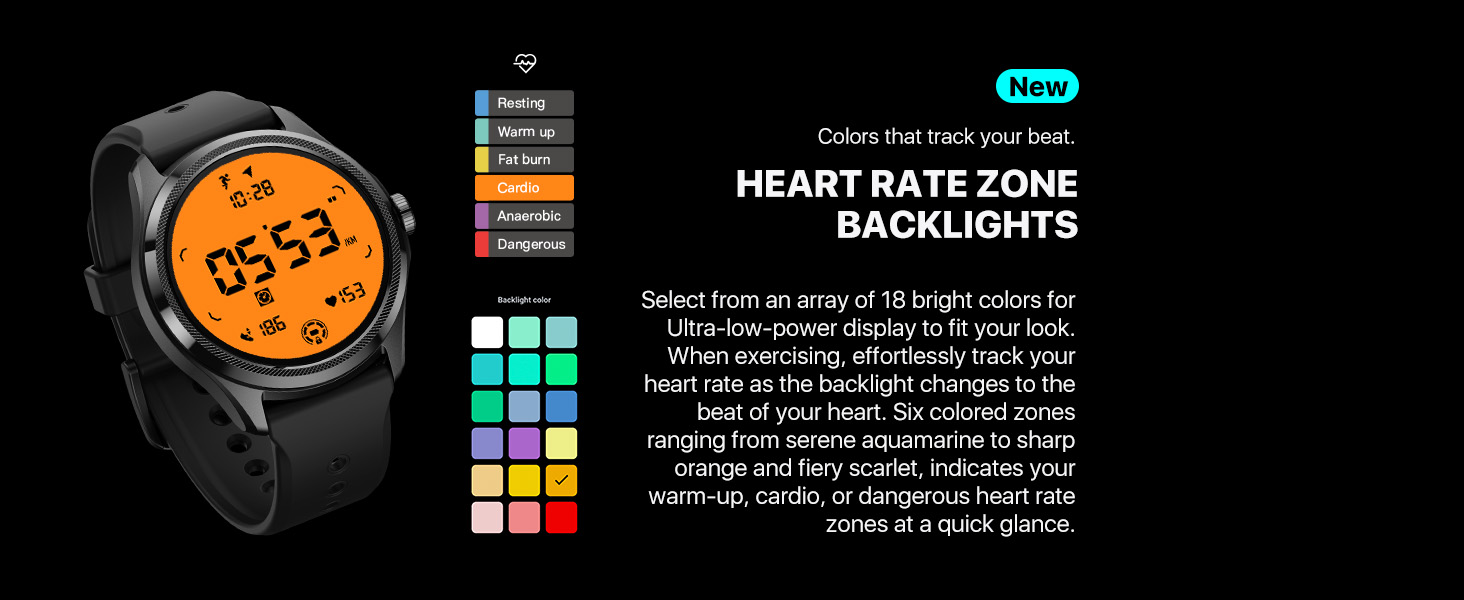
So, I had a Galaxy Watch 4 (which was a pretty good watch with an AWFUL battery life), so I decided to hunt for a replacement watch. No way I wanted to pay the full asking price for another Galaxy watch when I read that they still hadn't improved the battery life very much. So, which model to go with? The Pixel watch was available, but, like the Galaxy watch the battery life was pathetic. That's when I discovered the TicWatch Pro 5. I went to YouTube to see how others reviewed it, and what features it might have. It pretty well "Tics" all the boxes. Construction is great. I love the larger face of the watch (hey, I don't see as well as I used to so I appreciate having the extra screen real estate). It uses it's own health app, so I you are coming from a Google Pixel watch or a Samsung Galaxy, you will need to add another app to your phone. No problem. They basically have the same functionality. Later on I received a Pixel Watch 2 with my phone upgrade. After using them both for a while I prefer to the TicWatch to the Pixel 2 watch. The health app provides me with all the details I need without having to subscribe to Google's FitBit Premium app. The battery life of the TicWatch is phenomenal by comparison. The dual screen display (yes, there are two of them) works really well and saves a tremendous amount of battery life. The display is crisp and clean. The watch automatically detects when I go for a run or a walk and provides great color-based feedback on my exertion as it measures my heart rate. It isn't without some shortcomings. The Galaxy watch does a great job of "speaking" into my wireless earbuds when I am on a run, letting me know each time I've reached another mile marker and relaying my splits in my ear - all without looking at the watch. The TicWatch keeps track of all of that info as well, but it reads it aloud from the watch face - not through the wireless earbuds. It does vibrate nicely to give me a physical sense of when I reach a new mile marker. From a sleep perspective, the sleep score it provides lacks a little bit of nuance compared to the Pixel Watch 2. Basically, it will give me a sleep score of say, 75 or 80 or 85, while the Pixel watch is more incremental (like a score of 72, or 83, etc). The TicWatch can be set to go into "essential mode" - essentially it turns off the watch face while I sleep, yet it continues to track my vitals and delivers good sleep information. This also saves a lot of battery life. The only real knock I have seen against the watch is that it tends to lag a bit behind the other two big guys when it comes to software updates. But, for me at least, that isn't a big deal since it already does such a good job of delivering what I need when I need it. Plus, once you place it on the charger, the watch sends a message to your phone telling you when it is fully charged. Did I mention that it charges really fast? It does. And that is also really helpful when you need a little extra juice before heading out for the evening and you're looking for that extra guarantee that it will take you through the night. Just pop it on the charger and in a few short minutes you can gain a lot of extra power. For me, this watch has proven to be a winner.
TrustPilot
vor 1 Monat
vor 4 Tagen