We remain fully operational. Our teams are working around the clock to ensure your deliveries continue safely.

Laden Sie die App herunter


Kundendienst
Copyright © 2025 Desertcart Holdings Limited
Laden Sie die App herunter


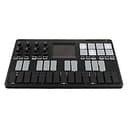
🎶 Compact. Wireless. Limitless. Your studio, anywhere.
The Korg nanoKEY Studio is a lightweight, ultra-portable 25-key MIDI controller designed for mobile music production. Featuring both USB and wireless Bluetooth connectivity, it offers seamless integration with iOS devices and computers. Equipped with 8 high-sensitivity trigger pads and a signature KAOSS touchpad, it enables expressive control over drums, chords, and synths. Perfect for on-the-go creators seeking a compact all-in-one music production solution.


| ASIN | B01AT2AT6S |
| Additional Features | Compact, Portable, Wireless, Touch Sensitive Pad, Trigger Pad |
| Amazon Bestseller | #2,463 in Musical Instruments ( See Top 100 in Musical Instruments ) #20 in Computer Recording MIDI Controllers |
| Brand Name | KORG |
| Color | Black |
| Compatible Devices | Desktop, Laptop, Tablet, Smartphone |
| Connectivity Technology | USB |
| Connector Type | USB |
| Control Method | Touch |
| Control Type | Keyboard Controller |
| Customer Reviews | 4.2 4.2 out of 5 stars (557) |
| Global Trade Identification Number | 04959112147423 |
| Hardware Interface | USB |
| Hardware Platform | iOS |
| Human Interface Input | Keyboard |
| Included Components | USB Cable |
| Instrument | Keyboard |
| Instrument Key | Any |
| Item Dimensions D x W x H | 16D x 27.8W x 3.3H cm |
| Item Type Name | MIDI Controller |
| Item Weight | 1.49 Pounds |
| Keyboard Description | Compact and mobile 25-key MIDI keyboard |
| Manufacturer | KORG(コルグ) |
| Model Number | NANOKEY-ST |
| Model Year | 2016 |
| Number of Keys | 25 |
| Platform | iOS |
| Product Style | Key |
| Supported Software | KORG Gadget |
| Total USB 2.0 Ports | 1 |
| Total USB Ports | 1 |
| UPC | 755756641020 632317248211 |
| Warranty Description | Based on manufacturer's warranty regulations |
E**K
良い👍 KORG Gadget使っているひとならマストです!
と**ー
iPadやiPhoneで使える持ち運び可能なMIDIコントローラーです。 それ以上でもそれ以下でも無いです。 据え置きで使うならもっといいMIDIコンはいくらでもあるので、別のものを探した方がいいでしょう。 ですが、持ち運んで使う場合はとても便利なアイテムです。 まずケーブルがいらない。 持ち運びにおいて荷物が二つ(ケーブルとアダプター)減るということはとても重要です。 そして薄い。 カバンにも無理なく入ります。 パッドのベロシティは、まあ値段なり。 ですが、パッドでサンプルを再生する場合、ベロシティは切っておく方が楽です。 キーボードについてはパソコンのキーボードと大して変わりません。 キー配置があまりよろしくなくコードを押さえるのは難儀します。 ただスケールに合わせてキーを自動で割り当ててくれる機能はとても重宝します。 ワンボタンでコードを演奏する機能もありますが、単純なボイシングのセブンスコードだけなのでほぼ実用性はないです。
あ**け
MacのガレバンとiPadのKorgのガジェット2で使用。 ガジェット2で使用したかったので想定どおりの動きです。 iPadと一緒に持ち運び気軽にLive演奏ができるよいUIです。 パッドの感触は他社上位製品の中くらい。キーは、プラスチックがかすれる音が気にならなければ 大丈夫だが、キーの押下時にベロシティがぶれて調整が難しい(なれが必要) メロディや楽曲で使いたいなら素直に、Akaiにしておいた方が良いです。 そのほかよくレビューで書いてある不満とかは正直数十万のそれ相応の高級機買えばいいのでは、と思ってる。
と**い
他の方が「USB給電でBluetooth使用」と書いておられましたが、 うちではUSB接続、給電時はなぜかBluetooth認識せず。 メーカーに問い合わせたところ、やはりそのような仕様とのこと。 長時間の作業にはBluetooth使用するのは電池がもったいなくて残念。 追記 : 後にメーカーに連絡したところ、USB給電でもShiftボタンとWirelessボタンを同時に押すことで認識出来ることが判明。 しっかりしてくださいよ、KORGさん! と、以上のことはiPadで試したことですが、 もうひとつMacで試したところ、Bluetoothドライバのシステム要件がOS X 10.11以降、64ビットプロセッサ、Bluetooth 4.0必須で、うちのMacでは動作出来ませんでした。
N**R
コードやスケールがいまいち理解できず悩んでいたのですが、これを買ってから音楽理論への理解が深まりました。 それぞれのスケールを光で教えてくれるので、スケールから外れることもなくサクサクと作曲することができます。 他の方が投稿していた動画で、右上のパッド部分の反応が鈍いということで不安はあったのですが、 弱い力では反応しづらいものの、押し方さえコツをつかめばきちんと反応してくれます。 (自分の場合は爪をたてて押すようにしています) たのしく実演しながら音楽理論を簡単に学べる素敵なアイテムだと思います。
り**り
とてもいい製品だったのですが... microUSBが最後までささらず、押し込んでみると、はまった感じがしたのですが、間違いだったのか、キーボードが光らなくなり反応がなくなってしまいました。合計2つ購入しましたが、しばらく使用していて、だめになり、また購入して、また同じようにだめになってしまいました💦
A**ー
日本語の説明書がほしかったな
A**R
DTMをやっているとUSBポートのやりくりが大変ですが、これはBluetoothで接続できるのでポートを専有しません。そして、軽いので片手で持ったり膝に乗せてササッと弾けます。
T**S
Wanted it to work with iPad Pro so had to do the upgrade. Had fun trying to get the upgrade to work on a pc. Found I had another keyboard in an the upgrade program did not like it. It all worked fine when I plugged the Nanokeys into the same usb port that the other keyboard was in. Works a treat on the iPad talking to Gadget 3 is really good.
N**V
I'm really impressed with this. I wanted a portable controller with knobs, pads, and keys (and the XY pad was a very alluring bonus). I got so much more. Korg squeeze every bit of functionality out of their beautiful backlighting array. I didn't expect to find things like scales useful, but combined with a highly customisable arpeggiator (for which you can tap tempo on the fly) and note bending/XY parameter control, things really take off. The backlighting is also used to great effect as visual feedback for various settings and options, from selecting pattern banks to transposing. People mention the toy-like construction of the keyboard, so I wasn't expecting much but also didn't require much. Actually, I really like the feel of the keys. A full keyboard it ain't but they have a pleasing bounce to them and their velocity response is pretty nice. The pads (which I use mainly for launching clips) require a bit too heavy a touch to trigger for my tastes, but then most drum pads do. The whole thing is compact, thin, and extremely light, without feeling too flimsy. The bluetooth functionality is great - anything to take the strain off my limited USB ports. My main quibble is the responsiveness of the XY pad. It takes a bit of pressure to register touch, which also makes it prone to error about position some of the time. Now that we're all used to incredible capacitive touch screens, this feels like a bit of a step backwards. (Perhaps if it was super-sensitive we'd be moaning about accidental touches though.) I've also found that sometimes there is simply some noise in its transmission. Finally - it's in the wrong place! It should really be in the top left corner, where you can get at it with the left hand in an instant without craning over the knobs. But despite all that, it is really promising for what I can accomplish with it, especially given all the XY parameter controls Live offers. My secondary small quibble is that the bluetooth connect software Korg offers isn't available for Yosemite, and in lieu of that I have to manually reconnect it every time I turn it on. But hey, I guess they did their best... The customisation software is a whole other portal that I haven't had time to wade into yet. I can't wait.
C**N
Non avrà il feeling di una tastiera, ma per chi è abituato a lavorare con i synth è un controller comodissimo per suonare con l'iPad: la connessione Midi bluetooth è molto stabile e l'uscita usbC o lightning rimane libera per la scheda audio o per le cuffie... Per me è geniale.
C**N
Si te gusta producir música con el iPad, usando Korg Gadget, este controlador es perfecto. Puedes tocar melodías y acordes, especialmente útil lo de las melodías, que intentar improvisar una tocando una pantalla del iPad es bastante incómodo.
A**.
Perfect midi controller, easy to use.
TrustPilot
vor 1 Woche
vor 1 Monat