
Laden Sie die App herunter


Kundendienst
Copyright © 2025 Desertcart Holdings Limited
Laden Sie die App herunter

🚀 Elevate your video calls—because your professional presence deserves nothing less!
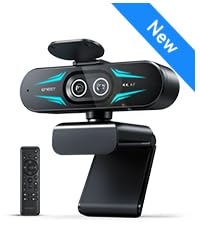
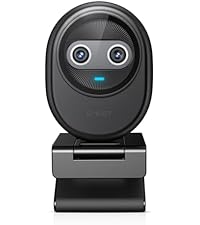
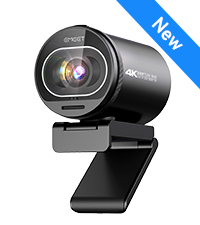
The EMEET C960 2025 Version is a compact, plug-and-play 1080P webcam featuring dual omnidirectional microphones, a 90° wide-angle lens, and advanced low-light correction. Compatible with Windows, macOS, and Android TV, it offers seamless USB Type-A and A-to-C connectivity, making it ideal for professional video conferencing, streaming, and remote collaboration.




| ASIN | B0DSPJPRXD |
| Are Batteries Included | No |
| Best Sellers Rank | #2 in Webcams |
| Brand | EMEET |
| Built-In Media | C960 Webcam, Cover, User Manual, USB Cable |
| Camcorder Type | Webcam |
| Color | Black |
| Compatible Devices | Laptop, Personal Computer, Android TV |
| Connectivity Technology | USB |
| Customer Reviews | 4.4 out of 5 stars 36,368 Reviews |
| Display Resolution Maximum | FHD |
| Effective Still Resolution | 1080 Pixels |
| Effective Video Resolution | 1080 Pixels |
| Features | Clip Base, Dual Omnidirectional Microphones, Low Light, Privacy Cover, USB Type-A & A-to-C Adapter |
| File Format | AVI |
| Flash Memory Type | NOT Available, Rely on Your PC/Mac |
| Focus Type | Fixed Focus |
| Form Factor | Ultra Compact |
| Has Image Stabilization | No |
| Image Aspect Ratio | 16:9 |
| Item Dimensions D x W x H | 4.88"D x 2.65"W x 2.04"H |
| Item Height | 2.04 inches |
| Item Weight | 0.16 Kilograms |
| Lens Type | Wide Angle |
| Manufacturer | Shenzhen eMeet technology Co.,Ltd. |
| Maximum Focal Length | 1200.0 |
| Minimum Focal Length | 500 Millimeters |
| Model Name | C960 2025 Version |
| Model Number | C960 2025 Version |
| Operating System | Android TV (V7.0 and above), We recommend using the mainstream operating systems instead of Chrome OS which may not be compatible with all versions and models., Windows (Win 10, 11,Tips: Incompatible with Windows Hello functions), macOS (10.14 and above) |
| Optical Zoom | 1 x |
| Photo Sensor Technology | CMOS |
| Screen Size | 3.8 Inches |
| Sensor Type | CMOS |
| Shooting Modes | Low Light |
| Style Name | 1080P Updated |
| Supported Audio Format | AAC, MP3, PCM |
| Supported Image Format | Mjpeg |
| Video Capture Format | AVI |
| Video Capture Resolution | 1080p |
| Video Resolution | 1080p |
| Warranty Description | 2-Year Warranty |
| Water Resistance Level | Not Water Resistant |
| Zoom | Digital |
J**E
Great video and sound quality
Works great. Easy to setup. Plug and play.
J**G
Great camera for the price!
This thing works as described. I plugged it in and my computer recognized it immediately and it started working. Zero setup. So i went into the camera app and ran a test. Sure enough it was working as it should. Ran a short video and the picture and sound were top notch.
M**C
Great But Wish It Had Filters
I really like this webcam. It was super easy to set up and start using right away, and the video quality looks great. My only small gripe is that I wish it had more built-in settings for filter options. That which was a little disappointing. But overall, for a simple plug-and-play webcam with solid quality, it does the job really well.
M**A
Easy setup and great product
Great product and easy setup. Plug-and-play worked perfectly right out of the box with no drivers needed. The 1080P video quality is clear and sharp, and the dual microphones pick up voice well without distortion. Wide 90° field of view is great for calls and meetings. Works flawlessly with Zoom, Teams, and FaceTime. The included USB-A to USB-C adapter is a nice touch. Overall, excellent value and hassle-free setup.
J**E
Excellent camera and microphone
This product works very well. The camera and microphone quality are excellent. Very easy to set up. I’ve used it for Zoom and Messenger meetings and it has done very well. I just noticed on Zoom that it had an autofocus feature. I’m very satisfied.
Y**A
Reliable Dash Cam for Everyday Driving
This dash cam is easy to install and delivers clear video quality day and night. It starts recording automatically and captures a wide view of the road without blocking my vision. It gives me extra peace of mind every time I drive. Great quality for the price and definitely worth it.
N**J
Very Good item
It works, its reliable and a really good 4K Webcam.
R**E
Pretty decent
I’ve had this camera for a very long time now and I’d say I recommend this for people who need a simple webcam. The main pros I’d say is the autofocus and the software feature. The autofocus is really good and it focuses really fast. Sometimes, there will be an issue with it not focusing but I’d fix it by doing the classic item in front of the hand. There is also a software for this camera called the eMeetLink and it works pretty well and you can adjust other settings for the camera. The camera fits pretty well on my monitor, the cable is long so I wrap it around. I also like that I can adjust it down to face my table for table cams when I’m building keyboards. Now to the cons, I would say is you cannot zoom and the camera may stop working properly but I’ll explain that in a bit. So as good as this camera is for its price, you can’t zoom in and out. So, if you need it for things like Twitch or you don’t want to show your entire room, probably should get a green screen or pick a good spot to use this camera. You can probably use some software to crop too. Now for the camera not working; when I first got it, I barely used the camera but it would glitch and the screen would go crazy even though I barely used it (1-2 times to test it). And no matter how much I disconnected the camera and deleted the software, it would still glitch and not work properly. I even contacted support and they weren’t really much help but I figured out the problem on my own late. I basically had to update the software I believe or the camera because there’s updates and after updating the camera on the software it literally fixed the issue. Ever since then I was able to stream on twitch with this camera and to my friends on Discord with no problem. As for the microphone I have no clue how it sounds but be sure you disable the camera mic (if you don’t need it) in sound settings on windows (search this up separately) because fortunately, I tested this webcam with a friend before streaming and the sound was automatically on somehow and I thought it was only my mic that people could hear. I muted my mic but the webcam mic was still on. So make sure you disable it if you don’t intend to use it!! As for the quality it’s like 50/50, sometimes it’s good but sometimes it can be blurry or wonky. I’m pretty sure lighting though affects it a lot. I’d say as long as you have good lightning the quality should be fine The reason why I say it’s good for simple use or beginners too, it does the job if you’re not worried about professional quality.
TrustPilot
vor 2 Wochen
vor 3 Wochen