We remain fully operational. Our teams are working around the clock to ensure your deliveries continue safely.

Laden Sie die App herunter


Kundendienst
Copyright © 2025 Desertcart Holdings Limited
Laden Sie die App herunter
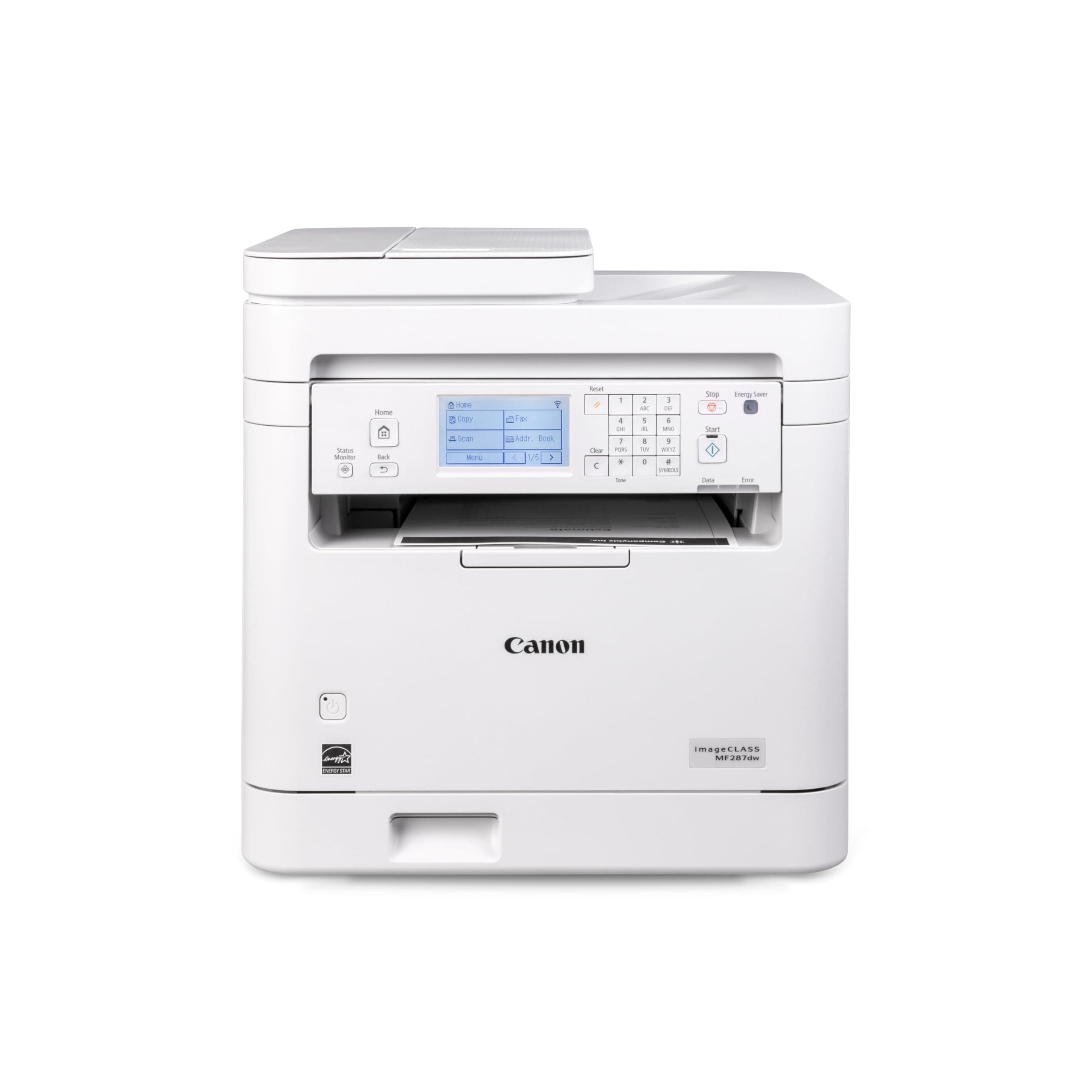
⚡ Print smarter, faster, greener — your office’s new MVP!
The Canon imageCLASS MF287dw is a monochrome all-in-one laser printer designed for busy professionals who demand speed, wireless convenience, and eco-friendly duplex printing. With up to 35 pages per minute, mobile printing compatibility, and a robust 250-sheet capacity, it streamlines office workflows while reducing paper waste. Backed by a 1-year limited warranty, it’s the reliable, high-performance solution for modern workspaces.


| ASIN | B0DGZ9LMD1 |
| Additional Printer functions | All In One |
| Best Sellers Rank | #57,789 in Office Products ( See Top 100 in Office Products ) #55 in Laser Computer Printers |
| Compatible Cartridge | Canon Genuine Toner 072 Standard, 072 High Capacity |
| Customer Reviews | 4.1 4.1 out of 5 stars (105) |
| Date First Available | September 24, 2024 |
| Dual-sided printing | Yes |
| Duplex | Automatic |
| Hardware Interface | USB 2.0 |
| Included Components | Toner Cartridges |
| Ink Color | Black |
| Item Weight | 27.6 pounds |
| Item model number | 6354C011 |
| Manufacturer | Canon |
| Max Copy Speed (Black & White) | 35 ppm |
| Max Input Sheet Capacity | 250 |
| Max copy resolution black-white | Up to 600 x 600 dpi |
| Maximum Black and White Print Resolution | Up to 600 x 600 dpi |
| Maximum Media Size | 8.5 x 14 inch |
| Model Series | imageCLASS |
| Print media | High-resolution paper, Paper (plain), Unknown |
| Printer Ink Type | toner |
| Product Dimensions | 22.5"D x 22.8"W x 22.1"H |
| Scanner Type | Automatic Document Feeder |
| Series Number | 6354011 |
| Sheet Size | 3 x 5 Inches to 8.5 x 14 Inches |
| Specific Uses For Product | Office |
| Total USB Ports | 1 |
| UPC | 013803372267 |
| Warranty Type | limited warranty |
| Wattage | 970 watts |
J**S
Work heavy duty machine
Truly ease of setup, just plug and play. The print quality is excellent, scanning is a breeze and two sided printing works great!
S**A
Convenient, why did I wait so long for a wireless printer?
So far, I’ve only used this for wireless printing. But it has very easy set up and now I can print from anywhere in my house, which I love. I’m expecting it to give us a lot of value over its life. We don’t do a lot of printing, but it’s nice to be able to print from any of our devices.
R**S
Nice
Really nice printer full features.
P**N
Total Junk, Barely Works, Not Recommended
This printer is horrible, don't buy it. It won't work at all unless connected directly to my computer by USB--it won't work at all with any kind of USB hub or pigtail. When it is connected direct to my computer, it barely works. It constantly gives non-describe "Error" messages and I need to restart the printer and/or my computer pretty much every time that I print. I'm running a powerful, new, windows machine with all updates and a new download of the printer software. This printer is total junk.
B**H
Great printer, but label ink smears
This printer has a lot going for it (wireless, duplex, all-in-one functions, and it’s quick), but I’m leaving 3 stars because the print results haven’t been consistent for the one thing I needed most: shipping labels. When I print labels, the text/barcodes smear/rub off too easily during normal handling, which is a big problem for packing orders. I also ran a standard test page (photo attached) and you can clearly see what I’m dealing with: random toner speckling/dots across the page, mottled “dirty” looking black patches, and streaking/banding in parts of the gradients/text. For a laser printer, I expected cleaner solids and more smudge-resistant output. If you’re mainly printing basic documents and don’t care about label durability, it may still work for you. But if you’re buying it for shipping labels or clean, crisp output, this has been frustrating.
W**S
Fast, though a bit noisy
I'm not explored all its facilities, but set up with quick and easy, it is absurdly fast. It's so fast you practically starts printing once the data light starts flashing. No warm up like other lasers. So far, it's great.
A**1
Canon printer with great ease of setup & use
Quality print. Easy to setup and use. You can print, scan, and fax with this printer.
D**L
A fully operable printer: Print, copy, scan, fax
The printer does not serve its purpose at all. I can’t print nor photo copy legal size paper, and it doesn’t have a usb port and option to scan documents to a flash drive. I need to return this printer and purchase a more modern day printer.
M**B
Photocopier like printing speed... not immediate plug and play, but simply FOLLOW THE PROVIDED INSTRUCTIONS and you'll have zero issues. It clearly states do not connect by usb before downloading the app/software....pretty simple. We set up software on one computer, then set up the printer following instructions to connect to wifi, and boom. Then added the second computer, and two android phones. The machine works great, very fast, excellent print quality. FAR faster and immediate startup from power on, than any ink cartridge I've ever had. No grinding, no head cleaning, just boom. I did not sign onto the toner plan you can opt into, probably a bad idea unless you print a lot. Scanner works great with flatbed and feeding (for legal and odd sizing). After a month, I have zero issues other than my mother in law turning the thing off when I try do anything with it. Great buy for home use. No regrets not getting colour, decided that for the amount of colour I've used the last 10 years, if I really need colour I'd usb myself to the copy /photo finish store. You'll save on ink cartridges for sure.
H**6
The printer arrived in perfect condition. Unpacking and setting it up for wireless printing was a breeze. If I recall correctly, the setup included online product registration. The USB cable was missing, but I contacted customer service via live chat and received a price rebate—quick and hassle-free. The machine has been a dream so far: printing in various sizes (including multiple pages per sheet), scanning, and copying have all worked flawlessly. I haven’t tested the fax send or receive functions yet. Overall, I would recommend this machine as an industrious addition to any small business office.
F**E
Super je l’aime bien, facile à installer.
R**N
Printer Works great but ink shows less than 20% after 1 ream of paper (500 pages)
S**H
Perfect, but some difficulties with setup.
TrustPilot
vor 2 Monaten
vor 1 Monat