We remain fully operational. Our teams are working around the clock to ensure your deliveries continue safely.

Laden Sie die App herunter


Kundendienst
Copyright © 2025 Desertcart Holdings Limited
Laden Sie die App herunter


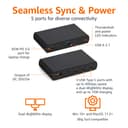
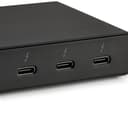
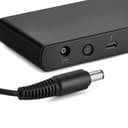


⚡ Elevate your workspace with power, speed, and style — don’t get left behind!
The Amazon Basics Thunderbolt 4 Docking Station delivers robust 85W power delivery, supports dual 4K@60Hz displays, and offers three Thunderbolt 4 downstream ports. Its compact, durable design is compatible with Windows 10+ and macOS Big Sur+ laptops, making it an essential hub for professionals seeking reliable, high-speed connectivity and seamless multi-device management.


| ASIN | B0CPT8K52Q |
| Best Sellers Rank | #4,518 in Computers & Accessories ( See Top 100 in Computers & Accessories ) #375 in Laptop Docking Stations |
| Brand | Amazon Basics |
| Built-In Media | Dock, power adpater, power cord, thunderbolt 4 cable, QSG |
| Color | Black |
| Compatible Devices | Laptops with Thunderbolt 4 or USB ports running Windows 10, and potentially other devices with similar hardware interfaces and operating systems |
| Customer Reviews | 4.0 4.0 out of 5 stars (360) |
| Hardware Interface | Thunderbolt, USB |
| Item Dimensions L x W x H | 4.76"L x 2.84"W x 0.85"H |
| Item Type Name | Amazon Basics Thunderbolt4/USB4 Docking Station, 3x downstream TBT4 (dual display), 1xUSB A 3.1 |
| Item Weight | 1.76 Pounds |
| Manufacturer | Amazon |
| Number of Ports | 4 |
| Total Usb Ports | 4 |
| UPC | 840324412260 |
| Unit Count | 1.0 Count |
| Wattage | 85.0 |
M**N
Simple, Well-Built, Affordable, & Widely Compatible
This is a great docking station! It has a durable metal casing, with just the right amount of ports, and a good compact size. I decided to try it out given that the competitors and "name brands" are charging around 2-3x the cost for a simple thunderbolt docks. I have been shopping a long time, and everything I was looking at was either incompatible, expensive, provided the wrong ports for my needs, or was too bulky. When I just wanted simple function. I have a MacBook Pro with a M3 Pro chip, and I'm generally happy with it, but it does not support MST and daisy-chaining. So, I have been looking for a good thunderbolt docking station that would allow me to upstream charge my laptop, and at least two downstream ports to cast my dual-monitor setup. I also thought it would be a bonus if I could attach my mechanical keyboard to a USB-A port, if available. When I came across this, it seemed like a perfect docking station to hook my entire desktop setup to, so I could easily connect my laptop and have it come to life. I have done heavy work if it is writing and debugging code, editing large files for photography projects, running VMs, etc. I have not yet run into any connectivity, speed, or quality issues while using this dock. I was very happy that it is so compatible with MacOS. Reading the many reviews on the competitors, they either didn't support every OS or it was grainy and slower with MacOS. I switch between my MacBook, or my dual-boot Lenovo with Windows and Linux. I will be testing with the Lenovo soon, to see the compatibility with all OS. I am so far very happy with the compatibility and simple yet high quality product. TLDR: If you want a simple docking station with a good performance at a reasonable cost, I would highly recommend getting this one!
C**R
Reliable and safe, great features
When I look for things to plug into an outlet and then into my equipment, I'm checking for a few things, but mainly power supplies because a lot of manufacturers skimp on these, and that's just not right. So I'll start with the power supply that comes with this unit, which is a big, beefy and heavy power supply made by Chicony, Model A18-135P1B, which is grounded, well-made and is UL and CE Listed. These things do matter to me. While it's long and wide, it's actually quite narrow and mounts under a desk very nicely. The dock itself is also very well-made and reminds me of any number of other higher-end units on the market in both size, shape, design and features. it has all of the ports I need (three USB-C/ThunderBolt 4 ports, one on the front to connect to your computer and two on the rear), three USB-A ports, again one on the front, one on the back, an Ethernet port, one HDMI port and a headphone jack. If you need more than this, hubs will always work, but so far I've been satisfied. Connected to my MacBook Pro M4 Pro, I get every ounce of speed and performance I expected with an external thunderbolt 4 drive, the audio works great passed-through, although I use a 3rd-party amp plugged into it's USB port and have noticed no issues at all. It's featureful enough to satisfy my needs, compact enough to fit under my laptop stand, and inexpensive enough to have me still scratching my head. I can't recommend it enough. If you're worried about spending too much on the flagship products, getting a dock that fits on your desk, but also worry about plugging something cheap into your valuable equipment, this is the dock for you. Great fit and finish all around, wonderful quality and attention to safety details like the outstanding power supply convinced me.
T**N
Doesn't appear to work with AMD or as a USB4 dock. Go Intel for TB4 IMHO, it just makes it easier.
This product does not work with ANYTHING AMD as far as I can tell (can’t get TB3/4 AIC 5pin header card for AMD board), research etc. I thought it would work with my minipc (USB4), or a new motherboard I'm researching right now for a new build. NOPE. I thought I could get a thunderbolt addon for my board. PCIE to get it to work. Nope. Only ebay uk/jp etc and they don’t ship USA. It is basically INTEL only (laptops or SPECIFIC motherboards). Also the description leads you to believe you can hook it to USB4 or Thunderbolt: "Amazon Basics Thunderbolt4/USB4 Pro Docking Station", that lead me to believe it would double as a USB4 dock. Nope. Not knocking the product, reviews say spectacularly with INTEL. But for an AMD buyer it's a return. Just be aware. Gave it 4 stars because build Quality seems very good, ports were exactly what I needed, but didn't know about no AMD (at least NOW). IMHO the description should be changed to "Amazon Basics Thunderbolt4 (NO USB4 dock) Pro Docking Station", but that is just me. I'm an ex-IT admin/support (and had a pc biz for 8yrs where I was the only tech), so if it fools me, how many others are disappointed. Thunderbolt to me on the whole isn't as good as Intel would like it to be. Look at the PCIE TB4/TB5 card reviews and tell me people seem happy with them. USB4 seems much better compatibility wise (works on both Intel/AMD pretty much anything). My UM790 Pro from minisforum has 2 usb4.0's which I thought would work with this dock, or my TB4 capable board I'm looking at (a little research left to support all my crap I hook up...LOL). But both are dead ends here. Amazon, please update the description. Even the Asus/Gbyte PCIE cards seem to not work on AMD (14pin not 5). If someone has this dock working on an AMD based system (today, just did it?), feel free to state so and I'll eat my hat so to speak :) Again not knocking the PRODUCT here, it's just a compatibility issue. I'm not even sure if the dock works (before returning now) other than the green light came on when plugged in ;) P.S. Stick with USB4 for now :) Why would you buy Intel with AMD kicking them in gaming, LLM, media creation etc for home use? AMD’s been rocking Intel's world for some time now in many things but can't quite seem to capitalize yet. Again, Design of this is great, quality seems good, easy to hook up etc, size was great too, fits easily on my desk. Got a Dell 30 and 27 I would have loved to see run from it, but oh well. Good luck, and God Bless to everyone. (edited to add Intel side 14pin header, AMD 5pin on most if not all mboards).
J**F
Amazing - finally a solid TB4 dock that works well and isn't overpriced. Very happy with this. I also have the Dell but it is way more expensive. I don't love where the USB-C TB port is... why right on the front and not on the side or back? But minor in the grand scheme of things.
P**G
This dock is pretty affordable as far as Thunderbolt 4 docks go, so I didn't necessarily expect the best build quality. Turns out it's surprisingly sturdy, looks great in person and works just as advertised. Recommended.
D**W
Works great. Have 2 1440p monitors running on it at 144hz. I have ethernet, 10gbps nvme drive running off it , microphone headphones and its all one wire connected to my m1 max map running smoothly. No glitches at all.
A**S
Used for nearly a month and it's been solid. Can't comment on the quality of video because I'm not technical, but everything is working as intended. No heating issue whenever I touch. I love that it's compact; have hid it behind my monitor. My only complaint is that the TBT4 cable that comes with it is very short. ~0.5 meters in length? Recommend buying a longer one or a USB-C extension cable with specs that match what you need.
W**N
I was pleasantly surprised by this hub. I previously used Plugable hubs as these were the few out there that would permit a MacBook Pro M1 to use dual external monitors when in clamshell mode. Connecting the Amazon Basics hub was a breeze. Everything worked right out of the box as it should. The included Thunderbolt 4 cable is a bit short, but the point of the hub is to be close to your computer. I mounted my hub underneath my desk using adhesive velcro strips, while running dual USB C cables to my monitors. Unlike my Plugable hub, there are no intermittent power issues. I have not confirmed the wattage output to the computer, but it indeed fast charges my devices and my laptop. I'd estimate the hub to be running at around 24 °C. Very cool compared to other devices. You can easily rest your hand there for a long time without being uncomfortable. The power button is a nice touch. Fortunately, there is no auto-off function, so the hub can be hidden tucked away without fear of needing access on a regular basis. Overall, I this hub provides great value over bigger brand name competitors. Highly recommended!
TrustPilot
vor 1 Monat
vor 1 Monat