We remain fully operational. Our teams are working around the clock to ensure your deliveries continue safely.

Laden Sie die App herunter


Kundendienst
Copyright © 2025 Desertcart Holdings Limited
Laden Sie die App herunter


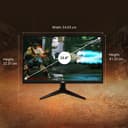


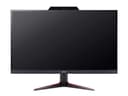


🔥 Level up your desk game with Acer Nitro VG240Y — where speed meets stunning visuals!
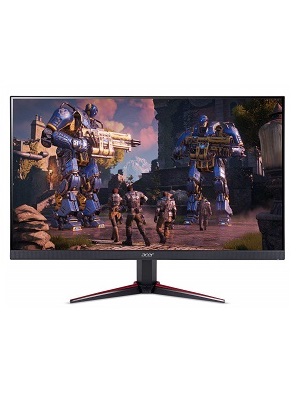
The Acer Nitro VG240Y is a 23.8-inch Full HD (1920x1080) IPS monitor designed for gamers and professionals seeking vibrant colors and smooth performance. Featuring a 1ms Visual Response Boost, 75Hz refresh rate, and AMD Radeon FreeSync technology, it delivers tear-free, fluid visuals. Dual HDMI and VGA ports provide versatile connectivity, while its zero-frame design supports multi-monitor setups. With built-in 2W stereo speakers and flicker-less, low-dimming ComfyView technology, it balances immersive gaming with comfortable long-term use—all backed by a 3-year warranty.







| ASIN | B07CYJ47JB |
| Adaptive Sync | FreeSync |
| Additional Features | Frameless |
| Aspect Ratio | 16:9 |
| Best Sellers Rank | #483,280 in Electronics ( See Top 100 in Electronics ) #9,443 in Computer Monitors |
| Brand | acer |
| Brightness | 250 cd/m² |
| Built-In Media | Display, Power Cord, Stand, VGA Cable |
| Cable Length | 21.27 Inches |
| Color | Black |
| Color Gamut | 0.72 |
| Connectivity Technology | HDMI, VGA |
| Contrast Ratio | 100 Million:1 MAX (ACM) |
| Customer Reviews | 4.6 4.6 out of 5 stars (1,644) |
| Display Resolution Maximum | 1920 x 1080 Pixels |
| Display Technology | LED |
| Display Type | LED |
| Global Trade Identification Number | 00191114655986, 04713883991872 |
| Hardware Connectivity | HDMI, VGA |
| Has Color Screen | Yes |
| Item Dimensions D x W x H | 9.4"D x 21.3"W x 16.2"H |
| Item Type Name | Acer Nitro VG240Y bmiix 23.8" Full HD IPS Monitor AMD Radeon FREESYNC Technology (2 x HDMI Ports & 1 x VGA) |
| Item Weight | 8.9 Pounds |
| Manufacturer | Acer Computer |
| Model Name | VG240Y |
| Model Number | VG240Y bmiix |
| Mounting Type | Seat |
| Native Resolution | 1920x1080 |
| Number of Component Outputs | 3 |
| Picture Quality Enhancement Technology | AMD Radeon FreeSync |
| Power Consumption | 21 Watts |
| Refresh Rate | 75 Hz |
| Resolution | FHD 1080p |
| Response Time | 1 Milliseconds |
| Screen Finish | Glossy |
| Screen Size | 23.8 Inches |
| Shape | Round |
| Specific Uses For Product | personal, gaming |
| Total Number of HDMI Ports | 2 |
| UPC | 191114655986 |
| Viewing Angle | 178 Degrees |
| Warranty Description | 3 Year Limited Warranty |
W**T
Superb monitor for the price.
I was looking for a gaming monitor for my Xbox One, had been using a Sony Bravia HD TV and it never failed anytime I wanted to game somebody was watching TV. Yep. I looked at the BenQs Zowie and almost pulled the trigger, but I really wanted an IPS monitor. So far I'm pleased with the purchase and for the price very happy with the quality of the product. Dimensions: Since the monitor doesn't come with an adjustable stand here's some measurements that might help you determine if you might want to purchase a separate stand. Height from desk to bottom edge of monitor: 3 1/2", height from desk to bottom edge of viewable screen: 4 1/4". Height from desk to top edge of Monitor: 16 1/4", and width of monitor: 21 1/4". The height of the monitor stand worked perfectly for me so I didn't need a separate stand. Initial impressions: The monitor comes in a basic plain cardboard box with some black graphics, nothing over the top. Packaging seemed adequate for the price point, standard foam protection wrapped in plastic. Assembly was straight forward, snapped together without issue. They left out markings for the connections, there's two HDMI connections but neither are marked, which one is HDMI 1 and 2? Small details left off to squeeze into the price bracket it's in. Not a big deal, not like you'll ever look at it again. The monitor stand, does it's job well and looks pretty cool. Startup: Fortunately for me I didn't notice any dead or stuck pixels. Color and appearance: Out of the box black was very washed out to light grey. Horrible. Played around with the settings and decreased the brightness. The settings menu has a lot of depth and adjustments, I set mine to Gaming. The only negative thing I have to say about this monitor is in the Gaming mode it throws the number "60" up in the top right hand corner of the screen. Not sure why they did this but oh well, I've gotten use to it. Another neat feature that I don't use is the monitor comes with built in crosshairs you can turn on, with a couple different versions. This wasn't mentioned in any of the information I read about it. Game play: Flawless as best as my aging eyes can tell, no issues. I'm nearing the completion of yet another play through of the Mass Effect trilogy and game play has been spectacular. Coming from playing on an older Sony Bravia HD TV to this it does feel more responsive. Maybe it's all in my head. In game movie cut scenes aren't great, maybe something to do with "gamer" mode settings. I've been using this monitor exclusively for the Xbox One, so I can't speak to how well it looks picture editing or such but based on the amount of settings it seems it would do fine as a standard desk top computer screen. I think this is a superb monitor for the price and I'm very happy with it's performance. Hope this helps.
L**A
A Well-Rounded All-Purpose Monitor
The VG240Y is an entry-level IPS display. One of the main downsides is that it's HDMI and DVI only, not supporting Displayport natively at all. While not the biggest issue, it can present itself as a problem in multi-display solutions, as most modern graphics cards only have 1 HDMI input. Regardless, the display works, looks pretty, and is fairly slim. IPS has great color accuracy, acceptable viewing angles, decent max brightness, and a 75hz response time is at least better than 60hz. -- The smaller bezels help make it look of a higher quality. They shake slightly on the stand, so if that bothers someone who types heavily, you may consider a stronger mount (they are VESA compatible). Due to it being an IPS display, it has some IPS glow. This is something that I, someone who only used TN panels, saw immediately. After using it for awhile, I can barely notice it now. Moving monitors around slightly to minimize the IPS glow is easy to do, and everyone has their own positions. When a monitor is centered in front of you (or even slightly left or right, but not tilted) you will not see the glow. For gaming, note that 75hz is generally fairly low (most competitive gamers will swear by 144hz or higher). IPS displays get extremely expensive, and are usually used more for the quality of the picture rather than the performance and speed. I can't recommend this to COMPETITIVE gamers, as your budget is probably better spent toward 144hz TN panels versus a 75hz IPS panel.
N**N
Pretty good, but the stand is very wobbly
The stand is extremely wobbly. Reading and watching reviews of that I didn't think it'd be much of a problem, but it wobbles a little bit even when typing on my mechanical keyboard. The picture quality is pretty nice as it is an IPS panel. The backlight gets really bright, bright enough such that sunlight glare isn't a problem. I have to turn on the backlight strobing in order for it to not hurt my eyes in a dark room. Going from 60Hz to 75Hz is a small but appreciable improvement. Despite what the product pages say, the actual lag from making an input to it showing is around ~12ms, (not 1ms) which isn't terrible, but definitely noticeable. The blacklight strobing (called VRB on the menu) seems to make it feel more responsive without doing anything to make it more responsive. I have been playing racing games on this and it's been fine for that. I haven't played any CSGO on it so FPS performance remains to be seen. (will try to remember to update when I do play) I like that it has 2 HDMI inputs so I can plug in a console without having to unplug my PC. You can't use the FreeSync on an Nvidia card as it doesn't have a DisplayPort input. The speakers are pretty bad, but I find my self using them often, they are really convenient. I had been plugging in my headphones into my mixer or the front panel but since the front panel is turned away from me, it's nice to be able to plug in my headphones into the jack in the back of the monitor.
D**I
The images are very bright with a nice resolution, really love the quality. I’m not an expert about resolution but it can go very further
A**L
Es un monitor de buen tamaño, calidad de imagen y, a diferencia de otros, tiene altavoces integrados.
V**V
Replaced my 10+ year old tv with this, not state of the art but works well with my early gen ps4, the additional hdmi is great to switch between multiple devices such as my desktop and ps4 it also has built in speakers not great but get the job done coming from gaming on a tv I wasn't excited about the idea of using a headset constantly so that was a bonus for me, it also has additional sound ports i.e. headphone jack etc. it also came with an audio cable haven't looked into what that's for. The resolution is decent if you play around with settings im sure it will suit your needs but if you have a newer laptop/pc or console I wouldn't recommend this however if you want to take advantage of some of those legacy ports this is fantastic.
A**.
Este monitor realmente fue para mi hermanito, pero le encanto la forma en como se ve la pantalla para jugar, llego super bien cuidado, es una buena compra
A**N
First, I ordered Samsung LS24R356FHWXXL (24 inch Flat) Monitor with 75Hz refresh rate, after 10 Days the monitor delivered, I seen heavy Back light bleeding issue so I have applied for replace and replaced monitor also had small amount of back light bleed issue so I start using it. After 4 day I seen white dots in top right corner of the display☹. Immediately applied for return. After so many search and reviews, I found Acer Nitro VG240Y bmiix (23.8 inch Display 75Hz, FHD (60cm) Monitor. I Ordered, delivery day I received a medium size box, I am just confused and I opened, its not a monitor, its plastic basket☹. I called and spoke with customer care with regarding this delivery. Then they applied for replace. Few days later I received Acer Nitro VG240Y Monitor(replaced order). There is no amazon packing but received monitor box in good condition. About Acer monitor. 1. 0% Back light bleeding issue . I am very happy because there is no back light bleeding in this monitor. 2. Good quality at this price range. 3. Inbuild speakers (2x2w) are added advantage. No need to turn on home theater for every time even for 1 min video. Good sound and no noise. We can watch youtube videos without turn on speakers. You can turn on home theater speakers, if you want audio with bass and loud. 4. Acer providing both VGA cable and HDMI Cable. It’s actually good quality cable, it will give you good picture quality. (Samsung provide only HDMI and VGA need to buy. We can see the text and folder shadows if use Poor quality cables.) 5. Acer have inbuild power adapter, so no need to worry about external power adapter will get damaged in future. 6. Its giving 75Hz Refresh rate. (Samsung i seen only 60Hz not 75Hz) 7. I won’t use to play any games so this part is empty. 8. Bought this monitor for Rs.9,580 only. 9. Every day I am checking and I am not found any issues as of now. We can see LED gaps in sky blue color while using VGA cable but it’s not a big issues or problem for me. 10. 1-VGA port, 2-HDMI Ports, 1-Audio in port, 1-Audio out port. (To use monitor speakers, use aux cable from CPU to Monitor audio in) 11. I am just connected with Videocon D2H set top box using HDMI cable and its works as TV very well. 12. Over all is good. Budget monitor with in-build speakers, VGA & HDMI cable. Go for it.
TrustPilot
vor 2 Monaten
vor 1 Woche