We remain fully operational. Our teams are working around the clock to ensure your deliveries continue safely.

Laden Sie die App herunter


Kundendienst
Copyright © 2025 Desertcart Holdings Limited
Laden Sie die App herunter
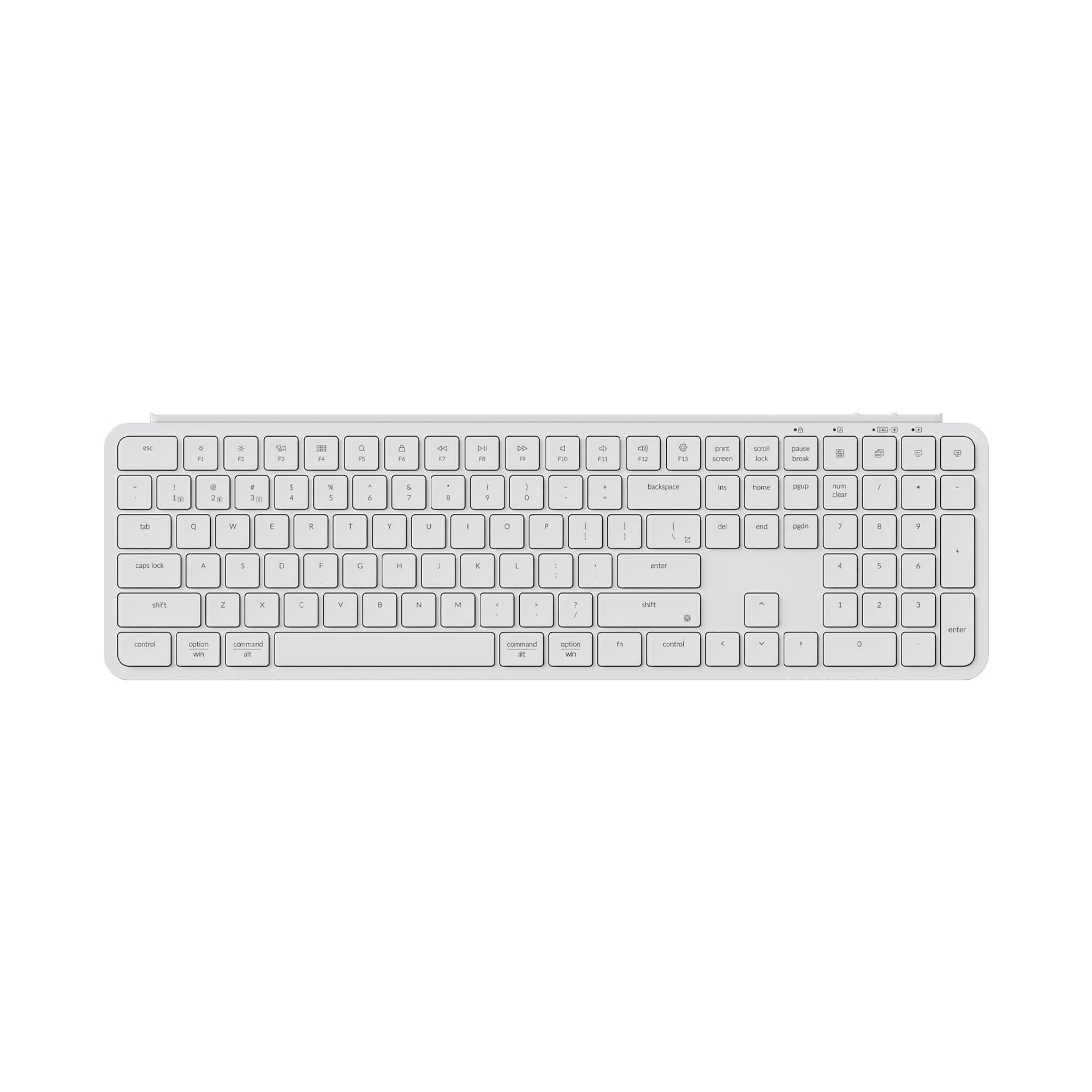
⌨️ Elevate your desk game with the ultra-slim powerhouse that keeps up with your hustle!
The Keychron B6 Pro is a full-size, ultra-thin wireless keyboard featuring a numeric keypad, tactile scissor switches, and triple-mode connectivity (2.4 GHz, Bluetooth 5.2, wired). It boasts an exceptional 1200-hour battery life, supports seamless multi-device switching, and offers full key remapping via ZMK firmware, making it a versatile, professional-grade keyboard compatible with Mac, Windows, and Linux systems.


| ASIN | B0D538B5G3 |
| Additional Features | 623g Lightweight Design, 8 Months Battery Life, Programmable Keys, Scissor Mechanism, Ultra-Slim Body |
| Antenna Location | Gaming, Office |
| Best Sellers Rank | #114 in Computer Keyboards |
| Brand | Keychron |
| Built-In Media | 1x Silicone Skin, 1x Type-A 2.4GHz Receiver, 1x Type-A to Type-C Adapter, 1x Type-C Cable |
| Button Quantity | 104 |
| Color | Ivory White |
| Compatible Devices | Laptop, PC |
| Connectivity Technology | 2.4 GHz, Bluetooth 5.2, Type-C Wired |
| Customer Reviews | 4.1 4.1 out of 5 stars (206) |
| Enclosure Material | ABS Plastic |
| Hand Orientation | Ambidextrous |
| Keyboard Description | Office |
| Keyboard Layout | QWERTY |
| Language | English |
| Manufacturer | Keychron |
| Mechanical Keyboard Switch Model | Tactile |
| Model Name | Keychron B6 Pro |
| Model Number | Keychron B6 Pro |
| Number of Keys | 109 |
| Power Source | Battery Powered |
| Series Number | 6 |
| Style Name | Contemporary |
| Switch Type | Tactile |
| Theme | Rainbow |
| Unit Count | 1.0 Count |
S**N
Great Scissor Switches!
I am not a gamer; I write. In the last ten years, I've owned every keyboard imaginable, or so I thought. Membrane switches, clicky switches, linear switches, low-profile switches, Razer, Corsair, Aula, you name it, I tried them. It finally dawned on me that I am chasing minutiae. There are so many new keyboards and switches, the search for the perfect keyboard is nothing more than settling for one while looking at another. I couldn't keep up, so I stopped. I don't need RGB or 0,75mm actuation distance, or Hall effect switches. I need a solid, reliable keyboard that is easy and fast to type on. The Keychron B6 Pro is that keyboard. I am a Mac user, and all the function keys work, and I can easily reach my WPM I was when using a mech board. It is the retro-blue color scheme, and it looks great on my desk, and I will probably get through the holidays before I need to charge it. It's been in use for weeks now, and the battery is still at 96%. The only complaint I had was that the typing angle is almost flat, which was easily resolved with a $5 riser to give me a 7mm lift. Now it's perfect. If you like the feel of a laptop board, this is an easy purchase for the price.
O**K
Keyboard great - programming macros is confusing
I'm using this keyboard with Mint Linux and it is working well with no problems (such as missing key presses). I find the keyboard feel very comfortable. The ability to program macros is the main reason that I chose this particular keyboard. Specifically, I wanted to hit one key to enter my system password (which is required frequently on Linux systems). I ran into two problems while using the Keychron Launcher to set up this macro: 1) The Launcher doesn't work under Linux (or at least I couldn't get to run). Fortunately, I have a dual boot system and was able to run the Launcher under Windows. Once the macro was programmed it worked under Linux. 2) I found the Launcher documentation and UI very confusing. By trial-and-error I was FINALLY able to program the macro which works very well and saves me a lot of time! BTW before getting this Keychron keyboard I tried using the Autokey program to output the system password when requested. Unfortunately, Autokey would not output the password - perhaps it generates "synthetic" text that is rejected by the system? (Autokey does work if just entering text into, for example, a text editor - very odd!) I'm deducting one star because of the Linux/Launcher problems, but otherwise I'm happy with this keyboard and just hope it continues to be reliable.
R**D
Great feel and responsive key board
Surprisingly good keyboard with great feeling keys. Easy to connect and setup and can connect to multiple laptops. Great that it has internal rechargeable battery so no battery replacements.
N**N
Very nice quiet, low profile keyboard
Really impressed. Wasn't sure I'd like the low profile, but it's actually really nice. Less wrist strain and the keys are quite, but still responsive. Easy to connect, just works really well.
D**D
I do not recommend this keyboard. Customer service is awful. Glitchy. Unreliable.
This was a recommended upgrade from my Logitech Easy‑Switch K811 for my Mac. On paper this is a really nice full sized keyboard for a reasonable price ($45). Its thin. They keypads are nice and responsive. Its quiet when typing. Regarding the experience with the keyboard, I have no complaints but there are a few things to point out. There is no backlit feature. The application used to customize keys is terrible as another reviewer mentioned, it requires logging into a website and to be frank I was unable to successfully connect my B6 Pro to this browser base app to make any custom inputs. Additionally, the customer service is absolutely terrible. my "A" key became unresponsive shortly after my purchase. It would not respond or it would randomly start inputting "aaaaaaa" on its own. I messaged the seller and its been over a week and they did not respond. Fortunately, this fixed itself and my keyboard is working okay. Overall not happy about that experience. EDIT: Customer service has not gotten back to me after 3-4 weeks. During this time the keyboard more cumbersome than anything I have ever used. The "D" key becomes unresponsive typing quickly, "aldosterone" quickly, the "d" will not register = "alosterone". the "Control" key jams despite nothing physically pressing it (I removed key and checked, too), thus alternative keys are typed. This happens as I type this now. Despite nearly a month, I still find myself not adjusted to the key placements and constantly misclick Backspace, insert, delete despite using a full size keyboard at work. I do not recommend this keyboard. Changed from 2 stars to 1. This keyboard is a return edit 2: two months later. i ended up talking to amazon and getting a replacement. gave it another go. in order to connect with the customized keys, you must be connected to your device via the USB C cable (any Usb C cable). i haven’t adapted to the key placements. the keys are very close together and i still misclick a lot, especially with the delete or inset keys. if you type very fast like i do, there can be a delay in keyboard response which is very annoying but oddly more easily to adjust to then the physical key placements. for example, typing “KDS” rapidly in capitals by holding shift will input “KS” (second capital D won’t work). there is also no adjustment to the angle of the keyboard, so i prop it up with the monitor mount. battery life however is good. after about 5 weeks or daily and heavy use, still haven’t charged it. overall i’m stuck with this keyboard and i do have regrets about keeping it instead of spending more on something better or finding an alternative in this price range.
J**E
Great Affordable Option for Easy Switching Between Mac and PC
I really like this keyboard. It's super easy to transition from working on my mac, to gaming on my PC. It only take half a second to swap to a different device. Battery life is phenomenal, I still haven't charged since buying it three or four months ago and it's still at 60% (2-3 full days per week of use). Key travel and key feel is ideal for me, especially coming from an apple magic keyboard. Keys are quiet but still give some auditory and physical feedback. A little louder than a magic keyboard, much quieter than a mechanical keyboard. I've had zero issues with functionality or build quality. I do wish it automatically sensed and changed the command/windows key like the MX Keys does. The physical switch is easy but annoying that it couldn't be done automatically. And I wish it woke up from sleep a little quicker. You can start typing right away on an MX Keys but this one takes about 3 seconds to wake up and start registering keystrokes. However, the price difference makes the downsides well worth it in my opinion.
S**N
Bon clavier, je l’ai acheter pour remplacer mon clavier de MAC qui a pris sa retraite et il faut une super bon job
M**W
I purchased this keyboard alongside the Keychron M6 mouse to use in my PC / Mac setup. This kayboard is great for this because it has three different connection modes. You can choose a wired connection, the 2.4ghz connection with the dongle or bluetooth. I've tested all the different connection and they work perfectly. With one switch on the keyboard I can switch the device to work from my PC to Mac. You can also quickly select either a windows or mac keyboard layout quickly with the dedicated switch. Using the Keychron launcher site you can customize the keyboard in a variety of different ways to suit your personal workflow. Typing feels great and even works well for some light gaming. My only complaint would be there is no backlighting but for the price of the keyboard i'm more than happy.
B**Y
Good quality keyboard with great multi device support.
G**R
The keystroke feel is excellent, but the plastic build leads to bending issues. After some use, the body warps slightly, which causes it not to sit flat on the desk.
J**H
This is a great membrane keyboard. Its not too light that it feels cheap but weighted enough to be able to ise it without knocking it off... Fyping feels amazing. I like low profile keyboards with less travel, helps me move my hands around the keyboard alot better without having to lift my fingers much... Only reason to take one star out is - the lack of backlight... Good keyboard if you don't need backlight...
TrustPilot
vor 2 Wochen
vor 2 Wochen