
Laden Sie die App herunter


Kundendienst
Copyright © 2025 Desertcart Holdings Limited
Laden Sie die App herunter


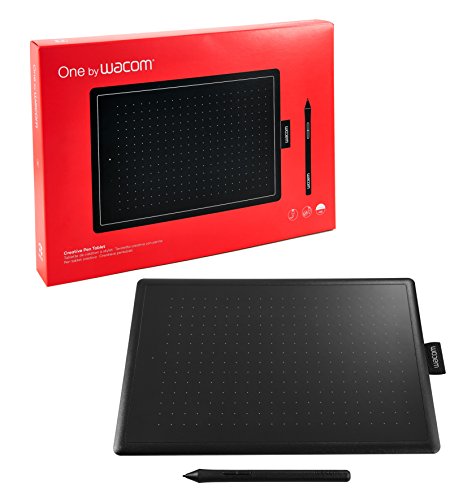


🎨 Elevate your digital artistry with precision and freedom!
The Wacom One CTL-672/K0-CX is a medium-sized graphic tablet featuring 2048 pressure-sensitive levels and a battery-free, cordless pen. Compatible with Windows, Mac, and ChromeOS, it offers a 8.5" x 5.3" active drawing area, making it a versatile and reliable tool for professionals and creatives seeking precision and portability.


| ASIN | B07583VVY5 |
| Are Batteries Included | No |
| Batteries | 1 Lithium Ion batteries required. |
| Best Sellers Rank | #2,222 in Computers & Accessories ( See Top 100 in Computers & Accessories ) #15 in Graphic Tablets |
| Brand | Wacom |
| Colour | Red/Black |
| Country of Origin | China |
| Customer Reviews | 4.4 4.4 out of 5 stars (11,105) |
| Date First Available | 12 October 2017 |
| Generic Name | Creative Pen Tablet |
| Imported By | Wacom India Pvt. Ltd. |
| Included Components | One pen tablet, pen, Replacement Cable, Quick start guide, Warranty Card |
| Item Dimensions LxWxH | 21 x 0.9 x 14.6 Centimeters |
| Item Height | 14.6 Centimeters |
| Item Weight | 250 g |
| Item Width | 0.87 Centimeters |
| Item model number | CTL-672/K0-C |
| Lithium Battery Energy Content | 5.5 Watt Hours |
| Lithium Battery Weight | 19 Grams |
| Manufacturer | Wacom India Pvt. Ltd, 426, DLF tower B, Jasola Vihar, New Delhi - 110025 |
| Net Quantity | 1 Count |
| Number of Lithium Ion Cells | 1 |
| Operating System | ChromeOS, MacOS, Windows 7 or later |
| Packer | Wacom India Pvt. Ltd. |
| Product Dimensions | 21 x 0.87 x 14.6 cm; 250 g |
| Screen Resolution | 1920 x 1080 pixels |
| Series | One By |
| Standing screen display size | 10 Inches |
| Wattage | 5 |
S**L
Best quality pen tablet. Japanese wacom
Good build quality product. Software provided are also good. For animation japanese wacom pen tablet is awesome. Sturdy and good sensitivity.
V**H
Can be purchased
Useful. Nice product.
A**R
Plug and Play, Easy to Use. Very Good for Software Engineers.
I am a Software Engineer, In Working-from-Home Situation I needed some way to Write /Draw and Explain things to my team. This tablet is effectively serving all my needs. Driver setup was straight forward, just had to follow link and download and install software. Driver UI is simple and intuitive, Worked well for my office and personal laptop (Windows 10 and 7) Orientation mapping can be changed for any layout I saw. So I could flip its mapping to RTL or LTR whatever way my cable is plugged in. That is good. If you see in the picture, since my mouse is on left, I needed cable to be on right, So I flipped the Tablet, flipped the mapping in Software and works well in this way too. I've used this with OneNote and Zoom Dashboard and works flawlessly. It is CTL-672 (8.5 inch model) in photos. Two buttons on pen I felt were unnecessary for me, so disabled them from software. Feel-wise it seems very premium. I've used it for like 2.5 months now. Nib has not worn much yet. Overall, it is worth buying, My productivity has increased a lot since I bought it.
S**.
Good product
Good product
L**R
Flawless performance
Pros: Works like a magic. User friendly and brilliantly smooth performance. There is practically nothing wrong with this device. It is almost flawless. Cons: the wacom one driver has stopped giving updates to the 32 bit computer processors. Although one can still use it by downloading a previous version. But for a reputed company like Wacom, this is unexpected and from my perspective the nibs and pen are too expensive for the kind of material they are made of and the nib does wear off quickly. And there is virtually no way to clean the surface of the tab. Random chemical or cleaner can not be used. And Wacom does not provide a proper guideline for this. Although it does not get scratched. A cheap but effective alternative to those who are yearning to take digital notes and Drooling over those over-priced Tablets that are currently shaking the market. All over excellent experience so far with very few flaws.
S**M
Good Product
I bought this product after long waiting as it was initially not available due to lock down and delivery service not there. I bought in 6800/- almost a month ago but now its price increased may be due to its demand. I was skeptical before ordering as i was not sure how to use and whether it will help me in my online classes or not. As i was initially teaching on white board and now i have to shift to this new writing pad and take lecture through online. But once I started using it, it become super easy and liking the way. And students are liking this ,its interactive and easy, now i can solve the problems directly on power point slide or word file. Smooth in writing and also my handwriting improved (which i was not expecting).. Now, i will talk about some disadvantages: In my case, it hang sometime if I used for more hrs like 2hrs continuous lecture session, It become hot also. and yes, it is not working smoothly on PDF file (at least in my case) thats major drawback it looks for me as i used to make videos on solution of several exam whose questions are in pdf file. Also download its driver from website before using..if you need any help, you can ask..
A**T
Super 👌
K**.
Waycom graphics,a set of pentab
Waycom graphic set, pen and writing pad both are of good quality and working well. But It has a very big drawback Waycom company is not providing it's pen 🖋️ seperately.
V**A
安い。使える。無駄な機能なし。 ミロが描くモナリザ、等、5分で描けるようになります(笑
ぴ**ん
iPadを液タブのように使っていましたが、バッテリーの消耗や姿勢の悪さが気になり、パソコン用のペンタブを検討していたところ、ワコムの「One by Wacom Medium」を購入しました。 ペンタブは初めての購入でしたが、Photoshopでの編集作業に問題なく使えています。描き心地も滑らかで、特に違和感はありません。Wacom製ということで信頼感もあり、安心して使い始められました。 Mサイズを選びましたが、13インチのMacBook Airと相性がよく、作業領域としてもちょうどいいサイズ感です。また、無駄な機能がなく、非常にシンプルな構成なので、初心者でも迷わず扱えるのが魅力です。 一方で、ショートカットキーなどの機能は省かれているため、作業効率を求める方は別途、左手デバイスの導入を検討してもよいかもしれません。また、ペンにカスタムボタンが2つしかなく、できればもう一つあれば…という点は少し惜しいと感じました。 iPadと違って、画面を見ながら手元で描くことになるので最初は少し慣れが必要です。しかし、慣れてしまえばマウスよりも圧倒的に繊細な操作が可能で、日常のパソコン操作にも応用できます。電池不要のペン、USB接続による給電など、使い勝手の面でも非常に快適です。 Wacom Intuosのような上位モデルもありますが、「まずはペンタブを試してみたい」という方には価格的にも手頃でおすすめです。シンプルで堅実な設計が魅力の、安心して使える一台です。
コ**ー
プロのイラストレーターとして使用していますが、 ペンタブレット入門者にとって非常にバランスの良いベストな選択肢の一つだと思います。 描画に必要な基本機能はすべて揃っており、スペック面でも不満はありません。 書き心地も安定していて、ワコム製品らしく線の追従性や遅延の少なさはしっかりしています。 この価格帯でワコムブランドという点も安心材料です。 特にMサイズの大きさが絶妙。 これより小さいサイズだと仕事レベルの作業は難しく、入門・実用どちらの面でもMサイズを選ぶ価値があります。 筆圧感知も良好で、線の入り抜けの反応も問題なし。 もちろん上位機種である Intuos シリーズのほうが感度は上ですが、「実用レベルで使えるか」という点で見ると十分に仕事でも対応できる性能です。 ペンはやや軽めで質感はシンプルですが、長時間使っても疲れにくいメリットがあります。 まとめると ・基本性能がしっかりしていて初心者に最適 ・Mサイズが作業領域としてちょうどよく、実務にも耐える ・筆圧・入り抜けの反応が良好 ・ペンは軽量で扱いやすい ・趣味用途なら十分、仕事でも対応可能 初めてのペンタブを選ぶ方には、安心しておすすめできる一台です。
T**I
個人レビューなので違っていたらすいません。 商品の書き心地は問題なく快適です。操作性能もシンプルなので、お絵かき初心者にうってつけの作りです。 他は初回購入としてクリスタ3か月のお試し期間が付いてきます。 お絵かきでクリスタが気になっている人にはおすすめです。 購入時の状況も記載しておきます。 商品ページには新品の文言がありましたが、未開封シールが剥がれた新品なのか怪しい品が最初に届きます。 パッケージの表紙の一部にGが付着していました。販売元がwacomだったのでwacom公式に交換してもらいました。 購入時の注意点は出荷元がamazonだから安心しないでください。 販売元もどういった業者なのか確認するべきだと思います。 お得な商品だからと言って後先考えずに購入する場合は自己責任です。
I**N
Does what it says on the box. Works with Bluebeam, but it's not as easy as you'd hope but I've just got to get used to how it works and getting the settings right. Works a bit easier with Microsoft Snip & Sketch. You need to download the driver, and if you've got multiple screens you can nominate one screen to be the one it works with, which is more user friendly for the size of the pad. All said, good value.
TrustPilot
vor 5 Tagen
vor 2 Wochen