We remain fully operational. Our teams are working around the clock to ensure your deliveries continue safely.

Laden Sie die App herunter


Kundendienst
Copyright © 2025 Desertcart Holdings Limited
Laden Sie die App herunter





🚦 Own your focus, signal your flow.
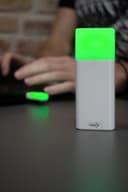
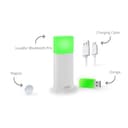
The 2nd Generation Luxafor Bluetooth PRO is a sleek, wireless LED busy light designed to reduce workplace interruptions by visually signaling your availability. Compatible across Windows, Mac, and Android, it features customizable color codes, smart scheduling, and powerful integrations with over 1500 apps via Zapier and Web API. Powered by a rechargeable Lithium-Ion battery and easy to install, it’s the ultimate productivity tool for professionals craving uninterrupted deep work.





| ASIN | B0C9BC9SQH |
| Antenna Location | Walkway |
| Battery Description | Lithium-Ion |
| Brand | LUXAFOR |
| Colour | Green |
| Compatible Devices | Windows, Mac, Android |
| Customer Reviews | 4.3 4.3 out of 5 stars (13) |
| Item Weight | 0.17 Kilograms |
| Manufacturer | Greynut LTD |
| Model Number | LUX_BT_PRO |
| Mounting Type | Wall Mount |
| Number of Batteries | 1 Lithium Ion batteries required. (included) |
| Part Number | LUX_BT_PRO |
| Power source | Battery Powered |
| Unit Count | 1.0 count |
S**W
Plug and Play ohne große Einrichtung. Auch die Batteriezeit überzeugt. Ich habe während meiner Bürozeiten die Lampe einfach auf „Rot“ eingestellt und in meiner Abwesenheit über Nacht sowie am Wochenende einfach im „Standby“ gelassen, also unangerührt. Nach 19 Tagen Nutzung und insgesamt 102 Stunden im Rot-Modus war der Akku dann alle. Richtig gut!
J**Y
LUXAFOR makes a variety of productivity products, many with the same theme as this one: communicating availability. Since I'm spend most of my time working remotely while I travel I guess my needs might be a bit different than a typical office employee. Even so, there are plenty of times when it's necessary to communicate that you are busy. Apparently the red light on my Bluetooth headset isn't enough so it helps to have another visual queue. The smartphone app for the product is simple but highly functional. There are settings to be notified for specific events (eg: LinkedIn messages, missed calls) but the most basic functionality is the most useful: green for 'available' and red for 'busy'. The app also lets you change the light to other colors which makes it all the more versatile. Some more integration with other apps/services would be great but at the same time there's much to be said for keeping it simple. After checking out the company's website I'm looking forward to trying more of their products. Highly recommended!
E**.
I purchased this because I work from home. Family members occasionally pop their head into my office to ask a question or just say hi. Most of the time this is fine but not when I'm on conference calls or really trying to focus on a task. Thanks where the Luxafor Bluetooth Pro comes in. I have it mounted just outside my office door using the included magnet with double sided tape. It stays secure to the wall with nothing more than what was included. Initially the device worked great over just bluetooth but after a day I noticed that just wasn't quite as reliable so I switched to using it with the USB dongle and that's been rock solid. I run the app on my laptop, when I am engaged or don't want to be bothered I simply tap the icon and it turns the light red. Everyone in the house knows that means "Don't knock or enter". It's just like a studio "On the air" light. There are integrations with popular apps such as Teams, Google Calendar, zoom and others, and the teams integration would be great but my company blocks that, it's not a dig against Luxafor as they can't control it, but just something to be aware of if you want to use one of the integrations. It was very simple to setup, and with it hanging on my wall running 24x7 the battery lasts for over a week. I just pop it on the charger every Sunday and haven't had an issue with it running out. For me it's an excellent value for the price and has allowed my family to still be comfortable popping in while allowing me the privacy and focus I need when I need it.
E**.
This thing is great. I started out just by using the simple configuration of it - I click a button on my computer and the light turns a specific color, letting everyone outside the room know that I am in a meeting. However, I quickly discovered that this thing has a whole ecosystem of devices and applications. I ended up buying a button so that I can change the colors without having to open the special app on my computer. Then, I ended up discovering that it has an absolutely awesome API which I could write scripts for... so I did. Now its automatic - whenever my webcam is on, the script turns on the corresponding light. I like a lot of the other touches in the design, for example, the USB dongle which controls it also has an LED which indicates the current color of the main light itself. This means the light need not be within line of sign from me. I can just tell whether its on or not by having the USB dongle somewhere nearby.
R**A
The device itself is solidly built. The LED lighting is not as homogenous as the images depict, but it's decent enough. My qualms have to do with the limited integration options for various office software. It's very reliant on Zapier for integration (similar to IFTTT) which can work well. However, if your workplace is like mine and blocks access of these services to your work email or calendar, there are very limited options left to integrate this device with your workflow. It would be very useful if the official Luxafor app could integrate locally with email or calendar apps, or even simply detect if the webcam or microphone are in use. There are some efforts coded by enthusiast using the Luxafor API but most are buggy and/or out-of-date. I don't feel like I should have to write a new app to make a $110 LED light check my calendar events/microphone. Disappointing.
TrustPilot
vor 5 Tagen
vor 1 Tag