We remain fully operational. Our teams are working around the clock to ensure your deliveries continue safely.

Laden Sie die App herunter


Kundendienst
Copyright © 2025 Desertcart Holdings Limited
Laden Sie die App herunter

🌊 Dive into smart pool care—because your water deserves the VIP treatment!
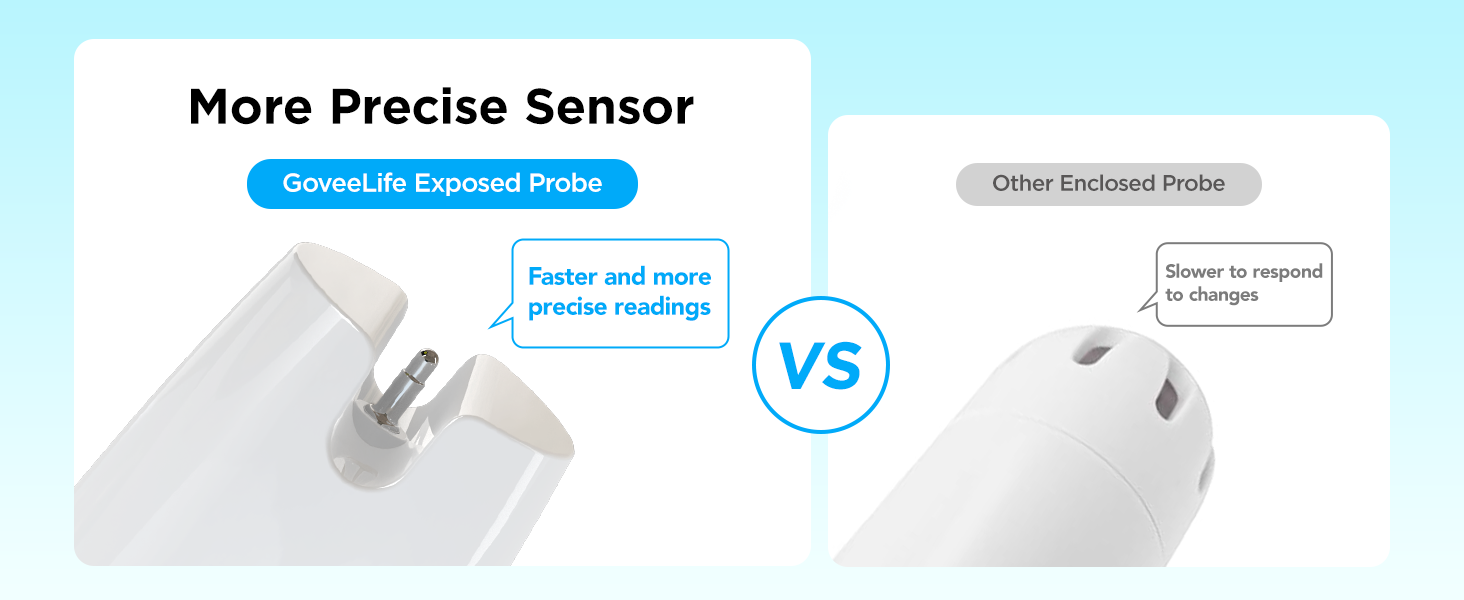
The GoveeLife Smart Pool Thermometer is a cutting-edge, WiFi-enabled floating sensor designed for precise water temperature monitoring in pools, hot tubs, ponds, and more. Featuring IPX7 waterproof protection, a rapid 2-second refresh rate, and a robust 328ft wireless range via its gateway, it offers real-time remote access through an intuitive app. With smart alerts, extensive data storage, and up to 3 years of battery life, it empowers millennial professionals to effortlessly optimize their aquatic environments with confidence and style.





| ASIN | B0CXDWQB9F |
| Age Range (Description) | Adult |
| Batteries | 2 AAA batteries required. (included) |
| Best Sellers Rank | #1,913 in Patio, Lawn & Garden ( See Top 100 in Patio, Lawn & Garden ) #3 in Water Garden & Pond Thermometers |
| Brand | GoveeLife |
| Color | White |
| Connectivity Technology | Wi Fi |
| Date First Available | June 6, 2024 |
| Display Type | Digital |
| Global Trade Identification Number | 00810127732896 |
| Immersion Depth | 5.9 Inches |
| Included Components | Pool thermometer, WiFi Gateway, Loop rubber*2, Fixed rope |
| Indoor/Outdoor Usage | Indoor, Outdoor |
| Item Length | 5.9 Inches |
| Item Weight | 15.8 ounces |
| Item model number | B5109 |
| Manufacturer | GoveeLife |
| Model Name | Smart Pool Thermometer |
| Number of Batteries | 2 AAA batteries required. (included) |
| Outer Material | Plastic |
| Power Source | Battery Powered |
| Product Care Instructions | Hand Wash Only |
| Response Time | 2 seconds |
| Reusability | Reusable |
| Special Feature | APP Control, Fast Refresh, High Accuracy, Low Battery Indicator, Waterproof |
| Style | 1 Gateway + 1 Sensor |
| UPC | 810127732896 |
| Unit Count | 1.0 Count |
| Upper Temperature Rating | 70 Degrees Celsius |
A**K
Surprisingly Simple and Reliable: A Great Pool Thermometer That Just Works
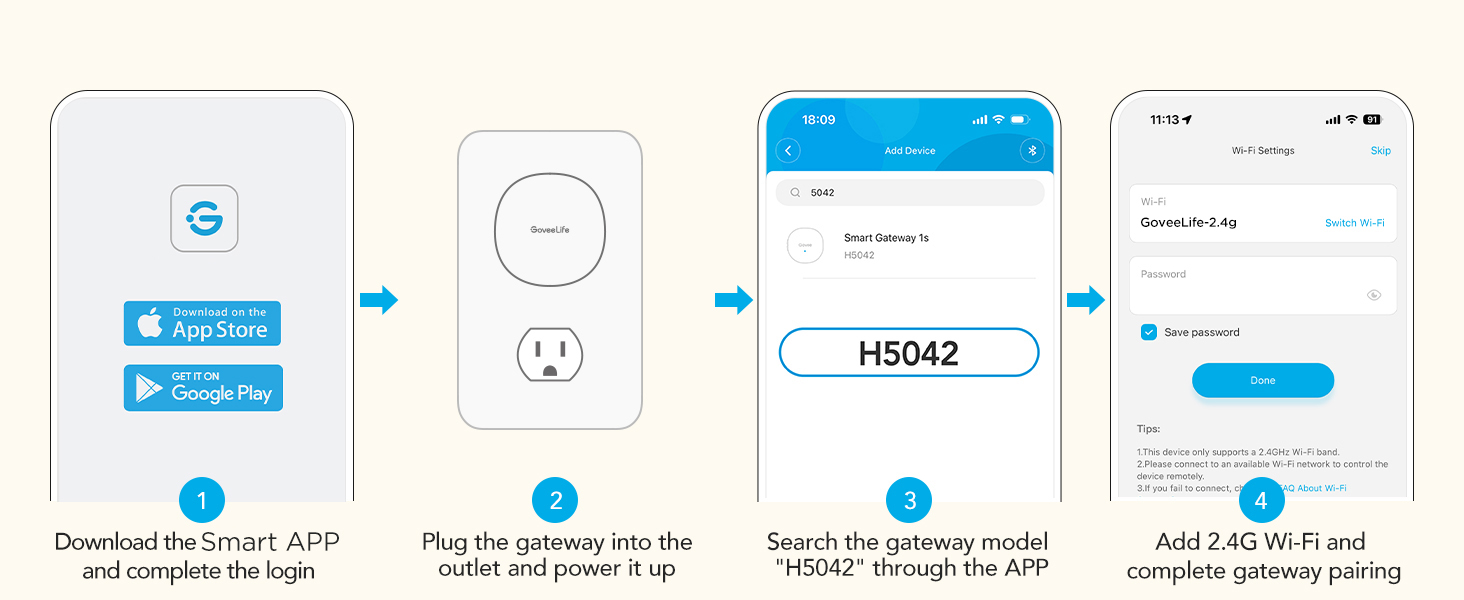
After some recent frustration with Amazon tech products, I was pleasantly surprised by how easy it was to set up the Govee pool thermometer. The process began with installing the Govee app and plugging in the Wi-Fi gateway. With just a quick button press, the app detected and paired with the gateway seamlessly. The temperature sensor itself requires two AA batteries (included), and while unscrewing the cover was a bit difficult, it's clearly designed that way to maintain waterproofing. Although the pairing instructions were provided, I didn’t need them—once I added a thermometer in the app, it paired automatically. I dropped the sensor into the pool and secured it to our steps using the included lanyard. Within a couple of minutes, the app displayed the correct water temperature, matching the sensor's screen which has nice big digits making it easy to read without lifting it from the water. The range is excellent. In my setup, the gateway is in the garage—about 75 feet from the floating sensor—and the connection remains strong. I also appreciate the app’s ability to store historical data and display graphs, which is great for tracking temperature trends. I discovered our electric air-source heat pump starts warming the pool around 15 minutes after sunrise, so now I can save money by turning it off overnight and restarting it in the morning. Despite some reviews to the contrary, I was able to connect the thermometer to our Alexa system without issue. Now, I can ask, "What's the pool temperature?" and get an accurate answer within five seconds. I did notice that Alexa can take up to ten minutes to reflect recent temperature changes, which might explain the trouble others have mentioned. One thing to note for software developers is that this sensor is not supported by the public API that Govee has, this is particularly annoying as Amazon and Google have access to the sensor, but not the rest of us. I've confirmed that this is the case with Govee support. Overall, this is a well-built device that offers excellent value for money. It’s one of the rare tech products that has actually become more affordable over time. I'm hoping it holds up well and that the batteries last; if not, I’ll update my review.
D**.
No more "test dipping"—reliable, accurate, and great range!
I have been using the GoveeLife Smart Pool Thermometer, and it’s a total game-changer. Here is why it’s worth the buy: • Rock-Solid Connection: The Wi-Fi gateway is the "secret sauce." Unlike Bluetooth versions that disconnect the moment you go indoors, this stays connected through walls, so I can check the temp from my couch. • Highly Accurate: I cross-checked it with a manual thermometer, and it’s spot on. The app updates every few seconds, which is great for watching the pool warm up. • Smart Features: I love the Alexa integration—I can just ask for the temp while getting ready. The app also sends me a notification if the water hits certain temps. • Excellent Customer Service: I had an issue with the sensor, and their support team was fantastic. They were incredibly helpful and had a very fast turnaround time on my inquiry. They sent a replacement almost immediately. It’s rare to find a company that responds that quickly these days! Pro-Tip: Make sure you screw the cap on perfectly straight and tight to ensure the waterproof seal stays 100% effective. If you want to stop walking out to the pool just to check the water, get this. It’s reliable, easy to set up, and the company clearly stands behind their product.
H**L
Great Thermometer!
Been great so far. It's easy to setup and get going on the Govee app. My favorite feature has been asking Alexa what's the temp of my pool. I have a secondary thermometer and it seems to be accurate. It's definitely waterproof, it's been floating around my pool for a few days now. Just make sure that the lid is closed tight after installing the batteries. It functions good, you can track all the temps and see how it fluctuations during the day. Being a Govee product I think it's worth the money.
J**E
Works well but a pain to pair!
Contrary to other reviews, this pool thermometer is not at all intuitively paired. It is easy enough once you figure it out but the directions are very limited and badly need improvement. The thermometer works great once you get it paired though and can be accessed via Alexa or other home devices. This pairing is not intuitive either lol! So here are the instructions which can save you a headache! First download the Govee app (there is a QR code in the tiny instruction manual. First thing that needs improvement: larger font size!!) and set up an account. Then connect your phone to your 2gb wifi connection. Then go back to the Govee app and ignore all the different kind of devices listed and just hit the little + button in the top right corner. It will then connect with your gateway device first (that’s the round thing that plugs into the wall) and hopefully it will flash blue. Then you just short press one of the two side buttons, not the reset button (that one you use if it doesn’t flash blue), and the gateway should be connected. (Instructions say to hold the button down for 5 seconds but that is incorrect; it’s a short press!) Then the app should automatically find the pool thermometer device itself and you need to have the battery cover off to hold down the button next to the battery compartment for three seconds. Then it should be connected! It will look like you need to hit “add” the device button at the bottom of the app, but you don’t. That’s just if you want to connect another thermometer. So then the app and the thermometer should show the water temperature. If you want to connect it to Alexa, then you need to go into your profile (head and shoulders icon on bottom of Govee app to the right) and then go to Voice Assistant setting. Then you hit Alexa or whatever you have and link the Govee skill to your Amazon account and Alexa right on the Govee app (don’t try it on the Alexa app, it won’t find the Govee skill for whatever reason). Then you can ask you-know-who what your pool temperature is! Cool! There are also Govee widgets available for iPhone and iPad that will show you the pool temperature as well (and possibly Apple watch app coming??) The app will show your pool temperature over time, not really sure why you need that lol. Obviously I just started using it, but I will update my review if it conks out prematurely. It does come with an extra gasket, which is nice because we all know chlorine is pretty toxic to everything. But so far very handy! I have had a pool for 20 years and have gotten to the point where I only go in if the water is above 82 degrees. So this is a very handy device, so I don’t have to take my heavy pool ladder down and walk up the steps to drag out the old manual thermometer every time I want to know the pool temperature. It may show a higher temperature than it really is, because this thermometer is only about 6 inches deep, and sometimes there can be a layer of hotter water at the top of the pool under the solar cover, but again I will update review if it isn’t accurate. Convenient device once you figure out how to pair everything!
J**.
Been using one of the sensors in my hot tub for about a month now and seems to be working as expected. I like to be able to check the temp especially when it is -30C outside.
TrustPilot
vor 3 Wochen
vor 1 Monat