We remain fully operational. Our teams are working around the clock to ensure your deliveries continue safely.

Laden Sie die App herunter


Kundendienst
Copyright © 2025 Desertcart Holdings Limited
Laden Sie die App herunter


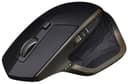


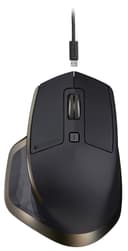
🚀 Elevate your productivity — the MX Master is the ultimate power user’s wireless mouse.
The Logitech MX Master Wireless Mouse is a premium, ergonomically designed mouse optimized for professional multitasking. It supports seamless control across three computers via Bluetooth and USB, features a hyper-fast, adaptive scroll wheel with precision mode, and offers up to 40 days of rechargeable battery life. Customizable buttons and advanced software integration make it ideal for power users on Mac or Windows platforms.


| ASIN | B076VKQVK3 |
| Additional Features | Wireless |
| Antenna Location | Gaming, Office, Graphic Design |
| Are Batteries Included | Yes |
| Are Batteries Required | Yes |
| Battery Average Life | 8 months |
| Best Sellers Rank | #4,846 in Computer Mice |
| Brand | Logitech |
| Built-In Media | mouse, receiver, user guide |
| Button Quantity | 6 |
| Color | Meteorite |
| Compatible Devices | Personal Computer |
| Connectivity Technology | Bluetooth, USB |
| Customer Reviews | 4.6 out of 5 stars 605 Reviews |
| Enclosure Material | Plastic |
| Finish | Glossy |
| Global Trade Identification Number | 00097855132819 |
| Hand Orientation | Right |
| Hardware Platform | Laptop, PC |
| Item Type Name | Logitech MX Master Wireless Mouse – High-precision Sensor, Speed-Adaptive Scroll Wheel, Easy-Switch up to 3 Devices - Meteorite (910-005228) |
| Item Weight | 4.96 ounces |
| Manufacturer | Logitech |
| Model Name | Mx Master 3S For Business |
| Model Number | 910-005228 |
| Mouse Maximum Sensitivity | 1600 Dots per Inch |
| Movement Detection | Optical |
| Movement Detection Technology | Optical |
| Number of Batteries | 1 A batteries required. (included) |
| Number of Buttons | 6 |
| Operating System | Mac OS X 10.7 Lion, Windows 10 |
| Power Source | Battery Powered |
| Range | 10.0 meters |
| Special Feature | Wireless |
| Style Name | MX Master |
| Theme | Office |
| UPC | 097855132819 |
| Unit Count | 1.0 Count |
| Warranty Description | 1-year Limited hardware warranty |
S**S
Great Mouse, many of the bad reviews didn't download the driver/software
laugh out loud at some of these reviews. If you plug and play this device, correct - the functionality, features, and capabilities of this mouse are not able to be fully utilized; unless you download the logitech options software. They fixed it in the latest update. You can customize the heck out of this thing. I am coming off of my G602, which I miss dearly. What an amazing mouse. Used it three years every day as a traveling consulting/occasional gamer/everything else and it took the beatings. But I was ready for a more normal looking mouse so I went with the MX master based on reviews. Glad I did. Feels great in the hand. Mine was Navy blue, and it looks very nice. Download the logi options software and look at how customizeable this mouse is. Map macros for a couple buttons, thumb wheel is nice for horiz scrolling while zoomed in, etc. Personally i mapped the two side thumb buttons to copy/paste because I do a lot of copying and pasting between documents, references, etc when putting together presentations. After a couple of days I can now copy/paste with my thumb very quickly while barely moving it. Much more efficient than reaching for the keyboard and hitting ctrl+c and then ctrl+v. Wow... #firstworldproblems Anyways. Great mouse you can map them to whatever you want. The mode-shift button on top is nice too. Press it and it applies pressure to the scroll wheel and engages "rachet" mode. You feel each click scroll. Hit mod shift again and its in freespin. I can freepin in large documents through sections quickly while seeing what I am scrolling past. Overall great mouse you won't be dissapointed. The thumb texture does take some getting used to. Occasionally after extended usage of the mouse (12+ hour work day) it can feel odd on the thumb like its tickling me. I know... strange.. the little rubber textures start to feel more protruding from the mouse I guess is how I would desribe it. But no biggie. A+++ Recommended from a mouse aficionado who used to use $800 triple optic mice when implementing radiology software
J**I
Best wireless mouse I've ever used
This is far and away the most comfortable wireless mouse I've ever used. It's also super reliable, fast, and really easy to connect to your computer. You can pair it up to three computers via bluetooth, unless you use the included USB dongle, which count's as a 'paired' connection...leaving two remaining connections you could establish. I've never had any issues you pairing it to a computer, and as soon as I turn on it will connect to the paired device. The main (vertical) scroll wheel on top has to 'modes': smooth natural scrolling, and more of a 'notched' step-styled scroll that was more prevalent on older scroll wheels. I prefer the smooth scrolling, but found that I had to tweek the sensitivity via the downloadable software utility (available on Mac/Win). Lastly, the battery life is absolutely fantastic! It lasts for ages without charging. I can't give actual battery life times because I usually just end up plugging it in before it dies, but you can keep using it as a normal wired mouse while it's charging via the included USB cable anyways. Overall, great mouse! I'd recommend it over any of the wireless Microsoft mice any day!
J**M
It's good and it's worth it
It's a Logitech MX series mouse. It's good and it's worth it. I'm glad to see the return of a full-sized model, since my MX Revolution from long ago is no longer viable. There is something viscerally satisfying about the way the mouse wheel goes from ratcheting to free spinning. The thumb context button is useful and registers fairly accurately (options range from just pressing the button to pressing and gesturing either up, down, left, or right), but you'll get the most mileage out of actually customizing the gestures in the downloaded software. I almost never use the horizontal thumb scroll, and the positioning and size of the forward/back buttons also mean those see little use. All the buttons can be remapped, but there's not much I would assign to those ones to try and get more out of them. Battery life is excellent. It probably only needs to be charged once a week, even when paired over Bluetooth. Pairing is another strong point. Up to three devices can paired, either Bluetooth or a Unifying receiver. A button on the bottom switches which one is currently in use, and picking up the mouse lights up the LED to indicate which one is currently active. Overall, a very solid mouse that screams Logitech.
K**R
Best wireless mouse I've purchased
This is far and away the most comfortable wireless mouse I've ever used, I’m now on my second one and I’m just as happy It's also super reliable, fast, and really easy to connect to your computer. You can pair it up to three computers via bluetooth, (I’ve got 2 laptops and my desktop) 2 bluetooth and 1 wireless. I've never had any issues you pairing it to a computer, and as soon as I turn on it will connect to the paired device. The main (vertical) scroll wheel on top has to 'modes': smooth natural scrolling, and more of a 'notched' step-styled scroll that was more prevalent on older scroll wheels. I will often switch between these modes depending on what I’m doing and how much of a document I need to get through. A massive thing for me is the battery life! And it’s absolutely fantastic! It lasts for weeks or months without charging
C**S
Best mouse I've ever owned.
I believe that one review called this the Mercedes of computer mice. This thing feels GREAT in the hand. It has a nice weight to it. It is amazingly configurable. I LOVE that I can sync it with three devices and switch seamlessly between them. I have it synced to my computer, laptop and phone. Everything about the MOUSE is perfect. The lack of the coveted "fifth star" is due to the software. While playing Call Of Duty I suddenly found that I wasn't throwing grenades when I clicked my chosen mouse button. And I wasn't hitting the floor when I pressed the other one. I had to switch out of the game and relaunch the Logitech Options software that had crashed. This also happened with Gimp Shop while editing photos. Then something amazing happened. The software popped up and told me that there was an update available. I thought "Great! They'll have solved the random crashes" Unfortunately, the software would not launch at all. A quick Google search revealed that pretty much everyone was having this problem and I had to do more searches to find out what the latest stable, functioning version was. (It happens to be 6.60.570) So the Mouse gets 5 stars, the software gets 3 and altogether it gets 4.
S**D
Best BT Mouse ever!
I was not expecting to enjoy this thing as much as I do. I got it since I was tired of having to deal with corded mice while traveling. I take my laptop, Bluetooth headphones, and this mouse to school every day. the only cord I need to manage is a charging cord for the laptop. I charged the mouse the second I got it and have been using it every day for a month and the battery is still full. I download the Logitech software so I could adjust the sensitivity. The mouse connects directly to my computer. I don't need the little adapter it came with. I love all the buttons on it. I don't really use the vertical scroll but every other button is awesome. I saw some complain about how the back and forwards buttons are hard to press. I say it takes some getting used too. but they are fine. by far my favorite button is the mode button. I can switch between all my virtual desktops with ease. this button is a time saver. This mouse is the ultimate productive tool.
M**.
Love the Fast Scroll Feature and Size of this mouse !!!
This is the best mouse I have ever used. If you have large hands or don't like little mice this is your best deal. It's greatest feature is the fast scroll button on top. It gets rid of the click and scrolls much quicker. One flick on the wheel and you can be at the top or bottom of a long page so fast. It depends on how fast you spin it. It is quick and easy to learn. The other cool feature is the side buttons to go forward or back in a second. Plus another side to side scroll wheel on the side. This my second one. The first one was bought when they first came out and is still working fine. Recharges fast and last many days. I charge it about once or twice a week. I am a heavy user and have not lost power once to this day..
S**A
Very high quality product
The cursor sensitivity is excellent. Great mouse for a multiple monitor display. Easy to make large movements across all monitors with a small wrist arc. The scroll wheel is phenomenal. It has a heft to it but there is no drag. When scrolling down through, for example, a 100 page PDF, you can spin the scroll wheel and the heft of the metal scrolls continuously without touching it due to the momentum created by the heft of the metal wheel. It can scroll through that 100 page PDF with lightening speed. Plus you vary the speed with the strength and speed you choose to apply. It stops with precision when you lightly touch the scroll wheel again. I used to use a Logitech Cordless Optical Trackman, the kind with the big red marble for your index finger. For its time it was very high quality. But they don't make those anymore so reluctantly I bought this mouse. It exceeds my expectation. I really can't imagine a better product.
TrustPilot
vor 2 Wochen
vor 2 Monaten