We remain fully operational. Our teams are working around the clock to ensure your deliveries continue safely.

Laden Sie die App herunter


Kundendienst
Copyright © 2025 Desertcart Holdings Limited
Laden Sie die App herunter
Buy anything from 5,000+ international stores. One checkout price. No surprise fees. Join 2M+ shoppers on Desertcart.
Desertcart purchases this item on your behalf and handles shipping, customs, and support to GERMANY.
🎨 Unleash your inner artist—wireless, precise, and ready to create anywhere!
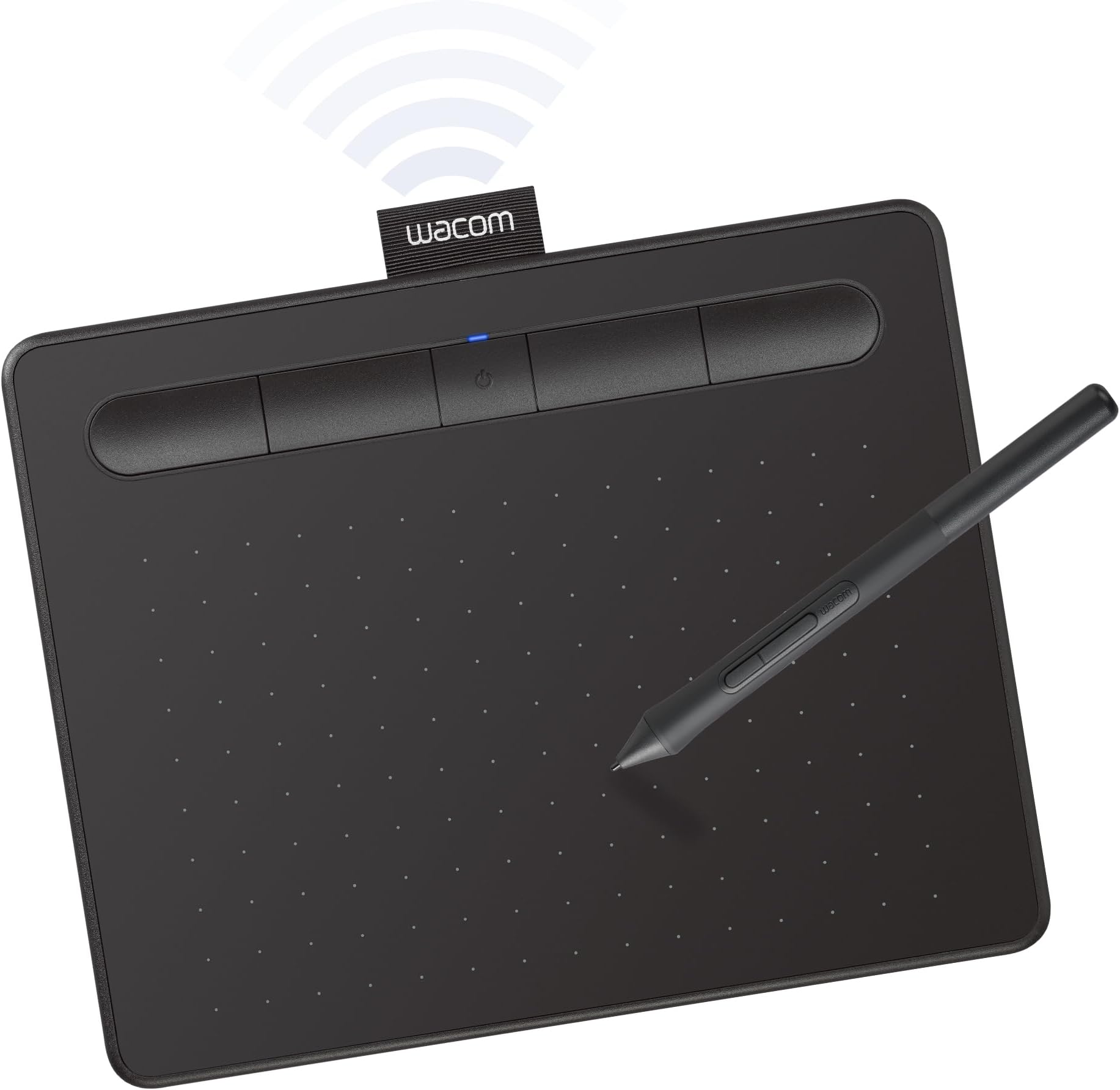
The Wacom Intuos Small Bluetooth Graphics Drawing Tablet offers a 6" x 3.7" active area with 4096 levels of pressure sensitivity using battery-free EMR pen technology. It supports wireless Bluetooth and wired USB-A connections, compatible across Mac, Windows, Chromebook, and select Android devices. Featuring 4 customizable ExpressKeys and 2 pen buttons, it enhances productivity for students, teachers, and creators. Included software trials and online tutorials make it the perfect entry point for digital art, note-taking, and remote work.


| ASIN | B079J2FSQ7 |
| Active Surface Area | 6 inches x 3.7 inches |
| Additional Features | Bluetooth |
| Best Sellers Rank | #1 in Computer Graphics Tablets |
| Brand | Wacom |
| Built-In Media | Pen tablet Small w/ BT Pressure-sensitive, battery-free Wacom Pen 4K PVC-free USB-A cable w ith cable tidy and L-shaped connector 3 extra standard nibs (located inside pen) nib removal tool on end of pen Quick start guide Regulation sheet Online User Guide and Important product information found in Wacom Desktop Center. |
| Color | Black |
| Compatible Devices | Mac (OS X 10.11 or later) or PC (Windows 7 or later) |
| Connectivity Technology | Bluetooth, USB-A |
| Customer Reviews | 4.4 4.4 out of 5 stars (5,538) |
| EU Spare Part Availability Duration | 7 Years |
| External Testing Certification | Não aplicável, Não aplicável |
| Global Trade Identification Number | 00753218986870 |
| Item Dimensions L x W | 6.3"L x 7.87"W |
| Item Type Name | Wacom CTL4100WLK0 Intuos Bluetooth Pen Tablet, Small, Black |
| Item Weight | 8.82 Ounces |
| Manufacturer | Wacom Technology Corporation |
| Model Name | Intuos S |
| Model Number | CTL4100WLK0 |
| Native Resolution | 4096 levels |
| Operating System | Compatibility with Windows 7 or later/macOS 10.10 or later/ChromeOS |
| Pressure Sensitivity | 4096 Levels |
| Screen Size | 7 Inches |
| Specific Uses For Product | Digital Art Creation, Photo Editing, Online Education, Writing, Designing, Note-taking, Remote Work |
| Target Audience | Student, Teacher |
| UPC | 753218986870 |
| Unit Count | 1.0 Count |
| Warranty Description | 1 year |
O**D
Great entry point
This is the first tablet for me. Wacom is the leader and I wanted to have a good experience my first time out. Opted for this for price and compatibility with my Mac OS, and to see if I can get used to digital drawing. Do be sure to check all the specifications for your computer! This is the smaller tablet and in some ways, it doesn't matter unless you usually draw with entire arm strokes or something (jk). It is a high-quality tablet and pen (with extra nibs) and perfect to make the leap into digital drawing. You can set up your own controls for the 2 buttons on the pen and also for 4 buttons on the tablet. The pen is very sensitive - you can adjust the sensitivity as well, even with that, I am putting a piece of paper on top of the tablet for a little more drag and the paper feel. A tip I found online. The product comes with trials for some software but since I already have Photoshop that is what I am staying with. Don't really want or need to learn another program, especially when Photoshop has everything you could possibly need. If you do not have other software then definitely opt to try one or two of the offers. Setting up was not difficult at all. Go to https://www.wacom.com/en-us/getting-started/wacom-intuos and it takes you through the whole process. Then just give yourself time to get acclimated. Don't expect a masterpiece in the first week. Play, experiment, and find what works best for you. There are tutorials on YouTube by many amazing artists sharing tips on digital drawing which are super helpful, from setting up the tablet, brushes, and how to work most efficiently. Good luck!
N**S
Perfect for Students
No issues with this at all, it works perfectly. I have been using it for my courses in college and it has made note-taking so much easier as somebody who does not have an iPad or other tablet I can draw on. It’s easy to connect, comfortable to use, and every student with a laptop should have one.
C**E
Well, but with some details.
Really good, although I could have had a metal body, so there are better options in that section... Bluetooth works well, although it feels somewhat delayed, it really is not entirely fluid, connected it works more than perfect.
M**W
It does its job.
-I got the Wacom Intuos Small (Bluetooth version) and it's a nice drawing tablet. Of course it's one of the more cheaper and introductory tablets but it does its job well. Writing on it feels nice and the small is good enough for me. I don't do digital art, I only use this for tutoring, writing down some notes, or annotating PDF's and it does great! -A COUPLE OF PROBLEMS THOUGH. Using it with Bluetooth causes it to be a little bit less responsive and your lines seem a little more jagged. Just enough to definitely feel and see it which bothers me a little. Not the worst thing ever but its okayyy. I just connect it to my Macbook with the cable it comes with and it is way more responsive and feels so much more smoother. I guess the Bluetooth just makes it a little more versatile in terms of its portability. Another thing is that when I was writing notes with it for three hours straight during my chemistry lecture, the pen got a little uncomfortable. It left a mark on my finger so for a long period of time you'll want to let your hand rest for a little. NOT the worst thing just, something to note of if you're going to be writing a lot with it. The pen comes with buttons but I just turned off the commands for it or whatever because I kept accidentally pressing them. Oh and the buttons on the actual tablet are good too. You can give them different functionalities depending on what you use more. Final thing is that this requires some practice and getting used to it. Is it called hand-eye coordination? You won't be looking at your hand to write so it'll feel weird in the beginning writing stuff down without looking down. Its good though, I don't have to constantly move my head up and down looking at my notes and the professor speaking. -You'd have to get an adaptor to connect it with the cable it comes with if you want to do so with a newer Macbook. I'm not sure if that's what they're called but my laptop only has USB C. I hope whoever reads this finds anything I said of use. I am happy with it. The good 100% outweighs the bad.
D**N
pic
Easy to use
D**O
The best one
I've tried A LOT of drawing tablets. I've had medium sized ones, I've had giant ones with displays. I've had other Wacom ones, I've had other brands. In the end, I came back to this one. This one is perfect. Trust me you don't need a giant tablet. You don't need the screen. Save yourself from neck and backpain, get this. Learn to draw without looking at the pen.
L**A
Will Not Pair With Second Device Unless You Completely Remove It From the First Device
UPDATE: Finally found a fix, but it seems like the only way to fix this is to entirely remove the tablet from the first device? Otherwise the tablet will literally never again enter pairing mode, which... if I'm honest, is pretty insane. Even bluetooth earbuds will let you manually pair with a new device on the fly. Wacom's bluetooth tech is in the stone age here. That feature is a big part of why I bought this particular tablet instead of just sticking with the older wired one I already had, so that's a pretty big hit for me. That said, it's otherwise an excellent tablet. If you only need to use it with one device, or don't care that you have to entirely remove it from one device to pair with another, it might work just fine for your needs.
N**I
mejor tableta de dibujo! amo diseñar con la intuos!
K**G
My son enjoyed the drawing pad. All is well, thank you!
A**T
This product's performance is better than I expected. It's small size, slim body and sleek design took my heart. I will recommend this product for all the graphic designers who are looking for a pen tab.
S**W
- Chegou muito bem embalado, bem protegido e em perfeito estado. PONTOS POSITIVOS * Acabamento bonito, percebe-se que é um produto caprichado e bem fabricado/montado. * Conforto e praticidade em não se ter o cabo 100% do tempo é maravilhoso. * Zero perda de funcionalidade por ser bluetooth, funciona maravilhosamente bem como se fosse a cabo. * 3 pontinhas extras guardadas dentro da própria caneta. * Caneta não precisa de bateria. * Fácil instalação do driver e do aplicativo Wacom. * A duração da bateria tem boa autonomia, não desenho todos os dias, mas quando desenho, fico por horas e horas, com certeza mais de 3 ou 4 horas, em 1 semana fiz apenas 1 recarga, acredito que desenhei em 3 ou 4 dias essa semana. PONTOS NEGATIVOS (ou não, depende SE você achar negativo). >>>OBSERVAÇÃO: Talvez isso não aconteça com todo mundo, e acredito que comigo aconteceu por conta da minha outra mesinha que também era Wacom. * Tive um contratempo ao tentar registrar o produto para poder resgatar a licença do software que vem de cortesia por ter comprado um produto Wacom, ao entrar no aplicativo aparece uma notificação que leva direto para o site e fazer o registro, e não há nada que se possa fazer, o registro é totalmente automático bastando apenas esperar o processo acontecer, o problema é que a minha nunca registrava, e o registro aconteceu justamente quando desinstalei o driver e o aplicativo, sem chegar a reinstalar, como fiz a desinstalação depois de uma nova tentativa fracassada, no momento que desinstalou o site atualizou com a mensagem de registro bem sucedido. E por fim, reinstalei o driver e o aplicativo Wacom. * Mais como um aviso do que um ponto negativo na verdade, a primeira carga até 100% demorou bastante, foram algumas horas, mas a segunda já me pareceu bem rápida, e tinha descarregado até 10%. * Até certo nível de bateria, aparentemente a mesinha apresenta um leve delay, quando percebi que a bateria estava baixa conectei o cabo para carregar, voltou tudo ao normal, e quando completou a recarga e retirei cabo, tudo 100% também.
B**R
ممتاز بس تحتاج اليوتيوب عشان تعرف طريقة التشغيل، ولو ما تعرف انقليزي حتضيع
A**A
The Wacom Intuos Small Bluetooth Graphics Drawing Tablet is a solid choice for digital artists and designers seeking a portable and responsive tablet. Its compact size makes it easy to carry, and the Bluetooth connectivity allows for a clutter-free workspace. The tablet features four customizable ExpressKeys, enhancing workflow efficiency. The included Wacom Pen 4K offers 4,096 levels of pressure sensitivity, providing precise control for detailed work. It's compatible with various operating systems, including Windows, macOS, and certain Android devices, making it versatile for different users. Overall, it's a dependable tablet that delivers consistent performance for both beginners and experienced artists.
TrustPilot
vor 4 Tagen
vor 1 Monat